mirror of
https://github.com/lobehub/lobehub.git
synced 2026-03-27 13:29:15 +07:00
 7ba15cceba
* 🔥 chore(docker-compose): remove Casdoor SSO dependency

Casdoor is no longer needed since BetterAuth now supports email/password registration natively.

LOBE-3907

* ♻️ refactor(docker-compose): restructure directories

- Rename local/ to dev/ for development dependencies
- Remove logto/ and zitadel/ from production/
- Restore Casdoor config in production/grafana/
- Simplify dev/ to core services only (postgresql, redis, rustfs, searxng)
- Update docker-compose.development.yml to use dev/
- Remove minio-bucket.config.json (switched to rustfs)

* ♻️ refactor(docker-compose): simplify dev environment setup

- Remove docker-compose.development.yml, use dev/docker-compose.yml directly
- Add npm scripts: dev:docker, dev:docker:down, dev:docker:reset
- Simplify .env.example.development (remove variable refs, redundant vars)
- Update docker-compose/dev/.env.example (consistent passwords)
- Add docker-compose/dev/data/ to .gitignore
- Update setup docs: use npm scripts, remove image generation section

* 🔧 chore: add SSRF_ALLOW_PRIVATE_IP_ADDRESS to dev env example

* 🔒 security: auto-generate KEY_VAULTS_SECRET and AUTH_SECRET in setup.sh

- Remove hardcoded secrets from docker-compose.yml
- Add placeholders to .env.example files
- Generate secrets dynamically in setup.sh using openssl rand -base64 32

* 🔧 chore(docker-compose): expose SearXNG port and improve dev scripts

- Add SearXNG port mapping (8180:8080) for host access
- Use --wait flag in dev:docker to ensure services are healthy
- Include db:migrate in dev:docker:reset for one-command reset
- Update MinIO reference to RustFS in zh-CN docs
- Add SearXNG to service URLs and port conflict docs
173 lines
4.4 KiB
Plaintext
173 lines
4.4 KiB
Plaintext
---
|
||
title: 环境设置指南
|
||
description: 详细介绍 LobeHub 的开发环境设置,包括软件安装和项目配置。
|
||
tags:
|
||
- LobeHub
|
||
- 开发环境
|
||
- Node.js
|
||
- PNPM
|
||
- Git
|
||
- Docker
|
||
- PostgreSQL
|
||
---
|
||
|
||
# 环境设置指南
|
||
|
||
欢迎阅读 LobeHub 的开发环境设置指南。
|
||
|
||
## 在线开发
|
||
|
||
如果你有 GitHub Codespaces 的使用权限,可以点击下方按钮一键进入在线开发环境:
|
||
|
||
[![][codespaces-shield]][codespaces-link]
|
||
|
||
## 本地开发
|
||
|
||
在开始开发 LobeHub 之前,你需要在本地环境中安装和配置一些必要的软件和工具。本文档将指导你完成这些步骤。
|
||
|
||
### 开发环境需求
|
||
|
||
首先,你需要安装以下软件:
|
||
|
||
- Node.js:LobeHub 是基于 Node.js 构建的,因此你需要安装 Node.js。我们建议安装最新的稳定版。
|
||
- PNPM:我们使用 PNPM 作为管理器。你可以从 [pnpm 的官方网站](https://pnpm.io/installation) 上下载并安装。
|
||
- Bun:我们使用 Bun 作为 npm scripts runner,你可以从 [Bun 的官方网站](https://bun.com/docs/installation) 上下载并安装。
|
||
- Git:我们使用 Git 进行版本控制。你可以从 Git 的官方网站上下载并安装。
|
||
- Docker:用于运行 PostgreSQL、RustFS 等服务。你可以从 [Docker 官方网站](https://www.docker.com/get-started) 下载并安装。
|
||
- IDE:你可以选择你喜欢的集成开发环境(IDE),我们推荐使用 WebStorm/VSCode。
|
||
|
||
### VSCode 用户
|
||
|
||
推荐安装 [.vscode/extensions.json](https://github.com/lobehub/lobehub/blob/main/.vscode/extensions.json) 中推荐安装的扩展获得最佳开发体验。
|
||
|
||
### 项目设置
|
||
|
||
完成上述软件的安装后,你可以开始设置 LobeHub 项目了。
|
||
|
||
#### 1. 获取代码
|
||
|
||
首先,你需要从 GitHub 上克隆 LobeHub 的代码库。在终端中运行以下命令:
|
||
|
||
```bash
|
||
git clone https://github.com/lobehub/lobehub.git
|
||
cd lobehub
|
||
```
|
||
|
||
#### 2. 安装依赖
|
||
|
||
使用 PNPM 安装项目的依赖包:
|
||
|
||
```bash
|
||
pnpm i
|
||
```
|
||
|
||
#### 3. 配置环境
|
||
|
||
复制示例环境文件:
|
||
|
||
```bash
|
||
# Docker 服务配置
|
||
cp docker-compose/dev/.env.example docker-compose/dev/.env
|
||
|
||
# Next.js 开发服务器配置
|
||
cp .env.example.development .env
|
||
```
|
||
|
||
根据需要编辑这些文件:
|
||
|
||
- `docker-compose/dev/.env` - Docker 服务配置(PostgreSQL、Redis、RustFS、SearXNG)
|
||
- `.env` - Next.js 开发服务器配置(数据库连接、S3 存储、认证等)
|
||
|
||
#### 4. 启动 Docker 服务
|
||
|
||
使用 Docker Compose 启动所有必需的服务:
|
||
|
||
```bash
|
||
bun run dev:docker
|
||
```
|
||
|
||
这将启动以下服务:
|
||
|
||
- PostgreSQL 数据库(端口 5432)
|
||
- Redis 缓存(端口 6379)
|
||
- RustFS 存储(API 端口 9000,控制台端口 9001)
|
||
- SearXNG 搜索(端口 8180)
|
||
|
||
可以通过运行以下命令检查所有 Docker 服务运行状态:
|
||
|
||
```bash
|
||
docker compose -f docker-compose/dev/docker-compose.yml ps
|
||
```
|
||
|
||
#### 5. 运行数据库迁移
|
||
|
||
执行数据库迁移脚本以创建所有必要的表:
|
||
|
||
```bash
|
||
pnpm db:migrate
|
||
```
|
||
|
||
预期输出:`✅ database migration pass.`
|
||
|
||
#### 6. 启动开发服务器
|
||
|
||
启动 LobeHub 开发服务器:
|
||
|
||
```bash
|
||
bun run dev
|
||
```
|
||
|
||
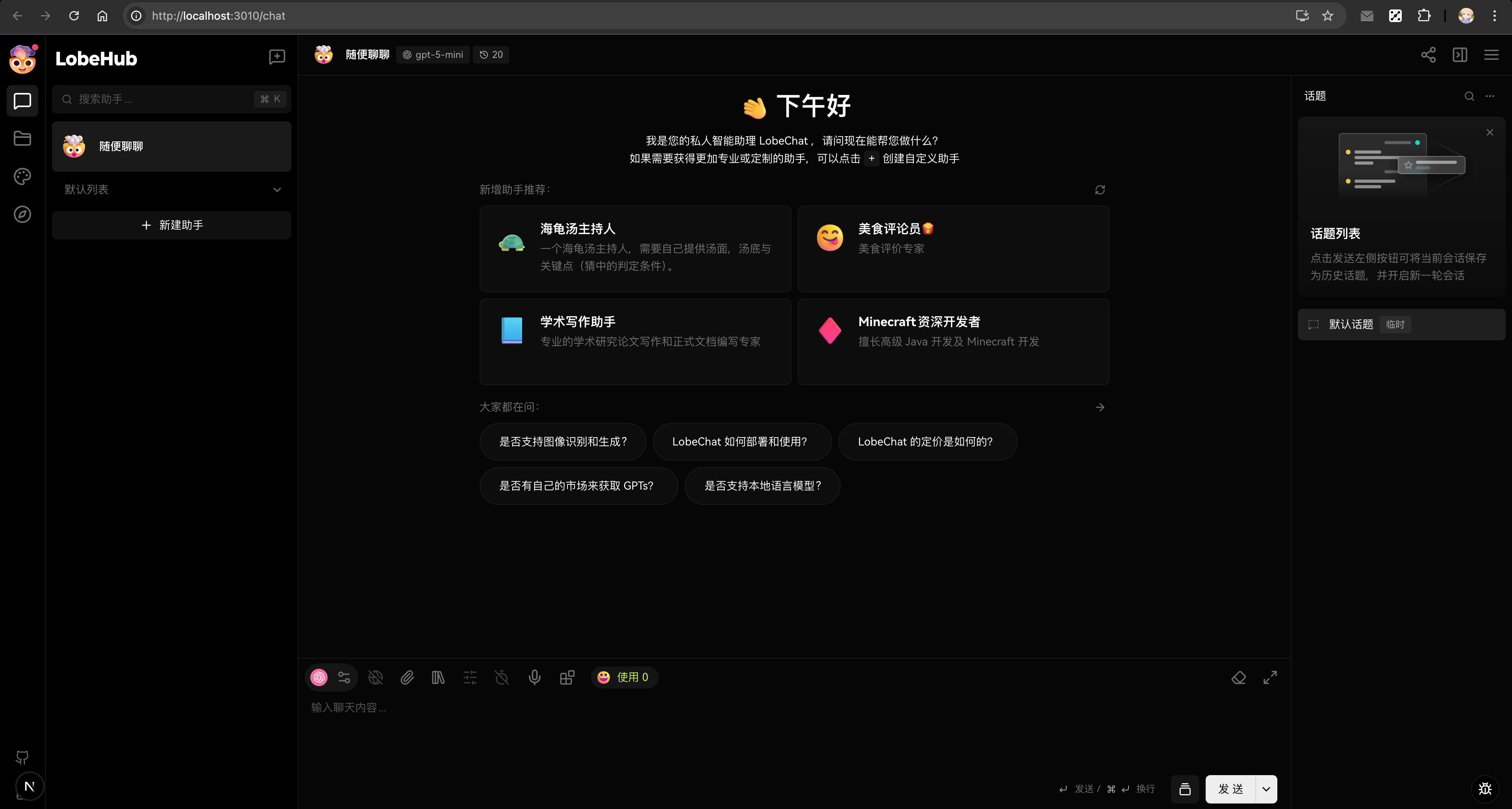
现在,你可以在浏览器中打开 `http://localhost:3010`,你应该能看到 LobeHub 的欢迎页面。这表明你已经成功地设置了开发环境。
|
||
|
||
|
||
|
||
## 服务地址
|
||
|
||
运行 Docker Compose 开发环境时:
|
||
|
||
- **PostgreSQL**:`postgres://postgres@localhost:5432/lobechat`
|
||
- **Redis**:`redis://localhost:6379`
|
||
- **RustFS API**:`http://localhost:9000`
|
||
- **RustFS 控制台**:`http://localhost:9001`
|
||
- **SearXNG**:`http://localhost:8180`
|
||
- **应用程序**:`http://localhost:3010`
|
||
|
||
## 故障排除
|
||
|
||
### 重置服务
|
||
|
||
如遇到问题,可以重置整个服务堆栈:
|
||
|
||
```bash
|
||
# 完全重置 Docker 环境(删除所有数据并重新启动)
|
||
bun run dev:docker:reset
|
||
```
|
||
|
||
### 端口冲突
|
||
|
||
如果端口已被占用:
|
||
|
||
```bash
|
||
# 检查端口使用情况
|
||
lsof -i :5432 # PostgreSQL
|
||
lsof -i :6379 # Redis
|
||
lsof -i :9000 # RustFS API
|
||
lsof -i :9001 # RustFS 控制台
|
||
lsof -i :8180 # SearXNG
|
||
```
|
||
|
||
### 数据库迁移
|
||
|
||
如需手动运行迁移:
|
||
|
||
```bash
|
||
pnpm db:migrate
|
||
```
|
||
|
||
---
|
||
|
||
在开发过程中,如果你在环境设置上遇到任何问题,或者有任何关于 LobeHub 开发的问题,欢迎随时向我们提问。我们期待看到你的贡献!
|
||
|
||
[codespaces-link]: https://codespaces.new/lobehub/lobehub
|
||
[codespaces-shield]: https://github.com/codespaces/badge.svg
|