mirror of
https://github.com/langgenius/dify-docs.git
synced 2026-03-27 13:28:32 +07:00

144 lines
6.2 KiB
Plaintext
144 lines
6.2 KiB
Plaintext
---
|
|
dimensions:
|
|
type:
|
|
primary: reference
|
|
detail: examples
|
|
level: intermediate
|
|
standard_title: Endpoint
|
|
language: en
|
|
title: Neko Cat Endpoint
|
|
description: Authors Yeuoly, Allen. This document details the structure and implementation
|
|
of Endpoints in Dify plugins, using the Neko Cat project as an example. It covers
|
|
defining Endpoint groups, configuring interfaces, implementing the _invoke method,
|
|
and handling requests and responses. The document explains the meaning and usage
|
|
of various YAML configuration fields.
|
|
---
|
|
|
|
# Endpoint
|
|
|
|
This document uses the [Neko Cat](/plugin-dev-en/9231-extension-plugin.mdx) project as an example to explain the structure of Endpoints within a plugin. Endpoints are HTTP interfaces exposed by the plugin, which can be used for integration with external systems. For the complete plugin code, please refer to the [GitHub repository](https://github.com/langgenius/dify-plugin-sdks/tree/main/python/examples/neko).
|
|
|
|
### Group Definition
|
|
|
|
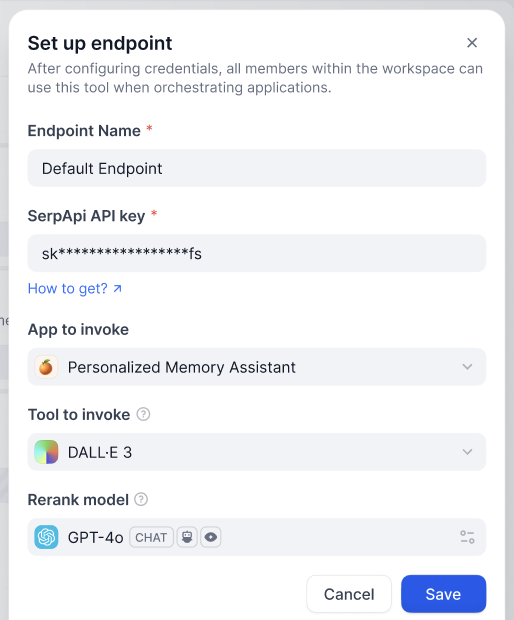
An `Endpoint` group is a collection of multiple `Endpoints`. When creating a new `Endpoint` within a Dify plugin, you might need to fill in the following configuration.
|
|
|
|
|
|
|
|
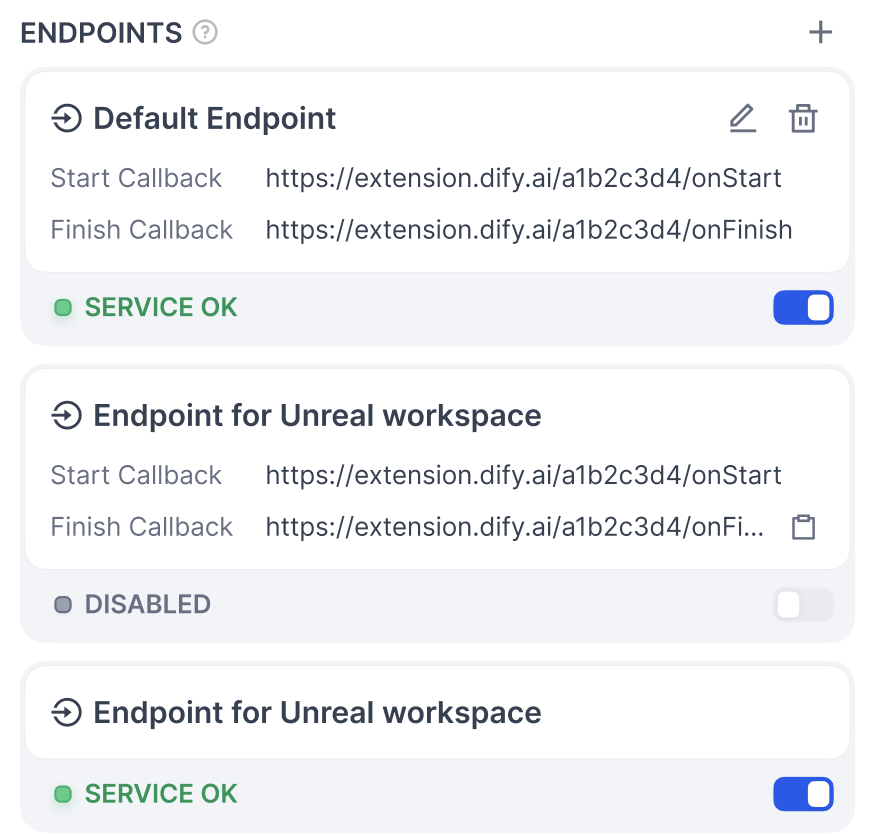
Besides the `Endpoint Name`, you can add new form items by writing the group's configuration information. After clicking save, you can see the multiple interfaces it contains, which will use the same configuration information.
|
|
|
|
|
|
|
|
#### **Structure**
|
|
|
|
* `settings` (map[string] [ProviderConfig](/plugin-dev-en/0411-general-specifications.mdx#providerconfig)): Endpoint configuration definition. (Note: Assuming the anchor `#providerconfig` exists in the target file).
|
|
* `endpoints` (list[string], required): Points to the specific `endpoint` interface definitions.
|
|
|
|
```yaml
|
|
settings:
|
|
api_key:
|
|
type: secret-input
|
|
required: true
|
|
label:
|
|
en_US: API key
|
|
zh_Hans: API key
|
|
ja_Jp: API key
|
|
pt_BR: API key
|
|
placeholder:
|
|
en_US: Please input your API key
|
|
zh_Hans: 请输入你的 API key
|
|
ja_Jp: あなたの API key を入れてください
|
|
pt_BR: Por favor, insira sua chave API
|
|
endpoints:
|
|
- endpoints/duck.yaml
|
|
- endpoints/neko.yaml
|
|
```
|
|
|
|
### Interface Definition
|
|
|
|
* `path` (string): Follows the Werkzeug interface standard.
|
|
* `method` (string): Interface method, only supports `HEAD`, `GET`, `POST`, `PUT`, `DELETE`, `OPTIONS`.
|
|
* `extra` (object): Configuration information beyond the basic details.
|
|
* `python` (object)
|
|
* `source` (string): The source code that implements this interface.
|
|
|
|
```yaml
|
|
path: "/duck/<app_id>"
|
|
method: "GET"
|
|
extra:
|
|
python:
|
|
source: "endpoints/duck.py"
|
|
```
|
|
|
|
### Interface Implementation
|
|
|
|
You need to implement a subclass that inherits from `dify_plugin.Endpoint` and implement the `_invoke` method.
|
|
|
|
* **Input Parameters**
|
|
* `r` (Request): The `Request` object from `werkzeug`.
|
|
* `values` (Mapping): Path parameters parsed from the path.
|
|
* `settings` (Mapping): Configuration information for this `Endpoint`.
|
|
* **Return**
|
|
* A `Response` object from `werkzeug`, supports streaming responses.
|
|
* Directly returning a string is not supported.
|
|
|
|
Example code:
|
|
|
|
```python
|
|
import json
|
|
from typing import Mapping
|
|
from werkzeug import Request, Response
|
|
from dify_plugin import Endpoint
|
|
|
|
class Duck(Endpoint):
|
|
def _invoke(self, r: Request, values: Mapping, settings: Mapping) -> Response:
|
|
"""
|
|
Invokes the endpoint with the given request.
|
|
"""
|
|
app_id = values["app_id"]
|
|
|
|
def generator():
|
|
yield f"{app_id} <br>"
|
|
|
|
return Response(generator(), status=200, content_type="text/html")
|
|
```
|
|
|
|
## Notes
|
|
|
|
* Endpoints are only instantiated when the plugin is called; they are not long-running services.
|
|
* Pay attention to security when developing Endpoints and avoid executing dangerous operations.
|
|
* Endpoints can be used to handle Webhook callbacks or provide interfaces for other systems to connect.
|
|
|
|
If you are learning plugin development, it is recommended to first read the [Getting Started with Plugin Development](/plugin-dev-en/0211-getting-started-dify-tool.mdx) and the [Developer Cheatsheet](/plugin-dev-en/0131-cheatsheet.mdx).
|
|
|
|
## Related Resources
|
|
|
|
* [Basic Concepts of Plugin Development](/plugin-dev-en/0111-getting-started-dify-plugin.mdx) - Understand the overall architecture of plugin development.
|
|
* [Neko Cat Example](/plugin-dev-en/9231-extension-plugin.mdx) - An example of extension plugin development.
|
|
* [General Specifications Definition](/plugin-dev-en/0411-general-specifications.mdx) - Understand common structures like ProviderConfig.
|
|
* [Develop a Slack Bot Plugin Example](/plugin-dev-en/0432-develop-a-slack-bot-plugin.mdx) - Another plugin development example.
|
|
* [Getting Started with Plugin Development](/plugin-dev-en/0211-getting-started-dify-tool.mdx) - Develop a plugin from scratch.
|
|
* [Reverse Invocation of Dify Services](/plugin-dev-en/9241-reverse-invocation-app.mdx) - Learn how to use the reverse invocation feature. (Note: Link updated to closest available English document)
|
|
|
|
{/*
|
|
Contributing Section
|
|
DO NOT edit this section!
|
|
It will be automatically generated by the script.
|
|
*/}
|
|
|
|
<CardGroup cols="2">
|
|
<Card
|
|
title="Edit this page"
|
|
icon="pen-to-square"
|
|
href="https://github.com/langgenius/dify-docs/edit/main/plugin-dev-en/0432-endpoint.mdx"
|
|
>
|
|
Help improve our documentation by contributing directly
|
|
</Card>
|
|
<Card
|
|
title="Report an issue"
|
|
icon="github"
|
|
href="https://github.com/langgenius/dify-docs/issues/new?title=Documentation%20Issue%3A%20endpo&body=%23%23%20Issue%20Description%0A%3C%21--%20Please%20briefly%20describe%20the%20issue%20you%20found%20--%3E%0A%0A%23%23%20Page%20Link%0Ahttps%3A%2F%2Fgithub.com%2Flanggenius%2Fdify-docs%2Fblob%2Fmain%2Fplugin-dev-en%2F0432-endpoint.mdx%0A%0A%23%23%20Suggested%20Changes%0A%3C%21--%20If%20you%20have%20specific%20suggestions%20for%20changes%2C%20please%20describe%20them%20here%20--%3E%0A%0A%3C%21--%20Thank%20you%20for%20helping%20improve%20our%20documentation%21%20--%3E"
|
|
>
|
|
Found an error or have suggestions? Let us know
|
|
</Card>
|
|
</CardGroup>
|