mirror of
https://github.com/langgenius/dify-docs.git
synced 2026-03-27 13:28:32 +07:00

111 lines
6.8 KiB
Plaintext
111 lines
6.8 KiB
Plaintext
---
|
|
title: Annotation Reply
|
|
---
|
|
|
|
|
|
The annotated replies feature provides customizable high-quality question-and-answer responses through manual editing and annotation.
|
|
|
|
Applicable scenarios:
|
|
|
|
* **Customized Responses for Specific Fields:** In customer service or knowledge base scenarios for enterprises, government, etc., service providers may want to ensure that certain specific questions are answered with definitive results. Therefore, it is necessary to customize the output for specific questions. For example, creating "standard answers" for certain questions or marking some questions as "unanswerable."
|
|
* **Rapid Tuning for POC or DEMO Products:** When quickly building prototype products, customized responses achieved through annotated replies can efficiently enhance the expected generation of Q\&A results, thereby improving customer satisfaction.
|
|
|
|
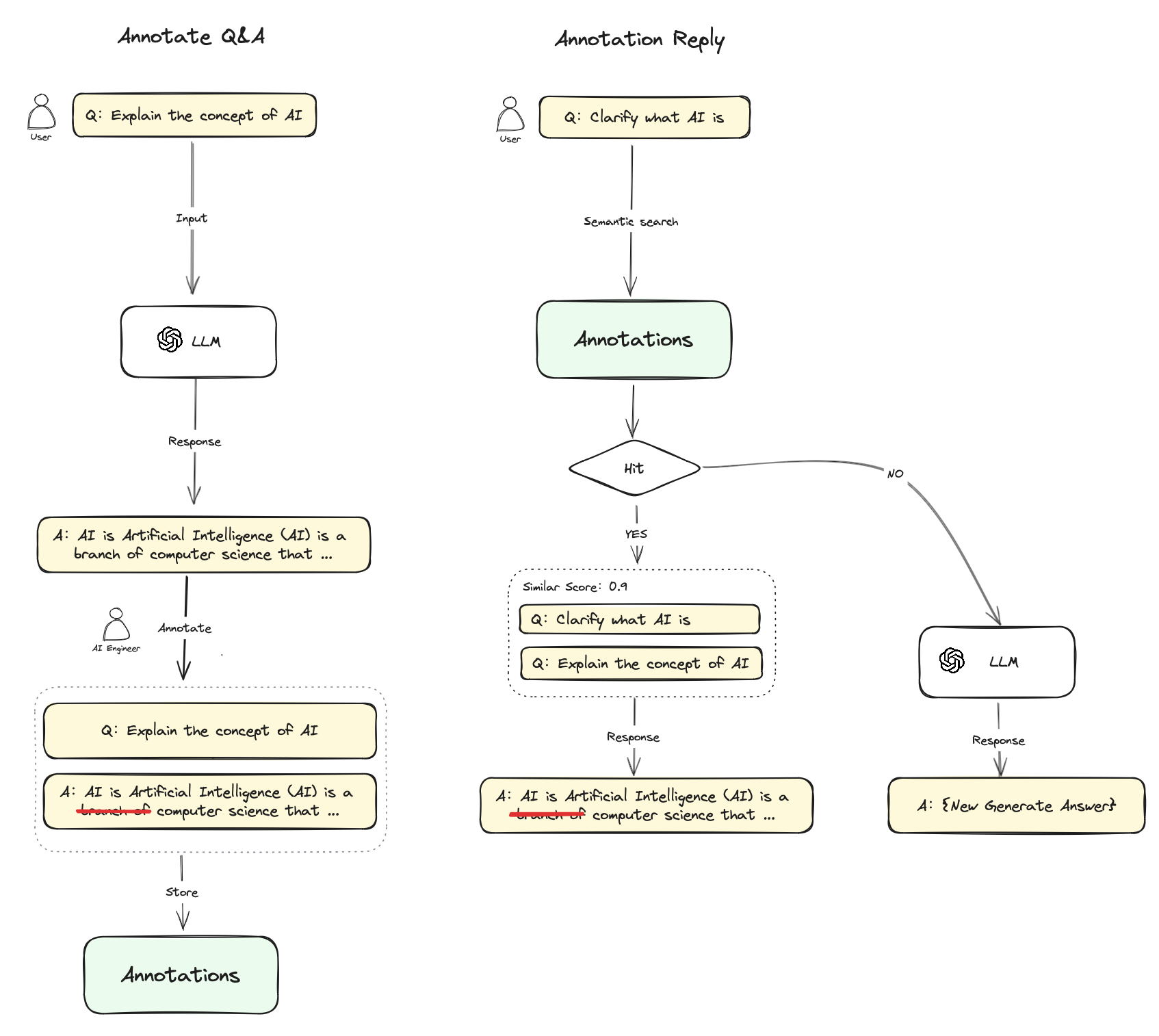
The annotated replies feature essentially provides another set of retrieval-enhanced systems, allowing you to bypass the LLM generation phase and avoid the hallucination issues of RAG.
|
|
|
|
### Workflow
|
|
|
|
1. After enabling the annotated replies feature, you can annotate the responses from LLM conversations. You can add high-quality answers from LLM responses directly as annotations or edit a high-quality answer according to your needs. These edited annotations will be saved persistently.
|
|
2. When a user asks a similar question again, the system will vectorize the question and search for similar annotated questions.
|
|
3. If a match is found, the corresponding answer from the annotation will be returned directly, bypassing the LLM or RAG process.
|
|
4. If no match is found, the question will continue through the regular process (passing to LLM or RAG).
|
|
5. Once the annotated replies feature is disabled, the system will no longer match responses from annotations.
|
|
|
|
|
|
|
|
### Enabling Annotated Replies in Prompt Orchestration
|
|
|
|
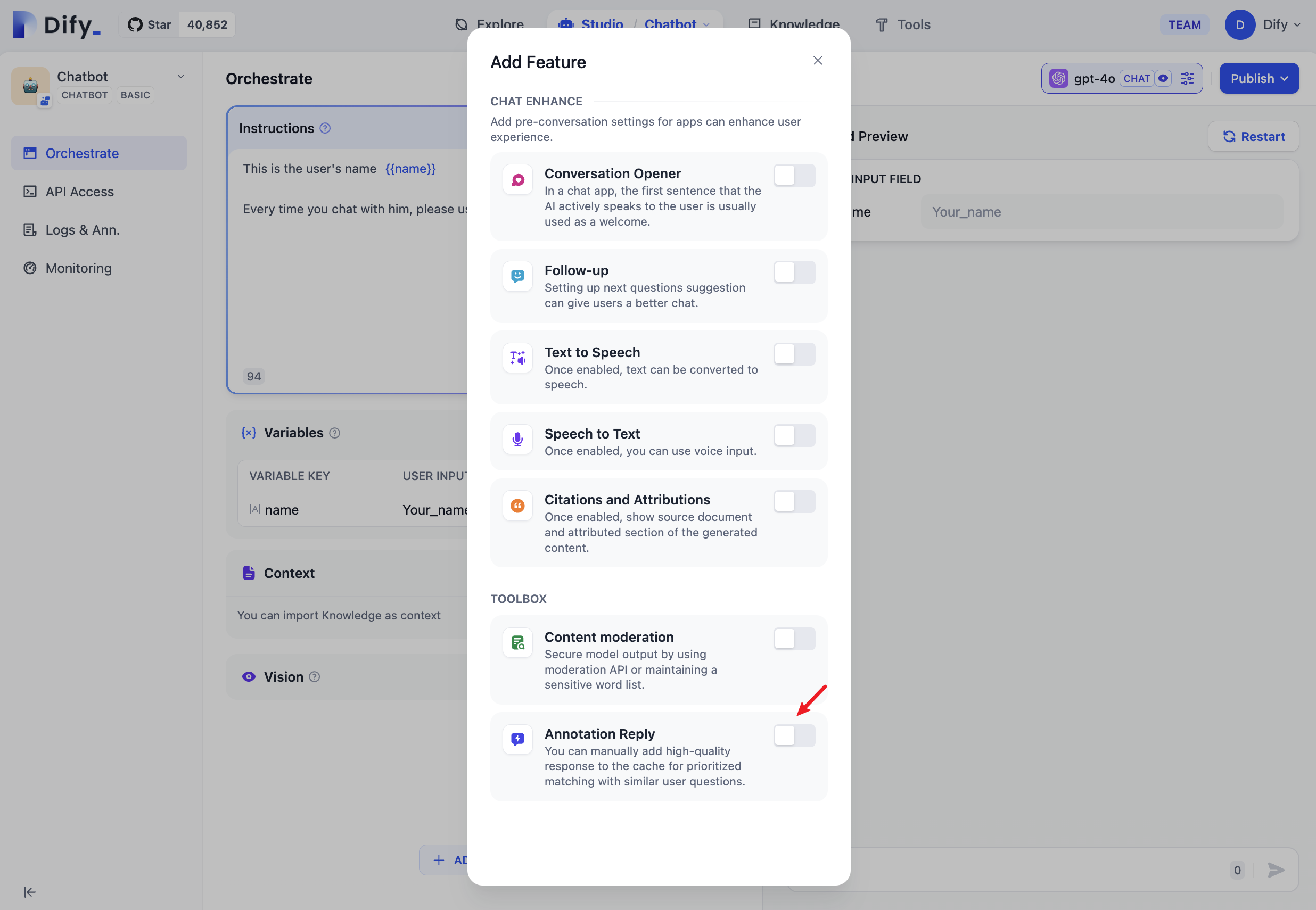
Enable the annotated replies switch by navigating to **“Orchestrate -> Add Features”**:
|
|
|
|
|
|
|
|
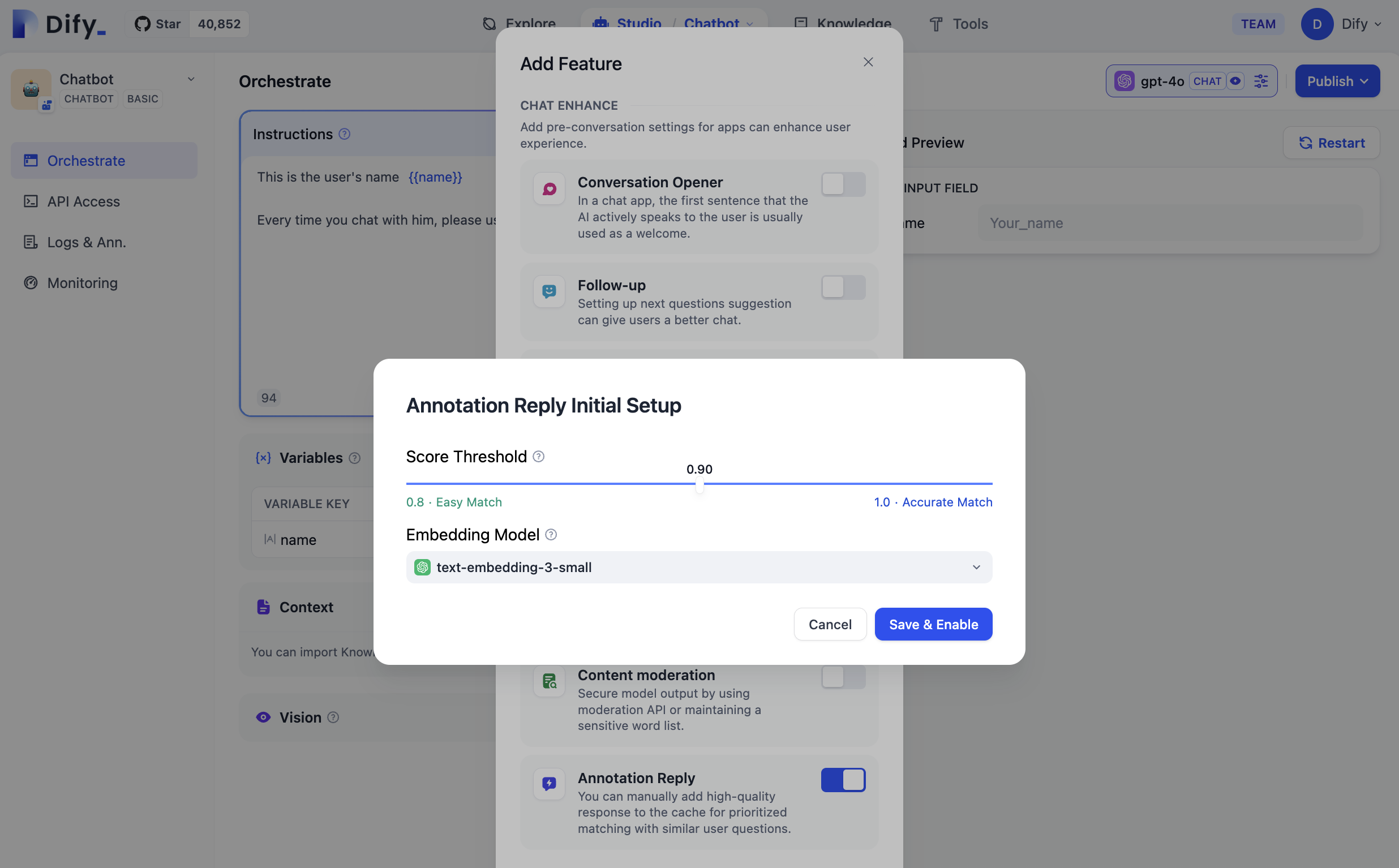
When enabling, you need to set the parameters for annotated replies, which include: Score Threshold and Embedding Model.
|
|
|
|
**Score Threshold:** This sets the similarity threshold for matching annotated replies. Only annotations with scores above this threshold will be recalled.
|
|
|
|
**Embedding Model:** This is used to vectorize the annotated text. Changing the model will regenerate the embeddings.
|
|
|
|
Click save and enable, and the settings will take effect immediately. The system will generate embeddings for all saved annotations using the embedding model.
|
|
|
|
|
|
|
|
### Adding Annotations in the Conversation Debug Page
|
|
|
|
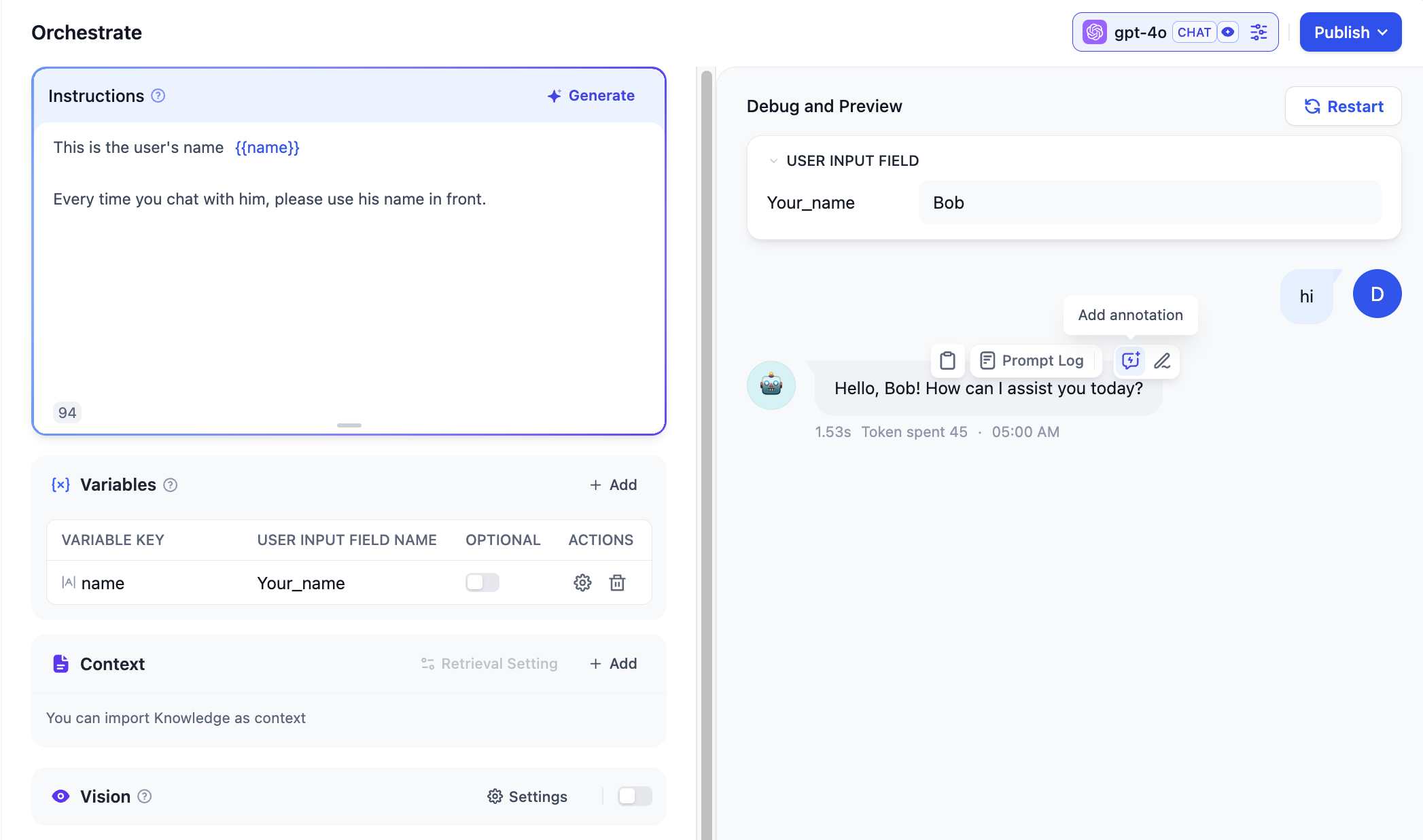
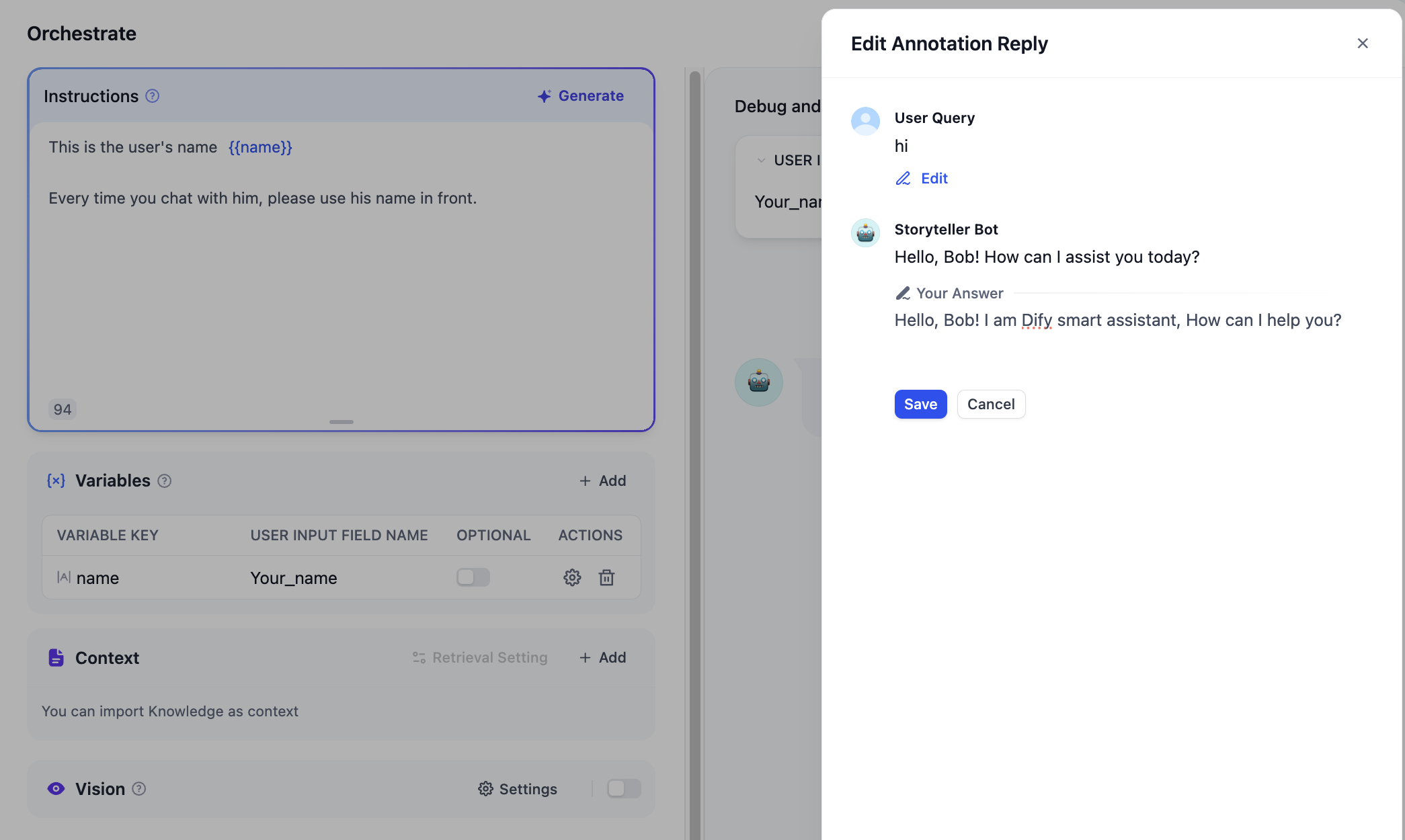
You can directly add or edit annotations on the model response information in the debug and preview pages.
|
|
|
|
|
|
|
|
Edit the response to the high-quality reply you need and save it.
|
|
|
|
|
|
|
|
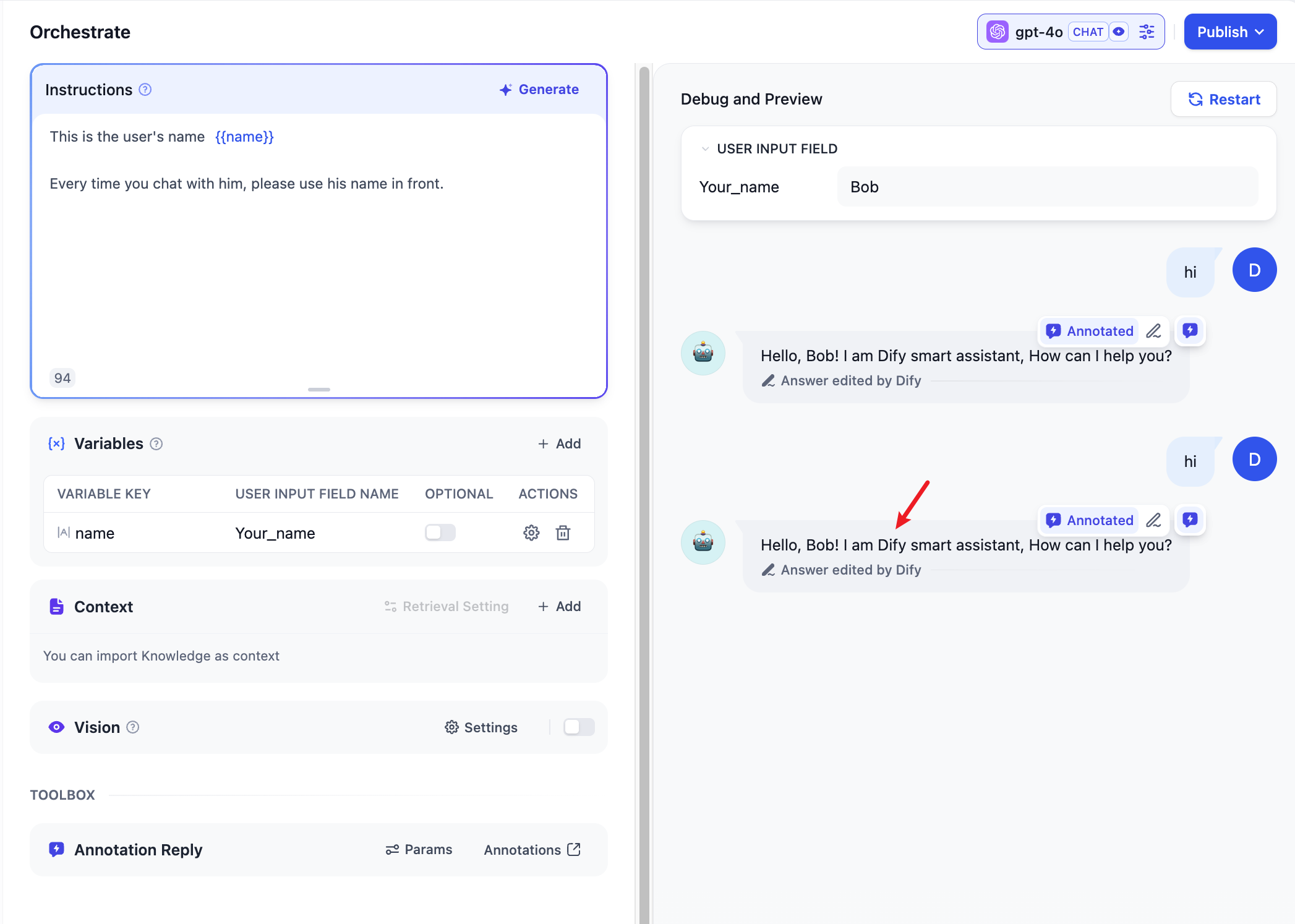
Re-enter the same user question, and the system will use the saved annotation to reply to the user's question directly.
|
|
|
|
|
|
|
|
### Enabling Annotated Replies in Logs and Annotations
|
|
|
|
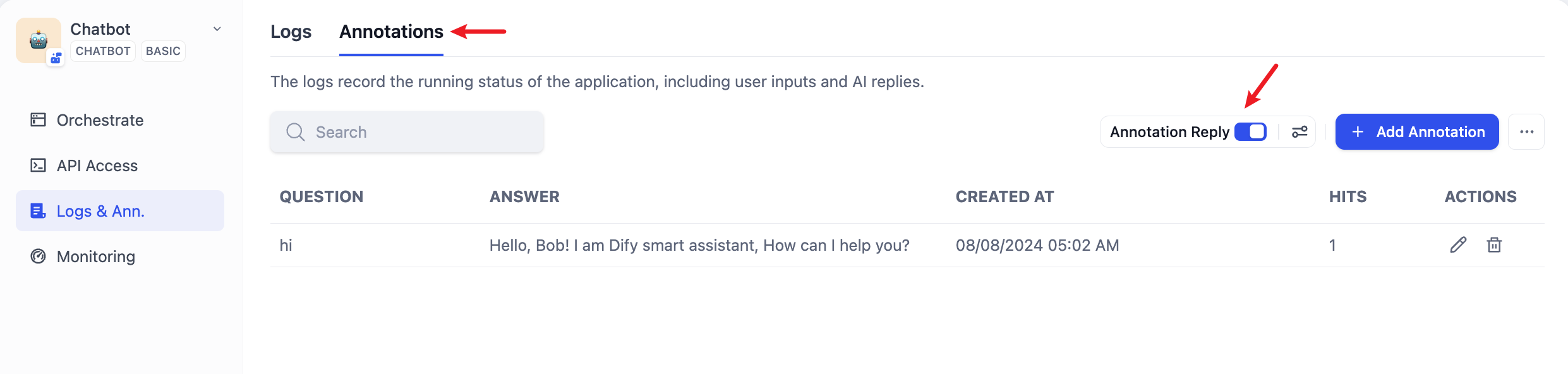
Enable the annotated replies switch by navigating to “Logs & Ann. -> Annotations”:
|
|
|
|
|
|
|
|
### Setting Parameters for Annotated Replies in the Annotation Backend
|
|
|
|
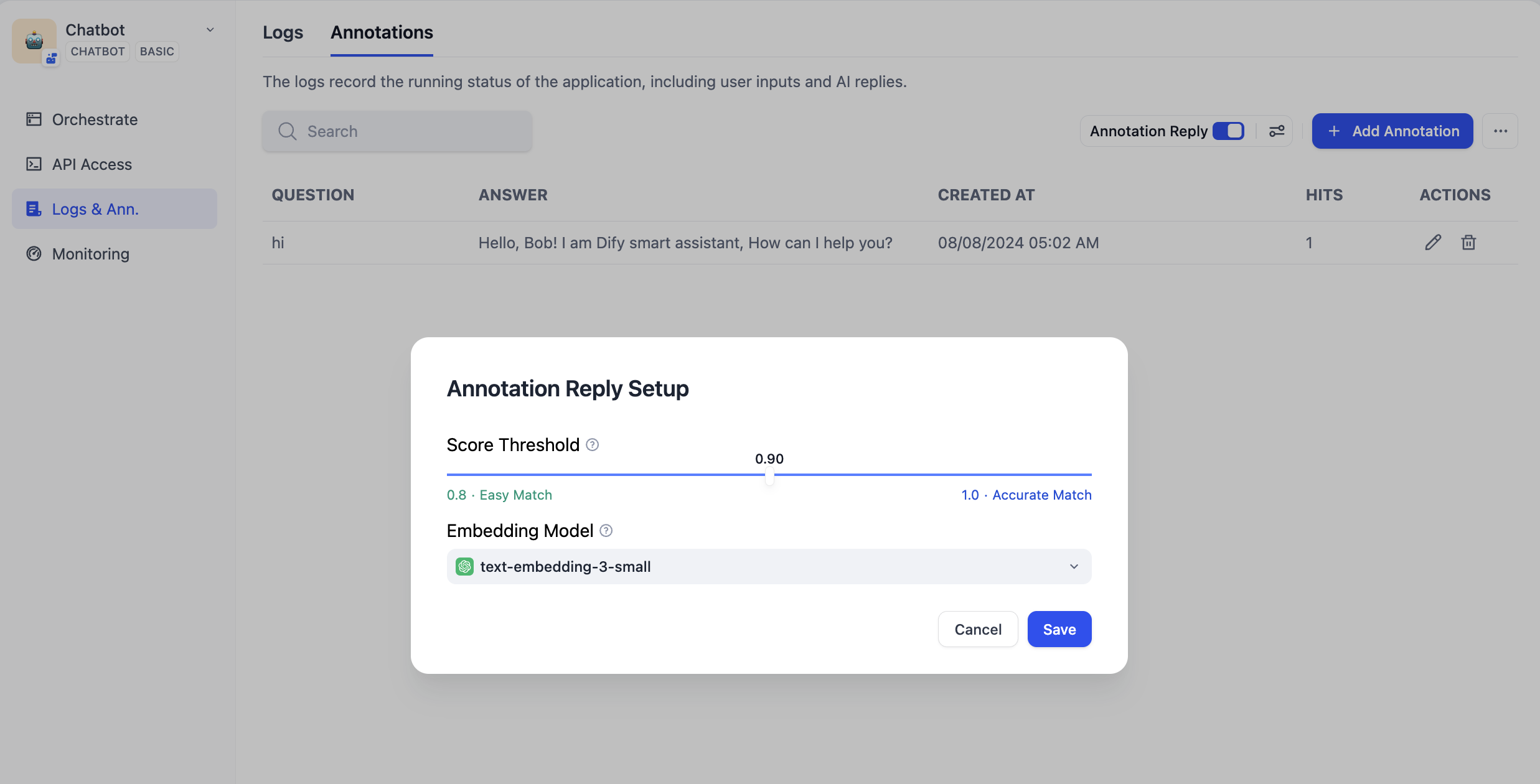
The parameters that can be set for annotated replies include: Score Threshold and Embedding Model.
|
|
|
|
**Score Threshold:** This sets the similarity threshold for matching annotated replies. Only annotations with scores above this threshold will be recalled.
|
|
|
|
**Embedding Model:** This is used to vectorize the annotated text. Changing the model will regenerate the embeddings.
|
|
|
|
|
|
|
|
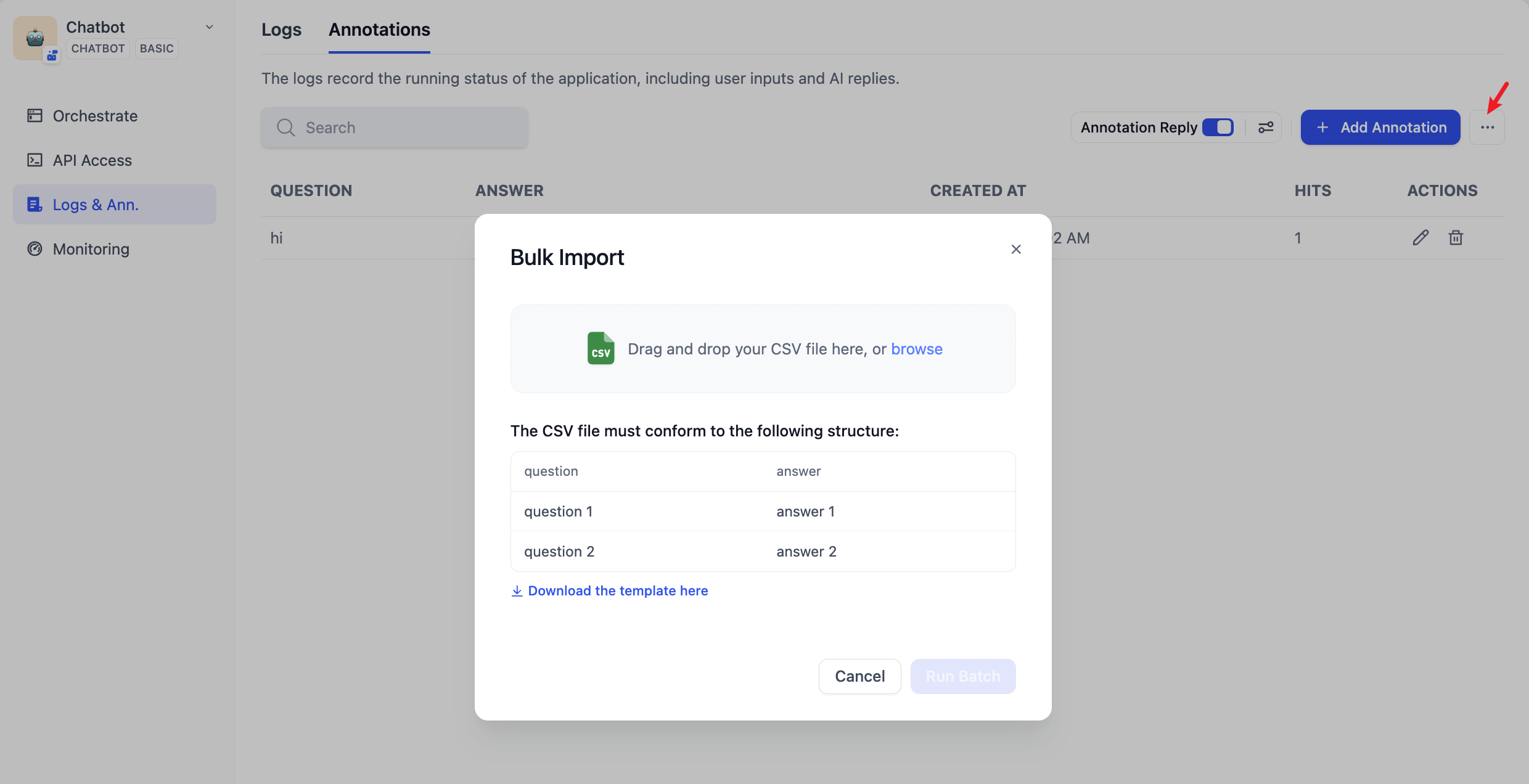
### Bulk Import of Annotated Q\&A Pairs
|
|
|
|
In the bulk import feature, you can download the annotation import template, edit the annotated Q\&A pairs according to the template format, and then import them in bulk.
|
|
|
|
|
|
|
|
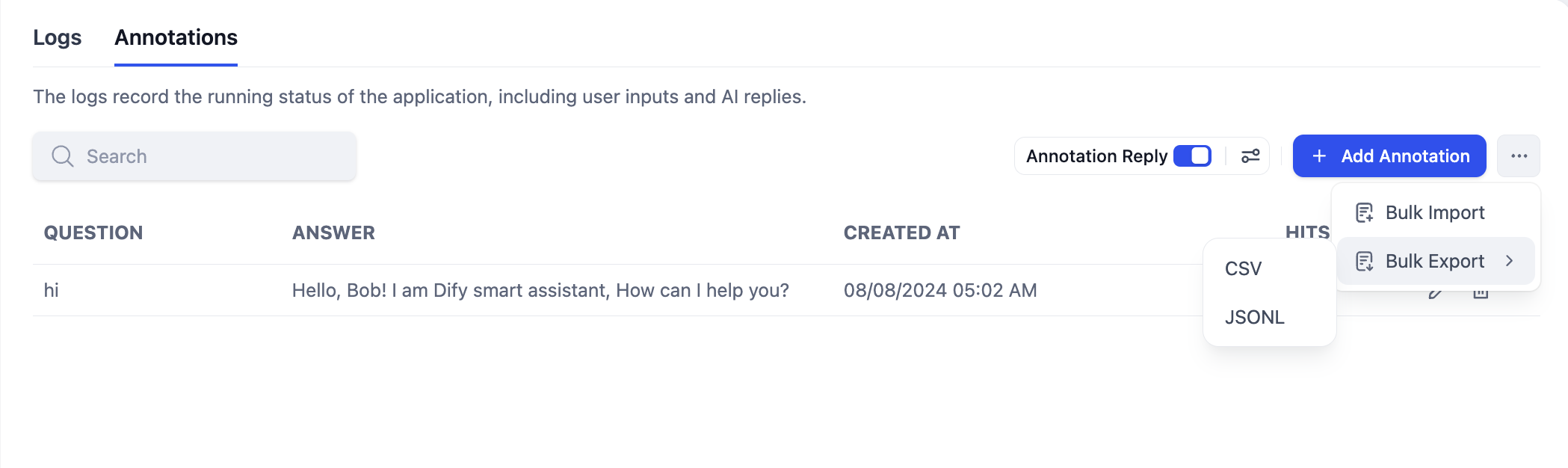
### Bulk Export of Annotated Q\&A Pairs
|
|
|
|
Through the bulk export feature, you can export all saved annotated Q\&A pairs in the system at once.
|
|
|
|
|
|
|
|
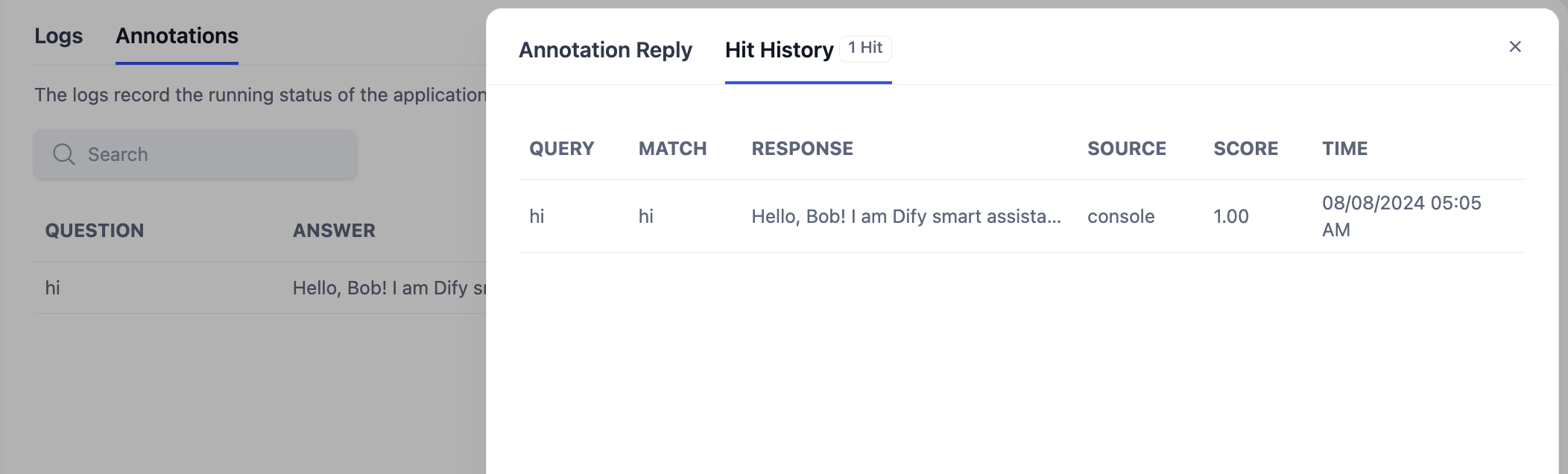
### Viewing Annotation Hit History
|
|
|
|
In the annotation hit history feature, you can view the edit history of all hits on the annotation, the user's hit questions, the response answers, the source of the hits, the matching similarity scores, the hit time, and other information. You can use this information to continuously improve your annotated content.
|
|
|
|
|
|
|
|
{/*
|
|
Contributing Section
|
|
DO NOT edit this section!
|
|
It will be automatically generated by the script.
|
|
*/}
|
|
|
|
<CardGroup cols="2">
|
|
<Card
|
|
title="Edit this page"
|
|
icon="pen-to-square"
|
|
href="https://github.com/langgenius/dify-docs/edit/main/en/guides/annotation/annotation-reply.mdx"
|
|
>
|
|
Help improve our documentation by contributing directly
|
|
</Card>
|
|
<Card
|
|
title="Report an issue"
|
|
icon="github"
|
|
href="https://github.com/langgenius/dify-docs/issues/new?title=Documentation%20Issue%3A%20ation-re&body=%23%23%20Issue%20Description%0A%3C%21--%20Please%20briefly%20describe%20the%20issue%20you%20found%20--%3E%0A%0A%23%23%20Page%20Link%0Ahttps%3A%2F%2Fgithub.com%2Flanggenius%2Fdify-docs%2Fblob%2Fmain%2Fen/guides/annotation%2Fannotation-reply.mdx%0A%0A%23%23%20Suggested%20Changes%0A%3C%21--%20If%20you%20have%20specific%20suggestions%20for%20changes%2C%20please%20describe%20them%20here%20--%3E%0A%0A%3C%21--%20Thank%20you%20for%20helping%20improve%20our%20documentation%21%20--%3E"
|
|
>
|
|
Found an error or have suggestions? Let us know
|
|
</Card>
|
|
</CardGroup>
|