mirror of
https://github.com/langgenius/dify-docs.git
synced 2026-03-27 13:28:32 +07:00

1103 lines
49 KiB
Plaintext
1103 lines
49 KiB
Plaintext
---
|
||
dimensions:
|
||
type:
|
||
primary: reference
|
||
detail: examples
|
||
level: advanced
|
||
standard_title: Agent Strategy Plugin
|
||
language: ja
|
||
title: Agent戦略プラグイン
|
||
description: このドキュメントでは、Agent戦略プラグインの開発方法について、プラグインテンプレートの初期化から、モデル呼び出し、ツール呼び出し、ログ出力、パッケージ化、公開までの全プロセスを詳細に説明します。LLMが推論や意思決定ロジックを実行するのを支援する自動ツール呼び出し機能の実装方法など、詳細なコード例も提供します。
|
||
---
|
||
|
||
Agent戦略プラグインは、LLMが推論や意思決定ロジックを実行するのを支援し、ツールの選択、呼び出し、結果処理を含め、より自動化された方法で問題を処理できるようにします。
|
||
|
||
この記事では、ツール呼び出し(Function Calling)機能を備え、現在の正確な時刻を自動的に取得するプラグインを作成する方法をデモンストレーションします。
|
||
|
||
### 事前準備
|
||
|
||
* Dify プラグインスケルトンツール
|
||
* Python 環境、バージョン番号 ≥ 3.12
|
||
|
||
プラグイン開発用のスケルトンツールの準備方法に関する詳細については、[開発ツールの初期化](/plugin-dev-ja/0221-initialize-development-tools)を参照してください。
|
||
|
||
**Tips**:ターミナルで `dify version` コマンドを実行し、バージョン番号が表示されるかどうかを確認して、スケルトンツールが正常にインストールされたことを確認してください。
|
||
|
||
### 1. プラグインテンプレートの初期化
|
||
|
||
次のコマンドを実行して、Agent プラグイン開発テンプレートを初期化します。
|
||
|
||
```
|
||
dify plugin init
|
||
```
|
||
|
||
ページの指示に従って、対応する情報を入力します。以下のコードのコメント情報を参照して設定してください。
|
||
|
||
```
|
||
➜ Dify Plugins Developing dify plugin init
|
||
Edit profile of the plugin
|
||
Plugin name (press Enter to next step): # プラグイン名を入力
|
||
Author (press Enter to next step): Author name # プラグインの作者を入力
|
||
Description (press Enter to next step): Description # プラグインの説明を入力
|
||
---
|
||
Select the language you want to use for plugin development, and press Enter to con
|
||
BTW, you need Python 3.12+ to develop the Plugin if you choose Python.
|
||
-> python # Python 環境を選択
|
||
go (not supported yet)
|
||
---
|
||
Based on the ability you want to extend, we have divided the Plugin into four type
|
||
|
||
- Tool: It's a tool provider, but not only limited to tools, you can implement an
|
||
- Model: Just a model provider, extending others is not allowed.
|
||
- Extension: Other times, you may only need a simple http service to extend the fu
|
||
- Agent Strategy: Implement your own logics here, just by focusing on Agent itself
|
||
|
||
What's more, we have provided the template for you, you can choose one of them b
|
||
tool
|
||
-> agent-strategy # Agent 戦略テンプレートを選択
|
||
llm
|
||
text-embedding
|
||
---
|
||
Configure the permissions of the plugin, use up and down to navigate, tab to sel
|
||
Backwards Invocation:
|
||
Tools:
|
||
Enabled: [✔] You can invoke tools inside Dify if it's enabled # デフォルトで有効
|
||
Models:
|
||
Enabled: [✔] You can invoke models inside Dify if it's enabled # デフォルトで有効
|
||
LLM: [✔] You can invoke LLM models inside Dify if it's enabled # デフォルトで有効
|
||
Text Embedding: [✘] You can invoke text embedding models inside Dify if it'
|
||
Rerank: [✘] You can invoke rerank models inside Dify if it's enabled
|
||
...
|
||
```
|
||
|
||
プラグインテンプレートを初期化すると、プラグイン開発プロセスに必要な完全なリソースを含むコードフォルダが生成されます。Agent 戦略プラグインの全体的なコード構造を理解することは、プラグインの開発プロセスに役立ちます。
|
||
|
||
```
|
||
├── GUIDE.md # ユーザーガイドとドキュメント
|
||
├── PRIVACY.md # プライバシーポリシーとデータ処理ガイドライン
|
||
├── README.md # プロジェクト概要とセットアップ手順
|
||
├── _assets/ # 静的アセットディレクトリ
|
||
│ └── icon.svg # Agent 戦略プロバイダーのアイコン/ロゴ
|
||
├── main.py # メインアプリケーションエントリーポイント
|
||
├── manifest.yaml # 基本プラグイン設定
|
||
├── provider/ # プロバイダー設定ディレクトリ
|
||
│ └── basic_agent.yaml # あなたの Agent プロバイダー設定
|
||
├── requirements.txt # Python 依存関係リスト
|
||
└── strategies/ # 戦略実装ディレクトリ
|
||
├── basic_agent.py # 基本 Agent 戦略実装
|
||
└── basic_agent.yaml # 基本 Agent 戦略設定
|
||
```
|
||
|
||
プラグインの機能コードは `strategies/` ディレクトリに集約されています。
|
||
|
||
### 2. プラグイン機能の開発
|
||
|
||
Agent 戦略プラグインの開発は、主に以下の2つのファイルを中心に行われます。
|
||
|
||
* プラグイン宣言ファイル:`strategies/basic_agent.yaml`
|
||
* プラグイン機能コード:`strategies/basic_agent.py`
|
||
|
||
#### 2.1 パラメータの定義
|
||
|
||
Agent プラグインを作成するには、まず `strategies/basic_agent.yaml` ファイルでプラグインに必要なパラメータを定義する必要があります。これらのパラメータは、LLM モデルの呼び出しやツールの使用能力など、プラグインのコア機能を決定します。
|
||
|
||
以下の4つの基本パラメータを優先的に設定することをお勧めします。
|
||
|
||
1. **model**:呼び出す大規模言語モデル(LLM)を指定します(例:GPT-4、GPT-4o-mini など)。
|
||
2. **tools**:プラグインが使用できるツールリストを定義し、プラグイン機能を強化します。
|
||
3. **query**:モデルと対話するためのプロンプトまたは入力内容を設定します。
|
||
4. **maximum_iterations**:プラグイン実行の最大反復回数を制限し、過剰な計算を回避します。
|
||
|
||
コード例:
|
||
|
||
```yaml
|
||
identity:
|
||
name: basic_agent # agent_strategy の名前
|
||
author: novice # agent_strategy の作成者
|
||
label:
|
||
en_US: BasicAgent # agent_strategy の英語ラベル
|
||
description:
|
||
en_US: BasicAgent # agent_strategy の英語の説明
|
||
parameters:
|
||
- name: model # model パラメータの名前
|
||
type: model-selector # モデルタイプ
|
||
scope: tool-call&llm # パラメータのスコープ
|
||
required: true
|
||
label:
|
||
en_US: Model
|
||
zh_Hans: 模型
|
||
pt_BR: Model
|
||
- name: tools # tools パラメータの名前
|
||
type: array[tools] # tool パラメータのタイプ
|
||
required: true
|
||
label:
|
||
en_US: Tools list
|
||
zh_Hans: 工具列表
|
||
pt_BR: Tools list
|
||
- name: query # query パラメータの名前
|
||
type: string # query パラメータのタイプ
|
||
required: true
|
||
label:
|
||
en_US: Query
|
||
zh_Hans: 查询
|
||
pt_BR: Query
|
||
- name: maximum_iterations
|
||
type: number
|
||
required: false
|
||
default: 5
|
||
label:
|
||
en_US: Maxium Iterations
|
||
zh_Hans: 最大迭代次数
|
||
pt_BR: Maxium Iterations
|
||
max: 50 # 最大値と最小値を設定すると、パラメータの表示はスライダーになります
|
||
min: 1
|
||
extra:
|
||
python:
|
||
source: strategies/basic_agent.py
|
||
|
||
```
|
||
|
||
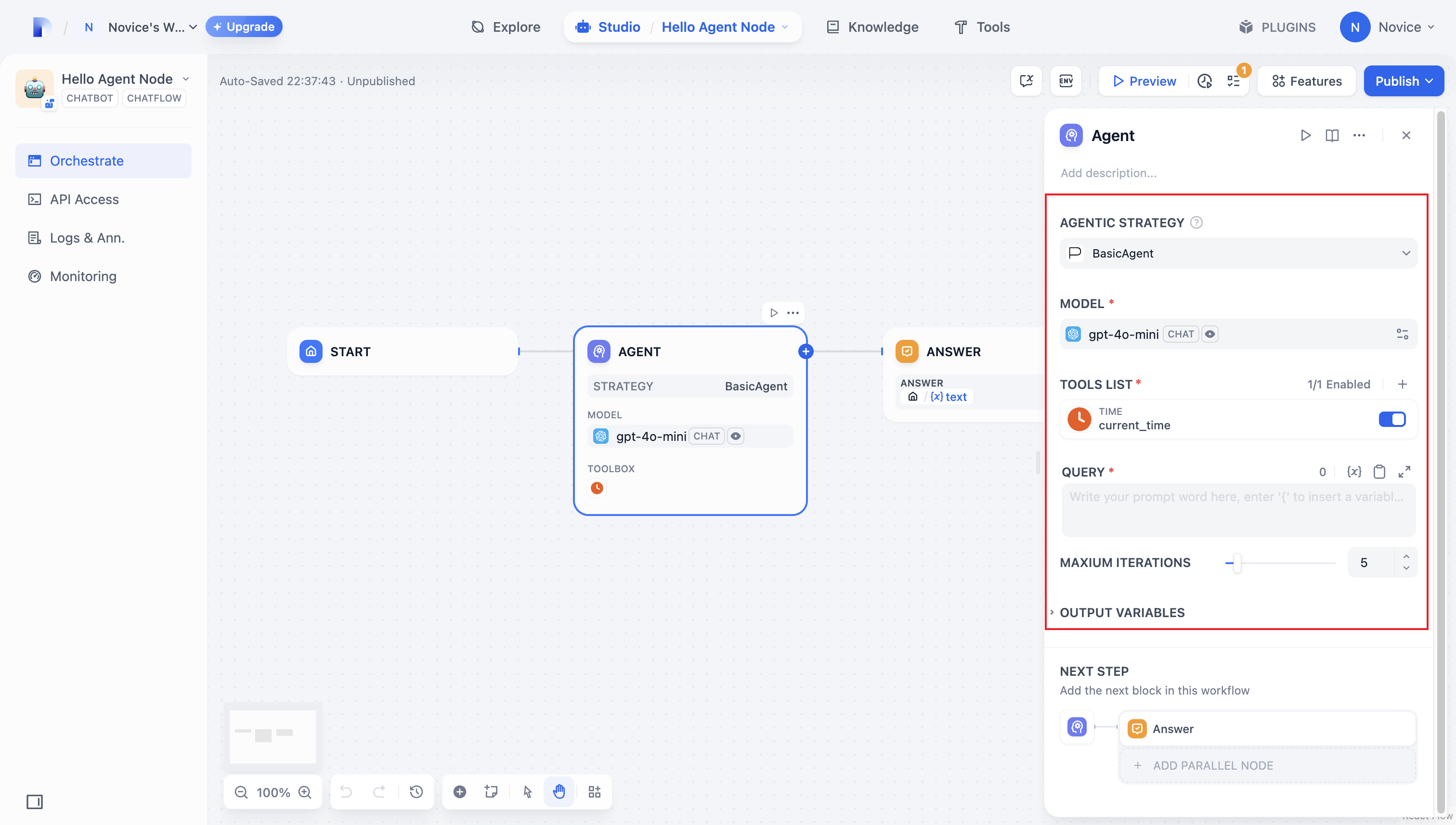
パラメータ設定が完了すると、プラグインは対応する設定の使用ページを自動生成し、直感的で便利な調整と使用が可能になります。
|
||
|
||
|
||
|
||
#### 2.2 パラメータの取得と実行
|
||
|
||
ユーザーがプラグインの使用ページで基本情報を入力した後、プラグインは入力されたパラメータを処理する必要があります。そのため、まず `strategies/basic_agent.py` ファイル内で後で使用するための Agent パラメータクラスを定義する必要があります。
|
||
|
||
入力パラメータの検証:
|
||
|
||
```python
|
||
from dify_plugin.entities.agent import AgentInvokeMessage
|
||
from dify_plugin.interfaces.agent import AgentModelConfig, AgentStrategy, ToolEntity
|
||
from pydantic import BaseModel
|
||
|
||
class BasicParams(BaseModel):
|
||
maximum_iterations: int
|
||
model: AgentModelConfig
|
||
tools: list[ToolEntity]
|
||
query: str
|
||
|
||
```
|
||
|
||
パラメータを取得した後、具体的なビジネスロジックを実行します。
|
||
|
||
```python
|
||
class BasicAgentAgentStrategy(AgentStrategy):
|
||
def _invoke(self, parameters: dict[str, Any]) -> Generator[AgentInvokeMessage]:
|
||
params = BasicParams(**parameters)
|
||
```
|
||
|
||
### 3. モデルの呼び出し
|
||
|
||
Agent 戦略プラグインにおいて、**モデルの呼び出し**はコア実行ロジックの1つです。SDK が提供する `session.model.llm.invoke()` メソッドを使用して、LLM モデルを効率的に呼び出し、テキスト生成、対話処理などの機能を実現できます。
|
||
|
||
モデルに**ツール呼び出し**機能を持たせたい場合は、まずモデルがツール呼び出し形式に準拠した入力パラメータを出力できることを確認する必要があります。つまり、モデルはユーザーの指示に基づいて、ツールインターフェースの要件に適合するパラメータを生成する必要があります。
|
||
|
||
以下のパラメータを構築します。
|
||
|
||
* model:モデル情報
|
||
* prompt_messages:プロンプトメッセージ
|
||
* tools:ツール情報(Function Calling 関連)
|
||
* stop:停止トークン
|
||
* stream:ストリーミング出力をサポートするかどうか
|
||
|
||
メソッド定義のコード例:
|
||
|
||
```python
|
||
def invoke(
|
||
self,
|
||
model_config: LLMModelConfig,
|
||
prompt_messages: list[PromptMessage],
|
||
tools: list[PromptMessageTool] | None = None,
|
||
stop: list[str] | None = None,
|
||
stream: bool = True,
|
||
) -> Generator[LLMResultChunk, None, None] | LLMResult:...
|
||
```
|
||
|
||
完全な機能実装を確認するには、モデル呼び出しの[コード例](agent-strategy-plugin.md#diao-yong-gong-ju-1)を参照してください。
|
||
|
||
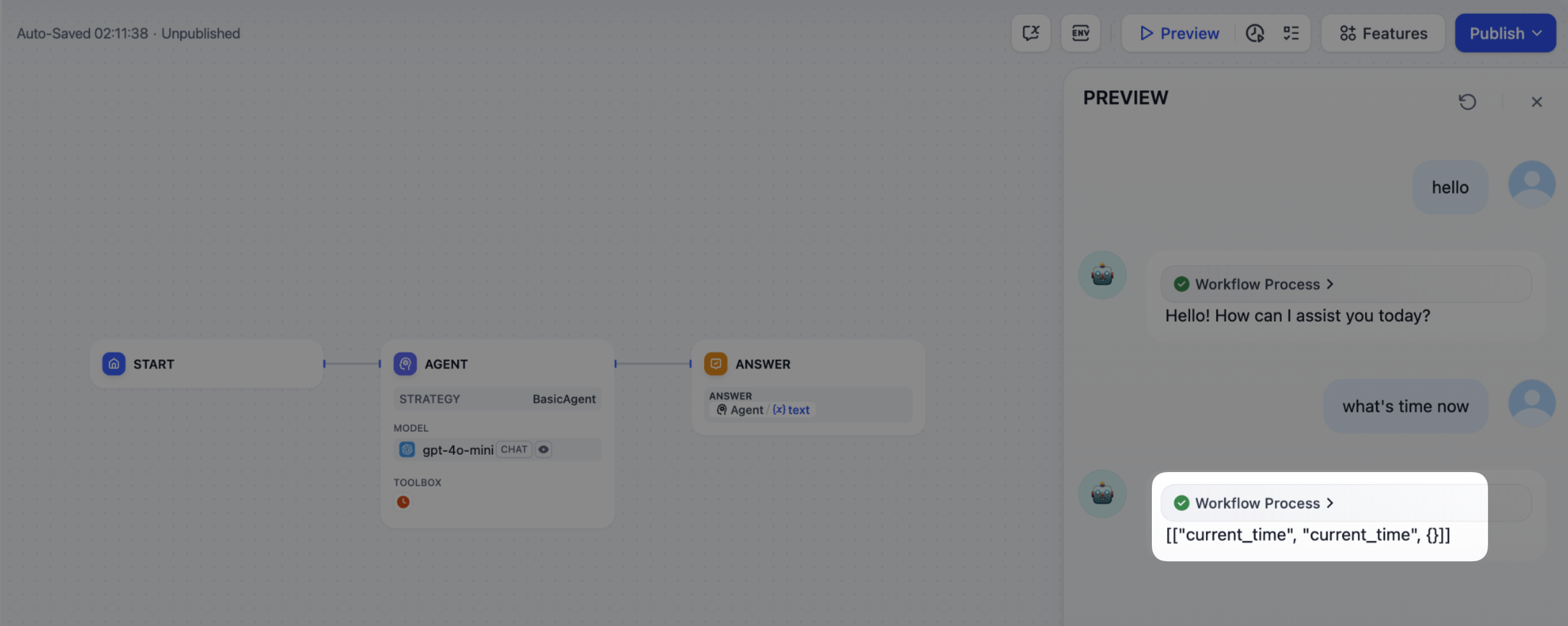
このコードは以下の機能を実現します。ユーザーが指示を入力すると、Agent 戦略プラグインは自動的に LLM を呼び出し、生成結果に基づいてツール呼び出しに必要なパラメータを構築・送信し、モデルが接続済みのツールを柔軟にスケジュールして、複雑なタスクを効率的に完了できるようにします。
|
||
|
||
|
||
|
||
### 4. ツールの呼び出し
|
||
|
||
ツールパラメータを入力した後、Agent 戦略プラグインに実際にツールを呼び出す能力を与える必要があります。SDK の `session.tool.invoke()` 関数を使用してツールを呼び出すことができます。
|
||
|
||
以下のパラメータを構築します。
|
||
|
||
* provider:ツールプロバイダー
|
||
* tool_name:ツール名
|
||
* parameters:入力パラメータ
|
||
|
||
メソッド定義のコード例:
|
||
|
||
```python
|
||
def invoke(
|
||
self,
|
||
provider_type: ToolProviderType,
|
||
provider: str,
|
||
tool_name: str,
|
||
parameters: dict[str, Any],
|
||
) -> Generator[ToolInvokeMessage, None, None]:...
|
||
```
|
||
|
||
LLM を介して直接パラメータを生成し、ツール呼び出しを完了したい場合は、以下のツール呼び出しのコード例を参照してください。
|
||
|
||
```python
|
||
tool_instances = (
|
||
{tool.identity.name: tool for tool in params.tools} if params.tools else {}
|
||
)
|
||
for tool_call_id, tool_call_name, tool_call_args in tool_calls:
|
||
tool_instance = tool_instances[tool_call_name]
|
||
self.session.tool.invoke(
|
||
provider_type=ToolProviderType.BUILT_IN,
|
||
provider=tool_instance.identity.provider,
|
||
tool_name=tool_instance.identity.name,
|
||
parameters={**tool_instance.runtime_parameters, **tool_call_args},
|
||
)
|
||
```
|
||
|
||
完全な機能コードを確認するには、ツール呼び出しの[コード例](agent-strategy-plugin.md#diao-yong-gong-ju-1)をお読みください。
|
||
|
||
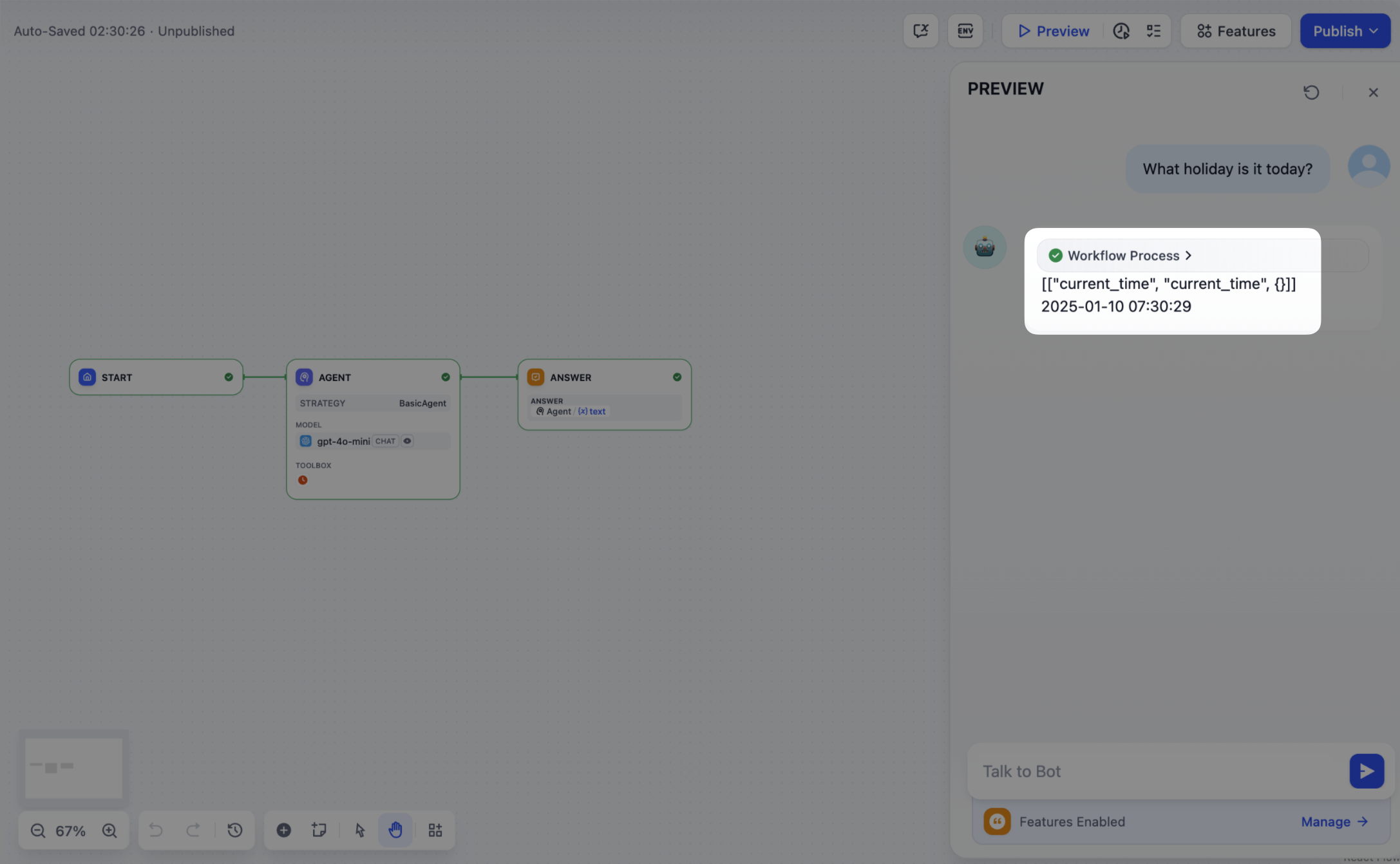
この部分の機能コードを実装すると、Agent 戦略プラグインは自動 Function Calling 機能を持つようになります。例えば、現在の時刻を自動的に取得するなどです。
|
||
|
||
|
||
|
||
### 5. ログ作成
|
||
|
||
**Agent 戦略プラグイン**では、複雑なタスクを完了するために通常、複数回の操作を実行する必要があります。各操作の実行結果を記録することは、開発者にとって非常に重要であり、Agent の実行プロセスを追跡し、各ステップの決定根拠を分析し、戦略効果をより良く評価・最適化するのに役立ちます。
|
||
|
||
この機能を実現するために、SDK の `create_log_message` および `finish_log_message` メソッドを使用してログを記録できます。この方法では、モデル呼び出しの前後で操作状態をリアルタイムに記録できるだけでなく、開発者が問題を迅速に特定するのにも役立ちます。
|
||
|
||
シナリオ例:
|
||
|
||
* モデル呼び出しの前に、「モデル呼び出し開始」というログを記録し、開発者がタスクの実行進捗を明確に把握できるようにします。
|
||
* モデル呼び出しが成功した後、「呼び出し成功」というログを記録し、モデル応答の完全性を追跡しやすくします。
|
||
|
||
```python
|
||
model_log = self.create_log_message(
|
||
label=f"{params.model.model} Thought",
|
||
data={},
|
||
metadata={"start_at": model_started_at, "provider": params.model.provider},
|
||
status=ToolInvokeMessage.LogMessage.LogStatus.START,
|
||
)
|
||
yield model_log
|
||
self.session.model.llm.invoke(...)
|
||
yield self.finish_log_message(
|
||
log=model_log,
|
||
data={
|
||
"output": response,
|
||
"tool_name": tool_call_names,
|
||
"tool_input": tool_call_inputs,
|
||
},
|
||
metadata={
|
||
"started_at": model_started_at,
|
||
"finished_at": time.perf_counter(),
|
||
"elapsed_time": time.perf_counter() - model_started_at,
|
||
"provider": params.model.provider,
|
||
},
|
||
)
|
||
```
|
||
|
||
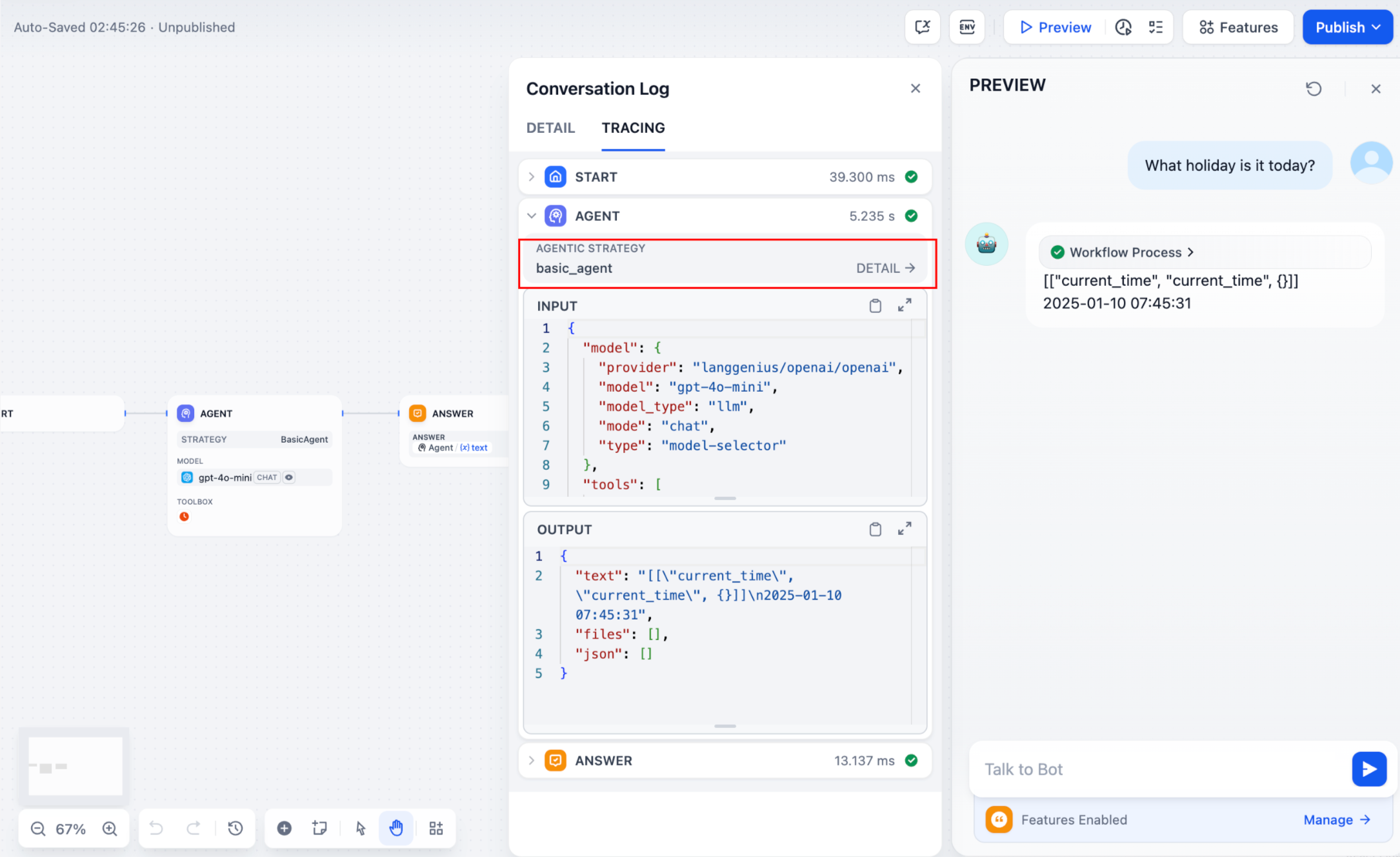
設定完了後、ワークフローログに実行結果が出力されます。
|
||
|
||
|
||
|
||
Agent の実行過程では、複数ラウンドのログが生成される可能性があります。ログが階層構造を持つと、開発者にとって確認しやすくなります。ログ記録時に parent パラメータを渡すことで、異なるラウンドのログが親子関係を形成し、ログ表示がより明確で追跡しやすくなります。
|
||
|
||
**参照方法:**
|
||
|
||
```python
|
||
function_call_round_log = self.create_log_message(
|
||
label="Function Call Round1 ",
|
||
data={},
|
||
metadata={},
|
||
)
|
||
yield function_call_round_log
|
||
|
||
model_log = self.create_log_message(
|
||
label=f"{params.model.model} Thought",
|
||
data={},
|
||
metadata={"start_at": model_started_at, "provider": params.model.provider},
|
||
status=ToolInvokeMessage.LogMessage.LogStatus.START,
|
||
# add parent log
|
||
parent=function_call_round_log,
|
||
)
|
||
yield model_log
|
||
```
|
||
|
||
#### プラグイン機能のコード例
|
||
|
||
|
||
#### モデルの呼び出し
|
||
|
||
以下のコードは、Agent 戦略プラグインにモデル呼び出し機能を与える方法を示します。
|
||
|
||
```python
|
||
import json
|
||
from collections.abc import Generator
|
||
from typing import Any, cast
|
||
|
||
from dify_plugin.entities.agent import AgentInvokeMessage
|
||
from dify_plugin.entities.model.llm import LLMModelConfig, LLMResult, LLMResultChunk
|
||
from dify_plugin.entities.model.message import (
|
||
PromptMessageTool,
|
||
UserPromptMessage,
|
||
)
|
||
from dify_plugin.entities.tool import ToolInvokeMessage, ToolParameter, ToolProviderType
|
||
from dify_plugin.interfaces.agent import AgentModelConfig, AgentStrategy, ToolEntity
|
||
from pydantic import BaseModel
|
||
|
||
class BasicParams(BaseModel):
|
||
maximum_iterations: int
|
||
model: AgentModelConfig
|
||
tools: list[ToolEntity]
|
||
query: str
|
||
|
||
class BasicAgentAgentStrategy(AgentStrategy):
|
||
def _invoke(self, parameters: dict[str, Any]) -> Generator[AgentInvokeMessage]:
|
||
params = BasicParams(**parameters)
|
||
chunks: Generator[LLMResultChunk, None, None] | LLMResult = (
|
||
self.session.model.llm.invoke(
|
||
model_config=LLMModelConfig(**params.model.model_dump(mode="json")),
|
||
prompt_messages=[UserPromptMessage(content=params.query)],
|
||
tools=[
|
||
self._convert_tool_to_prompt_message_tool(tool)
|
||
for tool in params.tools
|
||
],
|
||
stop=params.model.completion_params.get("stop", [])
|
||
if params.model.completion_params
|
||
else [],
|
||
stream=True,
|
||
)
|
||
)
|
||
response = ""
|
||
tool_calls = []
|
||
tool_instances = (
|
||
{tool.identity.name: tool for tool in params.tools} if params.tools else {}
|
||
)
|
||
|
||
for chunk in chunks:
|
||
# check if there is any tool call
|
||
if self.check_tool_calls(chunk):
|
||
tool_calls = self.extract_tool_calls(chunk)
|
||
tool_call_names = ";".join([tool_call[1] for tool_call in tool_calls])
|
||
try:
|
||
tool_call_inputs = json.dumps(
|
||
{tool_call[1]: tool_call[2] for tool_call in tool_calls},
|
||
ensure_ascii=False,
|
||
)
|
||
except json.JSONDecodeError:
|
||
# ensure ascii to avoid encoding error
|
||
tool_call_inputs = json.dumps(
|
||
{tool_call[1]: tool_call[2] for tool_call in tool_calls}
|
||
)
|
||
print(tool_call_names, tool_call_inputs)
|
||
if chunk.delta.message and chunk.delta.message.content:
|
||
if isinstance(chunk.delta.message.content, list):
|
||
for content in chunk.delta.message.content:
|
||
response += content.data
|
||
print(content.data, end="", flush=True)
|
||
else:
|
||
response += str(chunk.delta.message.content)
|
||
print(str(chunk.delta.message.content), end="", flush=True)
|
||
|
||
if chunk.delta.usage:
|
||
# usage of the model
|
||
usage = chunk.delta.usage
|
||
|
||
yield self.create_text_message(
|
||
text=f"{response or json.dumps(tool_calls, ensure_ascii=False)}\n"
|
||
)
|
||
result = ""
|
||
for tool_call_id, tool_call_name, tool_call_args in tool_calls:
|
||
tool_instance = tool_instances[tool_call_name]
|
||
tool_invoke_responses = self.session.tool.invoke(
|
||
provider_type=ToolProviderType.BUILT_IN,
|
||
provider=tool_instance.identity.provider,
|
||
tool_name=tool_instance.identity.name,
|
||
parameters={**tool_instance.runtime_parameters, **tool_call_args},
|
||
)
|
||
if not tool_instance:
|
||
tool_invoke_responses = {
|
||
"tool_call_id": tool_call_id,
|
||
"tool_call_name": tool_call_name,
|
||
"tool_response": f"there is not a tool named {tool_call_name}",
|
||
}
|
||
else:
|
||
# invoke tool
|
||
tool_invoke_responses = self.session.tool.invoke(
|
||
provider_type=ToolProviderType.BUILT_IN,
|
||
provider=tool_instance.identity.provider,
|
||
tool_name=tool_instance.identity.name,
|
||
parameters={**tool_instance.runtime_parameters, **tool_call_args},
|
||
)
|
||
result = ""
|
||
for tool_invoke_response in tool_invoke_responses:
|
||
if tool_invoke_response.type == ToolInvokeMessage.MessageType.TEXT:
|
||
result += cast(
|
||
ToolInvokeMessage.TextMessage, tool_invoke_response.message
|
||
).text
|
||
elif (
|
||
tool_invoke_response.type == ToolInvokeMessage.MessageType.LINK
|
||
):
|
||
result += (
|
||
f"result link: {cast(ToolInvokeMessage.TextMessage, tool_invoke_response.message).text}."
|
||
+ " please tell user to check it."
|
||
)
|
||
elif tool_invoke_response.type in {
|
||
ToolInvokeMessage.MessageType.IMAGE_LINK,
|
||
ToolInvokeMessage.MessageType.IMAGE,
|
||
}:
|
||
result += (
|
||
"image has been created and sent to user already, "
|
||
+ "you do not need to create it, just tell the user to check it now."
|
||
)
|
||
elif (
|
||
tool_invoke_response.type == ToolInvokeMessage.MessageType.JSON
|
||
):
|
||
text = json.dumps(
|
||
cast(
|
||
ToolInvokeMessage.JsonMessage,
|
||
tool_invoke_response.message,
|
||
).json_object,
|
||
ensure_ascii=False,
|
||
)
|
||
result += f"tool response: {text}."
|
||
else:
|
||
result += f"tool response: {tool_invoke_response.message!r}."
|
||
|
||
tool_response = {
|
||
"tool_call_id": tool_call_id,
|
||
"tool_call_name": tool_call_name,
|
||
"tool_response": result,
|
||
}
|
||
yield self.create_text_message(result)
|
||
|
||
def _convert_tool_to_prompt_message_tool(
|
||
self, tool: ToolEntity
|
||
) -> PromptMessageTool:
|
||
"""
|
||
convert tool to prompt message tool
|
||
"""
|
||
message_tool = PromptMessageTool(
|
||
name=tool.identity.name,
|
||
description=tool.description.llm if tool.description else "",
|
||
parameters={
|
||
"type": "object",
|
||
"properties": {},
|
||
"required": [],
|
||
},
|
||
)
|
||
|
||
parameters = tool.parameters
|
||
for parameter in parameters:
|
||
if parameter.form != ToolParameter.ToolParameterForm.LLM:
|
||
continue
|
||
|
||
parameter_type = parameter.type
|
||
if parameter.type in {
|
||
ToolParameter.ToolParameterType.FILE,
|
||
ToolParameter.ToolParameterType.FILES,
|
||
}:
|
||
continue
|
||
enum = []
|
||
if parameter.type == ToolParameter.ToolParameterType.SELECT:
|
||
enum = (
|
||
[option.value for option in parameter.options]
|
||
if parameter.options
|
||
else []
|
||
)
|
||
|
||
message_tool.parameters["properties"][parameter.name] = {
|
||
"type": parameter_type,
|
||
"description": parameter.llm_description or "",
|
||
}
|
||
|
||
if len(enum) > 0:
|
||
message_tool.parameters["properties"][parameter.name]["enum"] = enum
|
||
|
||
if parameter.required:
|
||
message_tool.parameters["required"].append(parameter.name)
|
||
|
||
return message_tool
|
||
|
||
def check_tool_calls(self, llm_result_chunk: LLMResultChunk) -> bool:
|
||
"""
|
||
Check if there is any tool call in llm result chunk
|
||
"""
|
||
return bool(llm_result_chunk.delta.message.tool_calls)
|
||
|
||
def extract_tool_calls(
|
||
self, llm_result_chunk: LLMResultChunk
|
||
) -> list[tuple[str, str, dict[str, Any]]]:
|
||
"""
|
||
Extract tool calls from llm result chunk
|
||
|
||
Returns:
|
||
List[Tuple[str, str, Dict[str, Any]]]: [(tool_call_id, tool_call_name, tool_call_args)]
|
||
"""
|
||
tool_calls = []
|
||
for prompt_message in llm_result_chunk.delta.message.tool_calls:
|
||
args = {}
|
||
if prompt_message.function.arguments != "":
|
||
args = json.loads(prompt_message.function.arguments)
|
||
|
||
tool_calls.append(
|
||
(
|
||
prompt_message.id,
|
||
prompt_message.function.name,
|
||
args,
|
||
)
|
||
)
|
||
|
||
return tool_calls
|
||
```
|
||
|
||
|
||
#### ツールの呼び出し
|
||
|
||
以下のコードは、Agent 戦略プラグインにモデル呼び出しを実装し、ツールに正規化されたリクエストを送信する方法を示します。
|
||
|
||
```python
|
||
import json
|
||
from collections.abc import Generator
|
||
from typing import Any, cast
|
||
|
||
from dify_plugin.entities.agent import AgentInvokeMessage
|
||
from dify_plugin.entities.model.llm import LLMModelConfig, LLMResult, LLMResultChunk
|
||
from dify_plugin.entities.model.message import (
|
||
PromptMessageTool,
|
||
UserPromptMessage,
|
||
)
|
||
from dify_plugin.entities.tool import ToolInvokeMessage, ToolParameter, ToolProviderType
|
||
from dify_plugin.interfaces.agent import AgentModelConfig, AgentStrategy, ToolEntity
|
||
from pydantic import BaseModel
|
||
|
||
class BasicParams(BaseModel):
|
||
maximum_iterations: int
|
||
model: AgentModelConfig
|
||
tools: list[ToolEntity]
|
||
query: str
|
||
|
||
class BasicAgentAgentStrategy(AgentStrategy):
|
||
def _invoke(self, parameters: dict[str, Any]) -> Generator[AgentInvokeMessage]:
|
||
params = BasicParams(**parameters)
|
||
chunks: Generator[LLMResultChunk, None, None] | LLMResult = (
|
||
self.session.model.llm.invoke(
|
||
model_config=LLMModelConfig(**params.model.model_dump(mode="json")),
|
||
prompt_messages=[UserPromptMessage(content=params.query)],
|
||
tools=[
|
||
self._convert_tool_to_prompt_message_tool(tool)
|
||
for tool in params.tools
|
||
],
|
||
stop=params.model.completion_params.get("stop", [])
|
||
if params.model.completion_params
|
||
else [],
|
||
stream=True,
|
||
)
|
||
)
|
||
response = ""
|
||
tool_calls = []
|
||
tool_instances = (
|
||
{tool.identity.name: tool for tool in params.tools} if params.tools else {}
|
||
)
|
||
|
||
for chunk in chunks:
|
||
# check if there is any tool call
|
||
if self.check_tool_calls(chunk):
|
||
tool_calls = self.extract_tool_calls(chunk)
|
||
tool_call_names = ";".join([tool_call[1] for tool_call in tool_calls])
|
||
try:
|
||
tool_call_inputs = json.dumps(
|
||
{tool_call[1]: tool_call[2] for tool_call in tool_calls},
|
||
ensure_ascii=False,
|
||
)
|
||
except json.JSONDecodeError:
|
||
# ensure ascii to avoid encoding error
|
||
tool_call_inputs = json.dumps(
|
||
{tool_call[1]: tool_call[2] for tool_call in tool_calls}
|
||
)
|
||
print(tool_call_names, tool_call_inputs)
|
||
if chunk.delta.message and chunk.delta.message.content:
|
||
if isinstance(chunk.delta.message.content, list):
|
||
for content in chunk.delta.message.content:
|
||
response += content.data
|
||
print(content.data, end="", flush=True)
|
||
else:
|
||
response += str(chunk.delta.message.content)
|
||
print(str(chunk.delta.message.content), end="", flush=True)
|
||
|
||
if chunk.delta.usage:
|
||
# usage of the model
|
||
usage = chunk.delta.usage
|
||
|
||
yield self.create_text_message(
|
||
text=f"{response or json.dumps(tool_calls, ensure_ascii=False)}\n"
|
||
)
|
||
result = ""
|
||
for tool_call_id, tool_call_name, tool_call_args in tool_calls:
|
||
tool_instance = tool_instances[tool_call_name]
|
||
tool_invoke_responses = self.session.tool.invoke(
|
||
provider_type=ToolProviderType.BUILT_IN,
|
||
provider=tool_instance.identity.provider,
|
||
tool_name=tool_instance.identity.name,
|
||
parameters={**tool_instance.runtime_parameters, **tool_call_args},
|
||
)
|
||
if not tool_instance:
|
||
tool_invoke_responses = {
|
||
"tool_call_id": tool_call_id,
|
||
"tool_call_name": tool_call_name,
|
||
"tool_response": f"there is not a tool named {tool_call_name}",
|
||
}
|
||
else:
|
||
# invoke tool
|
||
tool_invoke_responses = self.session.tool.invoke(
|
||
provider_type=ToolProviderType.BUILT_IN,
|
||
provider=tool_instance.identity.provider,
|
||
tool_name=tool_instance.identity.name,
|
||
parameters={**tool_instance.runtime_parameters, **tool_call_args},
|
||
)
|
||
result = ""
|
||
for tool_invoke_response in tool_invoke_responses:
|
||
if tool_invoke_response.type == ToolInvokeMessage.MessageType.TEXT:
|
||
result += cast(
|
||
ToolInvokeMessage.TextMessage, tool_invoke_response.message
|
||
).text
|
||
elif (
|
||
tool_invoke_response.type == ToolInvokeMessage.MessageType.LINK
|
||
):
|
||
result += (
|
||
f"result link: {cast(ToolInvokeMessage.TextMessage, tool_invoke_response.message).text}."
|
||
+ " please tell user to check it."
|
||
)
|
||
elif tool_invoke_response.type in {
|
||
ToolInvokeMessage.MessageType.IMAGE_LINK,
|
||
ToolInvokeMessage.MessageType.IMAGE,
|
||
}:
|
||
result += (
|
||
"image has been created and sent to user already, "
|
||
+ "you do not need to create it, just tell the user to check it now."
|
||
)
|
||
elif (
|
||
tool_invoke_response.type == ToolInvokeMessage.MessageType.JSON
|
||
):
|
||
text = json.dumps(
|
||
cast(
|
||
ToolInvokeMessage.JsonMessage,
|
||
tool_invoke_response.message,
|
||
).json_object,
|
||
ensure_ascii=False,
|
||
)
|
||
result += f"tool response: {text}."
|
||
else:
|
||
result += f"tool response: {tool_invoke_response.message!r}."
|
||
|
||
tool_response = {
|
||
"tool_call_id": tool_call_id,
|
||
"tool_call_name": tool_call_name,
|
||
"tool_response": result,
|
||
}
|
||
yield self.create_text_message(result)
|
||
|
||
def _convert_tool_to_prompt_message_tool(
|
||
self, tool: ToolEntity
|
||
) -> PromptMessageTool:
|
||
"""
|
||
convert tool to prompt message tool
|
||
"""
|
||
message_tool = PromptMessageTool(
|
||
name=tool.identity.name,
|
||
description=tool.description.llm if tool.description else "",
|
||
parameters={
|
||
"type": "object",
|
||
"properties": {},
|
||
"required": [],
|
||
},
|
||
)
|
||
|
||
parameters = tool.parameters
|
||
for parameter in parameters:
|
||
if parameter.form != ToolParameter.ToolParameterForm.LLM:
|
||
continue
|
||
|
||
parameter_type = parameter.type
|
||
if parameter.type in {
|
||
ToolParameter.ToolParameterType.FILE,
|
||
ToolParameter.ToolParameterType.FILES,
|
||
}:
|
||
continue
|
||
enum = []
|
||
if parameter.type == ToolParameter.ToolParameterType.SELECT:
|
||
enum = (
|
||
[option.value for option in parameter.options]
|
||
if parameter.options
|
||
else []
|
||
)
|
||
|
||
message_tool.parameters["properties"][parameter.name] = {
|
||
"type": parameter_type,
|
||
"description": parameter.llm_description or "",
|
||
}
|
||
|
||
if len(enum) > 0:
|
||
message_tool.parameters["properties"][parameter.name]["enum"] = enum
|
||
|
||
if parameter.required:
|
||
message_tool.parameters["required"].append(parameter.name)
|
||
|
||
return message_tool
|
||
|
||
def check_tool_calls(self, llm_result_chunk: LLMResultChunk) -> bool:
|
||
"""
|
||
Check if there is any tool call in llm result chunk
|
||
"""
|
||
return bool(llm_result_chunk.delta.message.tool_calls)
|
||
|
||
def extract_tool_calls(
|
||
self, llm_result_chunk: LLMResultChunk
|
||
) -> list[tuple[str, str, dict[str, Any]]]:
|
||
"""
|
||
Extract tool calls from llm result chunk
|
||
|
||
Returns:
|
||
List[Tuple[str, str, Dict[str, Any]]]: [(tool_call_id, tool_call_name, tool_call_args)]
|
||
"""
|
||
tool_calls = []
|
||
for prompt_message in llm_result_chunk.delta.message.tool_calls:
|
||
args = {}
|
||
if prompt_message.function.arguments != "":
|
||
args = json.loads(prompt_message.function.arguments)
|
||
|
||
tool_calls.append(
|
||
(
|
||
prompt_message.id,
|
||
prompt_message.function.name,
|
||
args,
|
||
)
|
||
)
|
||
|
||
return tool_calls
|
||
```
|
||
|
||
|
||
#### 完全な機能コード例
|
||
|
||
**モデル呼び出し、ツール呼び出し**、および**複数ラウンドログ出力機能**を含む完全なプラグインコード例:
|
||
|
||
```python
|
||
import json
|
||
import time
|
||
from collections.abc import Generator
|
||
from typing import Any, cast
|
||
|
||
from dify_plugin.entities.agent import AgentInvokeMessage
|
||
from dify_plugin.entities.model.llm import LLMModelConfig, LLMResult, LLMResultChunk
|
||
from dify_plugin.entities.model.message import (
|
||
PromptMessageTool,
|
||
UserPromptMessage,
|
||
)
|
||
from dify_plugin.entities.tool import ToolInvokeMessage, ToolParameter, ToolProviderType
|
||
from dify_plugin.interfaces.agent import AgentModelConfig, AgentStrategy, ToolEntity
|
||
from pydantic import BaseModel
|
||
|
||
class BasicParams(BaseModel):
|
||
maximum_iterations: int
|
||
model: AgentModelConfig
|
||
tools: list[ToolEntity]
|
||
query: str
|
||
|
||
class BasicAgentAgentStrategy(AgentStrategy):
|
||
def _invoke(self, parameters: dict[str, Any]) -> Generator[AgentInvokeMessage]:
|
||
params = BasicParams(**parameters)
|
||
function_call_round_log = self.create_log_message(
|
||
label="Function Call Round1 ",
|
||
data={},
|
||
metadata={},
|
||
)
|
||
yield function_call_round_log
|
||
model_started_at = time.perf_counter()
|
||
model_log = self.create_log_message(
|
||
label=f"{params.model.model} Thought",
|
||
data={},
|
||
metadata={"start_at": model_started_at, "provider": params.model.provider},
|
||
status=ToolInvokeMessage.LogMessage.LogStatus.START,
|
||
parent=function_call_round_log,
|
||
)
|
||
yield model_log
|
||
chunks: Generator[LLMResultChunk, None, None] | LLMResult = (
|
||
self.session.model.llm.invoke(
|
||
model_config=LLMModelConfig(**params.model.model_dump(mode="json")),
|
||
prompt_messages=[UserPromptMessage(content=params.query)],
|
||
tools=[
|
||
self._convert_tool_to_prompt_message_tool(tool)
|
||
for tool in params.tools
|
||
],
|
||
stop=params.model.completion_params.get("stop", [])
|
||
if params.model.completion_params
|
||
else [],
|
||
stream=True,
|
||
)
|
||
)
|
||
response = ""
|
||
tool_calls = []
|
||
tool_instances = (
|
||
{tool.identity.name: tool for tool in params.tools} if params.tools else {}
|
||
)
|
||
tool_call_names = ""
|
||
tool_call_inputs = ""
|
||
for chunk in chunks:
|
||
# check if there is any tool call
|
||
if self.check_tool_calls(chunk):
|
||
tool_calls = self.extract_tool_calls(chunk)
|
||
tool_call_names = ";".join([tool_call[1] for tool_call in tool_calls])
|
||
try:
|
||
tool_call_inputs = json.dumps(
|
||
{tool_call[1]: tool_call[2] for tool_call in tool_calls},
|
||
ensure_ascii=False,
|
||
)
|
||
except json.JSONDecodeError:
|
||
# ensure ascii to avoid encoding error
|
||
tool_call_inputs = json.dumps(
|
||
{tool_call[1]: tool_call[2] for tool_call in tool_calls}
|
||
)
|
||
print(tool_call_names, tool_call_inputs)
|
||
if chunk.delta.message and chunk.delta.message.content:
|
||
if isinstance(chunk.delta.message.content, list):
|
||
for content in chunk.delta.message.content:
|
||
response += content.data
|
||
print(content.data, end="", flush=True)
|
||
else:
|
||
response += str(chunk.delta.message.content)
|
||
print(str(chunk.delta.message.content), end="", flush=True)
|
||
|
||
if chunk.delta.usage:
|
||
# usage of the model
|
||
usage = chunk.delta.usage
|
||
|
||
yield self.finish_log_message(
|
||
log=model_log,
|
||
data={
|
||
"output": response,
|
||
"tool_name": tool_call_names,
|
||
"tool_input": tool_call_inputs,
|
||
},
|
||
metadata={
|
||
"started_at": model_started_at,
|
||
"finished_at": time.perf_counter(),
|
||
"elapsed_time": time.perf_counter() - model_started_at,
|
||
"provider": params.model.provider,
|
||
},
|
||
)
|
||
yield self.create_text_message(
|
||
text=f"{response or json.dumps(tool_calls, ensure_ascii=False)}\n"
|
||
)
|
||
result = ""
|
||
for tool_call_id, tool_call_name, tool_call_args in tool_calls:
|
||
tool_instance = tool_instances[tool_call_name]
|
||
tool_invoke_responses = self.session.tool.invoke(
|
||
provider_type=ToolProviderType.BUILT_IN,
|
||
provider=tool_instance.identity.provider,
|
||
tool_name=tool_instance.identity.name,
|
||
parameters={**tool_instance.runtime_parameters, **tool_call_args},
|
||
)
|
||
if not tool_instance:
|
||
tool_invoke_responses = {
|
||
"tool_call_id": tool_call_id,
|
||
"tool_call_name": tool_call_name,
|
||
"tool_response": f"there is not a tool named {tool_call_name}",
|
||
}
|
||
else:
|
||
# invoke tool
|
||
tool_invoke_responses = self.session.tool.invoke(
|
||
provider_type=ToolProviderType.BUILT_IN,
|
||
provider=tool_instance.identity.provider,
|
||
tool_name=tool_instance.identity.name,
|
||
parameters={**tool_instance.runtime_parameters, **tool_call_args},
|
||
)
|
||
result = ""
|
||
for tool_invoke_response in tool_invoke_responses:
|
||
if tool_invoke_response.type == ToolInvokeMessage.MessageType.TEXT:
|
||
result += cast(
|
||
ToolInvokeMessage.TextMessage, tool_invoke_response.message
|
||
).text
|
||
elif (
|
||
tool_invoke_response.type == ToolInvokeMessage.MessageType.LINK
|
||
):
|
||
result += (
|
||
f"result link: {cast(ToolInvokeMessage.TextMessage, tool_invoke_response.message).text}."
|
||
+ " please tell user to check it."
|
||
)
|
||
elif tool_invoke_response.type in {
|
||
ToolInvokeMessage.MessageType.IMAGE_LINK,
|
||
ToolInvokeMessage.MessageType.IMAGE,
|
||
}:
|
||
result += (
|
||
"image has been created and sent to user already, "
|
||
+ "you do not need to create it, just tell the user to check it now."
|
||
)
|
||
elif (
|
||
tool_invoke_response.type == ToolInvokeMessage.MessageType.JSON
|
||
):
|
||
text = json.dumps(
|
||
cast(
|
||
ToolInvokeMessage.JsonMessage,
|
||
tool_invoke_response.message,
|
||
).json_object,
|
||
ensure_ascii=False,
|
||
)
|
||
result += f"tool response: {text}."
|
||
else:
|
||
result += f"tool response: {tool_invoke_response.message!r}."
|
||
|
||
tool_response = {
|
||
"tool_call_id": tool_call_id,
|
||
"tool_call_name": tool_call_name,
|
||
"tool_response": result,
|
||
}
|
||
yield self.create_text_message(result)
|
||
|
||
def _convert_tool_to_prompt_message_tool(
|
||
self, tool: ToolEntity
|
||
) -> PromptMessageTool:
|
||
"""
|
||
convert tool to prompt message tool
|
||
"""
|
||
message_tool = PromptMessageTool(
|
||
name=tool.identity.name,
|
||
description=tool.description.llm if tool.description else "",
|
||
parameters={
|
||
"type": "object",
|
||
"properties": {},
|
||
"required": [],
|
||
},
|
||
)
|
||
|
||
parameters = tool.parameters
|
||
for parameter in parameters:
|
||
if parameter.form != ToolParameter.ToolParameterForm.LLM:
|
||
continue
|
||
|
||
parameter_type = parameter.type
|
||
if parameter.type in {
|
||
ToolParameter.ToolParameterType.FILE,
|
||
ToolParameter.ToolParameterType.FILES,
|
||
}:
|
||
continue
|
||
enum = []
|
||
if parameter.type == ToolParameter.ToolParameterType.SELECT:
|
||
enum = (
|
||
[option.value for option in parameter.options]
|
||
if parameter.options
|
||
else []
|
||
)
|
||
|
||
message_tool.parameters["properties"][parameter.name] = {
|
||
"type": parameter_type,
|
||
"description": parameter.llm_description or "",
|
||
}
|
||
|
||
if len(enum) > 0:
|
||
message_tool.parameters["properties"][parameter.name]["enum"] = enum
|
||
|
||
if parameter.required:
|
||
message_tool.parameters["required"].append(parameter.name)
|
||
|
||
return message_tool
|
||
|
||
def check_tool_calls(self, llm_result_chunk: LLMResultChunk) -> bool:
|
||
"""
|
||
Check if there is any tool call in llm result chunk
|
||
"""
|
||
return bool(llm_result_chunk.delta.message.tool_calls)
|
||
|
||
def extract_tool_calls(
|
||
self, llm_result_chunk: LLMResultChunk
|
||
) -> list[tuple[str, str, dict[str, Any]]]:
|
||
"""
|
||
Extract tool calls from llm result chunk
|
||
|
||
Returns:
|
||
List[Tuple[str, str, Dict[str, Any]]]: [(tool_call_id, tool_call_name, tool_call_args)]
|
||
"""
|
||
tool_calls = []
|
||
for prompt_message in llm_result_chunk.delta.message.tool_calls:
|
||
args = {}
|
||
if prompt_message.function.arguments != "":
|
||
args = json.loads(prompt_message.function.arguments)
|
||
|
||
tool_calls.append(
|
||
(
|
||
prompt_message.id,
|
||
prompt_message.function.name,
|
||
args,
|
||
)
|
||
)
|
||
|
||
return tool_calls
|
||
```
|
||
|
||
|
||
|
||
### 3. プラグインのデバッグ
|
||
|
||
プラグインの宣言ファイルと機能コードを設定した後、プラグインのディレクトリ内で `python -m main` コマンドを実行してプラグインを再起動します。次に、プラグインが正常に動作するかをテストする必要があります。Dify はリモートデバッグ方法を提供しており、[「プラグイン管理」](https://console-plugin.dify.dev/plugins)にアクセスしてデバッグキーとリモートサーバーアドレスを取得します。
|
||
|
||

|
||
|
||
プラグインプロジェクトに戻り、`.env.example` ファイルをコピーして `.env` に名前変更し、取得したリモートサーバーアドレスとデバッグキーなどの情報を `REMOTE_INSTALL_HOST` および `REMOTE_INSTALL_KEY` パラメータに入力します。
|
||
|
||
```bash
|
||
INSTALL_METHOD=remote
|
||
REMOTE_INSTALL_HOST=remote
|
||
REMOTE_INSTALL_PORT=5003
|
||
REMOTE_INSTALL_KEY=****-****-****-****-****
|
||
```
|
||
|
||
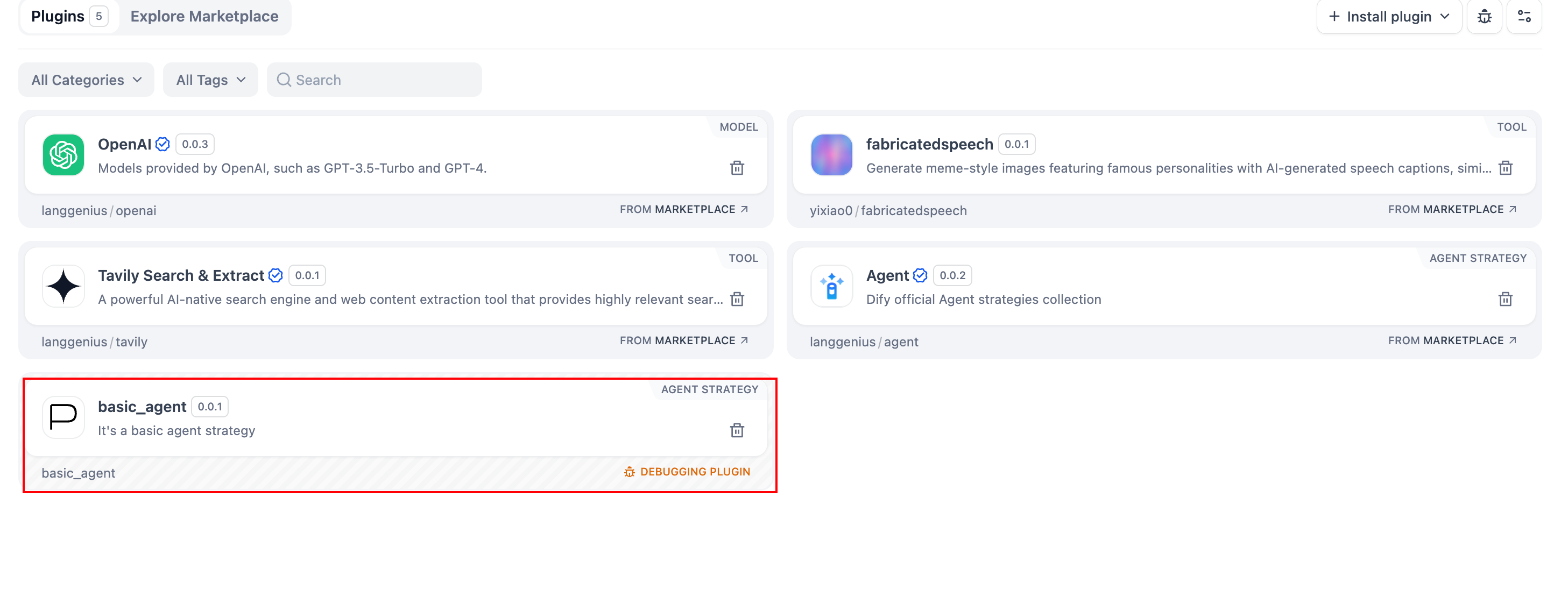
`python -m main` コマンドを実行してプラグインを起動します。プラグインページで、このプラグインが Workspace にインストールされていることを確認できます。他のチームメンバーもこのプラグインにアクセスできます。
|
||
|
||
|
||
|
||
### プラグインのパッケージ化(オプション)
|
||
|
||
プラグインが正常に動作することを確認した後、以下のコマンドラインツールを使用してプラグインをパッケージ化し、名前を付けることができます。実行後、現在のフォルダに `google.difypkg` ファイルが見つかります。これが最終的なプラグインパッケージです。
|
||
|
||
```bash
|
||
# ./basic_agent をプラグインプロジェクトの実際のパスに置き換えてください
|
||
dify plugin package ./basic_agent/
|
||
```
|
||
|
||
おめでとうございます!これでツールタイププラグインの完全な開発、デバッグ、パッケージ化プロセスが完了しました。
|
||
|
||
### プラグインの公開(オプション)
|
||
|
||
これで、[Dify Plugins コードリポジトリ](https://github.com/langgenius/dify-plugins)にアップロードしてプラグインを公開できます。アップロードする前に、プラグインが[プラグイン公開規範](https://docs.dify.ai/ja/plugins/publish-plugins/publish-to-dify-marketplace)に従っていることを確認してください。審査に合格すると、コードはメインブランチにマージされ、自動的に [Dify Marketplace](https://marketplace.dify.ai/) に公開されます。
|
||
|
||
### さらに探求する
|
||
|
||
複雑なタスクは、多くの場合、複数回の思考と複数回のツール呼び出しを必要とします。よりインテリジェントなタスク処理を実現するために、通常、**モデル呼び出し → ツール呼び出し**というループ実行戦略が採用され、タスクが完了するか、設定された最大反復回数に達するまで続けられます。
|
||
|
||
このプロセスでは、プロンプト管理が特に重要になります。モデル入力を効率的に整理し、動的に調整するために、プラグイン内の Function Calling 機能の[完全な実装コード](https://github.com/langgenius/dify-official-plugins/blob/main/agent-strategies/cot_agent/strategies/function_calling.py)を参照し、標準化された方法でモデルに外部ツールを呼び出させ、返された結果を処理する方法を理解することをお勧めします。
|
||
|
||
## 関連リソース
|
||
|
||
- [Agent プラグイン開発の基礎](/plugin-dev-ja/9232-agent) - Agent 戦略プラグインの基本概念を理解する
|
||
- [プラグイン開発の基本概念](/plugin-dev-ja/0111-getting-started-dify-plugin) - プラグイン開発の全体的なアーキテクチャを理解する
|
||
- [開発ツールの初期化](/plugin-dev-ja/0221-initialize-development-tools) - 開発環境の構築方法を学ぶ
|
||
- [モデルの逆呼び出し](/plugin-dev-ja/9242-reverse-invocation-model) - プラットフォーム内のモデル機能を呼び出す方法を理解する
|
||
- [ツールの逆呼び出し](/plugin-dev-ja/9242-reverse-invocation-tool) - 他のプラグインを呼び出す方法を理解する
|
||
- [プラグイン公開の概要](/plugin-dev-ja/0321-release-overview) - プラグイン公開プロセスを学ぶ
|
||
|
||
{/*
|
||
Contributing Section
|
||
DO NOT edit this section!
|
||
It will be automatically generated by the script.
|
||
*/}
|
||
|
||
---
|
||
|
||
[このページを編集する](https://github.com/langgenius/dify-docs/edit/main/plugin-dev-ja/9433-agent-strategy-plugin.mdx) | [問題を報告する](https://github.com/langgenius/dify-docs/issues/new?title=ドキュメントの問題%3A%20agent-strategy-plu&body=%23%23%20問題の説明%0A%3C%21--%20発見した問題について簡単に説明してください%20--%3E%0A%0A%23%23%20ページリンク%0Ahttps%3A%2F%2Fgithub.com%2Flanggenius%2Fdify-docs%2Fblob%2Fmain%2Fplugin-dev-ja%2F9433-agent-strategy-plugin.mdx%0A%0A%23%23%20提案される変更%0A%3C%21--%20特定の変更案がある場合は、ここで説明してください%20--%3E%0A%0A%3C%21--%20ドキュメントの品質向上にご協力いただきありがとうございます!%20--%3E)
|
||
|