mirror of
https://github.com/langgenius/dify-docs.git
synced 2026-03-27 13:28:32 +07:00

303 lines
13 KiB
Plaintext
303 lines
13 KiB
Plaintext
---
|
|
title: Integrate the Predefined Model
|
|
---
|
|
|
|
|
|
|
|
{/*
|
|
CONTRIBUTOR NOTE:
|
|
----------------
|
|
This is a legacy document that is being deprecated.
|
|
Please DO NOT make changes to this version.
|
|
All updates should be directed to the new version at:
|
|
/plugin-dev-en/0222-creating-new-model-provider-extra.en
|
|
*/}
|
|
|
|
<Card title="This Documentation is Being Deprecated" icon="circle-exclamation" href="/plugin-dev-en/0222-creating-new-model-provider-extra.en">
|
|
<p>This page is being phased out as part of our documentation reorganization.</p>
|
|
|
|
<p><strong>Click this card</strong> to be redirected to the updated version with the most current information.</p>
|
|
|
|
<p>If you notice any discrepancies or areas needing improvement in the new documentation, please use the "Report an issue" button at the bottom of the page.</p>
|
|
</Card>
|
|
|
|
Before accessing a predefined model, make sure you have created a [model provider](/en/plugins/quick-start/develop-plugins/model-plugin/create-model-providers). Accessing predefined models is roughly divided into the following steps:
|
|
|
|
1. **Create Module Structures by Model Type**
|
|
|
|
Create corresponding sub-modules under the provider module based on model types (such as `llm` or `text_embedding`). Ensure each model type has its own logical layer for easy maintenance and extension.
|
|
2. **Write Model Request Code**
|
|
|
|
Create a Python file with the same name as the model type (e.g., llm.py) under the corresponding model type module. Define a class that implements specific model logic and complies with the system's model interface specifications.
|
|
3. **Add Predefined Model Configuration**
|
|
|
|
If the provider offers predefined models, create `YAML` files named after each model (e.g., `claude-3.5.yaml`). Write file content according to [AIModelEntity](/en/plugins/schema-definition/model/model-designing-rules#modeltype) specifications, describing model parameters and functionality.
|
|
4. **Test Plugin**
|
|
|
|
Write unit tests and integration tests for newly added provider functionality to ensure all function modules meet expectations and operate normally.
|
|
|
|
***
|
|
|
|
Below are the access details:
|
|
|
|
### 1. Creation of different module structures by model type
|
|
|
|
A model provider may offer different model types, for example, OpenAI provides types such as `llm` or `text_embedding`. You need to create corresponding sub-modules under the provider module, ensuring each model type has its own logical layer for easy maintenance and extension.
|
|
|
|
Currently supported model types:
|
|
|
|
* `llm`: Text generation models
|
|
* `text_embedding`: Text Embedding models
|
|
* `rerank`: Rerank models
|
|
* `speech2text`: Speech to text
|
|
* `tts`: Text to speech
|
|
* `moderation`: Content moderation
|
|
|
|
Taking `Anthropic` as an example, since its model series only contains LLM type models, you only need to create an `/llm` folder under the `/models` path and add yaml files for different model versions. For detailed code structure, please refer to the [Github repository](https://github.com/langgenius/dify-official-plugins/tree/main/models/anthropic/models/llm).
|
|
|
|
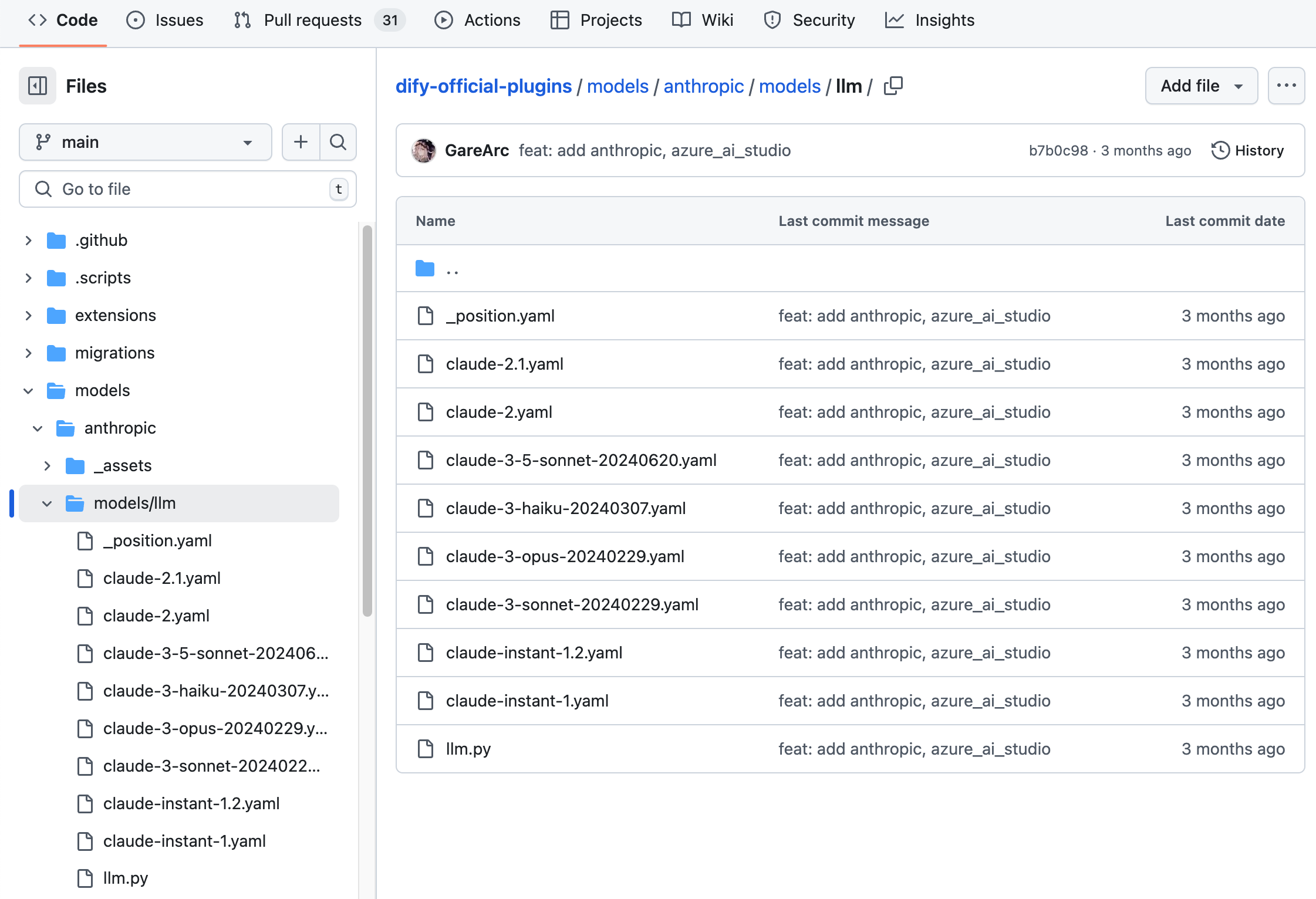
|
|
|
|
```bash
|
|
├── models
|
|
│ └── llm
|
|
│ ├── _position.yaml
|
|
│ ├── claude-2.1.yaml
|
|
│ ├── claude-2.yaml
|
|
│ ├── claude-3-5-sonnet-20240620.yaml
|
|
│ ├── claude-3-haiku-20240307.yaml
|
|
│ ├── claude-3-opus-20240229.yaml
|
|
│ ├── claude-3-sonnet-20240229.yaml
|
|
│ ├── claude-instant-1.2.yaml
|
|
│ ├── claude-instant-1.yaml
|
|
│ └── llm.py
|
|
```
|
|
|
|
If the model provider contains multiple types of large models, e.g., the OpenAI family of models contains llm and text\_embedding, moderation, speech2text, and tts types of models, you need to create a folder for each type under the /models path. The structure is as follows:
|
|
|
|
```bash
|
|
├── models
|
|
│ ├── common_openai.py
|
|
│ ├── llm
|
|
│ │ ├── _position.yaml
|
|
│ │ ├── chatgpt-4o-latest.yaml
|
|
│ │ ├── gpt-3.5-turbo.yaml
|
|
│ │ ├── gpt-4-0125-preview.yaml
|
|
│ │ ├── gpt-4-turbo.yaml
|
|
│ │ ├── gpt-4o.yaml
|
|
│ │ ├── llm.py
|
|
│ │ ├── o1-preview.yaml
|
|
│ │ └── text-davinci-003.yaml
|
|
│ ├── moderation
|
|
│ │ ├── moderation.py
|
|
│ │ └── text-moderation-stable.yaml
|
|
│ ├── speech2text
|
|
│ │ ├── speech2text.py
|
|
│ │ └── whisper-1.yaml
|
|
│ ├── text_embedding
|
|
│ │ ├── text-embedding-3-large.yaml
|
|
│ │ └── text_embedding.py
|
|
│ └── tts
|
|
│ ├── tts-1-hd.yaml
|
|
│ ├── tts-1.yaml
|
|
│ └── tts.py
|
|
```
|
|
|
|
It is recommended to prepare all model configurations before starting the model code implementation. For complete YAML rules, please refer to the [Model Design Rules](/en/plugins/schema-definition/model/model-designing-rules). For more code details, please refer to the example [Github repository](https://github.com/langgenius/dify-official-plugins/tree/main/models).
|
|
|
|
### 2. Writing Model Requesting Code
|
|
|
|
Next, you need to create an `llm.py` code file under the `/models` path. Taking `Anthropic` as an example, create an Anthropic LLM class in `llm.py` named `AnthropicLargeLanguageModel`, inheriting from the `__base.large_language_model.LargeLanguageModel` base class.
|
|
|
|
Here's example code for some functionality:
|
|
|
|
* **LLM Request**
|
|
|
|
The core method for requesting LLM, supporting both streaming and synchronous returns.
|
|
|
|
```python
|
|
def _invoke(self, model: str, credentials: dict,
|
|
prompt_messages: list[PromptMessage], model_parameters: dict,
|
|
tools: Optional[list[PromptMessageTool]] = None, stop: Optional[list[str]] = None,
|
|
stream: bool = True, user: Optional[str] = None) \
|
|
-> Union[LLMResult, Generator]:
|
|
"""
|
|
Invoke large language model
|
|
|
|
:param model: model name
|
|
:param credentials: model credentials
|
|
:param prompt_messages: prompt messages
|
|
:param model_parameters: model parameters
|
|
:param tools: tools for tool calling
|
|
:param stop: stop words
|
|
:param stream: is stream response
|
|
:param user: unique user id
|
|
:return: full response or stream response chunk generator result
|
|
"""
|
|
```
|
|
|
|
In the implementation, you need to be careful to use two functions to handle synchronized returns and streaming returns separately. This is because functions in Python that contain the yield keyword are recognized as generator functions, and their return type is fixed to Generator. synchronized return and streaming return need to be implemented independently in order to ensure that the logic is clear and to accommodate different return requirements.
|
|
|
|
Here's the sample code (the parameters are simplified in the example, so please follow the full parameter list in the actual implementation):
|
|
|
|
```python
|
|
def _invoke(self, stream: bool, **kwargs) -> Union[LLMResult, Generator]:
|
|
"""Call the corresponding processing function based on return type."""
|
|
if stream:
|
|
return self._handle_stream_response(**kwargs)
|
|
return self._handle_sync_response(**kwargs)
|
|
|
|
def _handle_stream_response(self, **kwargs) -> Generator:
|
|
"""Handle streaming response logic."""
|
|
for chunk in response: # Assume response is a streaming data iterator
|
|
yield chunk
|
|
|
|
def _handle_sync_response(self, **kwargs) -> LLMResult:
|
|
"""Handle synchronous response logic."""
|
|
return LLMResult(**response) # Assume response is a complete response dictionary
|
|
```
|
|
|
|
* **Pre-calculated number of input tokens**
|
|
|
|
If the model does not provide an interface to pre-calculate tokens, it can simply return 0, which is used to indicate that the feature is not applicable or not implemented. Example:
|
|
|
|
```python
|
|
def get_num_tokens(self, model: str, credentials: dict, prompt_messages: list[PromptMessage],
|
|
tools: Optional[list[PromptMessageTool]] = None) -> int:
|
|
"""
|
|
Get number of tokens for given prompt messages
|
|
|
|
:param model: model name
|
|
:param credentials: model credentials
|
|
:param prompt_messages: prompt messages
|
|
:param tools: tools for tool calling
|
|
:return:
|
|
"""
|
|
```
|
|
|
|
* **Request Exception Error Mapping Table**
|
|
|
|
When a model call encounters an exception, it needs to be mapped to the `InvokeError` type specified by Runtime, allowing Dify to handle different errors differently.
|
|
|
|
Runtime Errors:
|
|
|
|
* `InvokeConnectionError`: Connection error during invocation
|
|
* `InvokeServerUnavailableError`: Service provider unavailable
|
|
* `InvokeRateLimitError`: Rate limit reached
|
|
* `InvokeAuthorizationError`: Authorization failure during invocation
|
|
* `InvokeBadRequestError`: Invalid parameters in the invocation request
|
|
|
|
```python
|
|
@property
|
|
def _invoke_error_mapping(self) -> dict[type[InvokeError], list[type[Exception]]]:
|
|
"""
|
|
Map model invoke error to unified error
|
|
The key is the error type thrown to the caller
|
|
The value is the error type thrown by the model,
|
|
which needs to be converted into a unified error type for the caller.
|
|
|
|
:return: Invoke error mapping
|
|
"""
|
|
```
|
|
|
|
See the [Github code repository](https://github.com/langgenius/dify-official-plugins/blob/main/models/anthropic/models/llm/llm.py) for full code details.
|
|
|
|
### **3.** Add Predefined Model Configurations
|
|
|
|
If the provides predefined models, create YAML files for each model with the same name as the model name (e.g. claude-3.5.yaml). Write the contents of the file according to the AIModelEntity specification, describing the parameters and functionality of the model.
|
|
|
|
`claude-3-5-sonnet-20240620` Model example code:
|
|
|
|
```yaml
|
|
model: claude-3-5-sonnet-20240620
|
|
label:
|
|
en_US: claude-3-5-sonnet-20240620
|
|
model_type: llm
|
|
features:
|
|
- agent-thought
|
|
- vision
|
|
- tool-call
|
|
- stream-tool-call
|
|
- document
|
|
model_properties:
|
|
mode: chat
|
|
context_size: 200000
|
|
parameter_rules:
|
|
- name: temperature
|
|
use_template: temperature
|
|
- name: top_p
|
|
use_template: top_p
|
|
- name: top_k
|
|
label:
|
|
zh_Hans:
|
|
en_US: Top k
|
|
type: int
|
|
help:
|
|
zh_Hans:
|
|
en_US: Only sample from the top K options for each subsequent token.
|
|
required: false
|
|
- name: max_tokens
|
|
use_template: max_tokens
|
|
required: true
|
|
default: 8192
|
|
min: 1
|
|
max: 8192
|
|
- name: response_format
|
|
use_template: response_format
|
|
pricing:
|
|
input: '3.00'
|
|
output: '15.00'
|
|
unit: '0.000001'
|
|
currency: USD
|
|
```
|
|
|
|
### 4. Debugging Plugins
|
|
|
|
Dify provides remote debugging method, go to "Plugin Management" page to get the debugging key and remote server address. Check here for more details:
|
|
|
|
<Card title="Debug Plugin" icon="link" href="/en/plugins/quick-start/debug-plugin">
|
|
</Card>
|
|
|
|
### Publishing Plugins
|
|
|
|
You can now publish your plugin by uploading it to the [Dify Plugins code repository](https://github.com/langgenius/dify-plugins)! Before uploading, make sure your plugin follows the [plugin release guide](/en/plugins/publish-plugins/publish-to-dify-marketplace). Once approved, the code will be merged into the master branch and automatically live in the [Dify Marketplace](https://marketplace.dify.ai/).
|
|
|
|
#### Exploring More
|
|
|
|
**Quick Start:**
|
|
|
|
* [Develop Extension Type Plugin](/en/plugins/quick-start/develop-plugins/extension-plugin)
|
|
* [Develop Model Type Plugin](./)
|
|
* [Bundle Type Plugin: Package Multiple Plugins](/en/plugins/quick-start/develop-plugins/bundle)
|
|
|
|
**Plugins Specification Definition Documentaiton:**
|
|
|
|
* [Minifest](/en/plugins/schema-definition/manifest)
|
|
* [Endpoint](/en/plugins/schema-definition/endpoint)
|
|
* [Reverse Invocation of the Dify Service](/en/plugins/schema-definition/reverse-invocation-of-the-dify-service)
|
|
* [Tools](/en/guides/tools)
|
|
* [Models](/en/plugins/schema-definition/model/model-schema)
|
|
* [Extend Agent Strategy](/en/plugins/schema-definition/agent)
|
|
|
|
{/*
|
|
Contributing Section
|
|
DO NOT edit this section!
|
|
It will be automatically generated by the script.
|
|
*/}
|
|
|
|
<CardGroup cols="2">
|
|
<Card
|
|
title="Edit this page"
|
|
icon="pen-to-square"
|
|
href="https://github.com/langgenius/dify-docs-mintlify/edit/main/en/plugins/quick-start/develop-plugins/model-plugin/predefined-model.mdx"
|
|
>
|
|
Help improve our documentation by contributing directly
|
|
</Card>
|
|
<Card
|
|
title="Report an issue"
|
|
icon="github"
|
|
href="https://github.com/langgenius/dify-docs-mintlify/issues/new?title=Documentation%20Issue%3A%20fined-mo&body=%23%23%20Issue%20Description%0A%3C%21--%20Please%20briefly%20describe%20the%20issue%20you%20found%20--%3E%0A%0A%23%23%20Page%20Link%0Ahttps%3A%2F%2Fgithub.com%2Flanggenius%2Fdify-docs-mintlify%2Fblob%2Fmain%2Fen/plugins/quick-start/develop-plugins/model-plugin%2Fpredefined-model.mdx%0A%0A%23%23%20Suggested%20Changes%0A%3C%21--%20If%20you%20have%20specific%20suggestions%20for%20changes%2C%20please%20describe%20them%20here%20--%3E%0A%0A%3C%21--%20Thank%20you%20for%20helping%20improve%20our%20documentation%21%20--%3E"
|
|
>
|
|
Found an error or have suggestions? Let us know
|
|
</Card>
|
|
</CardGroup>
|