mirror of
https://github.com/langgenius/dify-docs.git
synced 2026-03-27 13:28:32 +07:00

371 lines
16 KiB
Plaintext
371 lines
16 KiB
Plaintext
---
|
||
dimensions:
|
||
type:
|
||
primary: reference
|
||
detail: examples
|
||
level: intermediate
|
||
standard_title: Develop A Slack Bot Plugin
|
||
language: zh
|
||
title: 开发 Slack Bot 插件
|
||
description: 本文档提供了完整的Slack Bot插件开发指南,包括遍历项目初始化、编辑配置表单、实现功能代码、插件调试、设置Endpoint、效果验证到打包发布的完整流程。需要使用Dify插件脚手架工具和已创建的Slack
|
||
App以实现在Slack平台上搞建由AI驱动的聊天机器人。
|
||
---
|
||
|
||
**本文将帮助你:**
|
||
|
||
深入掌握 Slack Bot 的搭建方法,创建由 AI 驱动的 Slack 聊天机器人,在 Slack 平台上智能回答用户的问题。如果你还没有开发插件的经验,建议先阅读[插件开发入门指南](/plugin_dev_zh/0211-getting-started-dify-tool.zh)。
|
||
|
||
### 项目背景
|
||
|
||
Dify 插件生态致力于支持更简单、更易用的接入方式。本文将以 Slack 为例,详细介绍如何开发一个 Slack Bot 插件,便于团队中的成员直接在 Slack 平台内与 LLM 对话,提升 AI 服务的使用效率。
|
||
|
||
Dify 插件生态旨在提供更简单、更便捷的接入方式。本文将以 Slack 为例,详细讲解如何开发一个 Slack Bot 插件,帮助团队成员直接在 Slack 平台使用 AI 应用,提升办公效率。
|
||
|
||
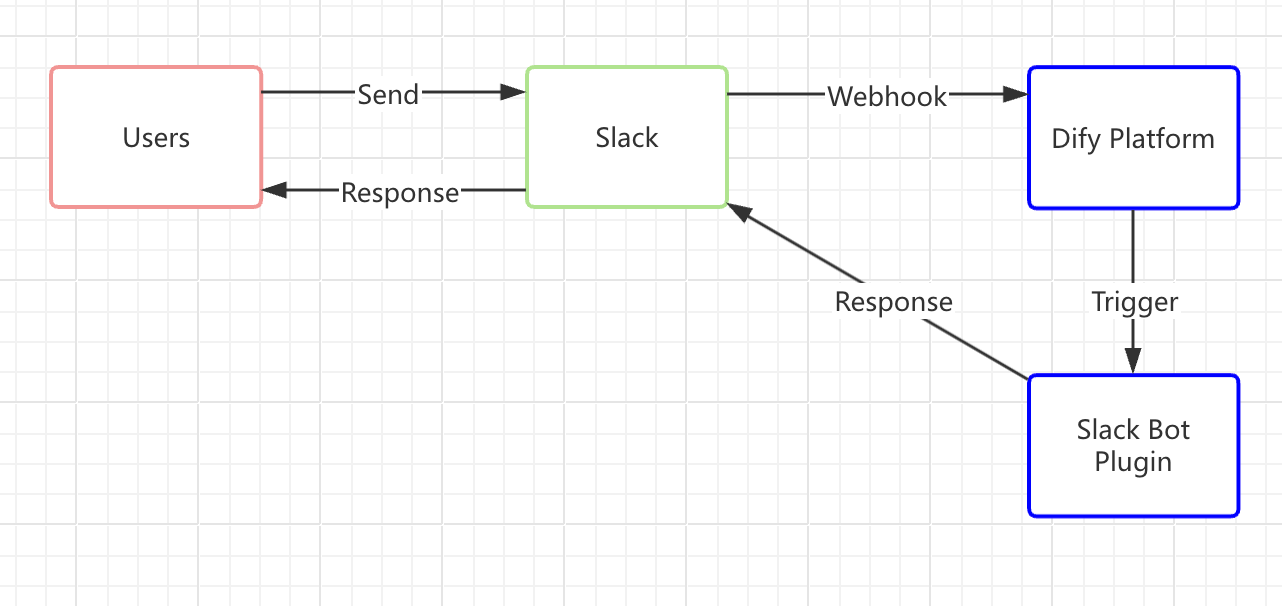
Slack 是一个自由开放的实时办公通信平台,拥有丰富的 API。其中,基于事件机制的 Webhook 功能易于上手开发。我们将利用该机制创建 Slack Bot 插件,其原理如下图所示:
|
||
|
||
|
||
|
||
> 为了避免混乱,现对以下概念作出解释:
|
||
>
|
||
> * **Slack Bot** 是在 Slack 平台上的一个聊天机器人,可以被视为虚拟角色,你可以与它进行聊天互动
|
||
> * **Slack Bot 插件**指的是 Dify Marketplace上的一款插件,用于连接 Dify 应用与 Slack 平台。本文将主要围绕该插件开发展开。
|
||
|
||
**原理简介:**
|
||
|
||
1. **向 Slack Bot 发送消息**
|
||
|
||
当用户在 Slack 中向 Bot 机器人发出一条消息的时候,Slack Bot 会发出一个 Webhook 请求到 Dify 平台。
|
||
2. **消息转发至 Slack Bot 插件**
|
||
|
||
用户在与 Slack bot 对话时,需要将消息转发至 Dify 应用。好比邮件系统需要一位收件人的邮箱,此时可以通过 Slack 的 API 配置一个 Slack Webhook 的地址,并将其填入至 Slack Bot 插件并建立连接。
|
||
3. **插件在接受到消息后,返回至某个 Dify 应用**
|
||
|
||
Slack Bot 插件将处理 Slack 请求,发送至 Dify 中的应用。由 LLM 分析用户输入的内容并给出回应。
|
||
4. **Dify 应用回应后,将消息返回至 Slack Bot 并回答用户**
|
||
|
||
Slack Bot 获取 Dify 应用的回复后,通过插件将消息原路返回至 Slack Bot,使得用户能够在使用 Slack 时直接与 Dify 应用互动
|
||
|
||
### 前置准备
|
||
|
||
* Dify 插件脚手架工具,详细说明请参考[初始化开发工具](/plugin_dev_zh/0221-initialize-development-tools.zh)。
|
||
* Python 环境,版本号 ≥ 3.12,详细说明请参考 [Python 安装教程](https://pythontest.com/python/installing-python-3-11/),或询问 LLM 获取完整的安装教程。
|
||
* 创建 Slack App 并获取 OAuth Token
|
||
|
||
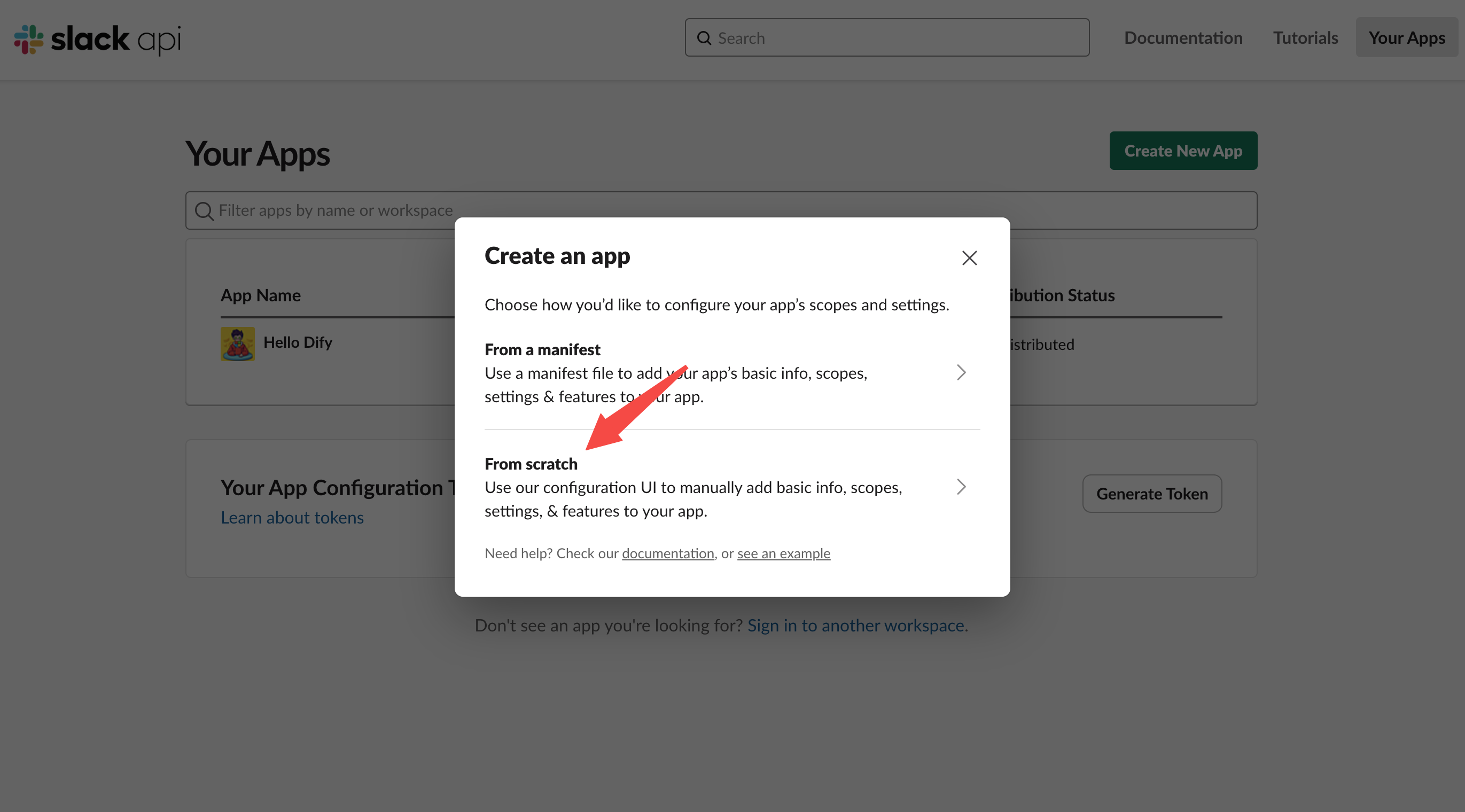
前往 [Slack API](https://api.slack.com/apps) 平台, 选择以 scratch 方式创建 Slack APP,并选择需部署应用的 Slack 空间。
|
||
|
||
|
||
|
||
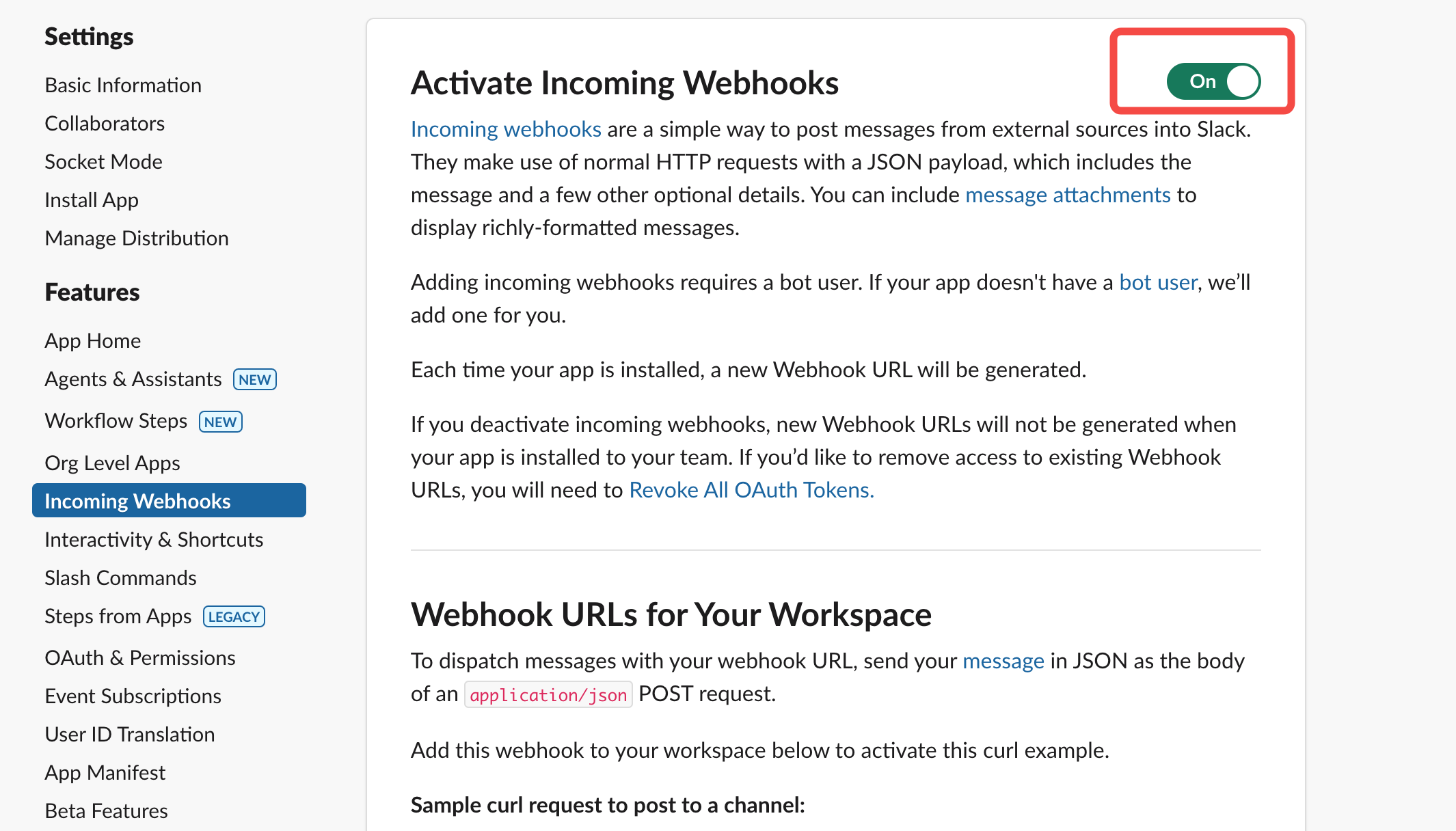
开启 Webhooks 功能。
|
||
|
||
|
||
|
||
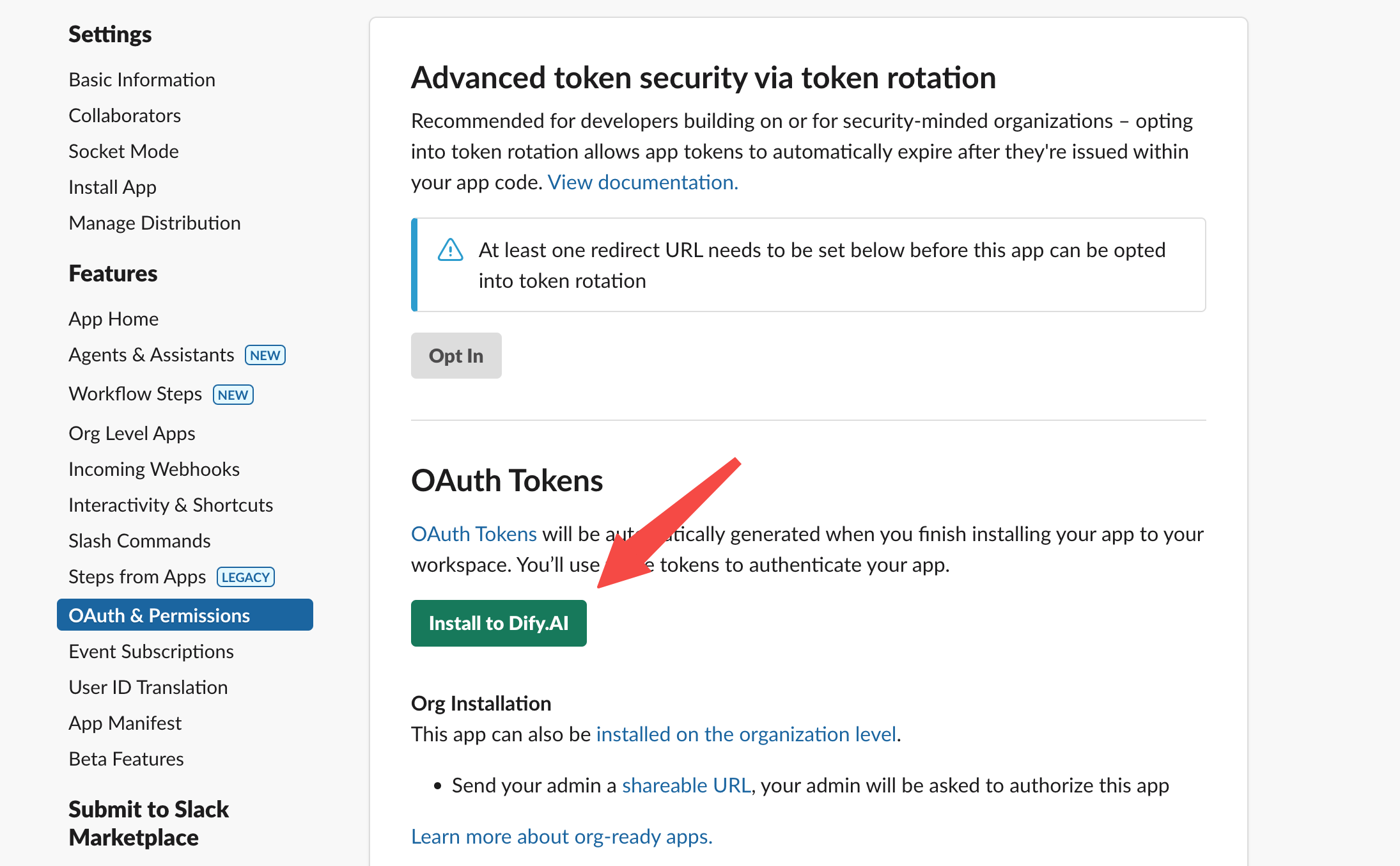
将 App 安装至 Slack 工作区内。
|
||
|
||
|
||
|
||
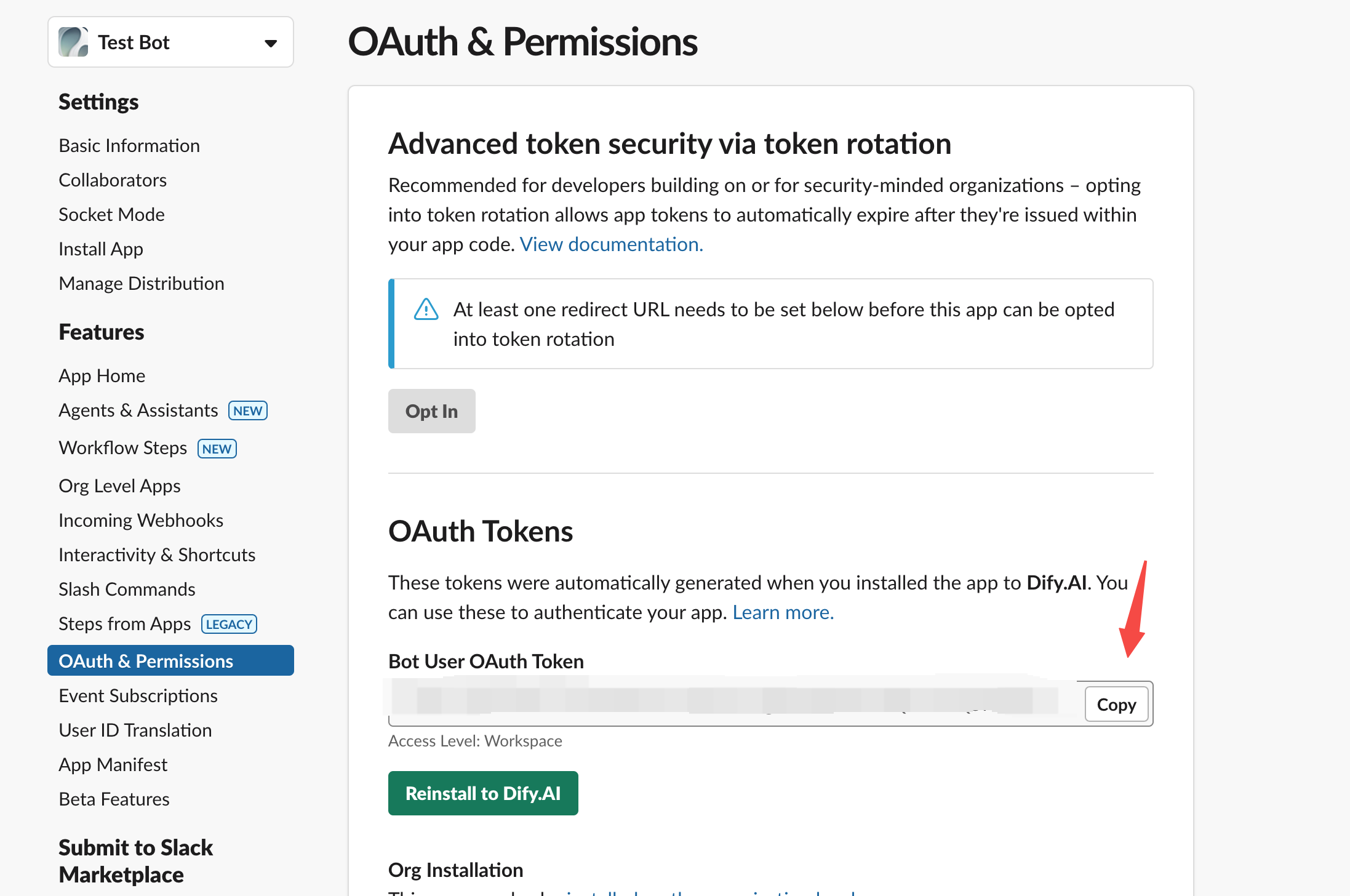
获取 OAuth Token,用于后续的插件开发。
|
||
|
||
|
||
|
||
### 1. 开发插件
|
||
|
||
现在开始实际的插件编码工作。在开始之前,请确保你已经阅读过[开发 Extension 插件](/plugin_dev_zh/9231-extension-plugin.zh),或已动手开发过一次 Dify 插件。
|
||
|
||
#### 初始化项目
|
||
|
||
运行以下命令初始化插件开发项目:
|
||
|
||
```bash
|
||
dify plugin init
|
||
```
|
||
|
||
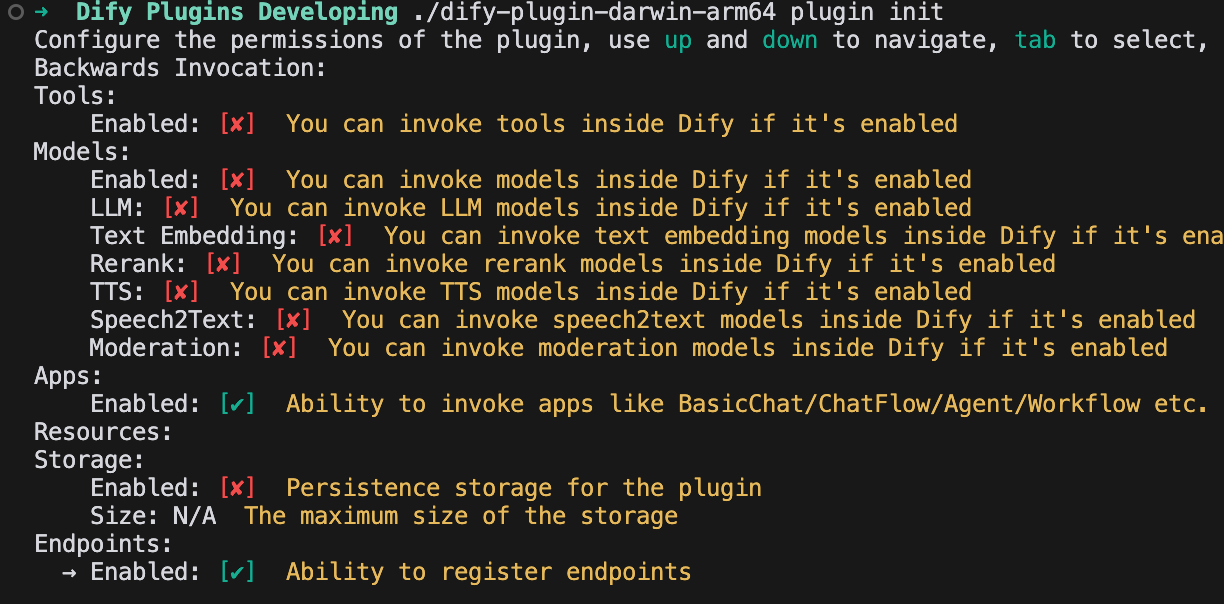
按照提示填写项目的基础信息,选择 `extension` 模板,并且授予 `Apps` 和 `Endpoints` 两个权限。
|
||
|
||
如需了解更多关于插件反向调用 Dify 平台能力,请参考[反向调用](/plugin_dev_zh/9241-reverse-invocation.zh)。
|
||
|
||
|
||
|
||
#### 1. 编辑配置表单
|
||
|
||
在这个插件中,需要指定使用哪个 Dify 的 App 进行回复,并且在回复的时候需要使用到 Slack 的 App token,因此需要在插件表单中加上这两个字段。
|
||
|
||
修改 group 路径下的 yaml 文件,例如 `group/slack.yaml。`表单配置文件的名称由创建插件时填写的基础信息决定,你可以修改对应的 yaml 文件。
|
||
|
||
**示例代码:**
|
||
|
||
`slack.yaml`
|
||
|
||
```yaml
|
||
settings:
|
||
- name: bot_token
|
||
type: secret-input
|
||
required: true
|
||
label:
|
||
en_US: Bot Token
|
||
zh_Hans: Bot Token
|
||
pt_BR: Token do Bot
|
||
ja_JP: Bot Token
|
||
placeholder:
|
||
en_US: Please input your Bot Token
|
||
zh_Hans: 请输入你的 Bot Token
|
||
pt_BR: Por favor, insira seu Token do Bot
|
||
ja_JP: ボットトークンを入力してください
|
||
- name: allow_retry
|
||
type: boolean
|
||
required: false
|
||
label:
|
||
en_US: Allow Retry
|
||
zh_Hans: 允许重试
|
||
pt_BR: Permitir Retentativas
|
||
ja_JP: 再試行を許可
|
||
default: false
|
||
- name: app
|
||
type: app-selector
|
||
required: true
|
||
label:
|
||
en_US: App
|
||
zh_Hans: 应用
|
||
pt_BR: App
|
||
ja_JP: アプリ
|
||
placeholder:
|
||
en_US: the app you want to use to answer Slack messages
|
||
zh_Hans: 你想要用来回答 Slack 消息的应用
|
||
pt_BR: o app que você deseja usar para responder mensagens do Slack
|
||
ja_JP: あなたが Slack メッセージに回答するために使用するアプリ
|
||
endpoints:
|
||
- endpoints/slack.yaml
|
||
```
|
||
|
||
代码数据结构说明:
|
||
|
||
```
|
||
- name: app
|
||
type: app-selector
|
||
scope: chat
|
||
```
|
||
|
||
* type 字段指定为 app-selector 字段
|
||
|
||
用户在使用插件时可以访问某个 Dify 应用并进行消息转发。
|
||
* scope 字段指定为 chat 字段
|
||
|
||
只能使用 `agent` 、`chatbot` 、`chatflow` 等类型的 app。
|
||
|
||
最后修改 `endpoints/slack.yaml` 文件中的请求路径和请求方式,需要将 method 修改为 POST 方式。
|
||
|
||
**示例代码:**
|
||
|
||
`endpoints/slack.yaml`
|
||
|
||
```yaml
|
||
path: "/"
|
||
method: "POST"
|
||
extra:
|
||
python:
|
||
source: "endpoints/slack.py"
|
||
```
|
||
|
||
#### 2. 编辑功能代码
|
||
|
||
修改 `endpoints/slack.py`文件,并在其中添加下面的代码:
|
||
|
||
````python
|
||
import json
|
||
import traceback
|
||
from typing import Mapping
|
||
from werkzeug import Request, Response
|
||
from dify_plugin import Endpoint
|
||
from slack_sdk import WebClient
|
||
from slack_sdk.errors import SlackApiError
|
||
|
||
|
||
class SlackEndpoint(Endpoint):
|
||
def _invoke(self, r: Request, values: Mapping, settings: Mapping) -> Response:
|
||
"""
|
||
Invokes the endpoint with the given request.
|
||
"""
|
||
retry_num = r.headers.get("X-Slack-Retry-Num")
|
||
if (not settings.get("allow_retry") and (r.headers.get("X-Slack-Retry-Reason") == "http_timeout" or ((retry_num is not None and int(retry_num) > 0)))):
|
||
return Response(status=200, response="ok")
|
||
data = r.get_json()
|
||
|
||
# Handle Slack URL verification challenge
|
||
if data.get("type") == "url_verification":
|
||
return Response(
|
||
response=json.dumps({"challenge": data.get("challenge")}),
|
||
status=200,
|
||
content_type="application/json"
|
||
)
|
||
|
||
if (data.get("type") == "event_callback"):
|
||
event = data.get("event")
|
||
if (event.get("type") == "app_mention"):
|
||
message = event.get("text", "")
|
||
if message.startswith("<@"):
|
||
message = message.split("> ", 1)[1] if "> " in message else message
|
||
channel = event.get("channel", "")
|
||
blocks = event.get("blocks", [])
|
||
blocks[0]["elements"][0]["elements"] = blocks[0].get("elements")[0].get("elements")[1:]
|
||
token = settings.get("bot_token")
|
||
client = WebClient(token=token)
|
||
try:
|
||
response = self.session.app.chat.invoke(
|
||
app_id=settings["app"]["app_id"],
|
||
query=message,
|
||
inputs={},
|
||
response_mode="blocking",
|
||
)
|
||
try:
|
||
blocks[0]["elements"][0]["elements"][0]["text"] = response.get("answer")
|
||
result = client.chat_postMessage(
|
||
channel=channel,
|
||
text=response.get("answer"),
|
||
blocks=blocks
|
||
)
|
||
return Response(
|
||
status=200,
|
||
response=json.dumps(result),
|
||
content_type="application/json"
|
||
)
|
||
except SlackApiError as e:
|
||
raise e
|
||
except Exception as e:
|
||
err = traceback.format_exc()
|
||
return Response(
|
||
status=200,
|
||
response="Sorry, I'm having trouble processing your request. Please try again later." + str(err),
|
||
content_type="text/plain",
|
||
)
|
||
else:
|
||
return Response(status=200, response="ok")
|
||
else:
|
||
return Response(status=200, response="ok")
|
||
else:
|
||
return Response(status=200, response="ok")
|
||
|
||
```
|
||
````
|
||
|
||
为了便于测试,插件功能目前仅能重复用户输入的内容,暂不调用 Dify app。
|
||
|
||
### 2. 调试插件
|
||
|
||
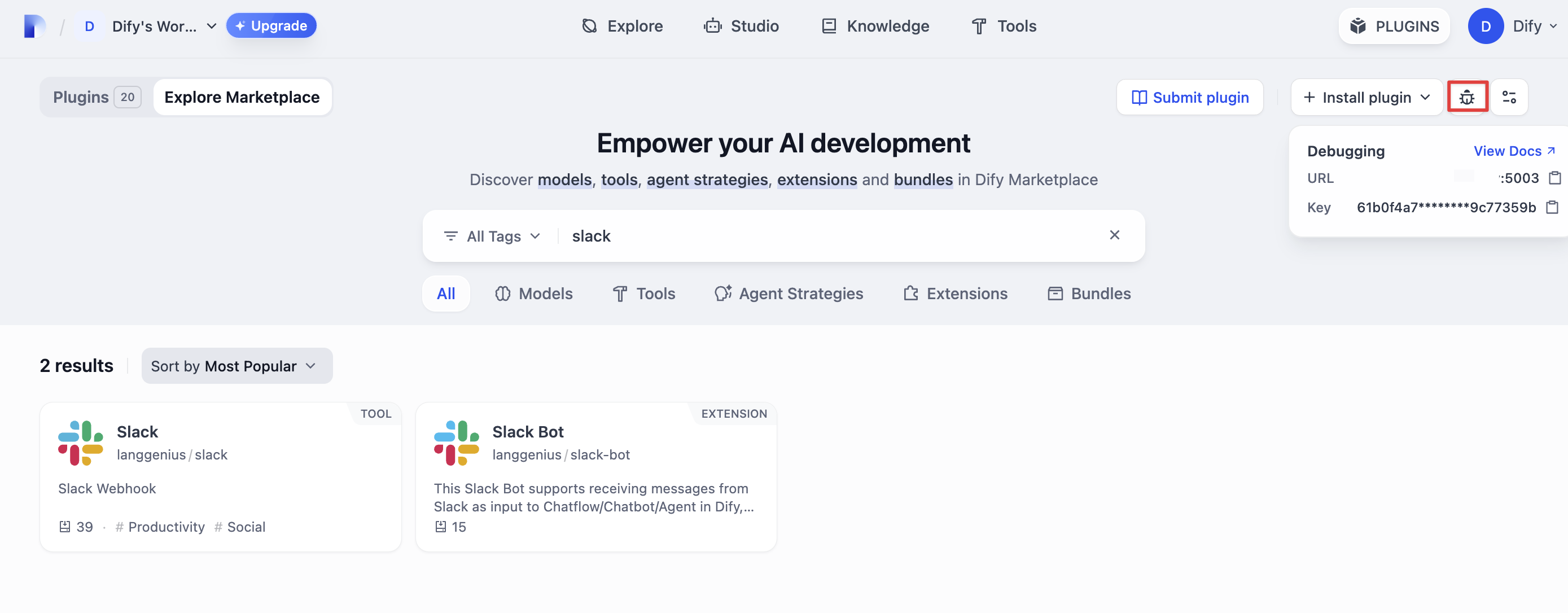
前往 Dify 平台,获取 Dify 插件远程调试的连接地址和密钥。
|
||
|
||
|
||
|
||
回到插件项目,复制 `.env.example` 文件并重命名为 `.env`。
|
||
|
||
```bash
|
||
INSTALL_METHOD=remote
|
||
REMOTE_INSTALL_HOST=remote-url
|
||
REMOTE_INSTALL_PORT=5003
|
||
REMOTE_INSTALL_KEY=****-****-****-****-****
|
||
```
|
||
|
||
运行 `python -m main` 命令启动插件。在插件页即可看到该插件已被安装至 Workspace 内。其他团队成员也可以访问该插件。
|
||
|
||
```bash
|
||
python -m main
|
||
```
|
||
|
||
#### 设置插件 Endpoint
|
||
|
||
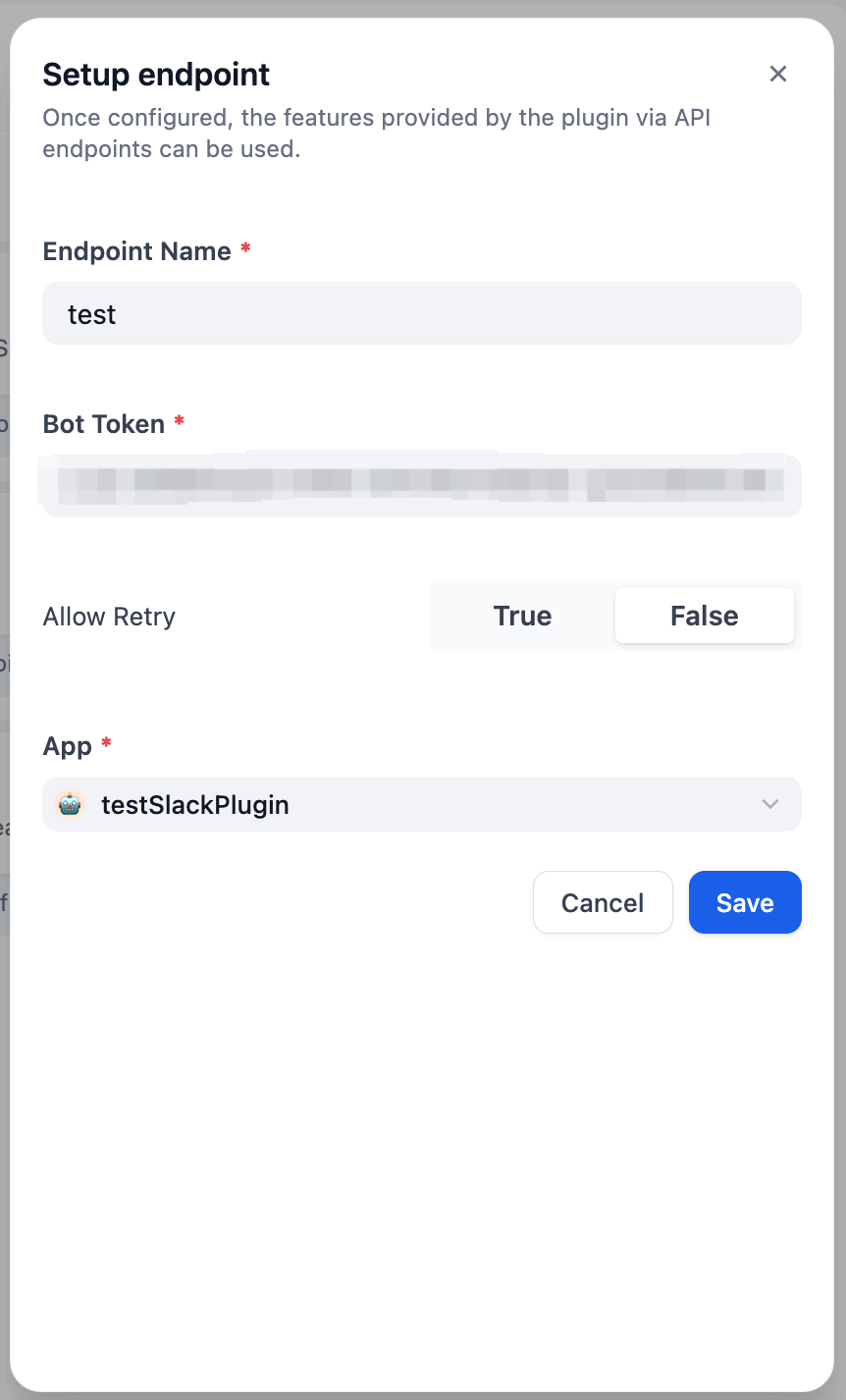
在 Dify 的插件管理页中找到自动安装的测试插件,新建一个 Endpoint,填写名称、Bot token、选择需要连接的 app。
|
||
|
||
|
||
|
||
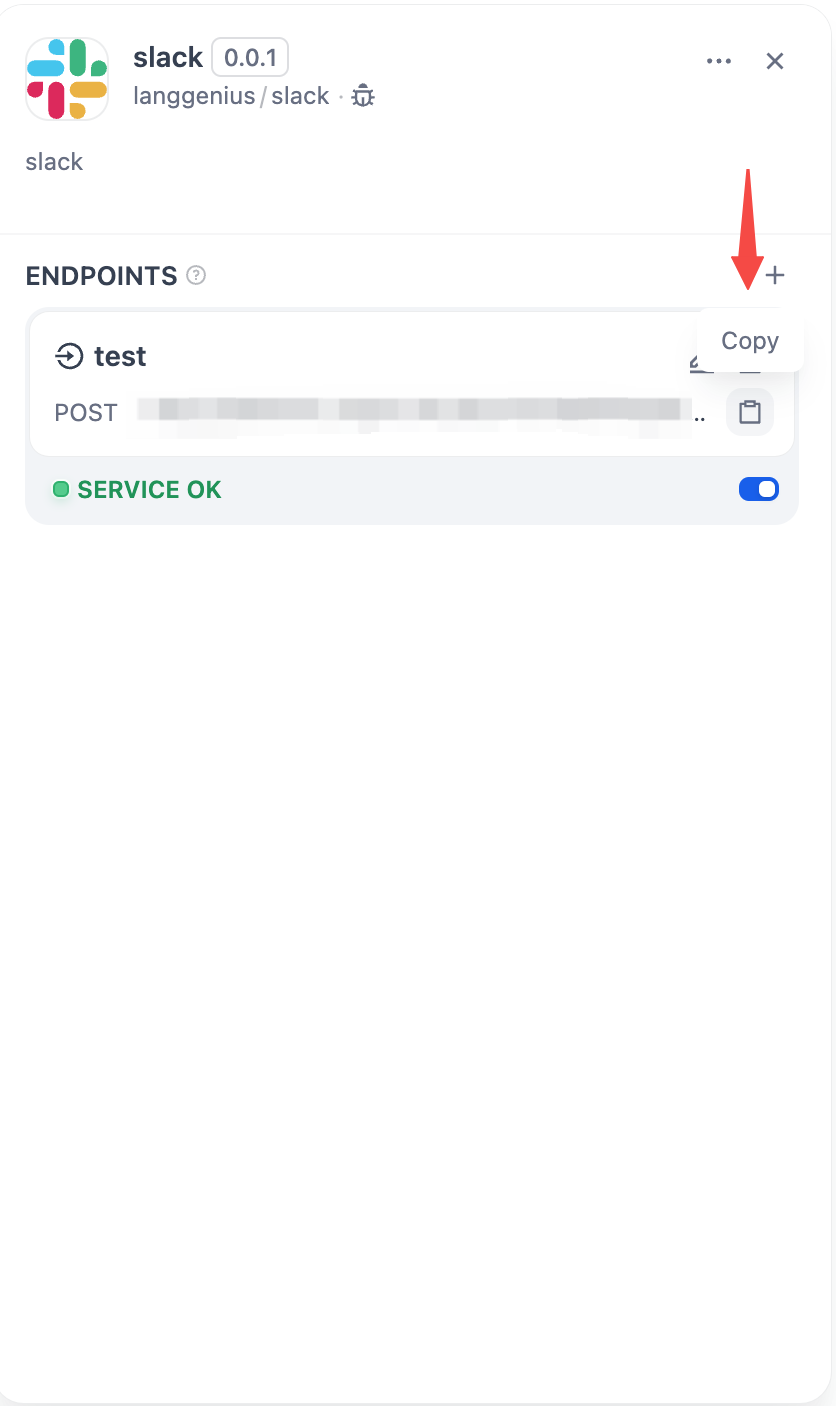
保存后将生成一个 POST 请求地址。
|
||
|
||
|
||
|
||
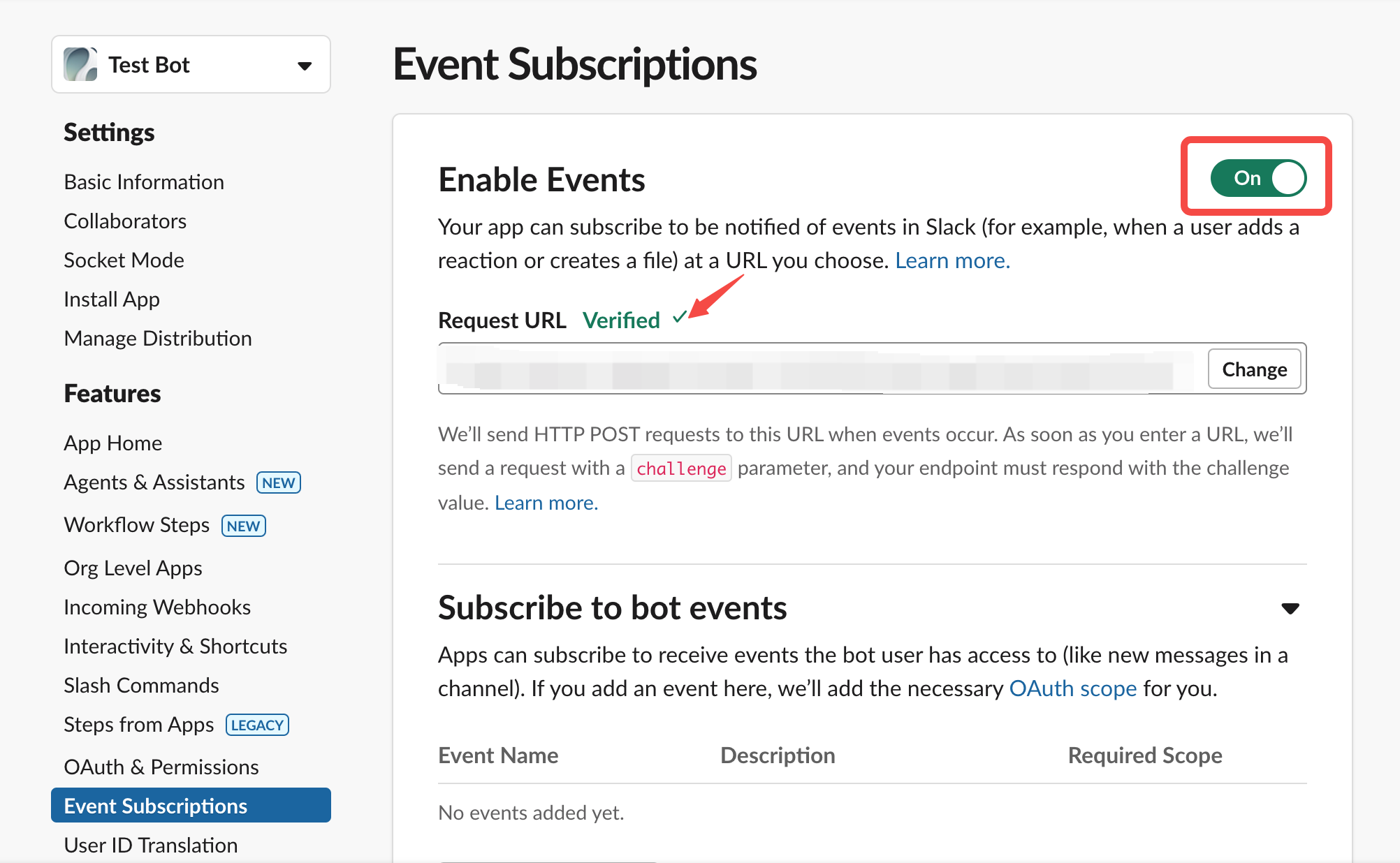
接下来还需要完成 Slack App 的设置。
|
||
|
||
1. 启用 Event 订阅
|
||
|
||
|
||
|
||
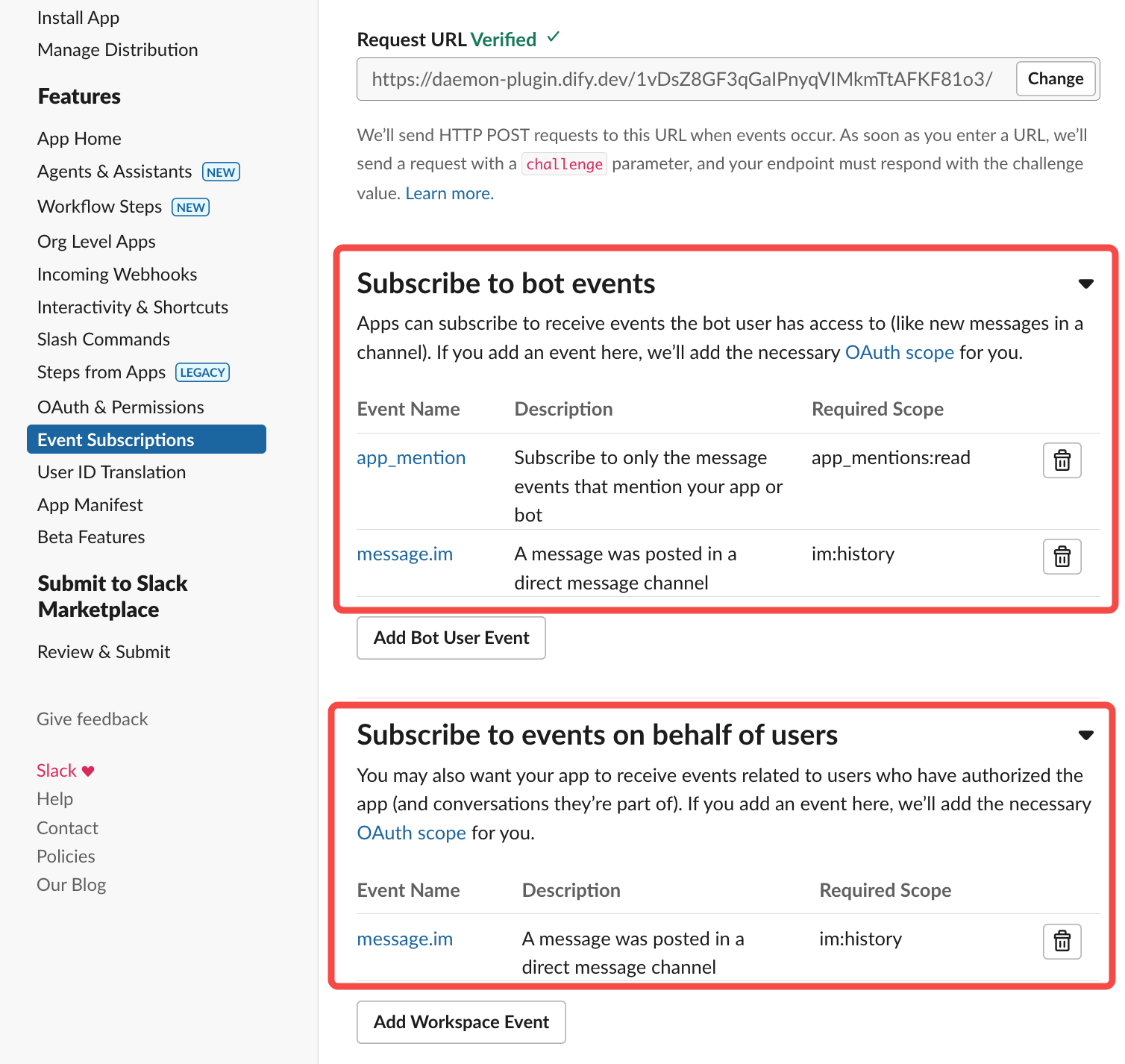
在其中粘贴上文中生成的插件 POST 请求地址。
|
||
|
||
|
||
|
||
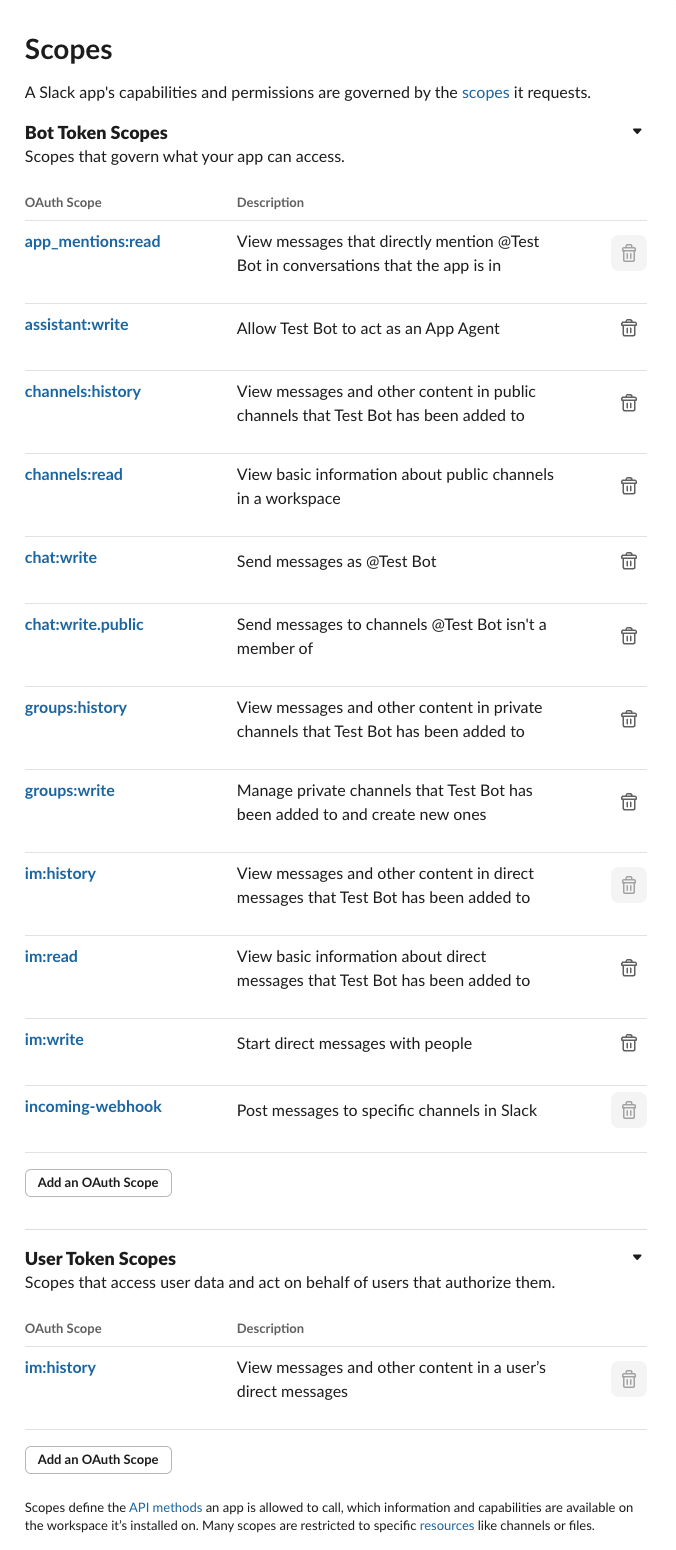
勾选 Slack App 所需具备的权限。
|
||
|
||
|
||
|
||
### 3. 验证插件效果
|
||
|
||
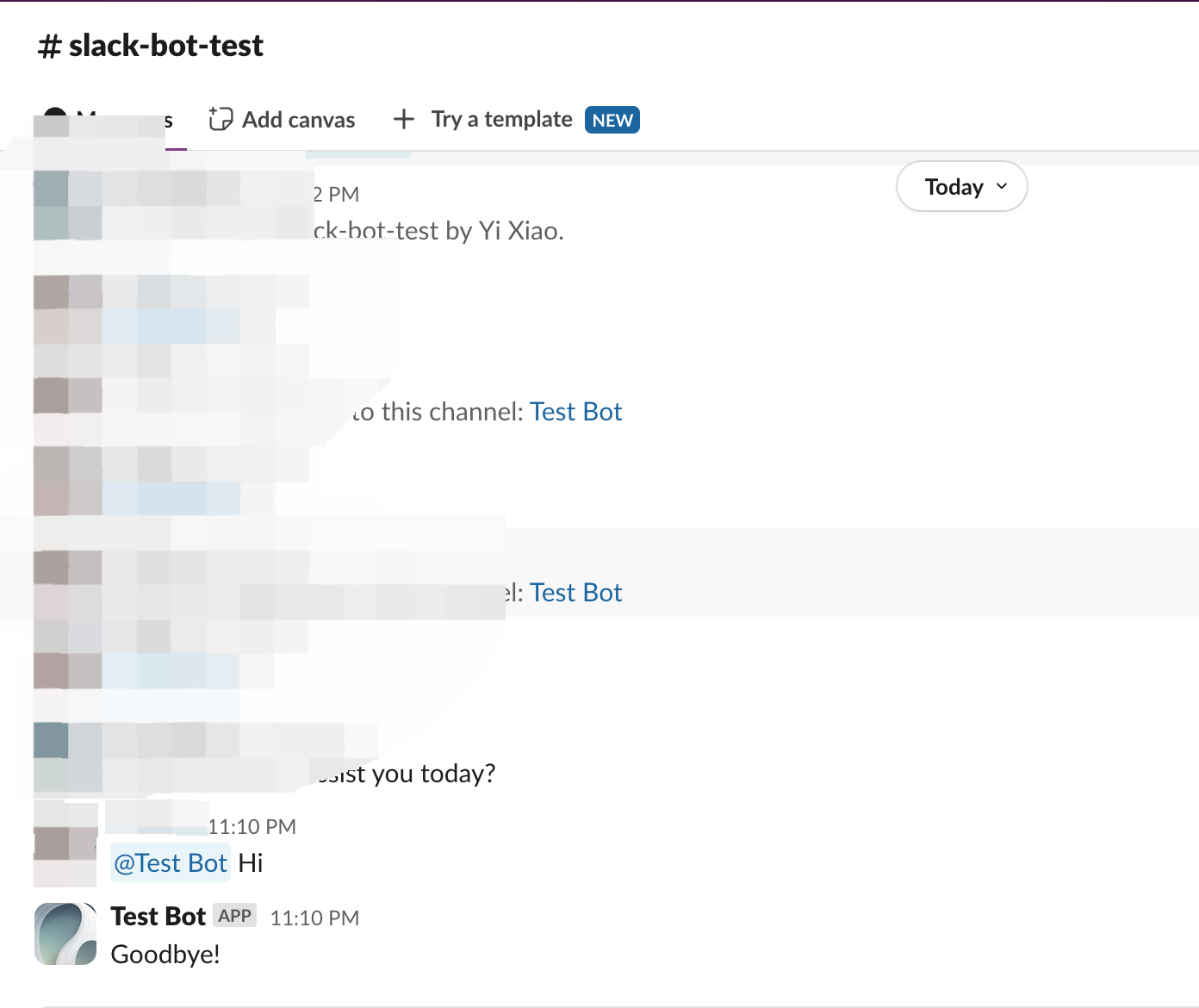
代码使用了 `self.session.app.chat.invoke` 调用 Dify 平台内的 App,并传递了 `app_id` 和 `query` 等信息,最后将 response 的内容返回至 Slack Bot。运行 `python -m main` 命令重启插件进行调试,确认 Slack Bot 是否能够正确输出 Dify App 的答复消息。
|
||
|
||
|
||
|
||
### 4. 打包插件(可选)
|
||
|
||
确认插件能够正常运行后,可以通过以下命令行工具打包并命名插件。运行以后你可以在当前文件夹发现 `slack_bot.difypkg` 文件,该文件为最终的插件包。关于打包的详细步骤,请参考[打包为本地文件与分享](/plugin_dev_zh/0322-release-by-file.zh)。
|
||
|
||
```bash
|
||
# Replace ./slack_bot with your actual plugin project path.
|
||
|
||
dify plugin package ./slack_bot
|
||
```
|
||
|
||
恭喜,你已完成一个插件的完整开发、测试打包过程!
|
||
|
||
### 5. 发布插件(可选)
|
||
|
||
现在可以将它上传至 [Dify Marketplace 仓库](https://github.com/langgenius/dify-plugins) 来发布你的插件了!不过在发布前,请确保你的插件遵循了[发布至 Dify Marketplace](/plugin_dev_zh/0322-release-to-dify-marketplace.zh)中的规范。
|
||
|
||
## 相关资源
|
||
|
||
- [插件开发基本概念](/plugin_dev_zh/0111-getting-started-dify-plugin.zh) - 全面了解Dify插件开发
|
||
- [插件开发入门指南](/plugin_dev_zh/0211-getting-started-dify-tool.zh) - 从零开始开发插件
|
||
- [开发 Extension 插件](/plugin_dev_zh/9231-extension-plugin.zh) - 了解扩展插件开发
|
||
- [反向调用 Dify 服务](/plugin_dev_zh/9241-reverse-invocation.zh) - 了解如何调用 Dify 平台能力
|
||
- [反向调用 App](/plugin_dev_zh/9242-reverse-invocation-app.zh) - 了解如何调用平台内的 App
|
||
- [发布插件](/plugin_dev_zh/0321-release-overview.zh) - 学习发布流程
|
||
- [发布至 Dify Marketplace](/plugin_dev_zh/0322-release-to-dify-marketplace.zh) - 市场发布指南
|
||
- [端点详细定义](/plugin_dev_zh/0432-endpoint.zh) - Endpoint 详细定义
|
||
|
||
### 参考阅读
|
||
|
||
如果你想要查看完整 Dify 插件的项目代码,请前往 [Github 代码仓库](https://github.com/langgenius/dify-plugins)。除此之外,你可以看到其它插件的完整代码与具体细节。
|
||
|
||
如果想要了解更多插件,请参考以下内容。
|
||
|
||
**快速开始:**
|
||
|
||
* [开发 Extension 插件](/plugin_dev_zh/9231-extension-plugin.zh)
|
||
* [开发 Model 插件](/plugin_dev_zh/0211-getting-started-new-model.zh)
|
||
* [Bundle 类型插件:将多个插件打包](/plugin_dev_zh/9241-bundle.zh)
|
||
|
||
**插件接口文档:**
|
||
|
||
* [通过清单文件定义插件信息](/plugin_dev_zh/0411-plugin-info-by-manifest.zh) - Manifest 结构
|
||
* [端点](/plugin_dev_zh/0432-endpoint.zh) - Endpoint 详细定义
|
||
* [反向调用](/plugin_dev_zh/9241-reverse-invocation.zh) - 反向调用 Dify 能力
|
||
* [通用规范](/plugin_dev_zh/0411-general-specifications.zh) - 工具规范
|
||
* [模型架构](/plugin_dev_zh/0412-model-schema.zh) - 模型
|
||
|
||
{/*
|
||
Contributing Section
|
||
DO NOT edit this section!
|
||
It will be automatically generated by the script.
|
||
*/}
|
||
|
||
<CardGroup cols="2">
|
||
<Card
|
||
title="编辑此页面"
|
||
icon="pen-to-square"
|
||
href="https://github.com/langgenius/dify-docs-mintlify/edit/main/plugin_dev_zh/0432-develop-a-slack-bot-plugin.zh.mdx"
|
||
>
|
||
通过直接提交修改来帮助改进文档内容
|
||
</Card>
|
||
<Card
|
||
title="提交问题"
|
||
icon="github"
|
||
href="https://github.com/langgenius/dify-docs-mintlify/issues/new?title=文档问题%3A%20develop-a-slack-bot-plugin&body=%23%23%20问题描述%0A%3C%21--%20请简要描述您发现的问题%20--%3E%0A%0A%23%23%20页面链接%0Ahttps%3A%2F%2Fgithub.com%2Flanggenius%2Fdify-docs-mintlify%2Fblob%2Fmain%2Fplugin_dev_zh%2F0432-develop-a-slack-bot-plugin.zh.mdx%0A%0A%23%23%20建议修改%0A%3C%21--%20如果有具体的修改建议,请在此说明%20--%3E%0A%0A%3C%21--%20感谢您对文档质量的关注!%20--%3E"
|
||
>
|
||
发现错误或有改进建议?请提交问题反馈
|
||
</Card>
|
||
</CardGroup>
|