mirror of
https://github.com/langgenius/dify-docs.git
synced 2026-03-27 13:28:32 +07:00

320 lines
16 KiB
Plaintext
320 lines
16 KiB
Plaintext
---
|
||
title: 定義済みモデルの組み込み
|
||
---
|
||
|
||
|
||
{/*
|
||
コントリビューター注:
|
||
----------------
|
||
これはレガシードキュメントであり、非推奨になります。
|
||
このバージョンに変更を加えないでください。
|
||
すべての更新は新しいバージョンに向けられるべきです:
|
||
/plugin_dev_ja/0222-creating-new-model-provider-extra.ja
|
||
*/}
|
||
|
||
<Card title="このドキュメントはまもなく非推奨になります" icon="circle-exclamation" href="/plugin_dev_ja/0222-creating-new-model-provider-extra.ja">
|
||
<p>ドキュメント再編の一環として、このページは段階的に廃止されます。</p>
|
||
|
||
<p><u><b>このカードをクリックして</b></u>、最新情報が含まれる更新版にリダイレクトしてください。</p>
|
||
|
||
<p>新しいドキュメントに不一致や改善が必要な箇所を見つけた場合は、ページ下部の「問題を報告」ボタンを使用してください。</p>
|
||
</Card>
|
||
|
||
[モデルプロバイダーの作成](/ja-jp/plugins/quick-start/develop-plugins/model-plugin/create-model-providers)が完了していることを確認してください。事前定義済みモデルを組み込むには、以下の手順に従います。
|
||
|
||
1. **モデルタイプに応じたモジュール構造の作成**
|
||
|
||
モデルのタイプ(`llm`や`text_embedding`など)に応じて、プロバイダーモジュール内に対応するサブモジュールを作成します。各モデルタイプが独立した論理構造を持つようにすることで、保守性と拡張性を高めます。
|
||
2. **モデル呼び出しコードの記述**
|
||
|
||
対応するモデルタイプのモジュール内に、モデルタイプと同名のPythonファイル(例:llm.py)を作成します。ファイル内に、具体的なモデルロジックを実装するクラスを定義します。このクラスは、システムのモデルインターフェース仕様に準拠している必要があります。
|
||
3. **事前定義済みモデル設定の追加**
|
||
|
||
プロバイダーが事前定義済みモデルを提供している場合、各モデルに対してモデル名と同名の`YAML`ファイル(例:`claude-3.5.yaml`)を作成します。[AIModelEntity](/ja-jp/plugins/schema-definition/model/model-designing-rules)の仕様に従ってファイルの内容を記述し、モデルのパラメータと機能を定義します。
|
||
4. **プラグインのテスト**
|
||
|
||
新たに追加されたプロバイダー機能に対して、ユニットテストと統合テストを作成し、すべての機能モジュールが期待どおりに動作することを確認します。
|
||
|
||
***
|
||
|
||
以下は、組み込みの詳細な手順です。
|
||
|
||
### **1. モデルタイプに応じたモジュール構造の作成**
|
||
|
||
モデルプロバイダーは、OpenAIが提供する`llm`や`text_embedding`のように、様々なモデルタイプを提供することがあります。プロバイダーモジュール内に、これらのモデルタイプに対応するサブモジュールを作成し、各モデルタイプが独立した論理構造を持つようにすることで、保守性と拡張性を高めます。
|
||
|
||
現在サポートされているモデルタイプは以下のとおりです。
|
||
|
||
* `llm`: テキスト生成モデル
|
||
* `text_embedding`: テキスト埋め込みモデル
|
||
* `rerank`: Rerankモデル
|
||
* `speech2text`: 音声テキスト変換
|
||
* `tts`: テキスト音声変換
|
||
* `moderation`: 審査
|
||
|
||
`Anthropic`を例にとると、そのシリーズモデルにはLLMタイプのモデルのみが含まれているため、`/models`パスに`/llm`フォルダを新規作成し、異なるモデルのYAMLファイルを追加するだけで済みます。詳細なコード構造については、[GitHubコードリポジトリ](https://github.com/langgenius/dify-official-plugins/tree/main/models/anthropic/models/llm)を参照してください。
|
||
|
||
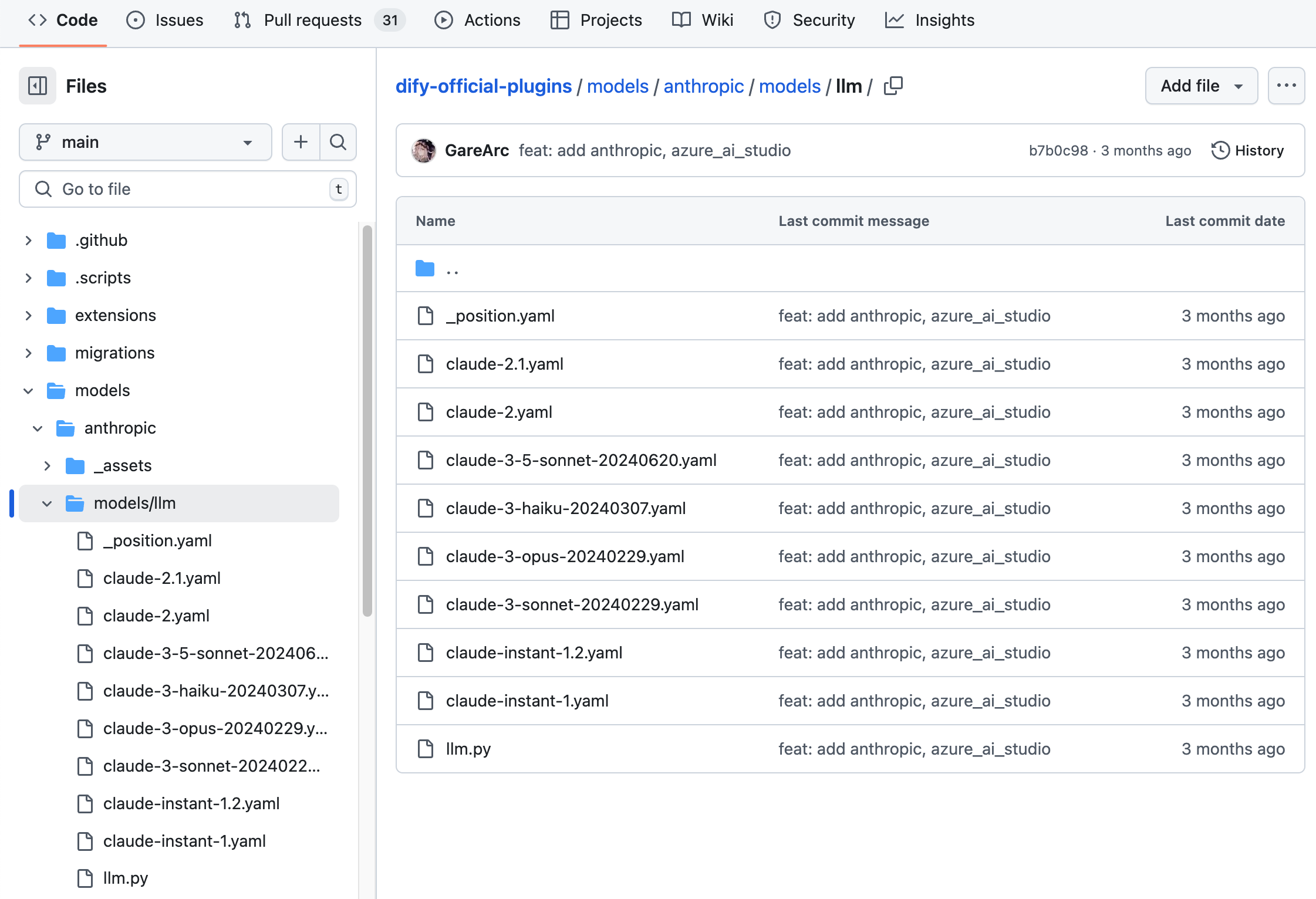
|
||
|
||
```bash
|
||
├── models
|
||
│ └── llm
|
||
│ ├── _position.yaml
|
||
│ ├── claude-2.1.yaml
|
||
│ ├── claude-2.yaml
|
||
│ ├── claude-3-5-sonnet-20240620.yaml
|
||
│ ├── claude-3-haiku-20240307.yaml
|
||
│ ├── claude-3-opus-20240229.yaml
|
||
│ ├── claude-3-sonnet-20240229.yaml
|
||
│ ├── claude-instant-1.2.yaml
|
||
│ ├── claude-instant-1.yaml
|
||
│ └── llm.py
|
||
```
|
||
|
||
`OpenAI`のファミリーモデルのように、モデルプロバイダーが`llm`、`text_embedding`、`moderation`、`speech2text`、`tts`など、さまざまなタイプのモデルを提供している場合は、`/models`パスに各タイプに対応するフォルダを作成する必要があります。構造は以下のようになります。
|
||
|
||
```bash
|
||
├── models
|
||
│ ├── common_openai.py
|
||
│ ├── llm
|
||
│ │ ├── _position.yaml
|
||
│ │ ├── chatgpt-4o-latest.yaml
|
||
│ │ ├── gpt-3.5-turbo.yaml
|
||
│ │ ├── gpt-4-0125-preview.yaml
|
||
│ │ ├── gpt-4-turbo.yaml
|
||
│ │ ├── gpt-4o.yaml
|
||
│ │ ├── llm.py
|
||
│ │ ├── o1-preview.yaml
|
||
│ │ └── text-davinci-003.yaml
|
||
│ ├── moderation
|
||
│ │ ├── moderation.py
|
||
│ │ └── text-moderation-stable.yaml
|
||
│ ├── speech2text
|
||
│ │ ├── speech2text.py
|
||
│ │ └── whisper-1.yaml
|
||
│ ├── text_embedding
|
||
│ │ ├── text-embedding-3-large.yaml
|
||
│ │ └── text_embedding.py
|
||
│ └── tts
|
||
│ ├── tts-1-hd.yaml
|
||
│ │ ├── tts-1.yaml
|
||
│ │ └── tts.py
|
||
```
|
||
|
||
すべてのモデル設定を準備してから、モデルコードの実装を開始することをお勧めします。完全なYAMLの記述規則については、[モデル設計規則](/ja-jp/plugins/schema-definition/model/model-designing-rules)を参照してください。詳細なコードについては、[Githubコードリポジトリ](https://github.com/langgenius/dify-official-plugins/tree/main/models)の例を参照してください。
|
||
|
||
### 2. **モデル呼び出しコードの記述**
|
||
|
||
次に、`/models`パスに`llm.py`というコードファイルを作成する必要があります。`Anthropic`を例にとると、`llm.py`にAnthropic LLMクラスを作成し、`AnthropicLargeLanguageModel`という名前を付け、`__base.large_language_model.LargeLanguageModel`基本クラスを継承します。
|
||
|
||
以下に、一部の機能のサンプルコードを示します。
|
||
|
||
* **LLMの呼び出し**
|
||
|
||
LLMをリクエストする主要なメソッドです。ストリーミングと同期の両方のレスポンスをサポートします。
|
||
|
||
```python
|
||
def _invoke(self, model: str, credentials: dict,
|
||
prompt_messages: list[PromptMessage], model_parameters: dict,
|
||
tools: Optional[list[PromptMessageTool]] = None, stop: Optional[list[str]] = None,
|
||
stream: bool = True, user: Optional[str] = None) \
|
||
-> Union[LLMResult, Generator]:
|
||
"""
|
||
Invoke large language model
|
||
|
||
:param model: model name
|
||
:param credentials: model credentials
|
||
:param prompt_messages: prompt messages
|
||
:param model_parameters: model parameters
|
||
:param tools: tools for tool calling
|
||
:param stop: stop words
|
||
:param stream: is stream response
|
||
:param user: unique user id
|
||
:return: full response or stream response chunk generator result
|
||
"""
|
||
```
|
||
|
||
実装時には、同期リターンとストリームリターンを個別に処理するために、2つの関数を使用する必要があることに注意してください。これは、Pythonで`yield`キーワードを含む関数はジェネレーター関数として認識され、その戻り値の型が`Generator`に固定されるためです。ロジックを明確にし、様々なリターンの要求に対応するために、同期リターンとストリームリターンは個別に実装する必要があります。
|
||
|
||
以下はサンプルコードです(サンプルではパラメータが簡略化されています。実際の実装では、完全なパラメータリストに従って記述してください)。
|
||
|
||
```python
|
||
def _invoke(self, stream: bool, **kwargs) -> Union[LLMResult, Generator]:
|
||
"""戻り値の型に応じて、対応する処理関数を呼び出します。"""
|
||
if stream:
|
||
return self._handle_stream_response(**kwargs)
|
||
return self._handle_sync_response(**kwargs)
|
||
|
||
def _handle_stream_response(self, **kwargs) -> Generator:
|
||
"""ストリームリターンのロジックを処理します。"""
|
||
for chunk in response: # responseがストリームデータのイテレーターであると仮定します
|
||
yield chunk
|
||
|
||
def _handle_sync_response(self, **kwargs) -> LLMResult:
|
||
"""同期リターンのロジックを処理します。"""
|
||
return LLMResult(**response) # responseが完全な応答の辞書であると仮定します
|
||
```
|
||
|
||
* **入力トークン数の事前計算**
|
||
|
||
モデルがトークン数の事前計算インターフェースを提供していない場合は、この機能が適用されないか、実装されていないことを示すために、直接0を返すことができます。例:
|
||
|
||
```python
|
||
def get_num_tokens(self, model: str, credentials: dict, prompt_messages: list[PromptMessage],
|
||
tools: Optional[list[PromptMessageTool]] = None) -> int:
|
||
"""
|
||
Get number of tokens for given prompt messages
|
||
|
||
:param model: model name
|
||
:param credentials: model credentials
|
||
:param prompt_messages: prompt messages
|
||
:param tools: tools for tool calling
|
||
:return:
|
||
"""
|
||
```
|
||
|
||
* **呼び出し例外エラーマッピングテーブル**
|
||
|
||
モデル呼び出しが例外の場合、Difyがさまざまなエラーに対して適切な処理を実行できるように、Runtimeによって指定された`InvokeError`タイプにマッピングする必要があります。
|
||
|
||
Runtime Errors:
|
||
|
||
* `InvokeConnectionError`: 呼び出し接続エラー
|
||
* `InvokeServerUnavailableError`: 呼び出しサービスが利用不可
|
||
* `InvokeRateLimitError`: 呼び出しが制限に達しました
|
||
* `InvokeAuthorizationError`: 呼び出し認証に失敗しました
|
||
* `InvokeBadRequestError`: 呼び出しパラメータにエラーがあります
|
||
|
||
```python
|
||
@property
|
||
def _invoke_error_mapping(self) -> dict[type[InvokeError], list[type[Exception]]]:
|
||
"""
|
||
Map model invoke error to unified error
|
||
The key is the error type thrown to the caller
|
||
The value is the error type thrown by the model,
|
||
which needs to be converted into a unified error type for the caller.
|
||
|
||
:return: Invoke error mapping
|
||
"""
|
||
```
|
||
|
||
完全なコードの詳細については、[Githubコードリポジトリ](https://github.com/langgenius/dify-official-plugins/blob/main/models/anthropic/models/llm/llm.py)を参照してください。
|
||
|
||
### **3. 事前定義済みモデル設定の追加**
|
||
|
||
プロバイダーが事前定義済みモデルを提供している場合、各モデルに対してモデル名と同名の`YAML`ファイル(例:`claude-3.5.yaml`)を作成します。[AIModelEntity](/ja-jp/plugins/schema-definition/model/model-designing-rules)の仕様に従ってファイルの内容を記述し、モデルのパラメータと機能を定義します。
|
||
|
||
`claude-3-5-sonnet-20240620`モデルのサンプルコード:
|
||
|
||
```yaml
|
||
model: claude-3-5-sonnet-20240620
|
||
label:
|
||
en_US: claude-3-5-sonnet-20240620
|
||
model_type: llm
|
||
features:
|
||
- agent-thought
|
||
- vision
|
||
- tool-call
|
||
- stream-tool-call
|
||
- document
|
||
model_properties:
|
||
mode: chat
|
||
context_size: 200000
|
||
parameter_rules:
|
||
- name: temperature
|
||
use_template: temperature
|
||
- name: top_p
|
||
use_template: top_p
|
||
- name: top_k
|
||
label:
|
||
zh_Hans: 取样数量
|
||
en_US: Top k
|
||
type: int
|
||
help:
|
||
zh_Hans: 仅从每个后续标记的前 K 个选项中采样。
|
||
en_US: Only sample from the top K options for each subsequent token.
|
||
required: false
|
||
- name: max_tokens
|
||
use_template: max_tokens
|
||
required: true
|
||
default: 8192
|
||
min: 1
|
||
max: 8192
|
||
- name: response_format
|
||
use_template: response_format
|
||
pricing:
|
||
input: '3.00'
|
||
output: '15.00'
|
||
unit: '0.000001'
|
||
currency: USD
|
||
```
|
||
|
||
### 4. プラグインのデバッグ
|
||
|
||
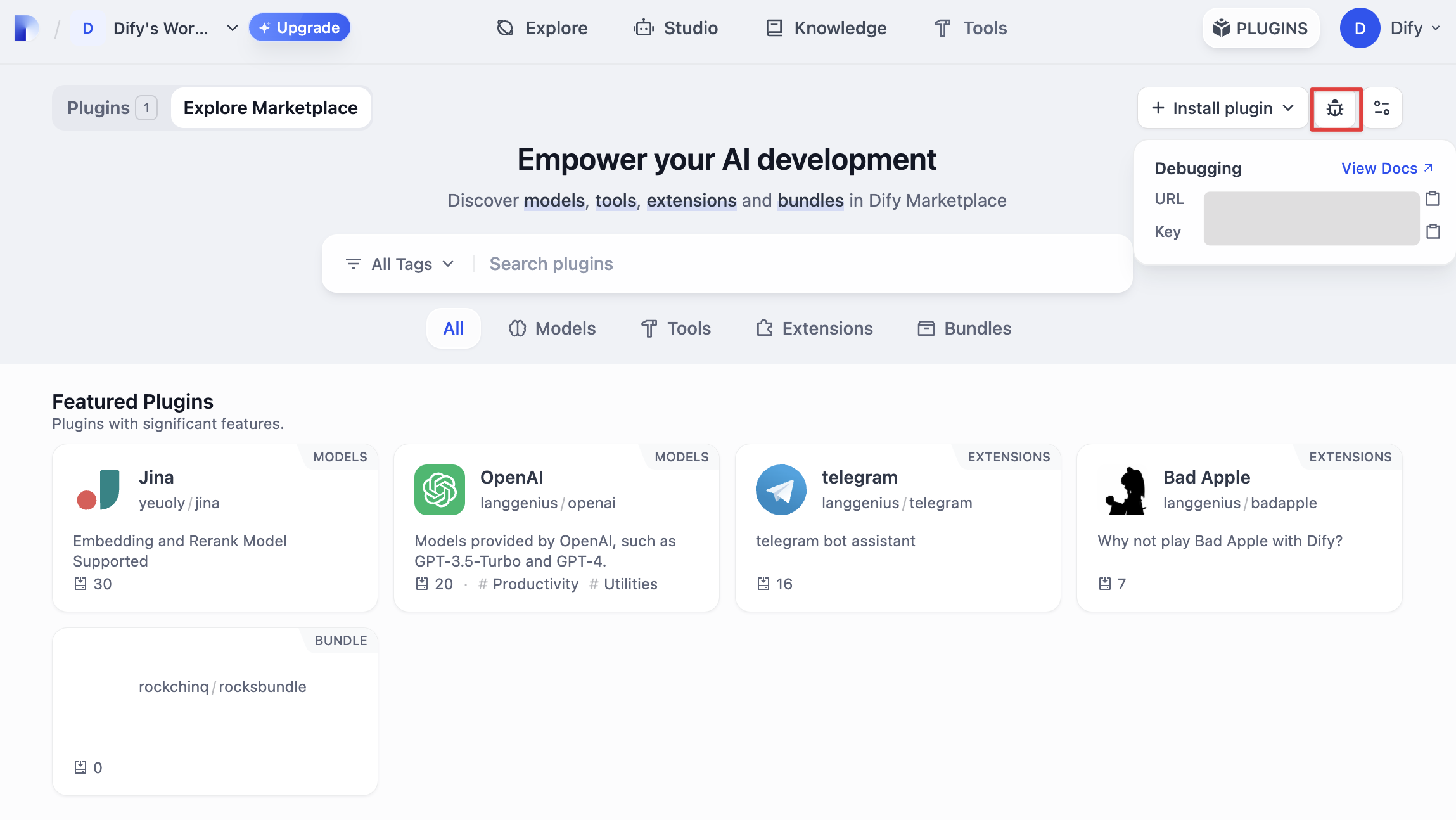
次に、プラグインが正常に動作するかどうかをテストする必要があります。Difyはリモートデバッグ方法を提供しており、「プラグイン管理」ページでデバッグキーとリモートサーバーアドレスを取得できます。
|
||
|
||
|
||
|
||
プラグインプロジェクトに戻り、`.env.example`ファイルをコピーして`.env`にリネームし、取得したリモートサーバーアドレスとデバッグKeyなどの情報を入力します。
|
||
|
||
`.env` ファイル
|
||
|
||
```bash
|
||
INSTALL_METHOD=remote
|
||
REMOTE_INSTALL_HOST=remote
|
||
REMOTE_INSTALL_PORT=5003
|
||
REMOTE_INSTALL_KEY=****-****-****-****-****
|
||
```
|
||
|
||
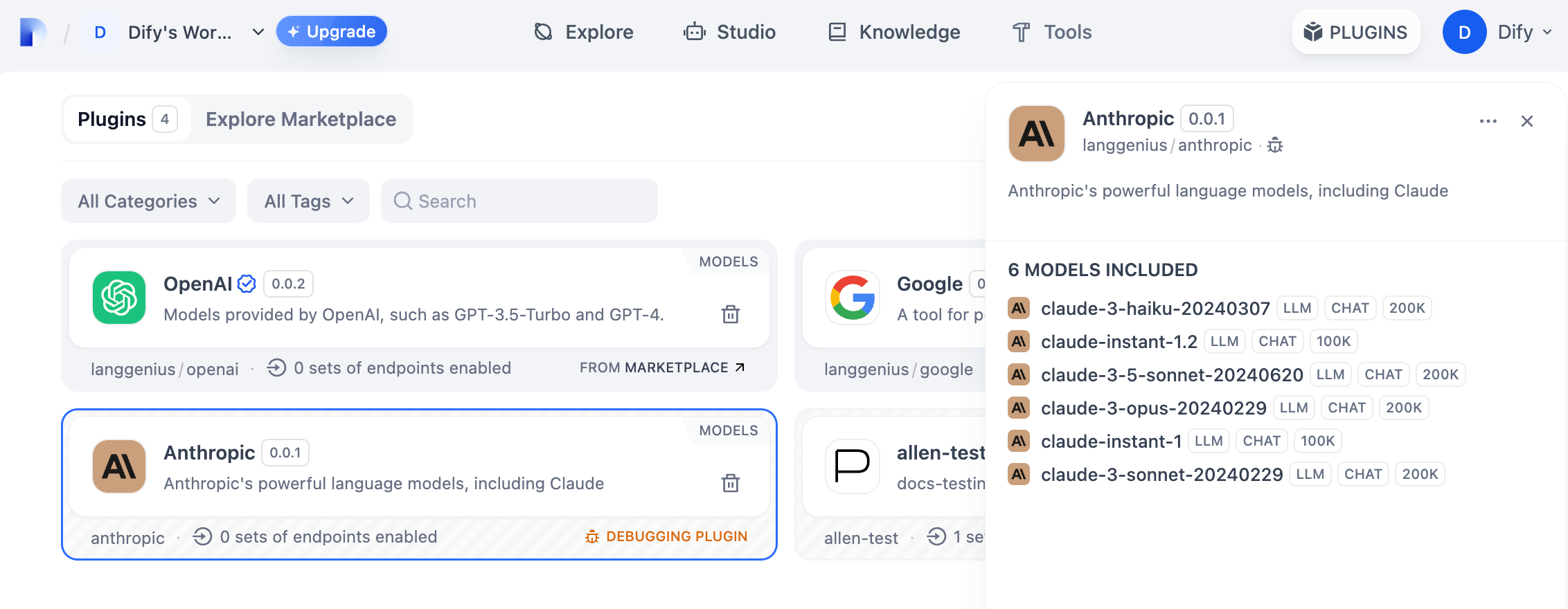
`python -m main`コマンドを実行してプラグインを起動します。プラグインページで、そのプラグインがWorkspaceにインストールされていることを確認できます。他のチームメンバーもこのプラグインにアクセスできます。
|
||
|
||
|
||
|
||
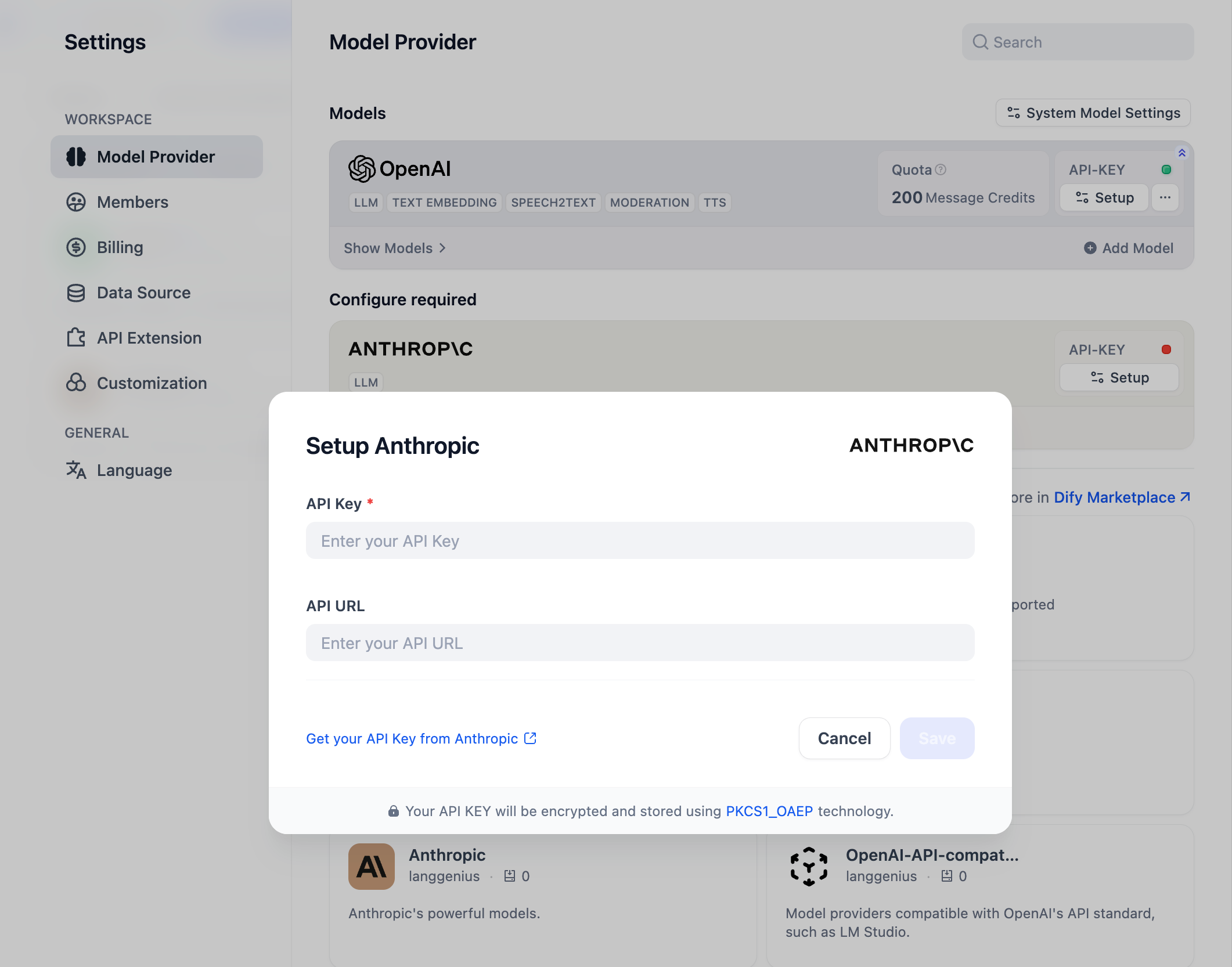
「設定」→「モデルプロバイダー」でAPI Keyを入力して、モデルプロバイダーを初期化できます。
|
||
|
||
|
||
|
||
### プラグインの公開
|
||
|
||
作成したプラグインを[Dify Pluginsコードリポジトリ](https://github.com/langgenius/dify-plugins)にアップロードして公開できます。アップロードする前に、プラグインが[プラグイン公開仕様](/ja-jp/plugins/publish-plugins/publish-to-dify-marketplace/README)に準拠していることを確認してください。審査に合格すると、コードがメインブランチにマージされ、[Dify Marketplace](https://marketplace.dify.ai/)に自動的に公開されます。
|
||
|
||
#### さらに詳しく
|
||
|
||
**クイックスタート:**
|
||
|
||
* [拡張タイププラグインの開発](/ja-jp/plugins/quick-start/develop-plugins/extension-plugin)
|
||
* [モデルタイププラグインの開発](README)
|
||
* [バンドルタイププラグイン:複数のプラグインをパッケージ化](/ja-jp/plugins/quick-start/develop-plugins/bundle)
|
||
|
||
**プラグインインターフェースドキュメント:**
|
||
|
||
* [マニフェスト](/ja-jp/plugins/schema-definition/manifest) 構造
|
||
* [エンドポイント](/ja-jp/plugins/schema-definition/endpoint) 詳細定義
|
||
* [Difyサービスの逆呼び出し](/ja-jp/plugins/schema-definition/reverse-invocation-of-the-dify-service/app)
|
||
* [ツール](/ja-jp/plugins/schema-definition/tool)
|
||
* [モデル](/ja-jp/plugins/schema-definition/reverse-invocation-of-the-dify-service/model)
|
||
* [拡張エージェント戦略](/ja-jp/plugins/schema-definition/agent)
|
||
|
||
{/*
|
||
Contributing Section
|
||
DO NOT edit this section!
|
||
It will be automatically generated by the script.
|
||
*/}
|
||
|
||
<CardGroup cols="2">
|
||
<Card
|
||
title="このページを編集する"
|
||
icon="pen-to-square"
|
||
href="https://github.com/langgenius/dify-docs-mintlify/edit/main/ja-jp/plugins/quick-start/develop-plugins/model-plugin/integrate-the-predefined-model.mdx"
|
||
>
|
||
直接貢献することでドキュメントの改善にご協力ください
|
||
</Card>
|
||
<Card
|
||
title="問題を報告する"
|
||
icon="github"
|
||
href="https://github.com/langgenius/dify-docs-mintlify/issues/new?title=ドキュメントの問題%3A%20rate-the-predefined-mo&body=%23%23%20問題の説明%0A%3C%21--%20発見した問題について簡単に説明してください%20--%3E%0A%0A%23%23%20ページリンク%0Ahttps%3A%2F%2Fgithub.com%2Flanggenius%2Fdify-docs-mintlify%2Fblob%2Fmain%2Fja-jp/plugins/quick-start/develop-plugins/model-plugin%2Fintegrate-the-predefined-model.mdx%0A%0A%23%23%20提案される変更%0A%3C%21--%20特定の変更案がある場合は、ここで説明してください%20--%3E%0A%0A%3C%21--%20ドキュメントの品質向上にご協力いただきありがとうございます!%20--%3E"
|
||
>
|
||
エラーを見つけたり提案がありますか?お知らせください
|
||
</Card>
|
||
</CardGroup>
|