mirror of
https://github.com/langgenius/dify-docs.git
synced 2026-03-27 13:28:32 +07:00

1208 lines
53 KiB
Plaintext
1208 lines
53 KiB
Plaintext
---
|
||
title: エージェント戦略プラグイン
|
||
---
|
||
|
||
|
||
{/*
|
||
コントリビューター注:
|
||
----------------
|
||
これはレガシードキュメントであり、非推奨になります。
|
||
このバージョンに変更を加えないでください。
|
||
すべての更新は新しいバージョンに向けられるべきです:
|
||
/plugin_dev_ja/9433-agent-strategy-plugin.ja
|
||
*/}
|
||
|
||
<Card title="このドキュメントはまもなく非推奨になります" icon="circle-exclamation" href="/plugin_dev_ja/9433-agent-strategy-plugin.ja">
|
||
<p>ドキュメント再編の一環として、このページは段階的に廃止されます。</p>
|
||
|
||
<p><u><b>このカードをクリックして</b></u>、最新情報が含まれる更新版にリダイレクトしてください。</p>
|
||
|
||
<p>新しいドキュメントに不一致や改善が必要な箇所を見つけた場合は、ページ下部の「問題を報告」ボタンを使用してください。</p>
|
||
</Card>
|
||
|
||
エージェント戦略プラグインは、LLMが推論や意思決定ロジックを実行するのを支援します。具体的には、ツール選択、呼び出し、結果処理といった一連の動作をより自動化された方法で実行し、問題を解決します。
|
||
|
||
この記事では、ツール呼び出し(Function Calling)機能を備え、現在の正確な時刻を自動的に取得するプラグインの作成方法を説明します。
|
||
|
||
### 事前準備
|
||
|
||
* Difyプラグインの足場ツール
|
||
* Python環境(バージョン3.12以上)
|
||
|
||
プラグイン開発の足場ツールを準備する方法については、[開発ツールの初期化](initialize-development-tools)を参照してください。
|
||
|
||
<Info>**ヒント**:ターミナルで `dify version` コマンドを実行し、バージョン番号が表示されることを確認することで、足場ツールが正常にインストールされたことを確認できます。</Info>
|
||
|
||
### 1. プラグインテンプレートの初期化
|
||
|
||
以下のコマンドを実行して、Agentプラグイン開発テンプレートを初期化します。
|
||
|
||
```
|
||
dify plugin init
|
||
```
|
||
|
||
表示される指示に従い、必要な情報を入力します。以下のコードのコメントを参考に設定してください。
|
||
|
||
```bash
|
||
➜ ./dify-plugin-darwin-arm64 plugin init ─╯
|
||
Edit profile of the plugin
|
||
Plugin name (press Enter to next step): # プラグイン名を入力
|
||
Author (press Enter to next step): # プラグイン作者を入力
|
||
Description (press Enter to next step): # プラグインの説明を入力
|
||
---
|
||
Select the language you want to use for plugin development, and press Enter to continue,
|
||
BTW, you need Python 3.12+ to develop the Plugin if you choose Python.
|
||
-> python # Python環境を選択
|
||
go (not supported yet)
|
||
---
|
||
Based on the ability you want to extend, we have divided the Plugin into four types: Tool, Model, Extension, and Agent Strategy.
|
||
|
||
- Tool: It's a tool provider, but not only limited to tools, you can implement an endpoint there, for example, you need both Sending Message and Receiving Message if you are
|
||
- Model: Just a model provider, extending others is not allowed.
|
||
- Extension: Other times, you may only need a simple http service to extend the functionalities, Extension is the right choice for you.
|
||
- Agent Strategy: Implement your own logics here, just by focusing on Agent itself
|
||
|
||
What's more, we have provided the template for you, you can choose one of them below:
|
||
tool
|
||
-> agent-strategy # Agent戦略テンプレートを選択
|
||
llm
|
||
text-embedding
|
||
---
|
||
Configure the permissions of the plugin, use up and down to navigate, tab to select, after selection, press enter to finish
|
||
Backwards Invocation:
|
||
Tools:
|
||
Enabled: [✔] You can invoke tools inside Dify if it's enabled # デフォルトで有効
|
||
Models:
|
||
Enabled: [✔] You can invoke models inside Dify if it's enabled # デフォルトで有効
|
||
LLM: [✔] You can invoke LLM models inside Dify if it's enabled # デフォルトで有効
|
||
→ Text Embedding: [✘] You can invoke text embedding models inside Dify if it's enabled
|
||
Rerank: [✘] You can invoke rerank models inside Dify if it's enabled
|
||
TTS: [✘] You can invoke TTS models inside Dify if it's enabled
|
||
Speech2Text: [✘] You can invoke speech2text models inside Dify if it's enabled
|
||
Moderation: [✘] You can invoke moderation models inside Dify if it's enabled
|
||
Apps:
|
||
Enabled: [✘] Ability to invoke apps like BasicChat/ChatFlow/Agent/Workflow etc.
|
||
Resources:
|
||
Storage:
|
||
Enabled: [✘] Persistence storage for the plugin
|
||
Size: N/A The maximum size of the storage
|
||
Endpoints:
|
||
Enabled: [✘] Ability to register endpoints
|
||
```
|
||
|
||
プラグインテンプレートを初期化すると、プラグインの開発に必要なすべてのリソースを含むコードフォルダが生成されます。エージェント戦略プラグインのコード構造を理解することで、開発プロセスがスムーズになります。
|
||
|
||
```
|
||
├── GUIDE.md # ユーザーガイドとドキュメント
|
||
├── PRIVACY.md # プライバシーポリシーとデータ処理ガイドライン
|
||
├── README.md # プロジェクト概要と設定手順
|
||
├── _assets/ # 静的アセットディレクトリ
|
||
│ └── icon.svg # エージェント戦略プロバイダーのアイコン/ロゴ
|
||
├── main.py # メインアプリケーションのエントリーポイント
|
||
├── manifest.yaml # 基本的なプラグイン構成
|
||
├── provider/ # プロバイダー構成ディレクトリ
|
||
│ └── basic_agent.yaml # Agentプロバイダーの設定
|
||
├── requirements.txt # Python依存関係リスト
|
||
└── strategies/ # 戦略実装ディレクトリ
|
||
├── basic_agent.py # 基本的なエージェント戦略の実装
|
||
└── basic_agent.yaml # 基本的なエージェント戦略の構成
|
||
```
|
||
|
||
プラグインの機能コードは、`strategies/` ディレクトリにまとめられています。
|
||
|
||
### 2. プラグイン機能の開発
|
||
|
||
エージェントプラグインの開発は、主に以下の2つのファイルを中心に行います。
|
||
|
||
* プラグイン定義ファイル:`strategies/basic_agent.yaml`
|
||
* プラグイン機能コード:`strategies/basic_agent.py`
|
||
|
||
#### 2.1 パラメータの定義
|
||
|
||
Agentプラグインを作成するには、まず `strategies/basic_agent.yaml` ファイルでプラグインに必要なパラメータを定義します。これらのパラメータは、LLMモデルの呼び出しやツールの使用など、プラグインの核となる機能を決定します。
|
||
|
||
次の4つの基本パラメータを優先的に設定することをお勧めします。
|
||
|
||
1. **model**:呼び出すLLM(GPT-4、GPT-4o-miniなど)を指定します。
|
||
2. **tools**:プラグインが使用できるツールリストを定義し、プラグインの機能を拡張します。
|
||
3. **query**:モデルとの対話に使用するプロンプトまたは入力内容を設定します。
|
||
4. **maximum\_iterations**:プラグインの最大反復回数を制限し、過剰な計算を避けます。
|
||
|
||
```yaml
|
||
identity:
|
||
name: basic_agent # agent_strategyの名前
|
||
author: novice # agent_strategyの作者
|
||
label:
|
||
en_US: BasicAgent # agent_strategyの英語ラベル
|
||
description:
|
||
en_US: BasicAgent # agent_strategyの英語説明
|
||
parameters:
|
||
- name: model # modelパラメータの名前
|
||
type: model-selector # model-type
|
||
scope: tool-call&llm # パラメータのスコープ
|
||
required: true
|
||
label:
|
||
en_US: Model
|
||
zh_Hans: 模型
|
||
pt_BR: Model
|
||
- name: tools # toolsパラメータの名前
|
||
type: array[tools] # toolパラメータの型
|
||
required: true
|
||
label:
|
||
en_US: Tools list
|
||
zh_Hans: 工具列表
|
||
pt_BR: Tools list
|
||
- name: query # queryパラメータの名前
|
||
type: string # queryパラメータの型
|
||
required: true
|
||
label:
|
||
en_US: Query
|
||
zh_Hans: 查询
|
||
pt_BR: Query
|
||
- name: maximum_iterations
|
||
type: number
|
||
required: false
|
||
default: 5
|
||
label:
|
||
en_US: Maxium Iterations
|
||
zh_Hans: 最大迭代次数
|
||
pt_BR: Maxium Iterations
|
||
max: 50 # maxとminの値を設定すると、パラメータ表示がスライダーになります
|
||
min: 1
|
||
extra:
|
||
python:
|
||
source: strategies/basic_agent.py
|
||
|
||
```
|
||
|
||
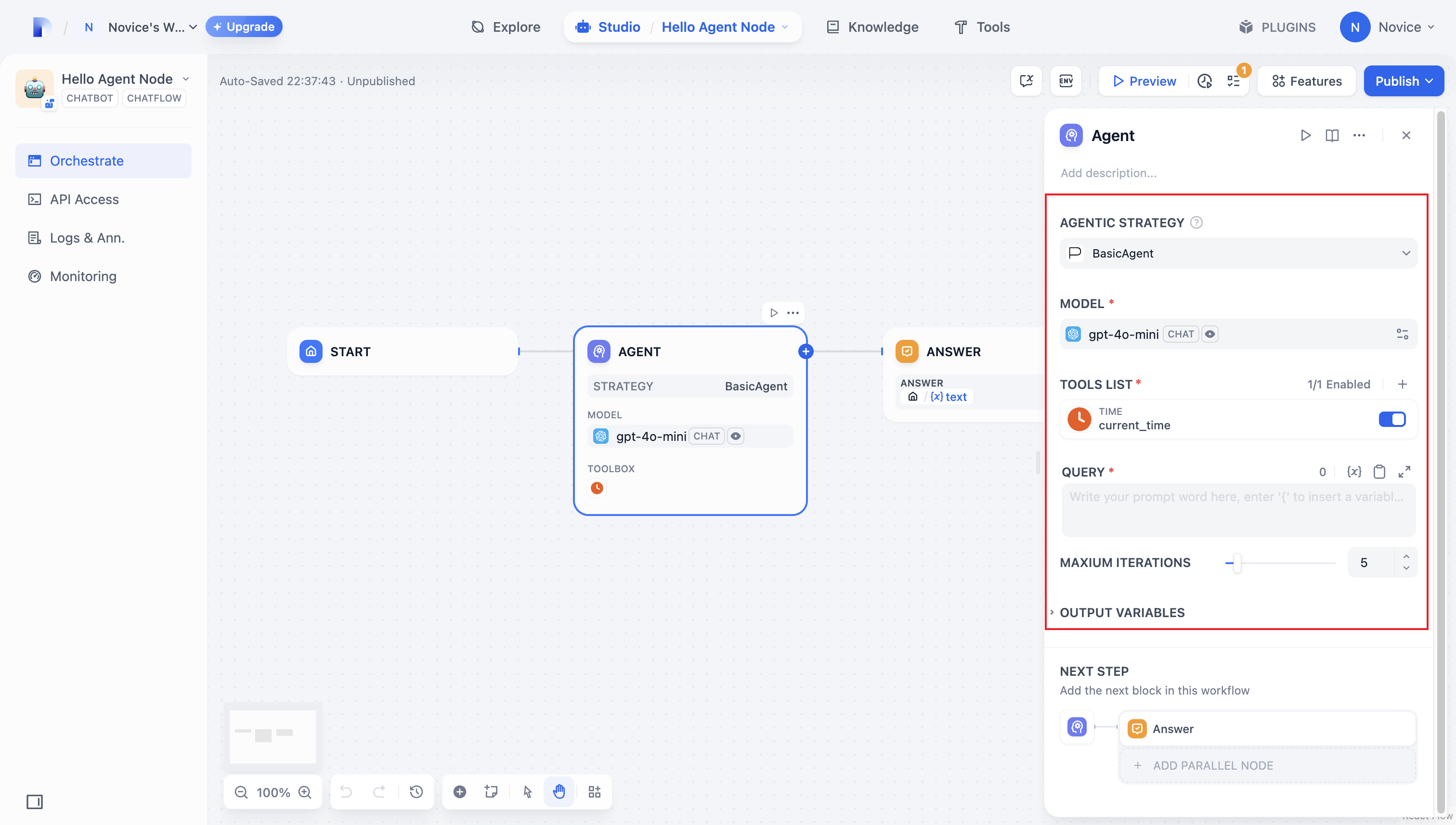
パラメータ設定が完了すると、プラグインは対応する設定ページを自動的に生成し、直感的かつ使いやすく調整や利用ができます。
|
||
|
||
|
||
|
||
#### 2.2 パラメータの取得と実行
|
||
|
||
ユーザーがプラグインの設定ページで基本情報を入力すると、プラグインは入力されたパラメータを処理する必要があります。そのため、まず `strategies/basic_agent.py` ファイル内で、後で使用するためのAgentパラメータクラスを定義します。
|
||
|
||
入力パラメータの検証:
|
||
|
||
```python
|
||
from dify_plugin.entities.agent import AgentInvokeMessage
|
||
from dify_plugin.interfaces.agent import AgentModelConfig, AgentStrategy, ToolEntity
|
||
from pydantic import BaseModel
|
||
|
||
class BasicParams(BaseModel):
|
||
maximum_iterations: int
|
||
model: AgentModelConfig
|
||
tools: list[ToolEntity]
|
||
query: str
|
||
|
||
```
|
||
|
||
パラメータを取得した後、具体的な処理ロジックを実行します。
|
||
|
||
```python
|
||
class BasicAgentAgentStrategy(AgentStrategy):
|
||
def _invoke(self, parameters: dict[str, Any]) -> Generator[AgentInvokeMessage]:
|
||
params = BasicParams(**parameters)
|
||
```
|
||
|
||
#### 2.3 モデルの呼び出し
|
||
|
||
エージェント戦略プラグインでは、**モデルの呼び出し**が中心的な処理ロジックの1つです。SDKが提供する `session.model.llm.invoke()` メソッドを使用すると、LLMモデルを効率的に呼び出して、テキスト生成や対話処理などの機能を実現できます。
|
||
|
||
モデルに**ツール呼び出し**機能を持たせたい場合は、まず、モデルがツール呼び出し形式に沿ったパラメータを出力できることを確認する必要があります。つまり、モデルはユーザーの指示に従って、ツールインターフェースの要件を満たすパラメータを生成する必要があります。
|
||
|
||
以下のパラメータを構築します。
|
||
|
||
* model:モデル情報
|
||
* prompt_messages:プロンプト
|
||
* tools:ツール情報(Function Calling関連)
|
||
* stop:停止記号
|
||
* stream:ストリーミング出力をサポートするかどうか
|
||
|
||
メソッド定義のサンプルコード:
|
||
|
||
```python
|
||
def invoke(
|
||
self,
|
||
model_config: LLMModelConfig,
|
||
prompt_messages: list[PromptMessage],
|
||
tools: list[PromptMessageTool] | None = None,
|
||
stop: list[str] | None = None,
|
||
stream: bool = True,
|
||
) -> Generator[LLMResultChunk, None, None] | LLMResult:...
|
||
```
|
||
|
||
完全な実装については、モデル呼び出しの[サンプルコード](agent-strategy-plugin.md#diao-yong-gong-ju-1)を参照してください。
|
||
|
||
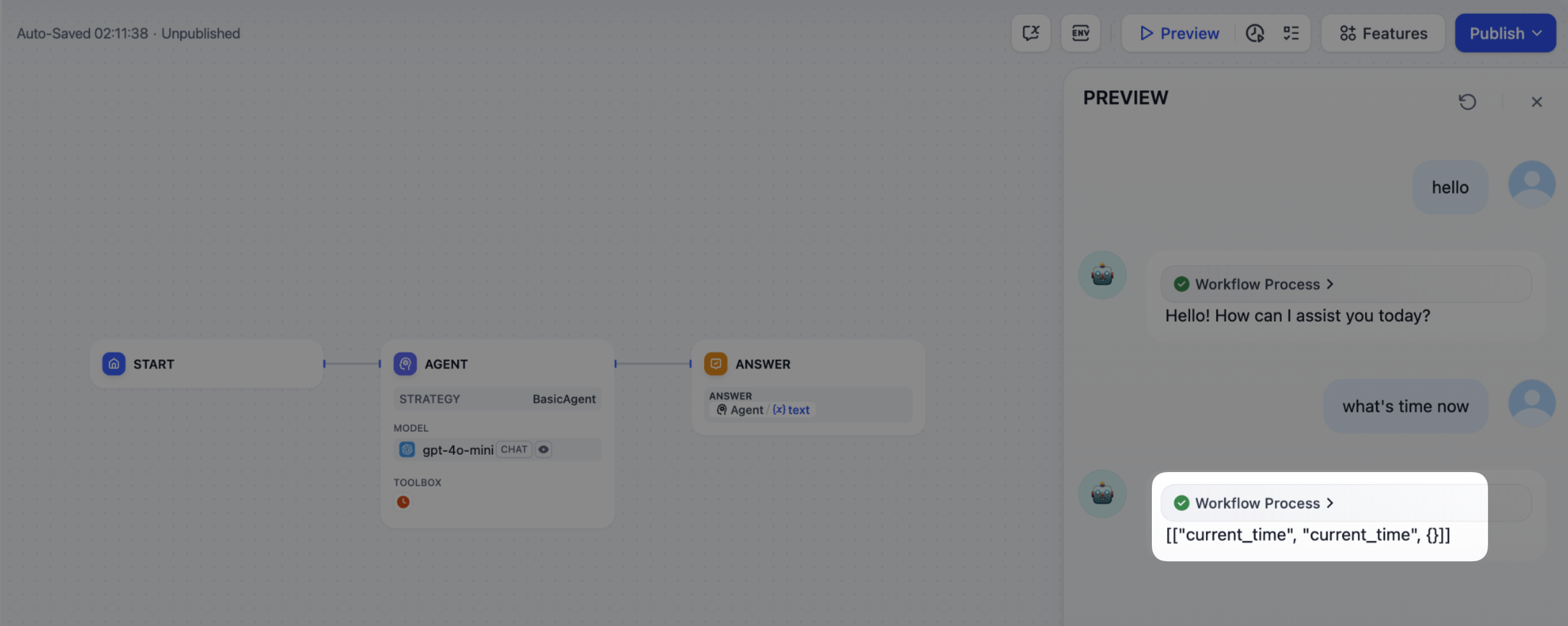
このコードでは、ユーザーが指示を入力すると、エージェント戦略プラグインが自動的にLLMを呼び出し、その結果に基づいてツールの呼び出しに必要なパラメータを構築し、渡します。これにより、モデルは連携されたツールを柔軟に活用し、複雑なタスクを効率的に完了できます。
|
||
|
||
|
||
|
||
#### 2.4 モデルへのメモリ機能の追加
|
||
|
||
Agentプラグインを使用してモデルを呼び出す際、メモリ機能を追加することで対話体験が大幅に向上します。メモリ機能により、モデルは完全な対話コンテキストを理解し、一貫性のある対話と正確なツール呼び出しを実現できます。
|
||
|
||
実装手順:
|
||
|
||
1. メモリ機能の設定
|
||
|
||
AgentプラグインのYAML設定ファイル`strategies/agent.yaml`に`history-messages`機能を追加します:
|
||
|
||
```yaml
|
||
identity:
|
||
name: basic_agent # Agent戦略名
|
||
author: novice # 作者
|
||
label:
|
||
en_US: BasicAgent # 英語ラベル
|
||
description:
|
||
en_US: BasicAgent # 英語説明
|
||
features:
|
||
- history-messages # 履歴メッセージ機能を有効化
|
||
...
|
||
```
|
||
|
||
2. メモリ設定の有効化
|
||
|
||
プラグイン設定ファイルを修正して再起動後、ノード設定画面に**メモリ**トグルが表示されます。右側のトグルボタンをクリックしてメモリ機能を有効にします。
|
||
|
||
有効化後、**ウィンドウサイズ**スライダーでメモリウィンドウを調整できます。これはモデルが「記憶」できる過去の対話の量を決定します。
|
||
|
||
3. 履歴メッセージのデバッグ
|
||
|
||
以下のコードを追加して、履歴メッセージの内容を確認します:
|
||
|
||
```python
|
||
class BasicAgentAgentStrategy(AgentStrategy):
|
||
def _invoke(self, parameters: dict[str, Any]) -> Generator[AgentInvokeMessage]:
|
||
params = BasicParams(**parameters)
|
||
print(f"history_messages: {params.model.history_prompt_messages}")
|
||
...
|
||
```
|
||
|
||

|
||
|
||
コンソールには以下のような出力が表示されます:
|
||
|
||
```
|
||
history_messages: []
|
||
history_messages: [UserPromptMessage(role=<PromptMessageRole.USER: 'user'>, content='hello, my name is novice', name=None), AssistantPromptMessage(role=<PromptMessageRole.ASSISTANT: 'assistant'>, content='Hello, Novice! How can I assist you today?', name=None, tool_calls=[])]
|
||
```
|
||
|
||
4. 履歴メッセージのモデル呼び出しへの統合
|
||
|
||
最後に、モデル呼び出しコードを修正して、履歴メッセージを現在のクエリに連結します:
|
||
|
||
```python
|
||
class BasicAgentAgentStrategy(AgentStrategy):
|
||
def _invoke(self, parameters: dict[str, Any]) -> Generator[AgentInvokeMessage]:
|
||
params = BasicParams(**parameters)
|
||
|
||
chunks: Generator[LLMResultChunk, None, None] | LLMResult = (
|
||
self.session.model.llm.invoke(
|
||
model_config=LLMModelConfig(**params.model.model_dump(mode="json")),
|
||
# 履歴メッセージを追加
|
||
prompt_messages=params.model.history_prompt_messages
|
||
+ [UserPromptMessage(content=params.query)],
|
||
tools=[
|
||
self._convert_tool_to_prompt_message_tool(tool)
|
||
for tool in params.tools
|
||
],
|
||
stop=params.model.completion_params.get("stop", [])
|
||
if params.model.completion_params
|
||
else [],
|
||
stream=True,
|
||
)
|
||
)
|
||
...
|
||
```
|
||
|
||
5. 効果の検証
|
||
|
||
メモリ機能を追加後、モデルは履歴に基づいて応答できるようになります。以下の例では、モデルは以前の対話で言及されたユーザー名を正しく記憶し、対話の一貫性を実現しています。
|
||
|
||

|
||
|
||
#### 2.5 ツールの呼び出し
|
||
|
||
ツールパラメータを設定した後、エージェント戦略プラグインに実際にツールを呼び出す機能を追加する必要があります。これは、SDKの `session.tool.invoke()` 関数を使用して行えます。
|
||
|
||
以下のパラメータを構築します。
|
||
|
||
* provider:ツール提供者
|
||
* tool_name:ツール名
|
||
* parameters:入力パラメータ
|
||
|
||
メソッド定義のサンプルコード:
|
||
|
||
```python
|
||
def invoke(
|
||
self,
|
||
provider_type: ToolProviderType,
|
||
provider: str,
|
||
tool_name: str,
|
||
parameters: dict[str, Any],
|
||
) -> Generator[ToolInvokeMessage, None, None]:...
|
||
```
|
||
|
||
LLMで直接パラメータを生成してツールを呼び出したい場合は、以下のツール呼び出しのサンプルコードを参照してください。
|
||
|
||
```python
|
||
tool_instances = (
|
||
{tool.identity.name: tool for tool in params.tools} if params.tools else {}
|
||
)
|
||
for tool_call_id, tool_call_name, tool_call_args in tool_calls:
|
||
tool_instance = tool_instances[tool_call_name]
|
||
self.session.tool.invoke(
|
||
provider_type=ToolProviderType.BUILT_IN,
|
||
provider=tool_instance.identity.provider,
|
||
tool_name=tool_instance.identity.name,
|
||
parameters={**tool_instance.runtime_parameters, **tool_call_args},
|
||
)
|
||
```
|
||
|
||
完全な機能コードについては、ツール呼び出しの[サンプルコード](agent-strategy-plugin.md#diao-yong-gong-ju-1)を参照してください。
|
||
|
||
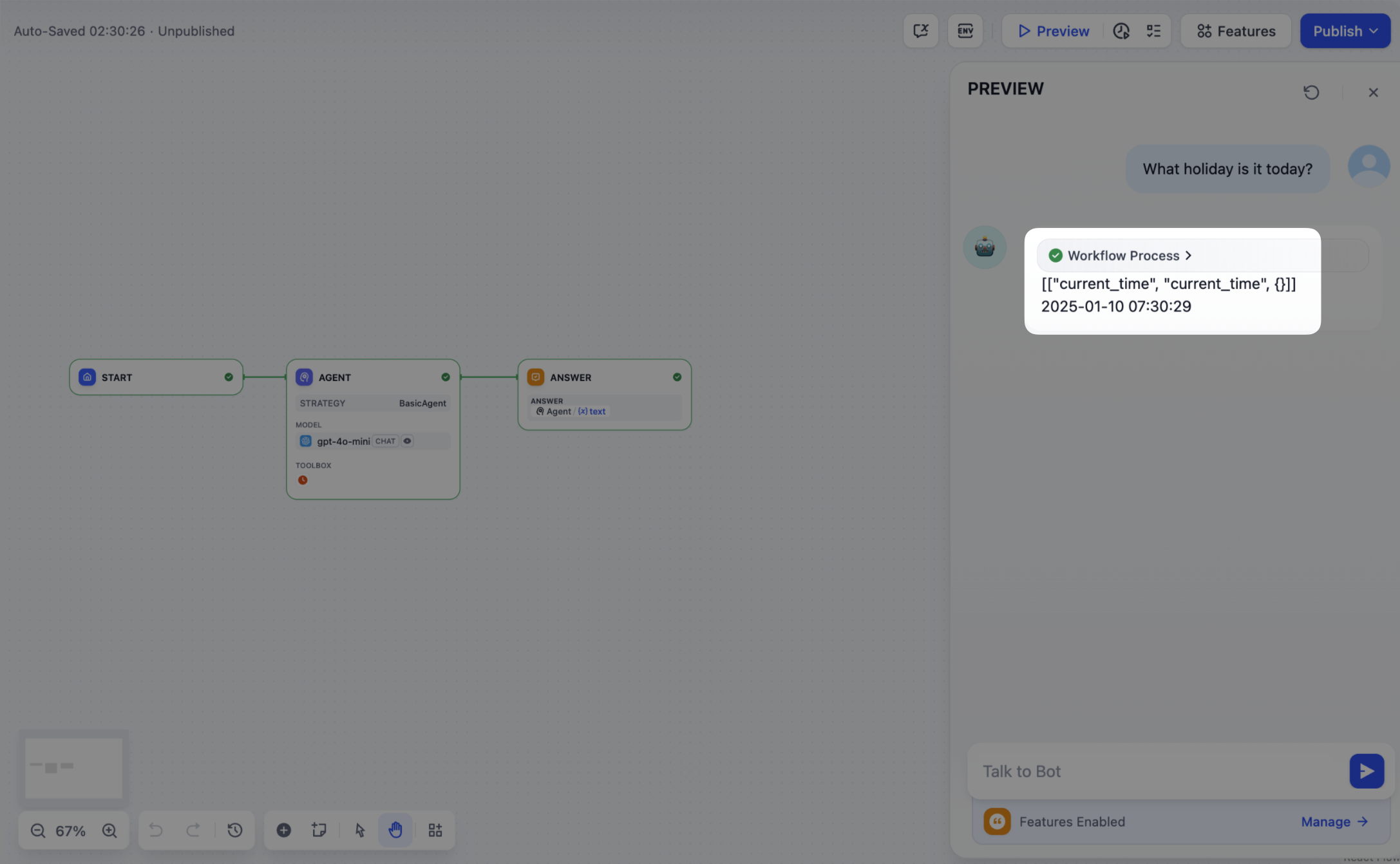
この機能コードを実装すると、エージェント戦略プラグインは自動的にFunction Callingを実行できるようになります。例えば、現在の時刻を自動的に取得するなどが可能です。
|
||
|
||
|
||
|
||
#### 2.6 ログの作成
|
||
|
||
**エージェント戦略プラグイン**では、複雑なタスクを完了するために、通常、複数回の操作が必要です。各操作の実行結果を記録することは、開発者にとって非常に重要です。Agentの実行プロセスを追跡し、各ステップの意思決定の根拠を分析することで、戦略の効果をより適切に評価し、最適化できます。
|
||
|
||
この機能を実装するために、SDKの `create_log_message` と `finish_log_message` メソッドを利用してログを記録できます。この方法では、モデル呼び出しの前後に操作状態をリアルタイムで記録できるだけでなく、開発者が問題を迅速に特定するのに役立ちます。
|
||
|
||
シナリオ例:
|
||
|
||
* モデルを呼び出す前に、「モデルの呼び出しを開始」というログを記録することで、開発者はタスクの実行状況を明確に把握できます。
|
||
* モデル呼び出しが成功した後、「呼び出し成功」というログを記録することで、モデルの応答の完全性を追跡できます。
|
||
|
||
```python
|
||
model_log = self.create_log_message(
|
||
label=f"{params.model.model} Thought",
|
||
data={},
|
||
metadata={"start_at": model_started_at, "provider": params.model.provider},
|
||
status=ToolInvokeMessage.LogMessage.LogStatus.START,
|
||
)
|
||
yield model_log
|
||
self.session.model.llm.invoke(...)
|
||
yield self.finish_log_message(
|
||
log=model_log,
|
||
data={
|
||
"output": response,
|
||
"tool_name": tool_call_names,
|
||
"tool_input": tool_call_inputs,
|
||
},
|
||
metadata={
|
||
"started_at": model_started_at,
|
||
"finished_at": time.perf_counter(),
|
||
"elapsed_time": time.perf_counter() - model_started_at,
|
||
"provider": params.model.provider,
|
||
},
|
||
)
|
||
```
|
||
|
||
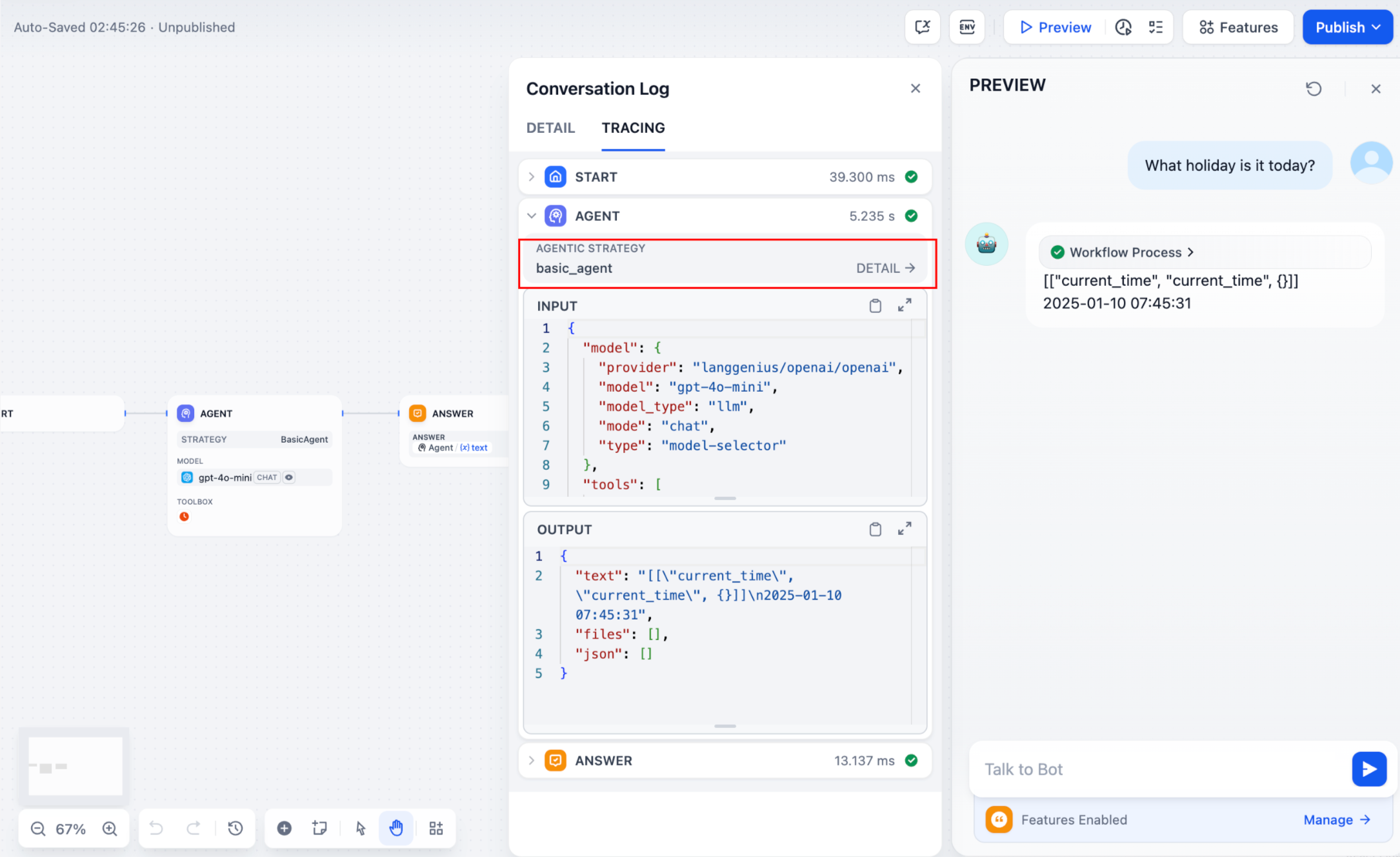
設定が完了すると、ワークフローログに実行結果が出力されます。
|
||
|
||
|
||
|
||
Agentの実行中には、複数ラウンドのログが生成される場合があります。ログに階層構造を持たせることで、開発者がログを確認しやすくなります。ログを記録する際に `parent` パラメータを渡すことで、異なるラウンドのログ間に親子関係が形成され、ログの表示がより明確になり、追跡が容易になります。
|
||
|
||
**使用方法:**
|
||
|
||
```python
|
||
function_call_round_log = self.create_log_message(
|
||
label="Function Call Round1 ",
|
||
data={},
|
||
metadata={},
|
||
)
|
||
yield function_call_round_log
|
||
|
||
model_log = self.create_log_message(
|
||
label=f"{params.model.model} Thought",
|
||
data={},
|
||
metadata={"start_at": model_started_at, "provider": params.model.provider},
|
||
status=ToolInvokeMessage.LogMessage.LogStatus.START,
|
||
# 親ログを追加
|
||
parent=function_call_round_log,
|
||
)
|
||
yield model_log
|
||
```
|
||
|
||
プラグイン機能のサンプルコード:
|
||
|
||
<Tabs>
|
||
<Tab title="モデルの呼び出し">
|
||
#### モデルの呼び出し
|
||
|
||
以下のコードは、エージェント戦略プラグインにモデルを呼び出す機能を追加する方法を示しています。
|
||
|
||
```python
|
||
import json
|
||
from collections.abc import Generator
|
||
from typing import Any, cast
|
||
|
||
from dify_plugin.entities.agent import AgentInvokeMessage
|
||
from dify_plugin.entities.model.llm import LLMModelConfig, LLMResult, LLMResultChunk
|
||
from dify_plugin.entities.model.message import (
|
||
PromptMessageTool,
|
||
UserPromptMessage,
|
||
)
|
||
from dify_plugin.entities.tool import ToolInvokeMessage, ToolParameter, ToolProviderType
|
||
from dify_plugin.interfaces.agent import AgentModelConfig, AgentStrategy, ToolEntity
|
||
from pydantic import BaseModel
|
||
|
||
class BasicParams(BaseModel):
|
||
maximum_iterations: int
|
||
model: AgentModelConfig
|
||
tools: list[ToolEntity]
|
||
query: str
|
||
|
||
class BasicAgentAgentStrategy(AgentStrategy):
|
||
def _invoke(self, parameters: dict[str, Any]) -> Generator[AgentInvokeMessage]:
|
||
params = BasicParams(**parameters)
|
||
chunks: Generator[LLMResultChunk, None, None] | LLMResult = (
|
||
self.session.model.llm.invoke(
|
||
model_config=LLMModelConfig(**params.model.model_dump(mode="json")),
|
||
prompt_messages=[UserPromptMessage(content=params.query)],
|
||
tools=[
|
||
self._convert_tool_to_prompt_message_tool(tool)
|
||
for tool in params.tools
|
||
],
|
||
stop=params.model.completion_params.get("stop", [])
|
||
if params.model.completion_params
|
||
else [],
|
||
stream=True,
|
||
)
|
||
)
|
||
response = ""
|
||
tool_calls = []
|
||
tool_instances = (
|
||
{tool.identity.name: tool for tool in params.tools} if params.tools else {}
|
||
)
|
||
|
||
for chunk in chunks:
|
||
# ツール呼び出しがあるか確認
|
||
if self.check_tool_calls(chunk):
|
||
tool_calls = self.extract_tool_calls(chunk)
|
||
tool_call_names = ";".join([tool_call[1] for tool_call in tool_calls])
|
||
try:
|
||
tool_call_inputs = json.dumps(
|
||
{tool_call[1]: tool_call[2] for tool_call in tool_calls},
|
||
ensure_ascii=False,
|
||
)
|
||
except json.JSONDecodeError:
|
||
# エンコードエラーを避けるため、asciiを保証
|
||
tool_call_inputs = json.dumps(
|
||
{tool_call[1]: tool_call[2] for tool_call in tool_calls}
|
||
)
|
||
print(tool_call_names, tool_call_inputs)
|
||
if chunk.delta.message and chunk.delta.message.content:
|
||
if isinstance(chunk.delta.message.content, list):
|
||
for content in chunk.delta.message.content:
|
||
response += content.data
|
||
print(content.data, end="", flush=True)
|
||
else:
|
||
response += str(chunk.delta.message.content)
|
||
print(str(chunk.delta.message.content), end="", flush=True)
|
||
|
||
if chunk.delta.usage:
|
||
# モデルを使用する
|
||
usage = chunk.delta.usage
|
||
|
||
yield self.create_text_message(
|
||
text=f"{response or json.dumps(tool_calls, ensure_ascii=False)}\n"
|
||
)
|
||
result = ""
|
||
for tool_call_id, tool_call_name, tool_call_args in tool_calls:
|
||
tool_instance = tool_instances[tool_call_name]
|
||
tool_invoke_responses = self.session.tool.invoke(
|
||
provider_type=ToolProviderType.BUILT_IN,
|
||
provider=tool_instance.identity.provider,
|
||
tool_name=tool_instance.identity.name,
|
||
parameters={**tool_instance.runtime_parameters, **tool_call_args},
|
||
)
|
||
if not tool_instance:
|
||
tool_invoke_responses = {
|
||
"tool_call_id": tool_call_id,
|
||
"tool_call_name": tool_call_name,
|
||
"tool_response": f"there is not a tool named {tool_call_name}",
|
||
}
|
||
else:
|
||
# ツールを呼び出す
|
||
tool_invoke_responses = self.session.tool.invoke(
|
||
provider_type=ToolProviderType.BUILT_IN,
|
||
provider=tool_instance.identity.provider,
|
||
tool_name=tool_instance.identity.name,
|
||
parameters={**tool_instance.runtime_parameters, **tool_call_args},
|
||
)
|
||
result = ""
|
||
for tool_invoke_response in tool_invoke_responses:
|
||
if tool_invoke_response.type == ToolInvokeMessage.MessageType.TEXT:
|
||
result += cast(
|
||
ToolInvokeMessage.TextMessage, tool_invoke_response.message
|
||
).text
|
||
elif (
|
||
tool_invoke_response.type == ToolInvokeMessage.MessageType.LINK
|
||
):
|
||
result += (
|
||
f"result link: {cast(ToolInvokeMessage.TextMessage, tool_invoke_response.message).text}."
|
||
+ " please tell user to check it."
|
||
)
|
||
elif tool_invoke_response.type in {
|
||
ToolInvokeMessage.MessageType.IMAGE_LINK,
|
||
ToolInvokeMessage.MessageType.IMAGE,
|
||
}:
|
||
result += (
|
||
"image has been created and sent to user already, "
|
||
+ "you do not need to create it, just tell the user to check it now."
|
||
)
|
||
elif (
|
||
tool_invoke_response.type == ToolInvokeMessage.MessageType.JSON
|
||
):
|
||
text = json.dumps(
|
||
cast(
|
||
ToolInvokeMessage.JsonMessage,
|
||
tool_invoke_response.message,
|
||
).json_object,
|
||
ensure_ascii=False,
|
||
)
|
||
result += f"tool response: {text}."
|
||
else:
|
||
result += f"tool response: {tool_invoke_response.message!r}."
|
||
|
||
tool_response = {
|
||
"tool_call_id": tool_call_id,
|
||
"tool_call_name": tool_call_name,
|
||
"tool_response": result,
|
||
}
|
||
yield self.create_text_message(result)
|
||
|
||
def _convert_tool_to_prompt_message_tool(
|
||
self, tool: ToolEntity
|
||
) -> PromptMessageTool:
|
||
"""
|
||
convert tool to prompt message tool
|
||
"""
|
||
message_tool = PromptMessageTool(
|
||
name=tool.identity.name,
|
||
description=tool.description.llm if tool.description else "",
|
||
parameters={
|
||
"type": "object",
|
||
"properties": {},
|
||
"required": [],
|
||
},
|
||
)
|
||
|
||
parameters = tool.parameters
|
||
for parameter in parameters:
|
||
if parameter.form != ToolParameter.ToolParameterForm.LLM:
|
||
continue
|
||
|
||
parameter_type = parameter.type
|
||
if parameter.type in {
|
||
ToolParameter.ToolParameterType.FILE,
|
||
ToolParameter.ToolParameterType.FILES,
|
||
}:
|
||
continue
|
||
enum = []
|
||
if parameter.type == ToolParameter.ToolParameterType.SELECT:
|
||
enum = (
|
||
[option.value for option in parameter.options]
|
||
if parameter.options
|
||
else []
|
||
)
|
||
|
||
message_tool.parameters["properties"][parameter.name] = {
|
||
"type": parameter_type,
|
||
"description": parameter.llm_description or "",
|
||
}
|
||
|
||
if len(enum) > 0:
|
||
message_tool.parameters["properties"][parameter.name]["enum"] = enum
|
||
|
||
if parameter.required:
|
||
message_tool.parameters["required"].append(parameter.name)
|
||
|
||
return message_tool
|
||
|
||
def check_tool_calls(self, llm_result_chunk: LLMResultChunk) -> bool:
|
||
"""
|
||
Check if there is any tool call in llm result chunk
|
||
"""
|
||
return bool(llm_result_chunk.delta.message.tool_calls)
|
||
|
||
def extract_tool_calls(
|
||
self, llm_result_chunk: LLMResultChunk
|
||
) -> list[tuple[str, str, dict[str, Any]]]:
|
||
"""
|
||
Extract tool calls from llm result chunk
|
||
|
||
Returns:
|
||
List[Tuple[str, str, Dict[str, Any]]]: [(tool_call_id, tool_call_name, tool_call_args)]
|
||
"""
|
||
tool_calls = []
|
||
for prompt_message in llm_result_chunk.delta.message.tool_calls:
|
||
args = {}
|
||
if prompt_message.function.arguments != "":
|
||
args = json.loads(prompt_message.function.arguments)
|
||
|
||
tool_calls.append(
|
||
(
|
||
prompt_message.id,
|
||
prompt_message.function.name,
|
||
args,
|
||
)
|
||
)
|
||
|
||
return tool_calls
|
||
```
|
||
</Tab>
|
||
|
||
<Tab title="ツールの呼び出し">
|
||
#### ツールの呼び出し
|
||
|
||
次のコードは、エージェント戦略プラグインのモデル呼び出しを実装し、正規化されたリクエストをツールに送信する方法を示しています。
|
||
|
||
```python
|
||
import json
|
||
from collections.abc import Generator
|
||
from typing import Any, cast
|
||
|
||
from dify_plugin.entities.agent import AgentInvokeMessage
|
||
from dify_plugin.entities.model.llm import LLMModelConfig, LLMResult, LLMResultChunk
|
||
from dify_plugin.entities.model.message import (
|
||
PromptMessageTool,
|
||
UserPromptMessage,
|
||
)
|
||
from dify_plugin.entities.tool import ToolInvokeMessage, ToolParameter, ToolProviderType
|
||
from dify_plugin.interfaces.agent import AgentModelConfig, AgentStrategy, ToolEntity
|
||
from pydantic import BaseModel
|
||
|
||
class BasicParams(BaseModel):
|
||
maximum_iterations: int
|
||
model: AgentModelConfig
|
||
tools: list[ToolEntity]
|
||
query: str
|
||
|
||
class BasicAgentAgentStrategy(AgentStrategy):
|
||
def _invoke(self, parameters: dict[str, Any]) -> Generator[AgentInvokeMessage]:
|
||
params = BasicParams(**parameters)
|
||
chunks: Generator[LLMResultChunk, None, None] | LLMResult = (
|
||
self.session.model.llm.invoke(
|
||
model_config=LLMModelConfig(**params.model.model_dump(mode="json")),
|
||
prompt_messages=[UserPromptMessage(content=params.query)],
|
||
tools=[
|
||
self._convert_tool_to_prompt_message_tool(tool)
|
||
for tool in params.tools
|
||
],
|
||
stop=params.model.completion_params.get("stop", [])
|
||
if params.model.completion_params
|
||
else [],
|
||
stream=True,
|
||
)
|
||
)
|
||
response = ""
|
||
tool_calls = []
|
||
tool_instances = (
|
||
{tool.identity.name: tool for tool in params.tools} if params.tools else {}
|
||
)
|
||
|
||
for chunk in chunks:
|
||
# ツール呼び出しがあるか確認
|
||
if self.check_tool_calls(chunk):
|
||
tool_calls = self.extract_tool_calls(chunk)
|
||
tool_call_names = ";".join([tool_call[1] for tool_call in tool_calls])
|
||
try:
|
||
tool_call_inputs = json.dumps(
|
||
{tool_call[1]: tool_call[2] for tool_call in tool_calls},
|
||
ensure_ascii=False,
|
||
)
|
||
except json.JSONDecodeError:
|
||
# エンコードエラーを避けるため、asciiを保証
|
||
tool_call_inputs = json.dumps(
|
||
{tool_call[1]: tool_call[2] for tool_call in tool_calls}
|
||
)
|
||
print(tool_call_names, tool_call_inputs)
|
||
if chunk.delta.message and chunk.delta.message.content:
|
||
if isinstance(chunk.delta.message.content, list):
|
||
for content in chunk.delta.message.content:
|
||
response += content.data
|
||
print(content.data, end="", flush=True)
|
||
else:
|
||
response += str(chunk.delta.message.content)
|
||
print(str(chunk.delta.message.content), end="", flush=True)
|
||
|
||
if chunk.delta.usage:
|
||
# モデルを使用する
|
||
usage = chunk.delta.usage
|
||
|
||
yield self.create_text_message(
|
||
text=f"{response or json.dumps(tool_calls, ensure_ascii=False)}\n"
|
||
)
|
||
result = ""
|
||
for tool_call_id, tool_call_name, tool_call_args in tool_calls:
|
||
tool_instance = tool_instances[tool_call_name]
|
||
tool_invoke_responses = self.session.tool.invoke(
|
||
provider_type=ToolProviderType.BUILT_IN,
|
||
provider=tool_instance.identity.provider,
|
||
tool_name=tool_instance.identity.name,
|
||
parameters={**tool_instance.runtime_parameters, **tool_call_args},
|
||
)
|
||
if not tool_instance:
|
||
tool_invoke_responses = {
|
||
"tool_call_id": tool_call_id,
|
||
"tool_call_name": tool_call_name,
|
||
"tool_response": f"there is not a tool named {tool_call_name}",
|
||
}
|
||
else:
|
||
# ツールを呼び出す
|
||
tool_invoke_responses = self.session.tool.invoke(
|
||
provider_type=ToolProviderType.BUILT_IN,
|
||
provider=tool_instance.identity.provider,
|
||
tool_name=tool_instance.identity.name,
|
||
parameters={**tool_instance.runtime_parameters, **tool_call_args},
|
||
)
|
||
result = ""
|
||
for tool_invoke_response in tool_invoke_responses:
|
||
if tool_invoke_response.type == ToolInvokeMessage.MessageType.TEXT:
|
||
result += cast(
|
||
ToolInvokeMessage.TextMessage, tool_invoke_response.message
|
||
).text
|
||
elif (
|
||
tool_invoke_response.type == ToolInvokeMessage.MessageType.LINK
|
||
):
|
||
result += (
|
||
f"result link: {cast(ToolInvokeMessage.TextMessage, tool_invoke_response.message).text}."
|
||
+ " please tell user to check it."
|
||
)
|
||
elif tool_invoke_response.type in {
|
||
ToolInvokeMessage.MessageType.IMAGE_LINK,
|
||
ToolInvokeMessage.MessageType.IMAGE,
|
||
}:
|
||
result += (
|
||
"image has been created and sent to user already, "
|
||
+ "you do not need to create it, just tell the user to check it now."
|
||
)
|
||
elif (
|
||
tool_invoke_response.type == ToolInvokeMessage.MessageType.JSON
|
||
):
|
||
text = json.dumps(
|
||
cast(
|
||
ToolInvokeMessage.JsonMessage,
|
||
tool_invoke_response.message,
|
||
).json_object,
|
||
ensure_ascii=False,
|
||
)
|
||
result += f"tool response: {text}."
|
||
else:
|
||
result += f"tool response: {tool_invoke_response.message!r}."
|
||
|
||
tool_response = {
|
||
"tool_call_id": tool_call_id,
|
||
"tool_call_name": tool_call_name,
|
||
"tool_response": result,
|
||
}
|
||
yield self.create_text_message(result)
|
||
|
||
def _convert_tool_to_prompt_message_tool(
|
||
self, tool: ToolEntity
|
||
) -> PromptMessageTool:
|
||
"""
|
||
convert tool to prompt message tool
|
||
"""
|
||
message_tool = PromptMessageTool(
|
||
name=tool.identity.name,
|
||
description=tool.description.llm if tool.description else "",
|
||
parameters={
|
||
"type": "object",
|
||
"properties": {},
|
||
"required": [],
|
||
},
|
||
)
|
||
|
||
parameters = tool.parameters
|
||
for parameter in parameters:
|
||
if parameter.form != ToolParameter.ToolParameterForm.LLM:
|
||
continue
|
||
|
||
parameter_type = parameter.type
|
||
if parameter.type in {
|
||
ToolParameter.ToolParameterType.FILE,
|
||
ToolParameter.ToolParameterType.FILES,
|
||
}:
|
||
continue
|
||
enum = []
|
||
if parameter.type == ToolParameter.ToolParameterType.SELECT:
|
||
enum = (
|
||
[option.value for option in parameter.options]
|
||
if parameter.options
|
||
else []
|
||
)
|
||
|
||
message_tool.parameters["properties"][parameter.name] = {
|
||
"type": parameter_type,
|
||
"description": parameter.llm_description or "",
|
||
}
|
||
|
||
if len(enum) > 0:
|
||
message_tool.parameters["properties"][parameter.name]["enum"] = enum
|
||
|
||
if parameter.required:
|
||
message_tool.parameters["required"].append(parameter.name)
|
||
|
||
return message_tool
|
||
|
||
def check_tool_calls(self, llm_result_chunk: LLMResultChunk) -> bool:
|
||
"""
|
||
Check if there is any tool call in llm result chunk
|
||
"""
|
||
return bool(llm_result_chunk.delta.message.tool_calls)
|
||
|
||
def extract_tool_calls(
|
||
self, llm_result_chunk: LLMResultChunk
|
||
) -> list[tuple[str, str, dict[str, Any]]]:
|
||
"""
|
||
Extract tool calls from llm result chunk
|
||
|
||
Returns:
|
||
List[Tuple[str, str, Dict[str, Any]]]: [(tool_call_id, tool_call_name, tool_call_args)]
|
||
"""
|
||
tool_calls = []
|
||
for prompt_message in llm_result_chunk.delta.message.tool_calls:
|
||
args = {}
|
||
if prompt_message.function.arguments != "":
|
||
args = json.loads(prompt_message.function.arguments)
|
||
|
||
tool_calls.append(
|
||
(
|
||
prompt_message.id,
|
||
prompt_message.function.name,
|
||
args,
|
||
)
|
||
)
|
||
|
||
return tool_calls
|
||
```
|
||
</Tab>
|
||
|
||
<Tab title="完全な機能コード例">
|
||
#### 完全な機能コード例
|
||
|
||
**モデルの呼び出し**、**ツールの呼び出し**、および**複数ターンのログ出力機能**を含む、完全なプラグインコードの例:
|
||
|
||
```python
|
||
import json
|
||
import time
|
||
from collections.abc import Generator
|
||
from typing import Any, cast
|
||
|
||
from dify_plugin.entities.agent import AgentInvokeMessage
|
||
from dify_plugin.entities.model.llm import LLMModelConfig, LLMResult, LLMResultChunk
|
||
from dify_plugin.entities.model.message import (
|
||
PromptMessageTool,
|
||
UserPromptMessage,
|
||
)
|
||
from dify_plugin.entities.tool import ToolInvokeMessage, ToolParameter, ToolProviderType
|
||
from dify_plugin.interfaces.agent import AgentModelConfig, AgentStrategy, ToolEntity
|
||
from pydantic import BaseModel
|
||
|
||
class BasicParams(BaseModel):
|
||
maximum_iterations: int
|
||
model: AgentModelConfig
|
||
tools: list[ToolEntity]
|
||
query: str
|
||
|
||
class BasicAgentAgentStrategy(AgentStrategy):
|
||
def _invoke(self, parameters: dict[str, Any]) -> Generator[AgentInvokeMessage]:
|
||
params = BasicParams(**parameters)
|
||
function_call_round_log = self.create_log_message(
|
||
label="Function Call Round1 ",
|
||
data={},
|
||
metadata={},
|
||
)
|
||
yield function_call_round_log
|
||
model_started_at = time.perf_counter()
|
||
model_log = self.create_log_message(
|
||
label=f"{params.model.model} Thought",
|
||
data={},
|
||
metadata={"start_at": model_started_at, "provider": params.model.provider},
|
||
status=ToolInvokeMessage.LogMessage.LogStatus.START,
|
||
parent=function_call_round_log,
|
||
)
|
||
yield model_log
|
||
chunks: Generator[LLMResultChunk, None, None] | LLMResult = (
|
||
self.session.model.llm.invoke(
|
||
model_config=LLMModelConfig(**params.model.model_dump(mode="json")),
|
||
prompt_messages=[UserPromptMessage(content=params.query)],
|
||
tools=[
|
||
self._convert_tool_to_prompt_message_tool(tool)
|
||
for tool in params.tools
|
||
],
|
||
stop=params.model.completion_params.get("stop", [])
|
||
if params.model.completion_params
|
||
else [],
|
||
stream=True,
|
||
)
|
||
)
|
||
response = ""
|
||
tool_calls = []
|
||
tool_instances = (
|
||
{tool.identity.name: tool for tool in params.tools} if params.tools else {}
|
||
)
|
||
tool_call_names = ""
|
||
tool_call_inputs = ""
|
||
for chunk in chunks:
|
||
# ツール呼び出しがあるか確認
|
||
if self.check_tool_calls(chunk):
|
||
tool_calls = self.extract_tool_calls(chunk)
|
||
tool_call_names = ";".join([tool_call[1] for tool_call in tool_calls])
|
||
try:
|
||
tool_call_inputs = json.dumps(
|
||
{tool_call[1]: tool_call[2] for tool_call in tool_calls},
|
||
ensure_ascii=False,
|
||
)
|
||
except json.JSONDecodeError:
|
||
# エンコードエラーを避けるため、asciiを保証
|
||
tool_call_inputs = json.dumps(
|
||
{tool_call[1]: tool_call[2] for tool_call in tool_calls}
|
||
)
|
||
print(tool_call_names, tool_call_inputs)
|
||
if chunk.delta.message and chunk.delta.message.content:
|
||
if isinstance(chunk.delta.message.content, list):
|
||
for content in chunk.delta.message.content:
|
||
response += content.data
|
||
print(content.data, end="", flush=True)
|
||
else:
|
||
response += str(chunk.delta.message.content)
|
||
print(str(chunk.delta.message.content), end="", flush=True)
|
||
|
||
if chunk.delta.usage:
|
||
# モデルを使用する
|
||
usage = chunk.delta.usage
|
||
|
||
yield self.finish_log_message(
|
||
log=model_log,
|
||
data={
|
||
"output": response,
|
||
"tool_name": tool_call_names,
|
||
"tool_input": tool_call_inputs,
|
||
},
|
||
metadata={
|
||
"started_at": model_started_at,
|
||
"finished_at": time.perf_counter(),
|
||
"elapsed_time": time.perf_counter() - model_started_at,
|
||
"provider": params.model.provider,
|
||
},
|
||
)
|
||
yield self.create_text_message(
|
||
text=f"{response or json.dumps(tool_calls, ensure_ascii=False)}\n"
|
||
)
|
||
result = ""
|
||
for tool_call_id, tool_call_name, tool_call_args in tool_calls:
|
||
tool_instance = tool_instances[tool_call_name]
|
||
tool_invoke_responses = self.session.tool.invoke(
|
||
provider_type=ToolProviderType.BUILT_IN,
|
||
provider=tool_instance.identity.provider,
|
||
tool_name=tool_instance.identity.name,
|
||
parameters={**tool_instance.runtime_parameters, **tool_call_args},
|
||
)
|
||
if not tool_instance:
|
||
tool_invoke_responses = {
|
||
"tool_call_id": tool_call_id,
|
||
"tool_call_name": tool_call_name,
|
||
"tool_response": f"there is not a tool named {tool_call_name}",
|
||
}
|
||
else:
|
||
# ツールを呼び出す
|
||
tool_invoke_responses = self.session.tool.invoke(
|
||
provider_type=ToolProviderType.BUILT_IN,
|
||
provider=tool_instance.identity.provider,
|
||
tool_name=tool_instance.identity.name,
|
||
parameters={**tool_instance.runtime_parameters, **tool_call_args},
|
||
)
|
||
result = ""
|
||
for tool_invoke_response in tool_invoke_responses:
|
||
if tool_invoke_response.type == ToolInvokeMessage.MessageType.TEXT:
|
||
result += cast(
|
||
ToolInvokeMessage.TextMessage, tool_invoke_response.message
|
||
).text
|
||
elif (
|
||
tool_invoke_response.type == ToolInvokeMessage.MessageType.LINK
|
||
):
|
||
result += (
|
||
f"result link: {cast(ToolInvokeMessage.TextMessage, tool_invoke_response.message).text}."
|
||
+ " please tell user to check it."
|
||
)
|
||
elif tool_invoke_response.type in {
|
||
ToolInvokeMessage.MessageType.IMAGE_LINK,
|
||
ToolInvokeMessage.MessageType.IMAGE,
|
||
}:
|
||
result += (
|
||
"image has been created and sent to user already, "
|
||
+ "you do not need to create it, just tell the user to check it now."
|
||
)
|
||
elif (
|
||
tool_invoke_response.type == ToolInvokeMessage.MessageType.JSON
|
||
):
|
||
text = json.dumps(
|
||
cast(
|
||
ToolInvokeMessage.JsonMessage,
|
||
tool_invoke_response.message,
|
||
).json_object,
|
||
ensure_ascii=False,
|
||
)
|
||
result += f"tool response: {text}."
|
||
else:
|
||
result += f"tool response: {tool_invoke_response.message!r}."
|
||
|
||
tool_response = {
|
||
"tool_call_id": tool_call_id,
|
||
"tool_call_name": tool_call_name,
|
||
"tool_response": result,
|
||
}
|
||
yield self.create_text_message(result)
|
||
|
||
def _convert_tool_to_prompt_message_tool(
|
||
self, tool: ToolEntity
|
||
) -> PromptMessageTool:
|
||
"""
|
||
convert tool to prompt message tool
|
||
"""
|
||
message_tool = PromptMessageTool(
|
||
name=tool.identity.name,
|
||
description=tool.description.llm if tool.description else "",
|
||
parameters={
|
||
"type": "object",
|
||
"properties": {},
|
||
"required": [],
|
||
},
|
||
)
|
||
|
||
parameters = tool.parameters
|
||
for parameter in parameters:
|
||
if parameter.form != ToolParameter.ToolParameterForm.LLM:
|
||
continue
|
||
|
||
parameter_type = parameter.type
|
||
if parameter.type in {
|
||
ToolParameter.ToolParameterType.FILE,
|
||
ToolParameter.ToolParameterType.FILES,
|
||
}:
|
||
continue
|
||
enum = []
|
||
if parameter.type == ToolParameter.ToolParameterType.SELECT:
|
||
enum = (
|
||
[option.value for option in parameter.options]
|
||
if parameter.options
|
||
else []
|
||
)
|
||
|
||
message_tool.parameters["properties"][parameter.name] = {
|
||
"type": parameter_type,
|
||
"description": parameter.llm_description or "",
|
||
}
|
||
|
||
if len(enum) > 0:
|
||
message_tool.parameters["properties"][parameter.name]["enum"] = enum
|
||
|
||
if parameter.required:
|
||
message_tool.parameters["required"].append(parameter.name)
|
||
|
||
return message_tool
|
||
|
||
def check_tool_calls(self, llm_result_chunk: LLMResultChunk) -> bool:
|
||
"""
|
||
Check if there is any tool call in llm result chunk
|
||
"""
|
||
return bool(llm_result_chunk.delta.message.tool_calls)
|
||
|
||
def extract_tool_calls(
|
||
self, llm_result_chunk: LLMResultChunk
|
||
) -> list[tuple[str, str, dict[str, Any]]]:
|
||
"""
|
||
Extract tool calls from llm result chunk
|
||
|
||
Returns:
|
||
List[Tuple[str, str, Dict[str, Any]]]: [(tool_call_id, tool_call_name, tool_call_args)]
|
||
"""
|
||
tool_calls = []
|
||
for prompt_message in llm_result_chunk.delta.message.tool_calls:
|
||
args = {}
|
||
if prompt_message.function.arguments != "":
|
||
args = json.loads(prompt_message.function.arguments)
|
||
|
||
tool_calls.append(
|
||
(
|
||
prompt_message.id,
|
||
prompt_message.function.name,
|
||
args,
|
||
)
|
||
)
|
||
|
||
return tool_calls
|
||
```
|
||
</Tab>
|
||
</Tabs>
|
||
|
||
### 3. プラグインのデバッグ
|
||
|
||
プラグインの設定ファイルと機能コードを記述したら、プラグインのディレクトリ内で `python -m main` コマンドを実行してプラグインを再起動します。次に、プラグインが正常に動作するかどうかをテストする必要があります。Difyのリモートデバッグ機能を利用するには、[「プラグイン管理」](https://cloud.dify.aij/plugins)にアクセスしてデバッグキーとリモートサーバーのアドレスを取得してください。
|
||
|
||
<figure><img src="https://assets-docs.dify.ai/2024/12/053415ef127f1f4d6dd85dd3ae79626a.png" alt="" /><figcaption></figcaption></figure>
|
||
|
||
プラグインプロジェクトに戻り、`.env.example` ファイルをコピーして `.env` にリネームします。そして、取得したリモートサーバーのアドレスとデバッグキーを、`.env`ファイルの `REMOTE_INSTALL_HOST` および `REMOTE_INSTALL_KEY` パラメータにそれぞれ入力します。
|
||
|
||
```bash
|
||
INSTALL_METHOD=remote
|
||
REMOTE_INSTALL_HOST=remote
|
||
REMOTE_INSTALL_PORT=5003
|
||
REMOTE_INSTALL_KEY=****-****-****-****-****
|
||
```
|
||
|
||
`python -m main` コマンドを実行してプラグインを起動します。プラグインページで、プラグインがワークスペースにインストールされたことを確認できます。このプラグインは、他のチームメンバーも利用可能です。
|
||
|
||
### プラグインのパッケージ化(オプション)
|
||
|
||
プラグインが正常に動作することを確認したら、以下のコマンドラインツールを使用してプラグインをパッケージ化し、名前を付けることができます。実行後、現在のフォルダに `google.difypkg` ファイルが生成されます。これが最終的なプラグインパッケージです。
|
||
|
||
```
|
||
dify plugin package ./basic_agent/
|
||
```
|
||
|
||
おめでとうございます!これで、ツールタイプのプラグインの開発、デバッグ、パッケージ化の全プロセスが完了しました。
|
||
|
||
### プラグインの公開(オプション)
|
||
|
||
作成したプラグインは、[Dify Plugins コードリポジトリ](https://github.com/langgenius/dify-plugins)にアップロードして公開できます。アップロードする前に、プラグインが[プラグイン公開規約](../../publish-plugins/publish-to-dify-marketplace)に準拠していることをご確認ください。審査に合格すると、コードはメインブランチにマージされ、[Dify Marketplace](https://marketplace.dify.ai/)に自動的に公開されます。
|
||
|
||
### さらに詳しく
|
||
|
||
複雑なタスクでは、複数回の思考とツール呼び出しが必要になることがよくあります。より高度なタスク処理を実現するために、通常は反復実行戦略が採用されます。つまり、「**モデル呼び出し → ツール呼び出し**」という流れを、タスクが完了するか、設定された最大反復回数に達するまで繰り返します。
|
||
|
||
このプロセスにおいて、プロンプト管理は非常に重要です。モデル入力を効率的に整理し、動的に調整するために、プラグイン内のFunction Calling機能の[実装コード](https://github.com/langgenius/dify-official-plugins/blob/main/agent-strategies/cot_agent/strategies/function_calling.py)を参照し、標準化された方法でモデルが外部ツールを呼び出し、その結果を処理する方法を理解することを推奨します。
|
||
|
||
{/*
|
||
Contributing Section
|
||
DO NOT edit this section!
|
||
It will be automatically generated by the script.
|
||
*/}
|
||
|
||
<CardGroup cols="2">
|
||
<Card
|
||
title="このページを編集する"
|
||
icon="pen-to-square"
|
||
href="https://github.com/langgenius/dify-docs-mintlify/edit/main/ja-jp/plugins/quick-start/develop-plugins/agent-strategy-plugin.mdx"
|
||
>
|
||
直接貢献することでドキュメントの改善にご協力ください
|
||
</Card>
|
||
<Card
|
||
title="問題を報告する"
|
||
icon="github"
|
||
href="https://github.com/langgenius/dify-docs-mintlify/issues/new?title=ドキュメントの問題%3A%20-strategy-plu&body=%23%23%20問題の説明%0A%3C%21--%20発見した問題について簡単に説明してください%20--%3E%0A%0A%23%23%20ページリンク%0Ahttps%3A%2F%2Fgithub.com%2Flanggenius%2Fdify-docs-mintlify%2Fblob%2Fmain%2Fja-jp/plugins/quick-start/develop-plugins%2Fagent-strategy-plugin.mdx%0A%0A%23%23%20提案される変更%0A%3C%21--%20特定の変更案がある場合は、ここで説明してください%20--%3E%0A%0A%3C%21--%20ドキュメントの品質向上にご協力いただきありがとうございます!%20--%3E"
|
||
>
|
||
エラーを見つけたり提案がありますか?お知らせください
|
||
</Card>
|
||
</CardGroup>
|