mirror of
https://github.com/langgenius/dify-docs.git
synced 2026-03-27 13:28:32 +07:00

387 lines
16 KiB
Plaintext
387 lines
16 KiB
Plaintext
---
|
||
dimensions:
|
||
type:
|
||
primary: implementation
|
||
detail: standard
|
||
level: intermediate
|
||
standard_title: Tool Plugin
|
||
language: zh
|
||
title: 工具插件
|
||
description: 本文档介绍如何开发 Dify 的工具插件,以 Google Search 为例实现了一个完整的工具插件开发流程。内容包括插件初始化、模板选择、模板选择、工具供应商配置文件定义、添加第三方服务凭证、工具功能代码实现、调试和打包发布等完整环节。
|
||
---
|
||
|
||
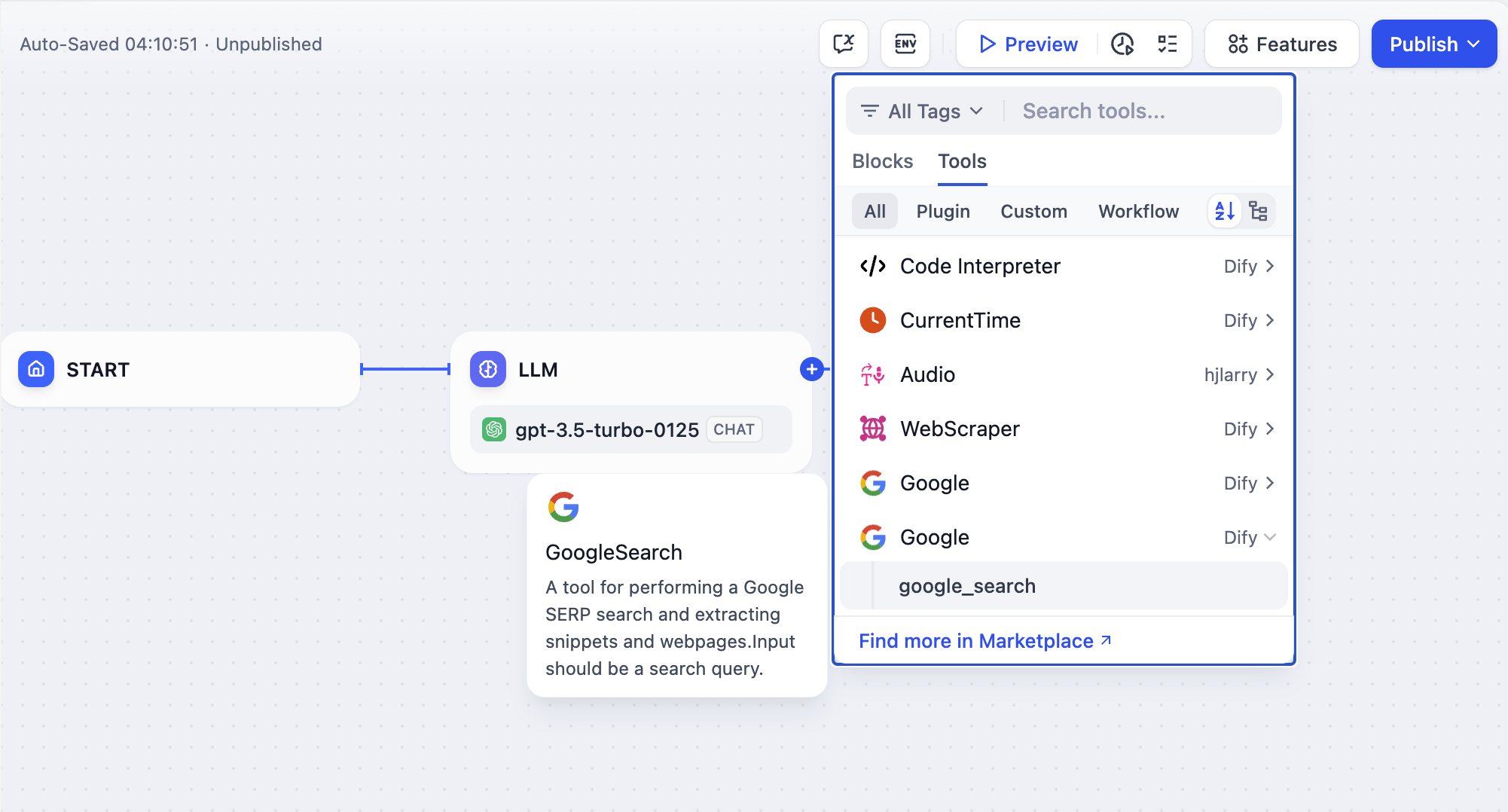
工具指的是能够被 Chatflow / Workflow / Agent 类型应用所调用的第三方服务,提供完整的 API 实现能力,用于增强 Dify 应用的能力。例如为应用添加在线搜索、图片生成等额外功能。
|
||
|
||
|
||
|
||
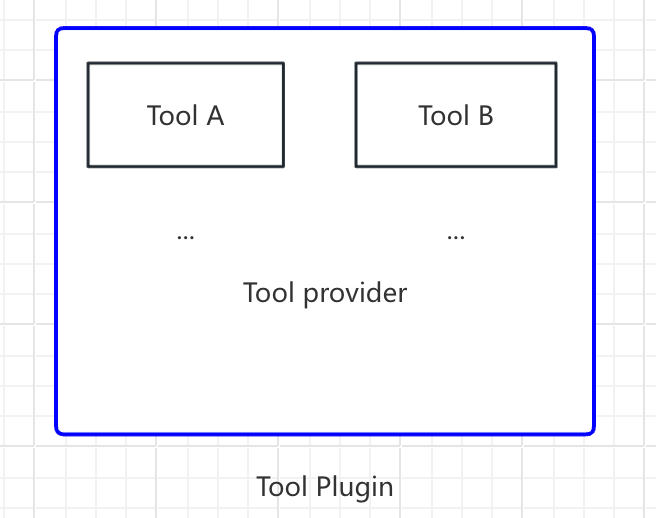
在本文中,**"工具插件"** 指的是一个完整的项目,其中包含工具供应商文件、功能代码等结构。一个工具供应商内允许包含多个 Tools(可以理解为单个工具中提供的额外功能),结构如下:
|
||
|
||
```
|
||
- 工具供应商
|
||
- Tool A
|
||
- Tool B
|
||
```
|
||
|
||
|
||
|
||
本文将以 `Google Search` 为例,介绍如何快速开发一个工具插件。
|
||
|
||
### 前置准备
|
||
|
||
- Dify 插件脚手架工具
|
||
- Python 环境,版本号 ≥ 3.12
|
||
|
||
关于如何准备插件开发的脚手架工具,详细说明请参考[初始化开发工具](/plugin-dev-zh/0221-initialize-development-tools)。如果你是初次开发插件,建议先阅读[Dify 插件开发:Hello World 指南](/plugin-dev-zh/0211-getting-started-dify-tool)。
|
||
|
||
### 创建新项目
|
||
|
||
运行脚手架命令行工具,创建一个新的 dify 插件项目。
|
||
|
||
```bash
|
||
./dify-plugin-darwin-arm64 plugin init
|
||
```
|
||
|
||
如果你已将该二进制文件重命名为 `dify` 并拷贝至 `/usr/local/bin` 路径下,可以运行以下命令创建新的插件项目:
|
||
|
||
```bash
|
||
dify plugin init
|
||
```
|
||
|
||
> 下文将使用 `dify` 作为命令行示例。如遇到问题,请将 `dify` 命令替换为命令行工具的所在路径。
|
||
|
||
### 选择插件类型和模板
|
||
|
||
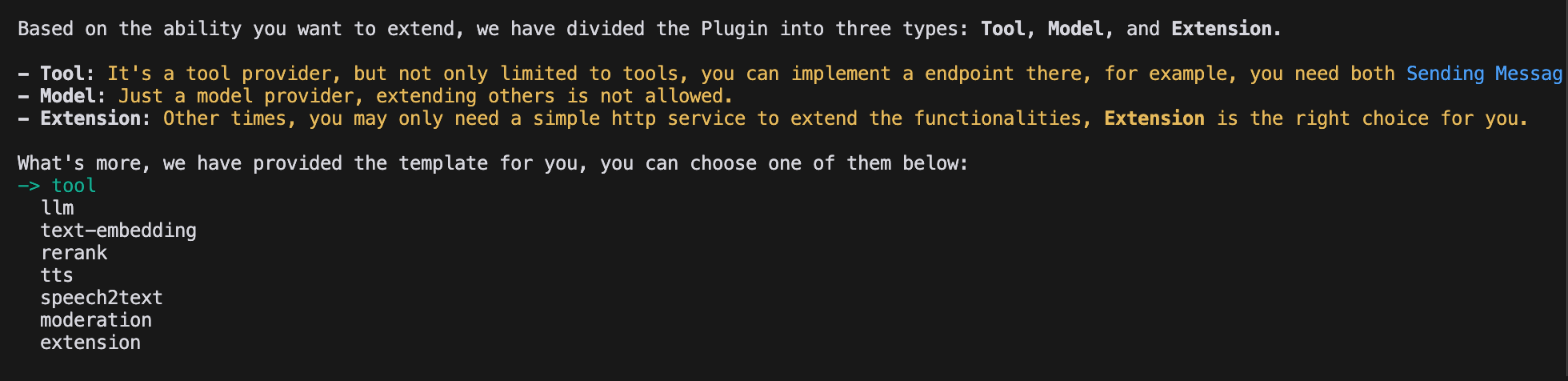
脚手架工具内的所有模板均已提供完整的代码项目。在本文实例中,选择 `Tool` 插件。
|
||
|
||
> 如果你已熟悉插件开发,无需借助模板,可参考[通用规范](/plugin-dev-zh/0411-general-specifications)指引完成不同类型的插件开发。
|
||
|
||
|
||
|
||
#### 配置插件权限
|
||
|
||
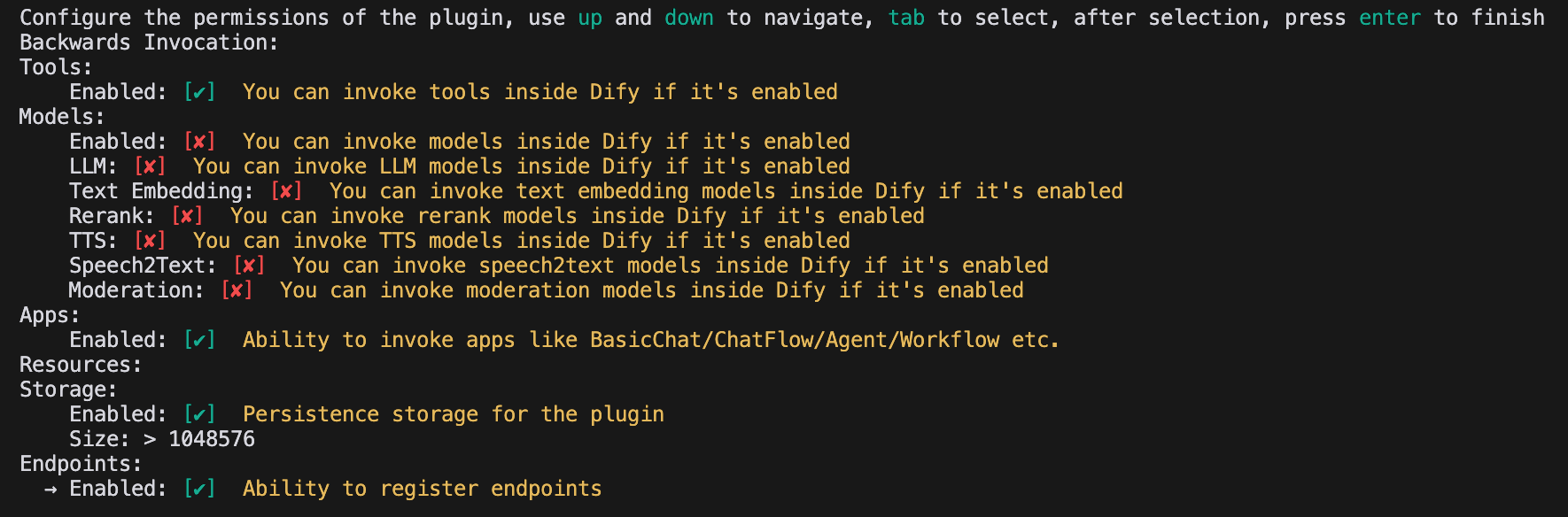
插件还需读取 Dify 平台的权限,为该示例插件授予以下权限:
|
||
|
||
- Tools
|
||
- Apps
|
||
- 启用持久化存储 Storage,分配默认大小存储
|
||
- 允许注册 Endpoint
|
||
|
||
> 在终端内使用方向键选择权限,使用 "Tab" 按钮授予权限。
|
||
|
||
勾选所有权限项后,轻点回车完成插件的创建。系统将自动生成插件项目代码。
|
||
|
||
|
||
|
||
### 开发工具插件
|
||
|
||
#### 1. 创建工具供应商文件
|
||
|
||
工具供应商文件为 yaml 格式文件,可以理解为工具插件的基础配置入口,用于向工具提供必要的授权信息。
|
||
|
||
前往插件模板项目中的 `/provider` 路径,将其中的 yaml 文件重命名为 `google.yaml`。该 `yaml` 文件将包含工具供应商的信息,包括供应商名称、图标、作者等详情。这部分信息将在安装插件时进行展示。
|
||
|
||
**示例代码**
|
||
|
||
```yaml
|
||
identity: # 工具供应商的基本信息
|
||
author: Your-name # 作者
|
||
name: google # 名称,唯一,不允许和其他供应商重名
|
||
label: # 标签,用于前端展示
|
||
en_US: Google # 英文标签
|
||
zh_Hans: Google # 中文标签
|
||
description: # 描述,用于前端展示
|
||
en_US: Google # 英文描述
|
||
zh_Hans: Google # 中文描述
|
||
icon: icon.svg # 工具图标,需要放置在 _assets 文件夹下
|
||
tags: # 标签,用于前端展示
|
||
- search
|
||
```
|
||
|
||
确保该文件路径位于 `/tools` 目录,完整的路径如下:
|
||
|
||
```yaml
|
||
plugins:
|
||
tools:
|
||
- 'google.yaml'
|
||
```
|
||
|
||
其中 `google.yaml` 文件需要使用其在插件项目的绝对路径。在本例中,它位于项目根目录。YAML 文件中的 identity 字段解释如下:`identity` 包含了工具供应商的基本信息,包括作者、名称、标签、描述、图标等。
|
||
|
||
- 图标需要属于附件资源,需要将其放置在项目根目录的 `_assets` 文件夹下。
|
||
- 标签可以帮助用户通过分类快速找到插件,以下是目前所支持的所有标签。
|
||
|
||
```python
|
||
class ToolLabelEnum(Enum):
|
||
SEARCH = 'search'
|
||
IMAGE = 'image'
|
||
VIDEOS = 'videos'
|
||
WEATHER = 'weather'
|
||
FINANCE = 'finance'
|
||
DESIGN = 'design'
|
||
TRAVEL = 'travel'
|
||
SOCIAL = 'social'
|
||
NEWS = 'news'
|
||
MEDICAL = 'medical'
|
||
PRODUCTIVITY = 'productivity'
|
||
EDUCATION = 'education'
|
||
BUSINESS = 'business'
|
||
ENTERTAINMENT = 'entertainment'
|
||
UTILITIES = 'utilities'
|
||
OTHER = 'other'
|
||
```
|
||
|
||
#### **2. 补全第三方服务凭据**
|
||
|
||
为了便于开发,选择采用第三方服务 `SerpApi` 所提供的 Google Search API 。 `SerpApi` 要求填写 API Key 进行使用,因此需要在 `yaml` 文件内添加 `credentials_for_provider` 字段。
|
||
|
||
完整代码如下:
|
||
|
||
```yaml
|
||
identity:
|
||
author: Dify
|
||
name: google
|
||
label:
|
||
en_US: Google
|
||
zh_Hans: Google
|
||
pt_BR: Google
|
||
description:
|
||
en_US: Google
|
||
zh_Hans: GoogleSearch
|
||
pt_BR: Google
|
||
icon: icon.svg
|
||
tags:
|
||
- search
|
||
credentials_for_provider: #添加 credentials_for_provider 字段
|
||
serpapi_api_key:
|
||
type: secret-input
|
||
required: true
|
||
label:
|
||
en_US: SerpApi API key
|
||
zh_Hans: SerpApi API key
|
||
placeholder:
|
||
en_US: Please input your SerpApi API key
|
||
zh_Hans: 请输入你的 SerpApi API key
|
||
help:
|
||
en_US: Get your SerpApi API key from SerpApi
|
||
zh_Hans: 从 SerpApi 获取您的 SerpApi API key
|
||
url: https://serpapi.com/manage-api-key
|
||
tools:
|
||
- tools/google_search.yaml
|
||
extra:
|
||
python:
|
||
source: google.py
|
||
```
|
||
|
||
- 其中 `credentials_for_provider` 的子级结构需要满足 [通用规范](/plugin-dev-zh/0411-general-specifications) 的要求。
|
||
- 需要指定该供应商包含了哪些工具。本示例仅包含了一个 `tools/google_search.yaml` 文件。
|
||
- 作为供应商,除了定义其基础信息外,还需要实现一些它的代码逻辑,因此需要指定其实现逻辑,在本例子中,将功能的代码文件放在了 `google.py` 中,但是暂时不实现它,而是先编写 `google_search` 的代码。
|
||
|
||
#### 3. 填写工具 yaml 文件
|
||
|
||
一个工具插件下可以有多个工具功能,每个工具功能需要一个 `yaml` 文件进行描述,包含工具功能的基本信息、参数、输出等。
|
||
|
||
仍以 `GoogleSearch` 工具为例,在 `/tools`文件夹内新建一个 `google_search.yaml` 文件。
|
||
|
||
```yaml
|
||
identity:
|
||
name: google_search
|
||
author: Dify
|
||
label:
|
||
en_US: GoogleSearch
|
||
zh_Hans: 谷歌搜索
|
||
pt_BR: GoogleSearch
|
||
description:
|
||
human:
|
||
en_US: A tool for performing a Google SERP search and extracting snippets and webpages.Input should be a search query.
|
||
zh_Hans: 一个用于执行 Google SERP 搜索并提取片段和网页的工具。输入应该是一个搜索查询。
|
||
pt_BR: A tool for performing a Google SERP search and extracting snippets and webpages.Input should be a search query.
|
||
llm: A tool for performing a Google SERP search and extracting snippets and webpages.Input should be a search query.
|
||
parameters:
|
||
- name: query
|
||
type: string
|
||
required: true
|
||
label:
|
||
en_US: Query string
|
||
zh_Hans: 查询语句
|
||
pt_BR: Query string
|
||
human_description:
|
||
en_US: used for searching
|
||
zh_Hans: 用于搜索网页内容
|
||
pt_BR: used for searching
|
||
llm_description: key words for searching
|
||
form: llm
|
||
extra:
|
||
python:
|
||
source: tools/google_search.py
|
||
```
|
||
|
||
- `identity` 包含了工具的基本信息,包括名称、作者、标签、描述等。
|
||
- `parameters` 参数列表
|
||
- `name` (必填)参数名称,唯一,不允许和其他参数重名。
|
||
- `type` (必填)参数类型,目前支持`string`、`number`、`boolean`、`select`、`secret-input`、`file`、`files`、`model-selector`、`app-selector` 九种类型,分别对应字符串、数字、布尔值、下拉框、加密输入框、文件、文件集、模型选择、应用选择,对于敏感信息,请使用 `secret-input` 类型。
|
||
- `label`(必填)参数标签,用于前端展示。
|
||
- `form` (必填)表单类型,目前支持`llm`、`form`两种类型。
|
||
- 在 Agent 应用中,`llm` 表示该参数 LLM 自行推理,`form` 表示要使用该工具可提前设定的参数。
|
||
- 在 Workflow 应用中,`llm`和`form` 均需要前端填写,但 `llm` 的参数会做为工具节点的输入变量。
|
||
- `required` 是否必填
|
||
- 在 `llm` 模式下,如果参数为必填,则会要求 Agent 必须要推理出这个参数。
|
||
- 在 `form` 模式下,如果参数为必填,则会要求用户在对话开始前在前端填写这个参数。
|
||
- `options` 参数选项
|
||
- 在 `llm` 模式下,Dify 会将所有选项传递给 LLM,LLM 可以根据这些选项进行推理。
|
||
- 在 `form` 模式下,`type` 为 `select` 时,前端会展示这些选项。
|
||
- `default` 默认值。
|
||
- `min` 最小值,当参数类型为`number`时可以设定。
|
||
- `max` 最大值,当参数类型为`number`时可以设定。
|
||
- `human_description` 用于前端展示的介绍,支持多语言。
|
||
- `placeholder` 字段输入框的提示文字,在表单类型为`form`,参数类型为`string`、`number`、`secret-input`时,可以设定,支持多语言。
|
||
- `llm_description` 传递给 LLM 的介绍。为了使得 LLM 更好理解这个参数,请在这里写上关于这个参数尽可能详细的信息,以便 LLM 能够理解该参数。
|
||
|
||
#### 4. 准备工具代码
|
||
|
||
填写工具的配置信息以后,可以开始编写工具的功能代码,实现工具的逻辑目的。在`/tools`目录下创建`google_search.py`,内容如下:
|
||
|
||
```python
|
||
from collections.abc import Generator
|
||
from typing import Any
|
||
|
||
import requests
|
||
|
||
from dify_plugin import Tool
|
||
from dify_plugin.entities.tool import ToolInvokeMessage
|
||
|
||
SERP_API_URL = "https://serpapi.com/search"
|
||
|
||
class GoogleSearchTool(Tool):
|
||
def _parse_response(self, response: dict) -> dict:
|
||
result = {}
|
||
if "knowledge_graph" in response:
|
||
result["title"] = response["knowledge_graph"].get("title", "")
|
||
result["description"] = response["knowledge_graph"].get("description", "")
|
||
if "organic_results" in response:
|
||
result["organic_results"] = [
|
||
{
|
||
"title": item.get("title", ""),
|
||
"link": item.get("link", ""),
|
||
"snippet": item.get("snippet", ""),
|
||
}
|
||
for item in response["organic_results"]
|
||
]
|
||
return result
|
||
|
||
def _invoke(self, tool_parameters: dict[str, Any]) -> Generator[ToolInvokeMessage]:
|
||
params = {
|
||
"api_key": self.runtime.credentials["serpapi_api_key"],
|
||
"q": tool_parameters["query"],
|
||
"engine": "google",
|
||
"google_domain": "google.com",
|
||
"gl": "us",
|
||
"hl": "en",
|
||
}
|
||
|
||
response = requests.get(url=SERP_API_URL, params=params, timeout=5)
|
||
response.raise_for_status()
|
||
valuable_res = self._parse_response(response.json())
|
||
|
||
yield self.create_json_message(valuable_res)
|
||
```
|
||
|
||
该例子的含义为请求 `serpapi`,并使用 `self.create_json_message` 返回一串 `json` 的格式化数据,如果想了解更多的返回数据类型,可以参考[远程调试插件](/plugin-dev-zh/0411-remote-debug-a-plugin)和[持久化存储 KV](/plugin-dev-zh/0411-persistent-storage-kv)文档。
|
||
|
||
#### 5. 完成工具供应商代码
|
||
|
||
最后需要创建一个供应商的实现代码,用于实现凭据验证逻辑。如果凭据验证失败,将会抛出`ToolProviderCredentialValidationError`异常。验证成功后,将正确请求 `google_search` 工具服务。
|
||
|
||
在 `/provider` 目录下创建 `google.py` 文件,代码的内容如下:
|
||
|
||
```python
|
||
from typing import Any
|
||
|
||
from dify_plugin import ToolProvider
|
||
from dify_plugin.errors.tool import ToolProviderCredentialValidationError
|
||
from tools.google_search import GoogleSearchTool
|
||
|
||
class GoogleProvider(ToolProvider):
|
||
def _validate_credentials(self, credentials: dict[str, Any]) -> None:
|
||
try:
|
||
for _ in GoogleSearchTool.from_credentials(credentials).invoke(
|
||
tool_parameters={"query": "test", "result_type": "link"},
|
||
):
|
||
pass
|
||
except Exception as e:
|
||
raise ToolProviderCredentialValidationError(str(e))
|
||
```
|
||
|
||
### 调试插件
|
||
|
||
插件开发完成后,接下来需要测试插件是否可以正常运行。Dify 提供便捷地远程调试方式,帮助你快速在测试环境中验证插件功能。
|
||
|
||
前往["插件管理"](https://cloud.dify.ai/plugins)页获取远程服务器地址和调试 Key。
|
||
|
||

|
||
|
||
回到插件项目,拷贝 `.env.example` 文件并重命名为 `.env`,将获取的远程服务器地址和调试 Key 等信息填入其中。
|
||
|
||
`.env` 文件:
|
||
|
||
```bash
|
||
INSTALL_METHOD=remote
|
||
REMOTE_INSTALL_URL=debug.dify.ai:5003
|
||
REMOTE_INSTALL_KEY=********-****-****-****-************
|
||
```
|
||
|
||
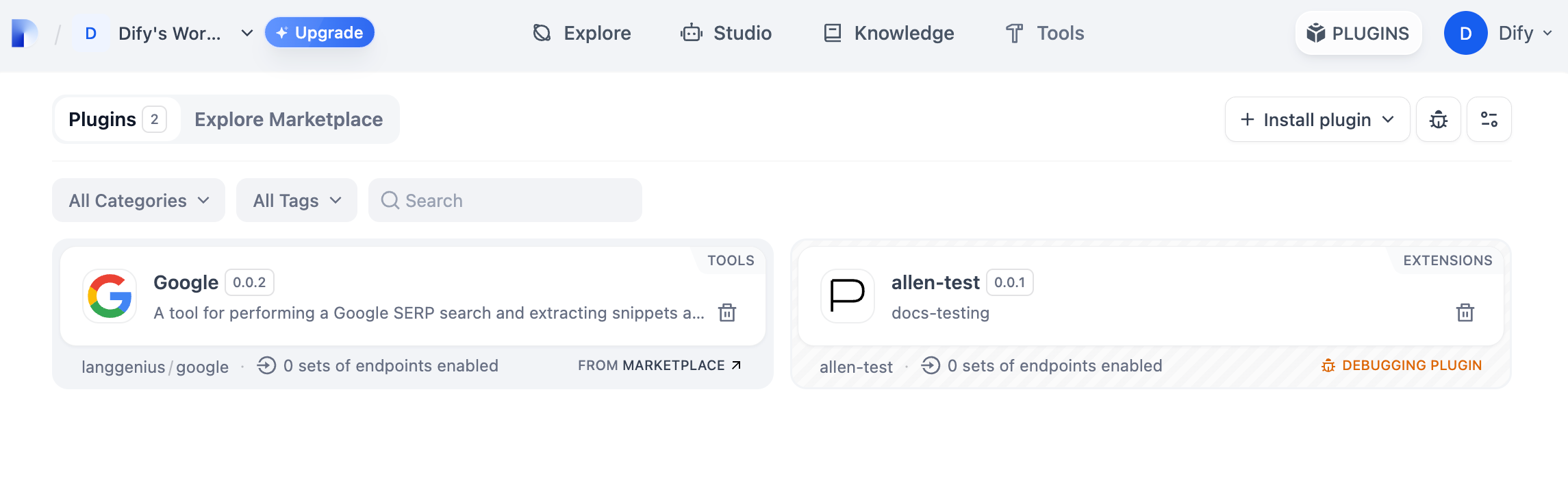
运行 `python -m main` 命令启动插件。在插件页即可看到该插件已被安装至 Workspace 内,团队中的其他成员也可以访问该插件。
|
||
|
||
|
||
|
||
### 打包插件(可选)
|
||
|
||
确认插件能够正常运行后,可以通过以下命令行工具打包并命名插件。运行以后你可以在当前文件夹发现 `google.difypkg` 文件,该文件为最终的插件包。
|
||
|
||
```bash
|
||
# 将 ./google 替换为插件项目的实际路径
|
||
|
||
dify plugin package ./google
|
||
```
|
||
|
||
恭喜,你已完成一个工具类型插件的完整开发、调试与打包过程!
|
||
|
||
### 发布插件(可选)
|
||
|
||
如果想要将插件发布至 Dify Marketplace,请确保你的插件遵循了[发布到 Dify 市场](/plugin-dev-zh/0322-release-to-dify-marketplace)中的规范。审核通过后,代码将合并至主分支并自动上线至 [Dify Marketplace](https://marketplace.dify.ai/)。
|
||
|
||
[发布概览](/plugin-dev-zh/0321-release-overview)
|
||
|
||
### 探索更多
|
||
|
||
#### **快速开始:**
|
||
|
||
- [开发 Extension 插件](/plugin-dev-zh/9231-extension-plugin)
|
||
- [开发 Model 插件](/plugin-dev-zh/0211-getting-started-new-model)
|
||
- [Bundle 插件:将多个插件打包](/plugin-dev-zh/9241-bundle)
|
||
|
||
#### **插件接口文档:**
|
||
|
||
- [一般规范定义](/plugin-dev-zh/0411-general-specifications) - Manifest 结构和工具规范
|
||
- [端点](/plugin-dev-zh/0432-endpoint) - Endpoint 详细定义
|
||
- [反向调用](/plugin-dev-zh/9241-reverse-invocation) - 反向调用 Dify 能力
|
||
- [模型架构](/plugin-dev-zh/0412-model-schema) - 模型
|
||
- [Agent 插件](/plugin-dev-zh/9232-agent) - 扩展 Agent 策略
|
||
|
||
## 下一步学习
|
||
|
||
- [远程调试插件](/plugin-dev-zh/0411-remote-debug-a-plugin) - 了解更高级的调试技巧
|
||
- [持久化存储](/plugin-dev-zh/0411-persistent-storage-kv) - 学习如何在插件中使用数据存储
|
||
- [Slack 机器人插件开发示例](/plugin-dev-zh/0432-develop-a-slack-bot-plugin) - 查看更复杂的插件开发案例
|
||
- [工具插件](/plugin-dev-zh/0411-tool) - 探索工具插件的高级功能
|
||
|
||
{/*
|
||
Contributing Section
|
||
DO NOT edit this section!
|
||
It will be automatically generated by the script.
|
||
*/}
|
||
|
||
---
|
||
|
||
[编辑此页面](https://github.com/langgenius/dify-docs/edit/main/plugin-dev-zh/0222-tool-plugin.mdx) | [提交问题](https://github.com/langgenius/dify-docs/issues/new?template=docs.yml)
|
||
|