mirror of
https://github.com/langgenius/dify-docs.git
synced 2026-03-27 13:28:32 +07:00

91 lines
4.0 KiB
Plaintext
91 lines
4.0 KiB
Plaintext
---
|
||
title: GPUStackによってデプロイされたローカルモデルの統合
|
||
---
|
||
|
||
[GPUStack](https://github.com/gpustack/gpustack)は、AIモデルを実行するために設計されたオープンソースのGPUクラスターマネージャーです。
|
||
|
||
Difyは、大規模言語モデルの推論、埋め込み、再順位付け機能をローカル環境で展開するために、GPUStackとの統合を実現しています。
|
||
|
||
## GPUStackの展開方法
|
||
|
||
GPUStackを展開する際は、公式の[ドキュメント](https://docs.gpustack.ai)を参照するか、以下の手順に従って簡単に統合できます。
|
||
|
||
### LinuxまたはMacOSでの展開
|
||
|
||
GPUStackは、systemdやlaunchdベースのシステムにサービスとしてインストールするためのスクリプトを提供しています。この方法でGPUStackをインストールするには、次のコマンドを実行してください:
|
||
|
||
```bash
|
||
curl -sfL https://get.gpustack.ai | sh -s -
|
||
```
|
||
|
||
### Windowsでの展開
|
||
|
||
管理者としてPowerShellを実行し(PowerShell ISEは使用しないでください)、次のコマンドを実行してGPUStackをインストールします:
|
||
|
||
```powershell
|
||
Invoke-Expression (Invoke-WebRequest -Uri "https://get.gpustack.ai" -UseBasicParsing).Content
|
||
```
|
||
|
||
その後、表示される指示に従ってGPUStackのUIにアクセスできます。
|
||
|
||
## LLMの展開手順
|
||
|
||
GPUStackにホストされたLLMを使用する方法の例です:
|
||
|
||
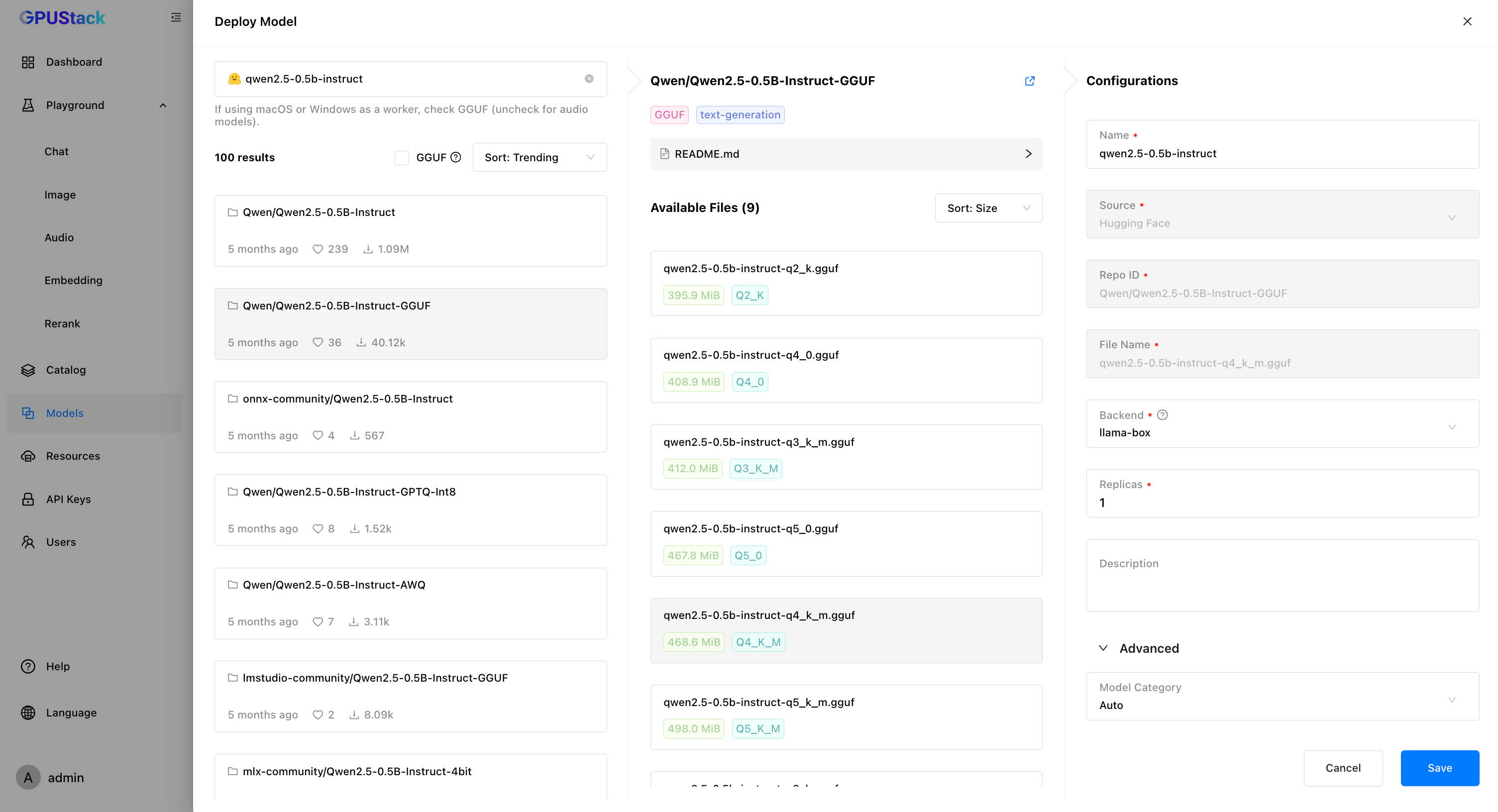
1. GPUStack UIで「Models」ページに移動し、「Deploy Model」をクリック、次に「Hugging Face」をドロップダウンメニューから選択します。
|
||
|
||
2. 左上の検索バーを使って、モデル名「Qwen/Qwen2.5-0.5B-Instruct-GGUF」を検索します。
|
||
|
||
3. モデルを展開するために「Save」をクリックします。
|
||
|
||
|
||
|
||
## APIキーの作成方法
|
||
|
||
1. 「API Keys」ページに移動し、「New API Key」をクリックします。
|
||
|
||
2. 名前を入力し、「Save」をクリックします。
|
||
|
||
3. APIキーをコピーし、後で使用するために保存しておきます。
|
||
|
||
## DifyとGPUStackの統合手順
|
||
|
||
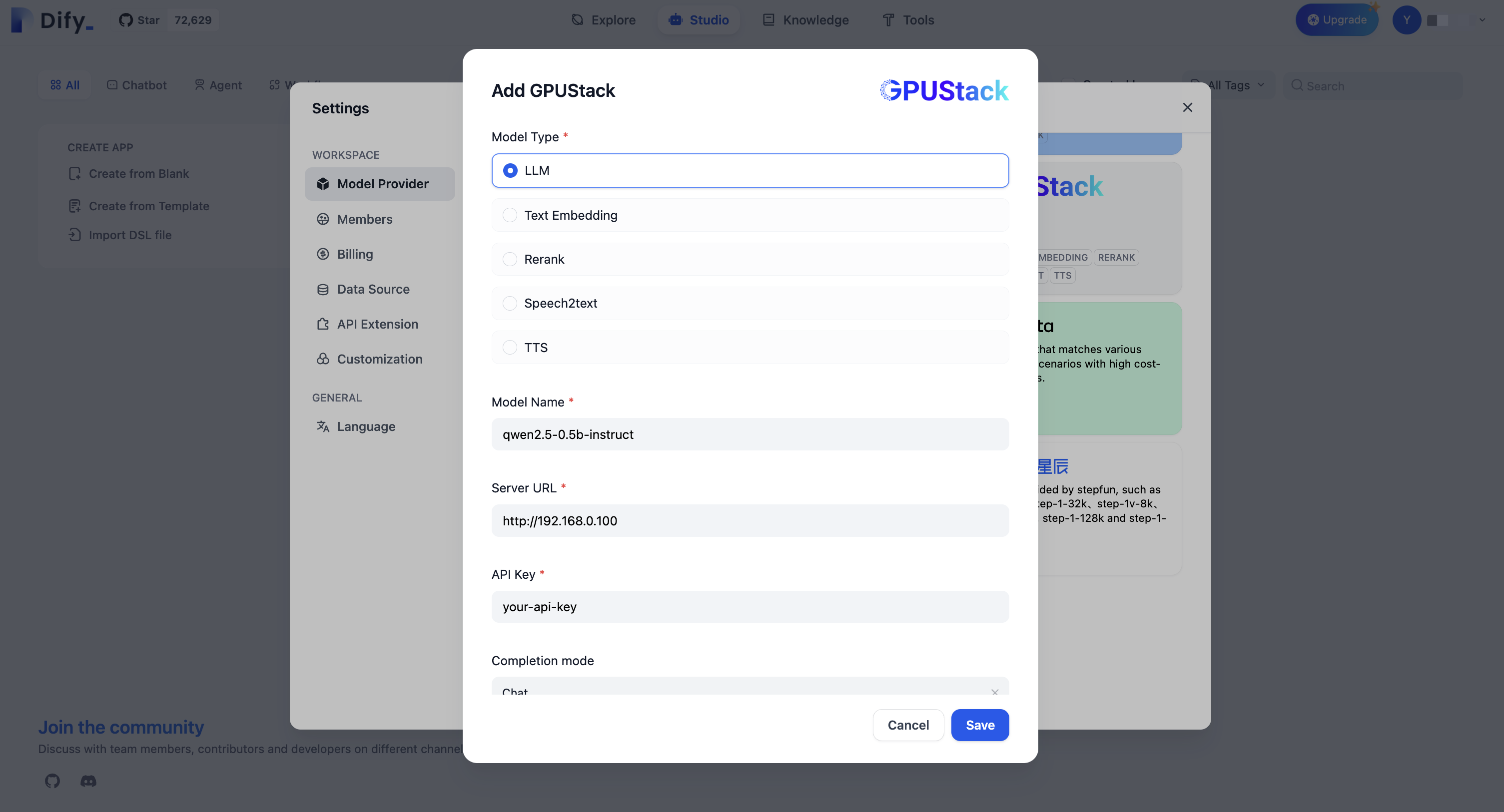
5. `Settings > Model Providers > GPUStack`に移動し、以下の情報を入力します:
|
||
|
||
- モデルタイプ:`LLM`
|
||
|
||
- モデル名:`qwen2.5-0.5b-instruct`
|
||
|
||
- サーバーURL:`http://your-gpustack-server-ip`
|
||
|
||
- APIキー:`コピーしたAPIキーを入力`
|
||
|
||
モデルをアプリケーションで使用するために、「Save」をクリックしてください。
|
||
|
||
|
||
|
||
GPUStackに関する詳細情報は、[GitHub Repo](https://github.com/gpustack/gpustack)を参照してください。
|
||
|
||
{/*
|
||
Contributing Section
|
||
DO NOT edit this section!
|
||
It will be automatically generated by the script.
|
||
*/}
|
||
|
||
<CardGroup cols="2">
|
||
<Card
|
||
title="このページを編集する"
|
||
icon="pen-to-square"
|
||
href="https://github.com/langgenius/dify-docs-mintlify/edit/main/ja-jp/development/models-integration/gpustack.mdx"
|
||
>
|
||
直接貢献することでドキュメントの改善にご協力ください
|
||
</Card>
|
||
<Card
|
||
title="問題を報告する"
|
||
icon="github"
|
||
href="https://github.com/langgenius/dify-docs-mintlify/issues/new?title=ドキュメントの問題%3A%20&body=%23%23%20問題の説明%0A%3C%21--%20発見した問題について簡単に説明してください%20--%3E%0A%0A%23%23%20ページリンク%0Ahttps%3A%2F%2Fgithub.com%2Flanggenius%2Fdify-docs-mintlify%2Fblob%2Fmain%2Fja-jp/development/models-integration%2Fgpustack.mdx%0A%0A%23%23%20提案される変更%0A%3C%21--%20特定の変更案がある場合は、ここで説明してください%20--%3E%0A%0A%3C%21--%20ドキュメントの品質向上にご協力いただきありがとうございます!%20--%3E"
|
||
>
|
||
エラーを見つけたり提案がありますか?お知らせください
|
||
</Card>
|
||
</CardGroup>
|