mirror of
https://github.com/langgenius/dify-docs.git
synced 2026-03-27 13:28:32 +07:00

262 lines
7.6 KiB
Plaintext
262 lines
7.6 KiB
Plaintext
---
|
||
title: API 扩展
|
||
sidebarTitle: 概览
|
||
---
|
||
|
||
开发者可通过 API 扩展模块能力,当前支持以下模块扩展:
|
||
|
||
* `moderation` 敏感内容审计
|
||
* `external_data_tool` 外部数据工具
|
||
|
||
在扩展模块能力之前,你需要准备一个 API 和用于鉴权的 API Key。
|
||
|
||
除了需要开发对应的模块能力,还需要遵照以下规范,以便 Dify 正确调用 API。
|
||
|
||
## API 规范
|
||
|
||
Dify 将会以以下规范调用你的接口:
|
||
|
||
```
|
||
POST {Your-API-Endpoint}
|
||
```
|
||
|
||
### Header
|
||
|
||
| Header | Value | Desc |
|
||
| --------------- | ----------------- | --------------------------------------------------------------------- |
|
||
| `Content-Type` | application/json | 请求内容为 JSON 格式。 |
|
||
| `Authorization` | Bearer \{api_key\} | API Key 以 Token 令牌的方式传输,你需要解析该 `api_key` 并确认是否和提供的 API Key 一致,保证接口安全。 |
|
||
|
||
### Request Body
|
||
|
||
```
|
||
{
|
||
"point": string, // 扩展点,不同模块可能包含多个扩展点
|
||
"params": {
|
||
... // 各模块扩展点传入参数
|
||
}
|
||
}
|
||
```
|
||
|
||
### API 返回
|
||
|
||
```
|
||
{
|
||
... // API 返回的内容,不同扩展点返回见不同模块的规范设计
|
||
}
|
||
```
|
||
|
||
## 校验
|
||
|
||
在 Dify 配置 API-based Extension 时,Dify 将会发送一个请求至 API Endpoint,以检验 API 的可用性。
|
||
|
||
当 API Endpoint 接收到 `point=ping` 时,接口应返回 `result=pong`,具体如下:
|
||
|
||
### Header
|
||
|
||
```
|
||
Content-Type: application/json
|
||
Authorization: Bearer {api_key}
|
||
```
|
||
|
||
### Request Body
|
||
|
||
```
|
||
{
|
||
"point": "ping"
|
||
}
|
||
```
|
||
|
||
### API 期望返回
|
||
```
|
||
{
|
||
"result": "pong"
|
||
}
|
||
```
|
||
|
||
## 范例
|
||
|
||
此处以外部数据工具为例,场景为根据地区获取外部天气信息作为上下文。
|
||
|
||
### API 范例
|
||
|
||
```
|
||
POST https://fake-domain.com/api/dify/receive
|
||
```
|
||
|
||
**Header**
|
||
|
||
```
|
||
Content-Type: application/json
|
||
Authorization: Bearer 123456
|
||
```
|
||
|
||
**Request Body**
|
||
|
||
```
|
||
{
|
||
"point": "app.external_data_tool.query",
|
||
"params": {
|
||
"app_id": "61248ab4-1125-45be-ae32-0ce91334d021",
|
||
"tool_variable": "weather_retrieve",
|
||
"inputs": {
|
||
"location": "London"
|
||
},
|
||
"query": "How's the weather today?"
|
||
}
|
||
}
|
||
```
|
||
|
||
**API 返回**
|
||
|
||
```
|
||
{
|
||
"result": "City: London\nTemperature: 10°C\nRealFeel®: 8°C\nAir Quality: Poor\nWind Direction: ENE\nWind Speed: 8 km/h\nWind Gusts: 14 km/h\nPrecipitation: Light rain"
|
||
}
|
||
```
|
||
|
||
### 代码范例
|
||
|
||
代码基于 Python FastAPI 框架。
|
||
|
||
1. 安装依赖
|
||
|
||
```
|
||
pip install fastapi[all] uvicorn
|
||
```
|
||
2. 按照接口规范编写代码
|
||
|
||
```
|
||
from fastapi import FastAPI, Body, HTTPException, Header
|
||
from pydantic import BaseModel
|
||
|
||
app = FastAPI()
|
||
|
||
|
||
class InputData(BaseModel):
|
||
point: str
|
||
params: dict = {}
|
||
|
||
|
||
@app.post("/api/dify/receive")
|
||
async def dify_receive(data: InputData = Body(...), authorization: str = Header(None)):
|
||
"""
|
||
Receive API query data from Dify.
|
||
"""
|
||
expected_api_key = "123456" # TODO Your API key of this API
|
||
auth_scheme, _, api_key = authorization.partition(' ')
|
||
|
||
if auth_scheme.lower() != "bearer" or api_key != expected_api_key:
|
||
raise HTTPException(status_code=401, detail="Unauthorized")
|
||
|
||
point = data.point
|
||
|
||
# for debug
|
||
print(f"point: {point}")
|
||
|
||
if point == "ping":
|
||
return {
|
||
"result": "pong"
|
||
}
|
||
if point == "app.external_data_tool.query":
|
||
return handle_app_external_data_tool_query(params=data.params)
|
||
# elif point == "{point name}":
|
||
# TODO other point implementation here
|
||
|
||
raise HTTPException(status_code=400, detail="Not implemented")
|
||
|
||
|
||
def handle_app_external_data_tool_query(params: dict):
|
||
app_id = params.get("app_id")
|
||
tool_variable = params.get("tool_variable")
|
||
inputs = params.get("inputs")
|
||
query = params.get("query")
|
||
|
||
# for debug
|
||
print(f"app_id: {app_id}")
|
||
print(f"tool_variable: {tool_variable}")
|
||
print(f"inputs: {inputs}")
|
||
print(f"query: {query}")
|
||
|
||
# TODO your external data tool query implementation here,
|
||
# return must be a dict with key "result", and the value is the query result
|
||
if inputs.get("location") == "London":
|
||
return {
|
||
"result": "City: London\nTemperature: 10°C\nRealFeel®: 8°C\nAir Quality: Poor\nWind Direction: ENE\nWind "
|
||
"Speed: 8 km/h\nWind Gusts: 14 km/h\nPrecipitation: Light rain"
|
||
}
|
||
else:
|
||
return {"result": "Unknown city"}
|
||
```
|
||
3. 启动 API 服务,默认端口为 8000,API 完整地址为:`http://127.0.0.1:8000/api/dify/receive`,配置的 API Key 为 `123456`。
|
||
|
||
```
|
||
uvicorn main:app --reload --host 0.0.0.0
|
||
```
|
||
4. 在 Dify 配置该 API。
|
||
|
||
5. 在 App 中选择该 API 扩展。
|
||
|
||
App 调试时,Dify 将请求配置的 API,并发送以下内容(范例):
|
||
|
||
```
|
||
{
|
||
"point": "app.external_data_tool.query",
|
||
"params": {
|
||
"app_id": "61248ab4-1125-45be-ae32-0ce91334d021",
|
||
"tool_variable": "weather_retrieve",
|
||
"inputs": {
|
||
"location": "London"
|
||
},
|
||
"query": "How's the weather today?"
|
||
}
|
||
}
|
||
```
|
||
|
||
API 返回为:
|
||
|
||
```
|
||
{
|
||
"result": "City: London\nTemperature: 10°C\nRealFeel®: 8°C\nAir Quality: Poor\nWind Direction: ENE\nWind Speed: 8 km/h\nWind Gusts: 14 km/h\nPrecipitation: Light rain"
|
||
}
|
||
```
|
||
|
||
## 本地调试
|
||
|
||
由于 Dify 云端版无法访问内网 API 服务,为了方便本地调试 API 服务,可以使用 [Ngrok](https://ngrok.com) 将 API 服务的端点暴露到公网,实现云端调试本地代码。操作步骤:
|
||
|
||
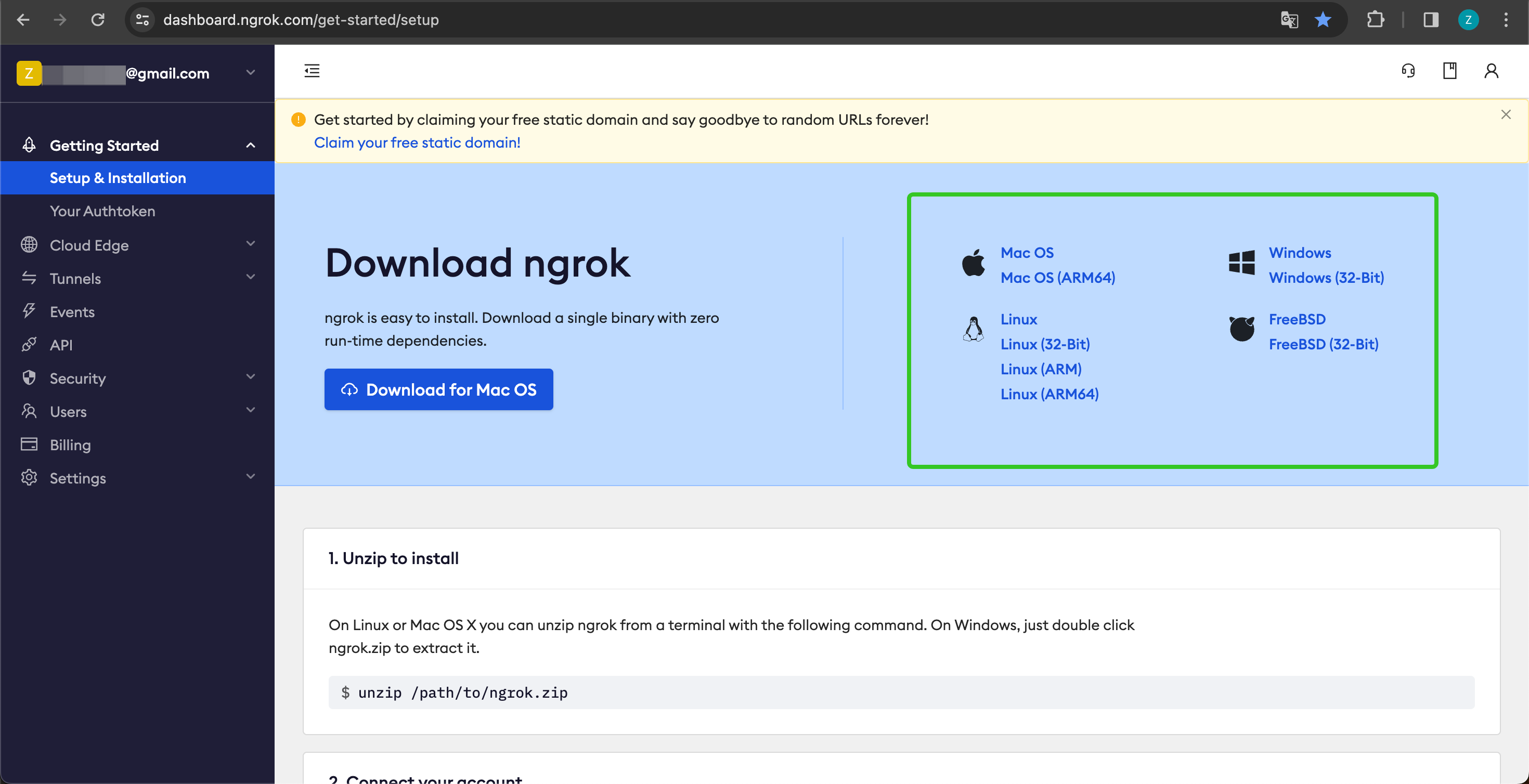
1. 进入 [https://ngrok.com](https://ngrok.com) 官网,注册并下载 Ngrok 文件。
|
||
|
||
|
||
|
||
2. 下载完成后,进入下载目录,根据下方说明解压压缩包,并执行说明中的初始化脚本。
|
||
```shell
|
||
unzip /path/to/ngrok.zip
|
||
./ngrok config add-authtoken 你的Token
|
||
```
|
||
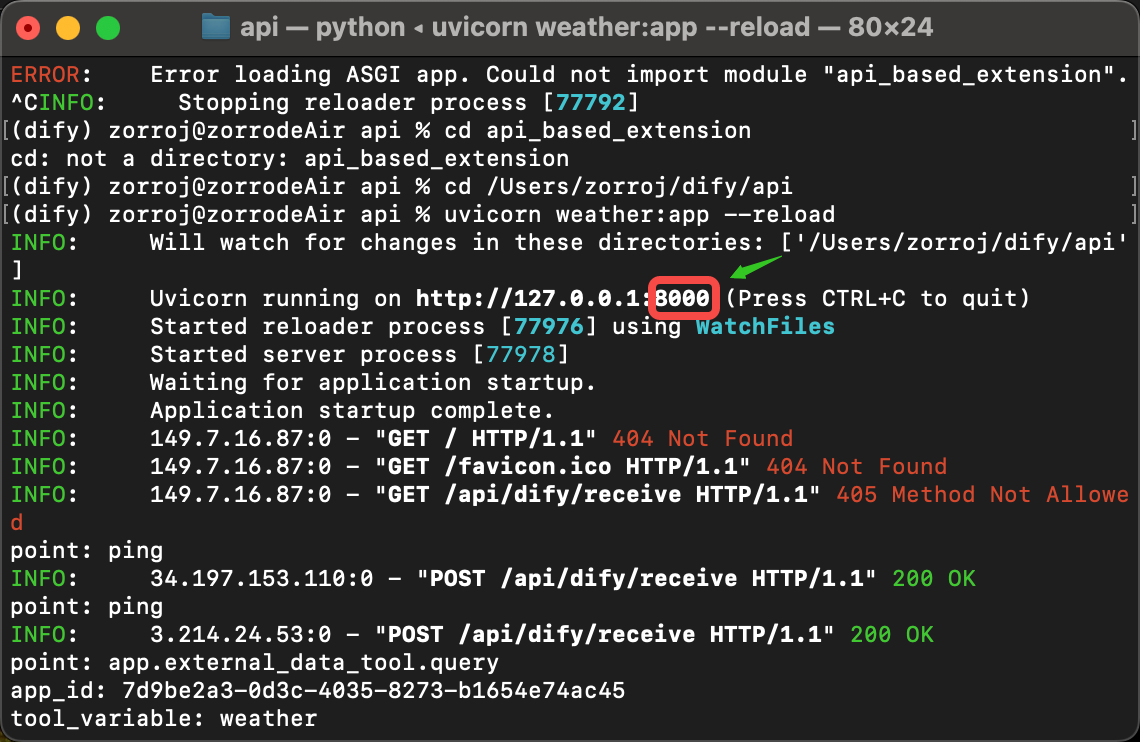
3. 查看本地 API 服务的端口:
|
||
|
||
|
||
|
||
并运行以下命令启动:
|
||
|
||
```shell
|
||
./ngrok http 端口号
|
||
```
|
||
|
||
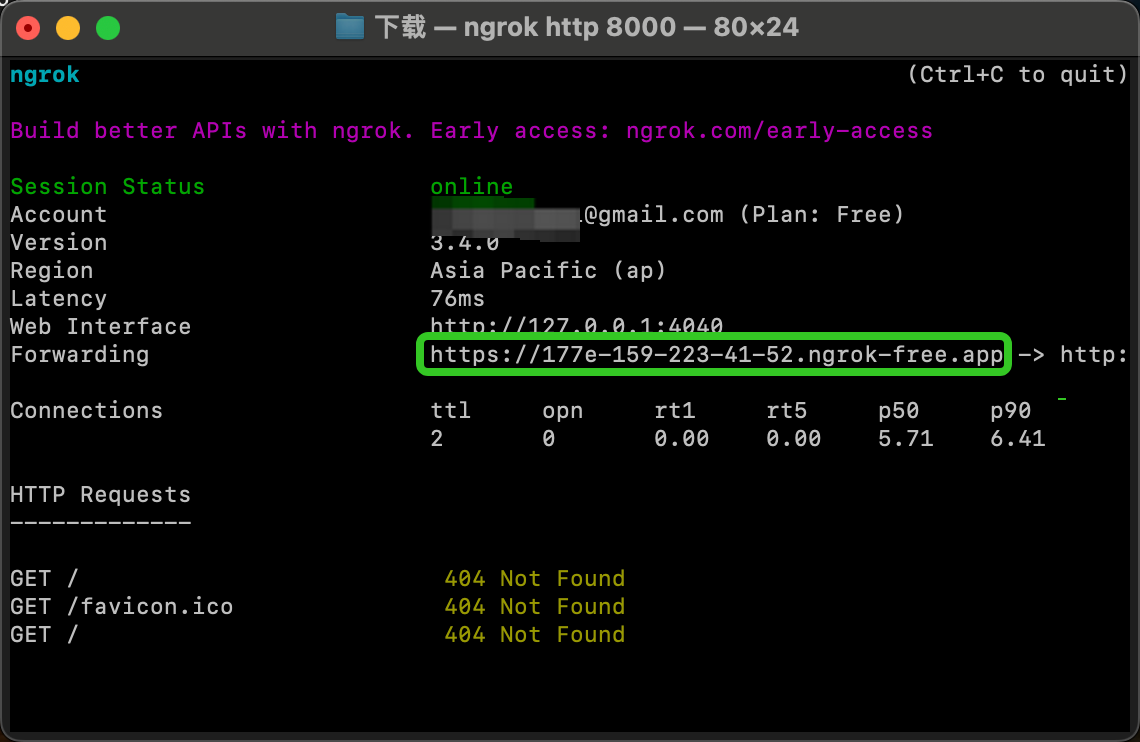
启动成功的样例如下:
|
||
|
||
|
||
|
||
4. 我们找到 Forwarding 中,如上图:`https://177e-159-223-41-52.ngrok-free.app`(此为示例域名,请替换为自己的)即为公网域名。
|
||
|
||
按照上述的范例,我们把本地已经启动的服务端点暴露出去,将代码范例接口:`http://127.0.0.1:8000/api/dify/receive` 替换为 `https://177e-159-223-41-52.ngrok-free.app/api/dify/receive`
|
||
|
||
此 API 端点即可公网访问。至此,我们即可在 Dify 配置该 API 端点进行本地调试代码,配置步骤请参考 [外部数据工具](/zh/use-dify/workspace/api-extension/external-data-tool-api-extension)。
|
||
|
||
## 使用 Cloudflare Workers 部署 API 扩展
|
||
|
||
我们推荐你使用 Cloudflare Workers 来部署你的 API 扩展,因为 Cloudflare Workers 可以方便的提供一个公网地址,而且可以免费使用。
|
||
|
||
详细说明请参考 [使用 Cloudflare Workers 部署 API 扩展](/zh/use-dify/workspace/api-extension/cloudflare-worker)。
|