mirror of
https://github.com/langgenius/dify-docs.git
synced 2026-03-27 13:28:32 +07:00

312 lines
16 KiB
Plaintext
312 lines
16 KiB
Plaintext
---
|
|
dimensions:
|
|
type:
|
|
primary: implementation
|
|
detail: high
|
|
level: beginner
|
|
standard_title: Extension Plugin
|
|
language: en
|
|
title: Extension Plugin
|
|
description: This document provides a complete tutorial for developing Extension type
|
|
plugins, detailing the entire process including environment preparation, project
|
|
creation, defining plugin request entry points, writing functional code, debugging,
|
|
packaging, and publishing. The example project is a Nyan Cat plugin that demonstrates
|
|
how to handle HTTP requests and provide web services through an Extension plugin.
|
|
---
|
|
|
|
This article will guide you through quickly developing an Extension type plugin to help you understand the basic plugin development process.
|
|
|
|
### Prerequisites
|
|
|
|
* Dify plugin scaffolding tool
|
|
* Python environment, version ≥ 3.12
|
|
|
|
For detailed instructions on preparing the plugin development scaffolding tool, please refer to [Initializing Development Tools](/plugin_dev_en/0221-initialize-development-tools.en).
|
|
|
|
### Creating a New Project
|
|
|
|
In the current path, run the scaffolding command line tool to create a new Dify plugin project.
|
|
|
|
```
|
|
./dify-plugin-darwin-arm64 plugin init
|
|
```
|
|
|
|
If you have renamed the binary file to `dify` and copied it to the `/usr/local/bin` path, you can run the following command to create a new plugin project:
|
|
|
|
```bash
|
|
dify plugin init
|
|
```
|
|
|
|
### **Filling in Plugin Information**
|
|
|
|
Follow the prompts to configure the plugin name, author information, and plugin description. If you are working collaboratively as a team, you can also enter an organization name as the author.
|
|
|
|
> The plugin name must be 1-128 characters long and can only contain letters, numbers, hyphens, and underscores.
|
|
|
|

|
|
|
|
Once completed, select Python as the plugin development language.
|
|
|
|

|
|
|
|
### 3. Select Plugin Type and Initialize Project Template
|
|
|
|
All templates in the scaffolding tool provide complete code projects. For demonstration purposes, this article will use the `Extension` type plugin template as an example. For developers already familiar with plugin development, templates are not necessary, and you can refer to the [interface documentation](/plugin_dev_en/0411-general-specifications.en) to guide the development of different types of plugins.
|
|
|
|
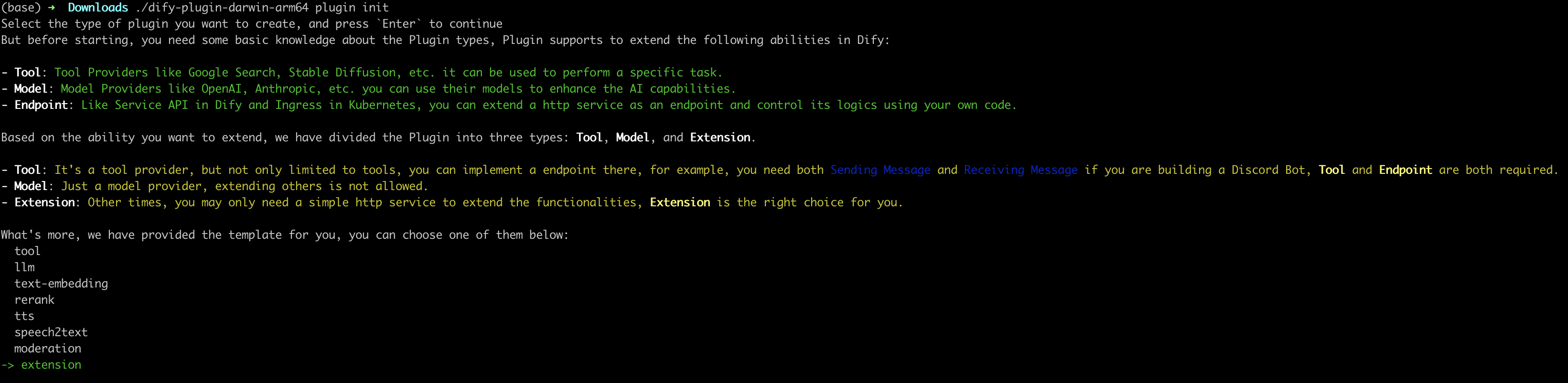
|
|
|
|
#### Configure Plugin Permissions
|
|
|
|
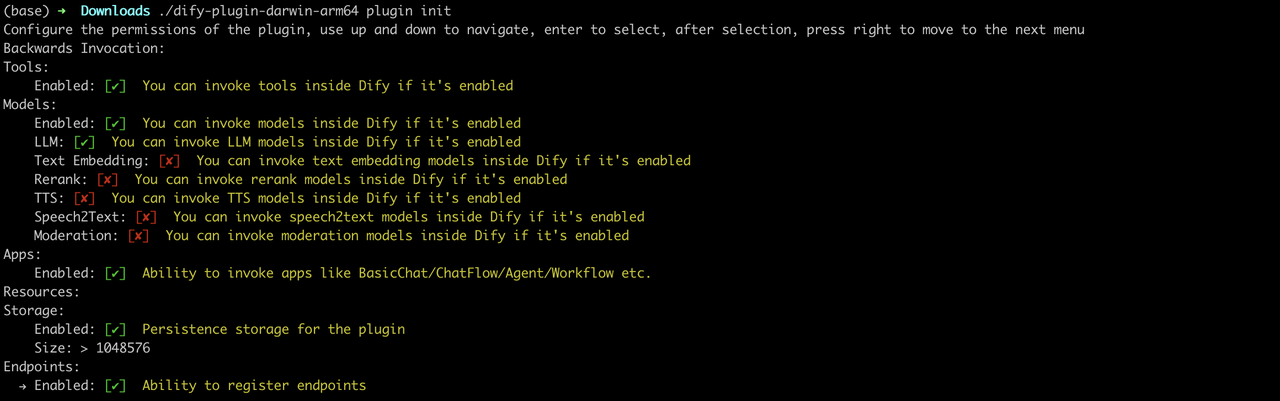
The plugin also needs permissions to read from the Dify main platform to connect properly. Grant the following permissions to this example plugin:
|
|
|
|
* Tools
|
|
* LLMs
|
|
* Apps
|
|
* Enable persistent storage Storage, allocate default size storage
|
|
* Allow registering Endpoints
|
|
|
|
> Use the arrow keys in the terminal to select permissions, and use the "Tab" button to grant permissions.
|
|
|
|
After checking all permission items, press Enter to complete the plugin creation. The system will automatically generate the plugin project code.
|
|
|
|
|
|
|
|
The basic file structure of the plugin includes the following:
|
|
|
|
```
|
|
.
|
|
├── GUIDE.md
|
|
├── README.md
|
|
├── _assets
|
|
│ └── icon.svg
|
|
├── endpoints
|
|
│ ├── your-project.py
|
|
│ └── your-project.yaml
|
|
├── group
|
|
│ └── your-project.yaml
|
|
├── main.py
|
|
├── manifest.yaml
|
|
└── requirements.txt
|
|
```
|
|
|
|
* `GUIDE.md` A short tutorial guiding you through the plugin writing process.
|
|
* `README.md` Brief introduction about the current plugin, where you need to fill in the introduction and usage instructions for the plugin.
|
|
* `_assets` Stores all multimedia files related to the current plugin.
|
|
* `endpoints` An `Extension` type plugin template created according to the CLI guidance, this directory stores all Endpoint implementation code.
|
|
* `group` Specifies the key type, multilingual settings, and the file path of the API definition.
|
|
* `main.py` The entry file for the entire project.
|
|
* `manifest.yaml` The basic configuration file for the entire plugin, containing configuration information such as what permissions the plugin needs and what type of extension it is.
|
|
* `requirements.txt` Stores Python environment dependencies.
|
|
|
|
### Developing the Plugin
|
|
|
|
#### 1. Define the Plugin's Request Entry Point (Endpoint)
|
|
|
|
Edit `endpoints/test_plugin.yaml`, referring to the following code for modification:
|
|
|
|
```yaml
|
|
path: "/neko"
|
|
method: "GET"
|
|
extra:
|
|
python:
|
|
source: "endpoints/test_plugin.py"
|
|
```
|
|
|
|
The intent of this code is to define the entry path for the plugin as `/neko`, with the request method as GET type. The plugin's functional implementation code is in the `endpoints/test_plugin.py` file.
|
|
|
|
#### 2. Write Plugin Functionality
|
|
|
|
Plugin functionality: Request service, output a Nyan Cat.
|
|
|
|
Write the plugin's functional implementation code in the `endpoints/test_plugin.py` file, referring to the following example code:
|
|
|
|
```python
|
|
from typing import Mapping
|
|
from werkzeug import Request, Response
|
|
from flask import Flask, render_template_string
|
|
from dify_plugin import Endpoint
|
|
|
|
app = Flask(__name__)
|
|
|
|
class NekoEndpoint(Endpoint):
|
|
def _invoke(self, r: Request, values: Mapping, settings: Mapping) -> Response:
|
|
ascii_art = '''
|
|
⬜️⬜️⬜️⬜️⬜️⬜️⬜️⬜️⬜️⬜️⬜️⬜️⬜️⬜️⬜️⬜️⬜️⬜️⬜️⬜️⬜️⬜️⬜️⬜️⬜️⬜️⬜️⬛️⬛️⬛️⬛️⬛️⬛️⬛️⬛️⬛️⬛️⬛️⬛️⬛️⬛️⬛️⬛⬛️⬜️⬜️⬜️⬜️⬜⬜️⬜️️
|
|
🟥🟥⬜️⬜️⬜️⬜️⬜️⬜️⬜️⬜️🟥🟥🟥🟥🟥🟥🟥🟥⬜️⬜️⬜️⬜️⬜️⬜️⬜️⬜️⬛🥧🥧🥧🥧🥧🥧🥧🥧🥧🥧🥧🥧🥧🥧🥧🥧🥧⬛️⬜️⬜️⬜️⬜️⬜⬜️️
|
|
🟥🟥🟥🟥🟥🟥🟥🟥🟥🟥🟥🟥🟥🟥🟥🟥🟥🟥🟥🟥🟥🟥🟥🟥🟥⬛️🥧🥧🥧💟💟💟💟💟💟💟💟💟💟💟💟💟🥧🥧🥧⬛️⬜️⬜️⬜️⬜⬜️️
|
|
🟥🟥🟥🟥🟥🟥🟥🟥🟥🟥🟥🟥🟥🟥🟥🟥🟥🟥🟥🟥🟥🟥🟥🟥🟥⬛️🥧🥧💟💟💟💟💟💟🍓💟💟🍓💟💟💟💟💟🥧🥧⬛️⬜️⬜️⬜️⬜️⬜️️
|
|
🟧🟧🟥🟥🟥🟥🟥🟥🟥🟥🟧🟧🟧🟧🟧🟧🟧🟧🟥🟥🟥🟥🟥🟥🟥⬛🥧💟💟🍓💟💟💟💟💟💟💟💟💟💟💟💟💟💟🥧⬛️⬜️⬜️⬜️⬜⬜️️
|
|
🟧🟧🟧🟧🟧🟧🟧🟧🟧🟧🟧🟧🟧🟧🟧🟧🟧🟧🟧🟧🟧🟧🟧🟧🟧⬛️🥧💟💟💟💟💟💟💟💟💟💟⬛️⬛️💟💟🍓💟💟🥧⬛️⬜️⬛️️⬛️️⬜⬜️️
|
|
🟧🟧🟧🟧🟧🟧🟧🟧🟧🟧🟧🟧🟧🟧🟧🟧🟧🟧🟧🟧🟧🟧🟧🟧🟧⬛️🥧💟💟💟💟💟💟💟💟💟⬛️🌫🌫⬛💟💟💟💟🥧⬛️⬛️🌫🌫⬛⬜️️
|
|
🟨🟨🟧🟧🟧🟧🟧🟧🟧🟧🟨🟨🟨🟨🟨🟨🟨🟨🟧⬛️⬛️⬛️⬛️🟧🟧⬛️🥧💟💟💟💟💟💟🍓💟💟⬛️🌫🌫🌫⬛💟💟💟🥧⬛️🌫🌫🌫⬛⬜️️
|
|
🟨🟨🟨🟨🟨🟨🟨🟨🟨🟨🟨🟨🟨🟨🟨🟨🟨🟨🟨⬛️🌫🌫⬛️⬛️🟧⬛️🥧💟💟💟💟💟💟💟💟💟⬛️🌫🌫🌫🌫⬛️⬛️⬛️⬛️🌫🌫🌫🌫⬛⬜️️
|
|
🟨🟨🟨🟨🟨🟨🟨🟨🟨🟨🟨🟨🟨🟨🟨🟨🟨🟨🟨⬛️⬛️🌫🌫⬛️⬛️⬛️🥧💟💟💟🍓💟💟💟💟💟⬛️🌫🌫🌫🌫🌫🌫🌫🌫🌫🌫🌫🌫⬛⬜️️
|
|
🟩🟩🟨🟨🟨🟨🟨🟨🟨🟨🟩🟩🟩🟩🟩🟩🟩🟩🟨🟨⬛⬛️🌫🌫⬛️⬛️🥧💟💟💟💟💟💟💟🍓⬛️🌫🌫🌫🌫🌫🌫🌫🌫🌫🌫🌫🌫🌫🌫⬛️
|
|
🟩🟩🟩🟩🟩🟩🟩🟩🟩🟩🟩🟩🟩🟩🟩🟩🟩🟩🟩🟩🟩⬛️⬛️🌫🌫⬛️🥧💟🍓💟💟💟💟💟💟⬛️🌫🌫🌫⬜️⬛️🌫🌫🌫🌫🌫⬜️⬛️🌫🌫⬛️
|
|
️🟩🟩🟩🟩🟩🟩🟩🟩🟩🟩🟩🟩🟩🟩🟩🟩🟩🟩🟩🟩🟩🟩⬛️⬛️⬛️⬛️🥧💟💟💟💟💟💟💟💟⬛️🌫🌫🌫⬛️⬛️🌫🌫🌫⬛️🌫⬛️⬛️🌫🌫⬛️
|
|
🟦🟦🟩🟩🟩🟩🟩🟩🟩🟩🟦🟦🟦🟦🟦🟦🟦🟦🟩🟩🟩🟩🟩🟩⬛️⬛️🥧💟💟💟💟💟🍓💟💟⬛🌫🟥🟥🌫🌫🌫🌫🌫🌫🌫🌫🌫🟥🟥⬛️
|
|
🟦🟦🟦🟦🟦🟦🟦🟦🟦🟦🟦🟦🟦🟦🟦🟦🟦🟦🟦🟦🟦🟦🟦🟦🟦⬛️🥧🥧💟🍓💟💟💟💟💟⬛️🌫🟥🟥🌫⬛️🌫🌫⬛️🌫🌫⬛️🌫🟥🟥⬛️
|
|
🟦🟦🟦🟦🟦🟦🟦🟦🟦🟦🟦🟦🟦🟦🟦🟦🟦🟦🟦🟦🟦🟦🟦🟦🟦⬛️🥧🥧🥧💟💟💟💟💟💟💟⬛️🌫🌫🌫⬛️⬛️⬛️⬛️⬛️⬛️⬛️🌫🌫⬛️⬜️
|
|
🟪🟪🟦🟦🟦🟦🟦🟦🟦🟦🟪🟪🟪🟪🟪🟪🟪🟪🟦🟦🟦🟦🟦🟦⬛️⬛️⬛️🥧🥧🥧🥧🥧🥧🥧🥧🥧🥧⬛️🌫🌫🌫🌫🌫🌫🌫🌫🌫🌫⬛️⬜️⬜️
|
|
🟪🟪🟪🟪🟪🟪🟪🟪🟪🟪🟪🟪🟪🟪🟪🟪🟪🟪🟪🟪🟪🟪🟪⬛️🌫🌫🌫⬛️⬛️⬛️⬛️⬛️⬛️⬛️⬛️⬛️⬛️⬛️⬛️⬛️⬛️⬛️⬛️⬛️⬛️⬛️⬛️⬛️⬜️⬜️⬜️
|
|
🟪🟪🟪🟪🟪🟪🟪🟪🟪🟪🟪🟪🟪🟪🟪🟪🟪🟪🟪🟪🟪🟪🟪⬛️🌫🌫⬛️⬛️⬜️⬛️🌫🌫⬛️⬜️⬜️⬜️⬜️⬜️⬛️🌫🌫⬛️⬜️⬛️🌫🌫⬛️⬜️⬜️⬜️⬜️
|
|
⬜️⬜️🟪🟪🟪🟪🟪🟪🟪🟪⬜️⬜️⬜️⬜️⬜️⬜️⬜️⬜️🟪🟪🟪🟪🟪⬛️⬛️⬛️⬛⬜️⬜️⬛️⬛️⬛️⬜️⬜️⬜️⬜️⬜️⬜️⬜️⬛️⬛️⬛️⬜️⬜️⬛️⬛️⬜️⬜️⬜️⬜️⬜️️
|
|
'''
|
|
ascii_art_lines = ascii_art.strip().split('\n')
|
|
with app.app_context():
|
|
return Response(render_template_string('''
|
|
<!DOCTYPE html>
|
|
<html>
|
|
<head>
|
|
<style>
|
|
body {
|
|
background-color: black;
|
|
color: white;
|
|
overflow: hidden;
|
|
margin: 0;
|
|
padding: 0;
|
|
}
|
|
#ascii-art {
|
|
font-family: monospace;
|
|
white-space: pre;
|
|
position: absolute;
|
|
top: 50%;
|
|
transform: translateY(-50%);
|
|
display: inline-block;
|
|
font-size: 16px;
|
|
line-height: 1;
|
|
}
|
|
</style>
|
|
</head>
|
|
<body>
|
|
<div id="ascii-art"></div>
|
|
<script>
|
|
var asciiArtLines = {{ ascii_art_lines | tojson }};
|
|
var asciiArtDiv = document.getElementById("ascii-art");
|
|
var index = 0;
|
|
function displayNextLine() {
|
|
if (index < asciiArtLines.length) {
|
|
var line = asciiArtLines[index];
|
|
var lineElement = document.createElement("div");
|
|
lineElement.innerHTML = line;
|
|
asciiArtDiv.appendChild(lineElement);
|
|
index++;
|
|
setTimeout(displayNextLine, 100);
|
|
} else {
|
|
animateCat();
|
|
}
|
|
}
|
|
function animateCat() {
|
|
var pos = 0;
|
|
var screenWidth = window.innerWidth;
|
|
var catWidth = asciiArtDiv.offsetWidth;
|
|
function move() {
|
|
asciiArtDiv.style.left = pos + "px";
|
|
pos += 2;
|
|
if (pos > screenWidth) {
|
|
pos = -catWidth;
|
|
}
|
|
requestAnimationFrame(move);
|
|
}
|
|
move();
|
|
}
|
|
displayNextLine();
|
|
</script>
|
|
</body>
|
|
</html>
|
|
''', ascii_art_lines=ascii_art_lines), status=200, content_type="text/html")
|
|
```
|
|
|
|
To run this code, you need to first install the following Python dependency packages:
|
|
|
|
```python
|
|
pip install werkzeug
|
|
pip install flask
|
|
pip install dify-plugin
|
|
```
|
|
|
|
### Debugging the Plugin
|
|
|
|
Next, you need to test whether the plugin can function properly. Dify provides a remote debugging method. Go to the "Plugin Management" page to obtain the debugging Key and remote server address.
|
|
|
|
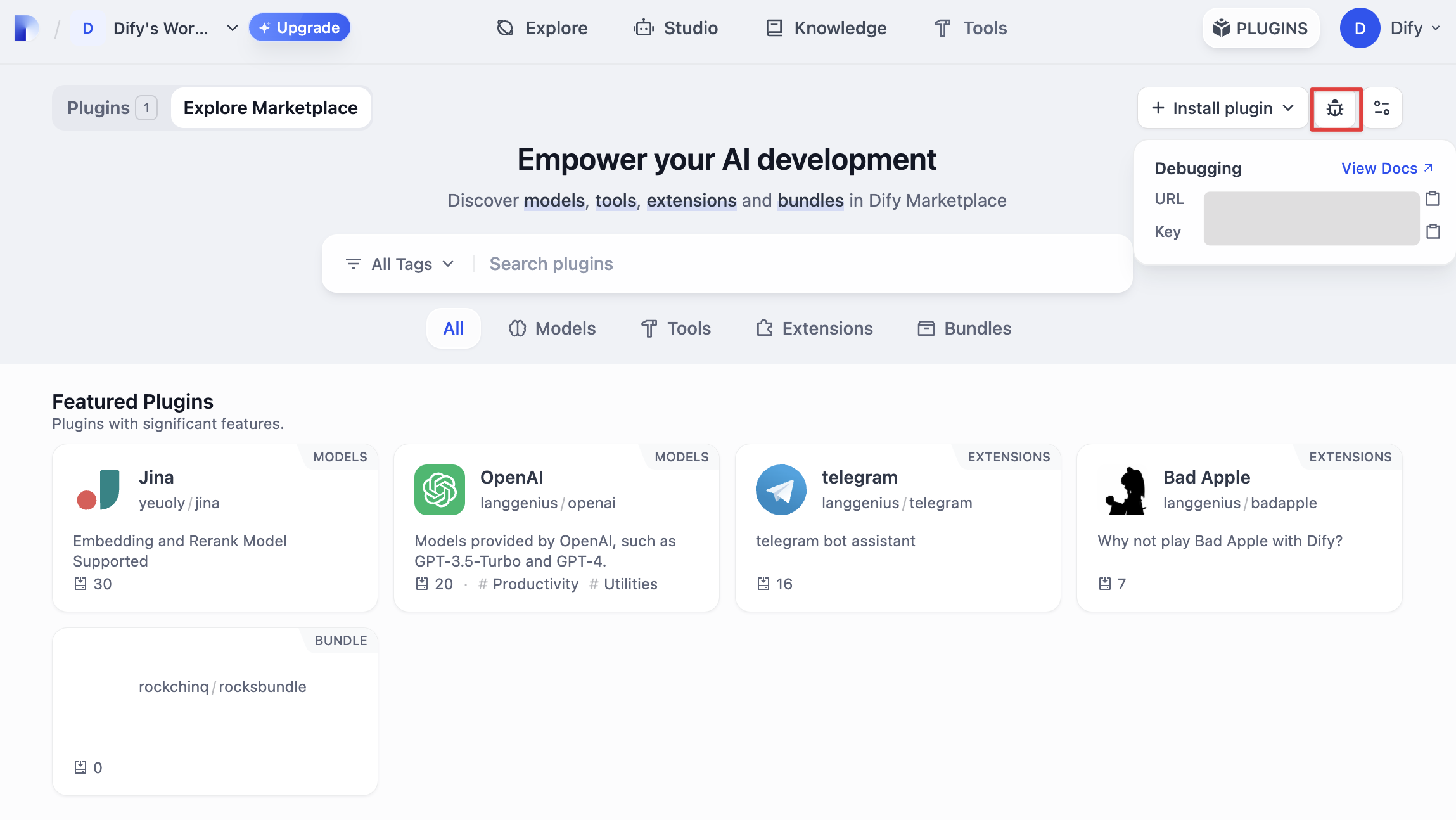
|
|
|
|
Return to the plugin project, copy the `.env.example` file and rename it to `.env`, then fill in the remote server address and debugging Key information you obtained.
|
|
|
|
`.env` file
|
|
|
|
```bash
|
|
INSTALL_METHOD=remote
|
|
REMOTE_INSTALL_HOST=remote
|
|
REMOTE_INSTALL_PORT=5003
|
|
REMOTE_INSTALL_KEY=****-****-****-****-****
|
|
```
|
|
|
|
Run the `python -m main` command to start the plugin. On the plugins page, you can see that the plugin has been installed in the Workspace. Other team members can also access the plugin.
|
|
|
|
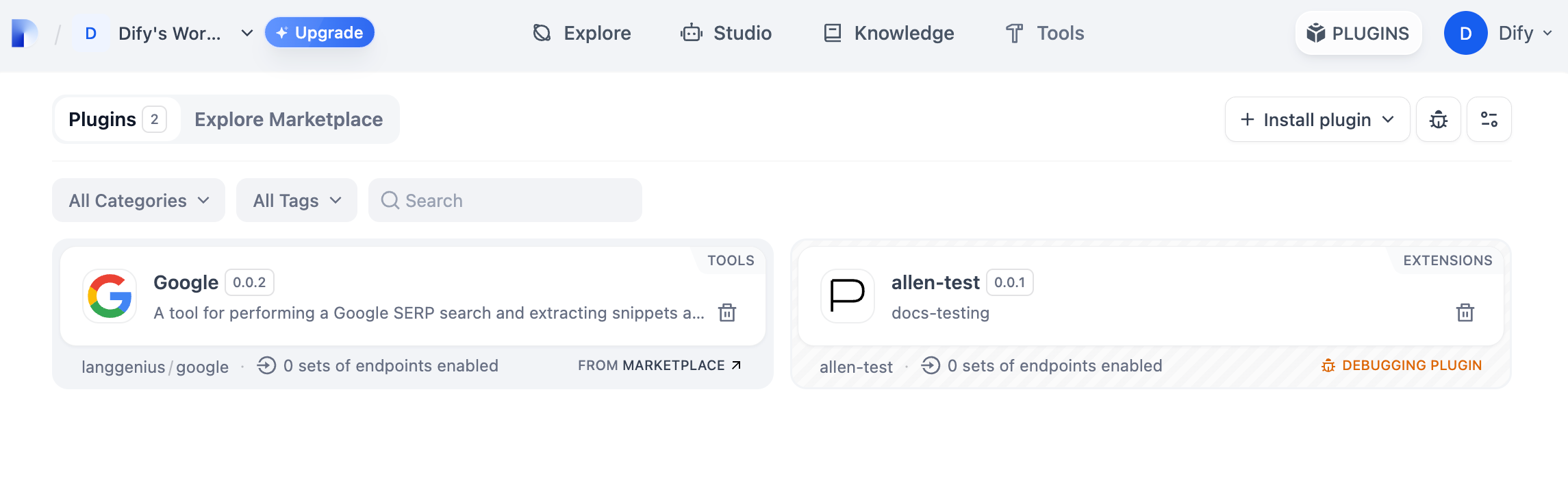
|
|
|
|
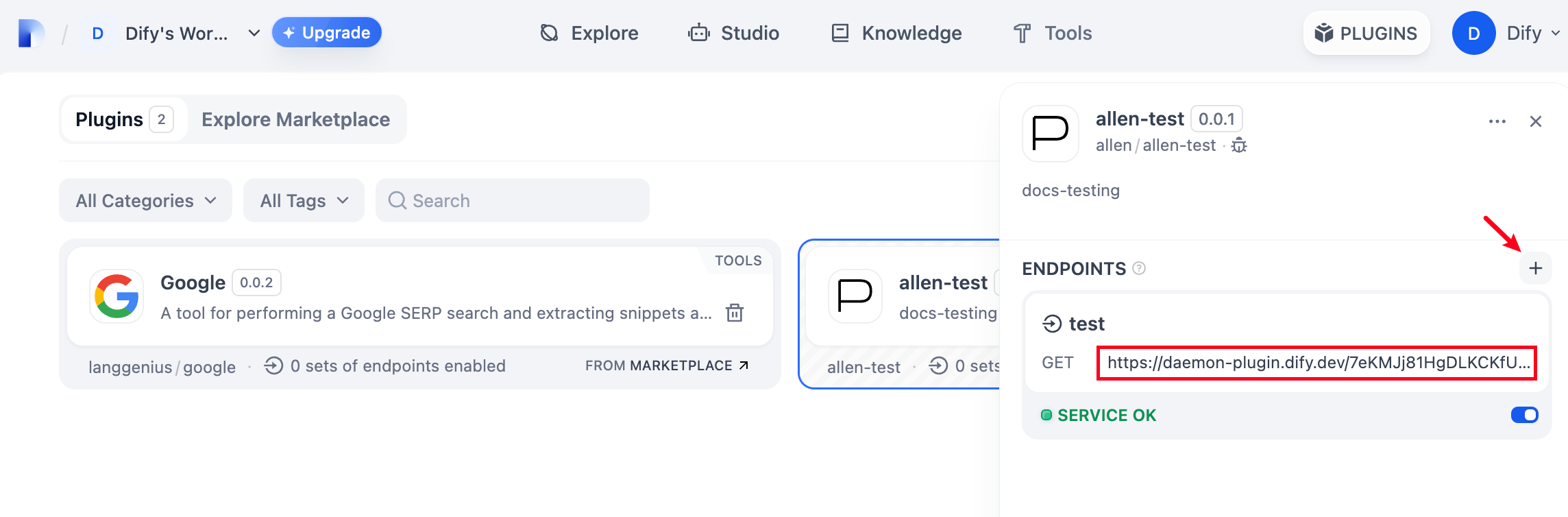
Add a new Endpoint in the plugin, fill in the name and `api_key` information as desired. Visit the automatically generated URL to see the web service provided by the plugin.
|
|
|
|
|
|
|
|
### Packaging the Plugin
|
|
|
|
After confirming that the plugin can run normally, you can package and name the plugin using the following command line tool. After running, you will discover a `neko.difypkg` file in the current folder, which is the final plugin package.
|
|
|
|
```bash
|
|
# Replace ./neko with the actual path of the plugin project
|
|
|
|
dify plugin package ./neko
|
|
```
|
|
|
|
Congratulations, you have completed the entire process of developing, testing, and packaging a plugin!
|
|
|
|
### Publishing the Plugin
|
|
|
|
Now you can upload it to the [Dify Plugins code repository](https://github.com/langgenius/dify-plugins) to publish your plugin! Before uploading, please ensure that your plugin follows the [plugin publishing specifications](/plugin_dev_en/0322-release-to-dify-marketplace.en). After the review is approved, the code will be merged into the main branch and automatically launched to the [Dify Marketplace](https://marketplace.dify.ai/).
|
|
|
|
### Explore More
|
|
|
|
**Quick Start:**
|
|
|
|
* [Tool Plugin: Google Search](/plugin_dev_en/0222-tool-plugin.en)
|
|
* [Model Plugin](/plugin_dev_en/0211-getting-started-new-model.en)
|
|
* [Bundle Plugin: Packaging Multiple Plugins](/plugin_dev_en/9241-bundle.en)
|
|
|
|
**Plugin Interface Documentation:**
|
|
|
|
* [Manifest](/plugin_dev_en/0411-general-specifications.en) Structure
|
|
* [Endpoint](/plugin_dev_en/0411-general-specifications.en) Detailed Definition
|
|
* [Reverse Invocation of Dify Capabilities](/plugin_dev_en/9241-reverse-invocation.en)
|
|
* [Tools](/plugin_dev_en/0411-tool.en)
|
|
* [Models](/plugin_dev_en/0412-model-schema.en)
|
|
* [Extending Agent Strategies](/plugin_dev_en/9232-agent.en)
|
|
|
|
**Best Practices:**
|
|
|
|
[Developing a Slack Bot Plugin](/plugin_dev_en/0432-develop-a-slack-bot-plugin.en)
|
|
|
|
{/*
|
|
Contributing Section
|
|
DO NOT edit this section!
|
|
It will be automatically generated by the script.
|
|
*/}
|
|
|
|
<CardGroup cols="2">
|
|
<Card
|
|
title="Edit this page"
|
|
icon="pen-to-square"
|
|
href="https://github.com/langgenius/dify-docs-mintlify/edit/main/plugin_dev_en/9231-extension-plugin.en.mdx"
|
|
>
|
|
Help improve our documentation by contributing directly
|
|
</Card>
|
|
<Card
|
|
title="Report an issue"
|
|
icon="github"
|
|
href="https://github.com/langgenius/dify-docs-mintlify/issues/new?title=Documentation%20Issue%3A%20extension-plugin&body=%23%23%20Issue%20Description%0A%3C%21--%20Please%20briefly%20describe%20the%20issue%20you%20found%20--%3E%0A%0A%23%23%20Page%20Link%0Ahttps%3A%2F%2Fgithub.com%2Flanggenius%2Fdify-docs-mintlify%2Fblob%2Fmain%2Fplugin_dev_en%2F9231-extension-plugin.en.mdx%0A%0A%23%23%20Suggested%20Changes%0A%3C%21--%20If%20you%20have%20specific%20suggestions%20for%20changes%2C%20please%20describe%20them%20here%20--%3E%0A%0A%3C%21--%20Thank%20you%20for%20helping%20improve%20our%20documentation%21%20--%3E"
|
|
>
|
|
Found an error or have suggestions? Let us know
|
|
</Card>
|
|
</CardGroup>
|