mirror of
https://github.com/langgenius/dify-docs.git
synced 2026-03-28 13:38:36 +07:00

308 lines
12 KiB
Plaintext
308 lines
12 KiB
Plaintext
---
|
||
title: 接入预定义模型
|
||
---
|
||
|
||
|
||
|
||
{/*
|
||
贡献者注意:
|
||
----------------
|
||
本文档为旧版文档,即将弃用。
|
||
请勿对此版本进行更改。
|
||
所有更新应指向新版本:
|
||
/plugin-dev-zh/0222-creating-new-model-provider-extra
|
||
*/}
|
||
|
||
<Card title="本文档即将弃用" icon="circle-exclamation" href="/plugin-dev-zh/0222-creating-new-model-provider-extra">
|
||
<p>作为我们文档重组的一部分,此页面正在逐步淘汰。</p>
|
||
|
||
<p><u><b>点击此卡片</b></u>跳转到包含最新信息的更新版本。</p>
|
||
|
||
<p>如果您在新的文档中发现任何差异或需要改进的地方,请使用页面底部的“报告问题”按钮。</p>
|
||
</Card>
|
||
|
||
请确保你已创建[模型供应商](create-model-providers),接入预定义模型大致分为以下步骤:
|
||
|
||
1. **按模型类型创建不同的模块结构**
|
||
|
||
根据模型的类型(如 `llm` 或 `text_embedding`),在供应商模块下创建相应的子模块。确保每种模型类型有独立的逻辑分层,便于维护和扩展。
|
||
2. **编写模型调用代码**
|
||
|
||
在对应的模型类型模块下,创建一个与模型类型同名的 Python 文件(例如 llm.py)。在文件中定义实现具体模型逻辑的类,该类应符合系统的模型接口规范。
|
||
3. **添加预定义模型配置**
|
||
|
||
如果供应商提供了预定义模型,为每个模型创建与模型名称同名的 `YAML` 文件(例如 `claude-3.5.yaml`)。按照 [AIModelEntity](../../../schema-definition/model/model-designing-rules#aimodelentity) 的规范编写文件内容,描述模型的参数和功能。
|
||
4. **测试插件**
|
||
|
||
为新增的供应商功能编写单元测试和集成测试,确保所有功能模块符合预期,并能够正常运行。
|
||
|
||
***
|
||
|
||
以下是接入详情:
|
||
|
||
### **1. 按模型类型创建不同的模块结构**
|
||
|
||
模型供应商下可能提供了不同的模型类型,例如 Openai 提供了 `llm` 或 `text_embedding` 等模型类型。需在供应商模块下创建相应的子模块,确保每种模型类型有独立的逻辑分层,便于维护和扩展。
|
||
|
||
当前支持模型类型如下:
|
||
|
||
* `llm` 文本生成模型
|
||
* `text_embedding` 文本 `Embedding` 模型
|
||
* `rerank` Rerank 模型
|
||
* `speech2text` 语音转文字
|
||
* `tts` 文字转语音
|
||
* `moderation` 审查
|
||
|
||
以 `Anthropic` 为例,系列模型内仅包含 LLM 类型模型,因此仅需在 `/models` 路径下新建 `/llm` 文件夹,并新增不同型号模型的 yaml 文件。详细代码结构请参考 [GitHub 代码仓库](https://github.com/langgenius/dify-official-plugins/tree/main/models/anthropic/models/llm)。
|
||
|
||
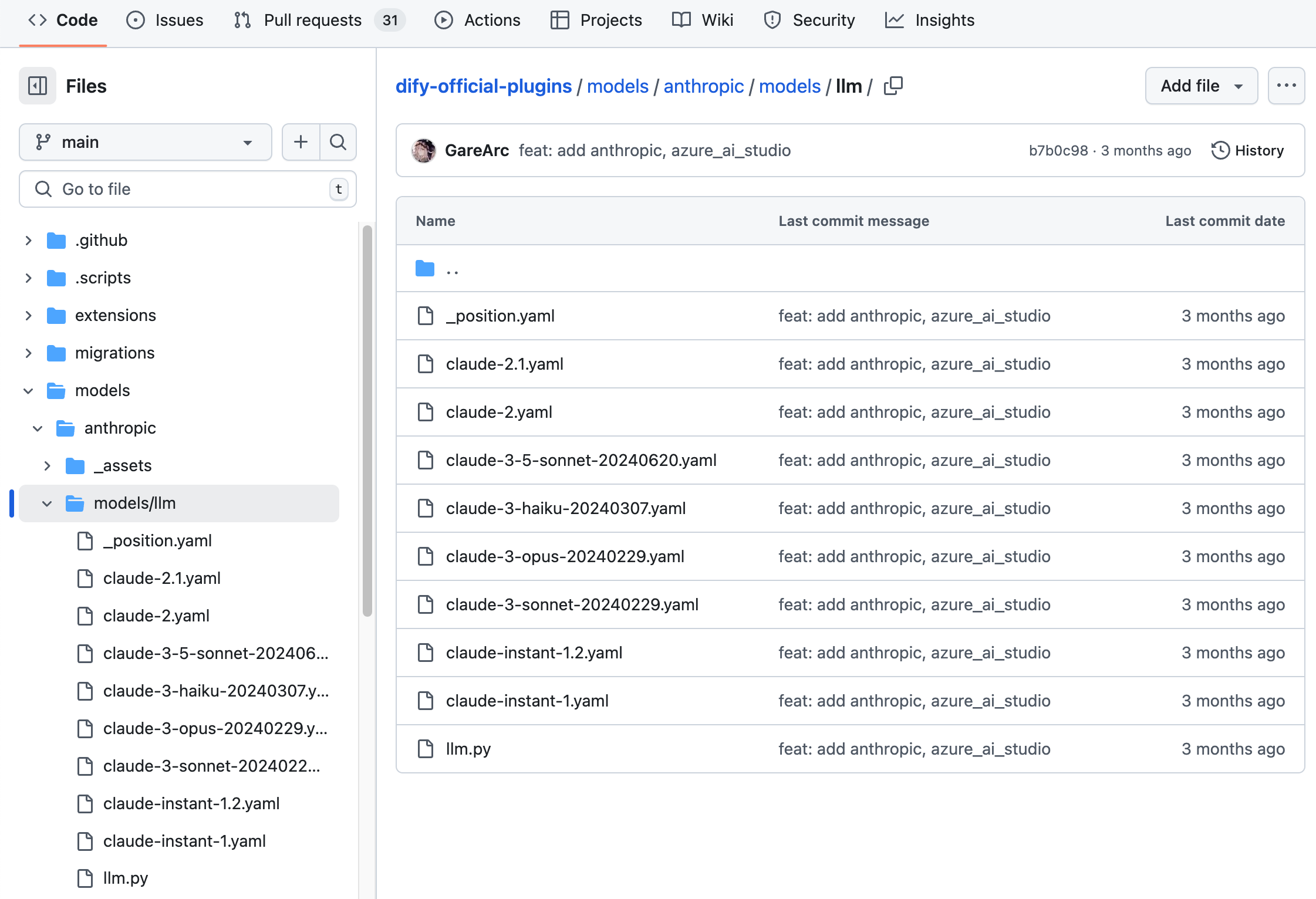
|
||
|
||
```bash
|
||
├── models
|
||
│ └── llm
|
||
│ ├── _position.yaml
|
||
│ ├── claude-2.1.yaml
|
||
│ ├── claude-2.yaml
|
||
│ ├── claude-3-5-sonnet-20240620.yaml
|
||
│ ├── claude-3-haiku-20240307.yaml
|
||
│ ├── claude-3-opus-20240229.yaml
|
||
│ ├── claude-3-sonnet-20240229.yaml
|
||
│ ├── claude-instant-1.2.yaml
|
||
│ ├── claude-instant-1.yaml
|
||
│ └── llm.py
|
||
```
|
||
|
||
若模型供应商内包含多种类型的大模型,例如 `OpenAI` 家族模型下包含 `llm` 和 `text_embedding` ,`moderation`,`speech2text`,`tts` 类模型,则需要在 `/models` 路径下为每种类型创建对应的文件夹。结构如下:
|
||
|
||
```bash
|
||
├── models
|
||
│ ├── common_openai.py
|
||
│ ├── llm
|
||
│ │ ├── _position.yaml
|
||
│ │ ├── chatgpt-4o-latest.yaml
|
||
│ │ ├── gpt-3.5-turbo.yaml
|
||
│ │ ├── gpt-4-0125-preview.yaml
|
||
│ │ ├── gpt-4-turbo.yaml
|
||
│ │ ├── gpt-4o.yaml
|
||
│ │ ├── llm.py
|
||
│ │ ├── o1-preview.yaml
|
||
│ │ └── text-davinci-003.yaml
|
||
│ ├── moderation
|
||
│ │ ├── moderation.py
|
||
│ │ └── text-moderation-stable.yaml
|
||
│ ├── speech2text
|
||
│ │ ├── speech2text.py
|
||
│ │ └── whisper-1.yaml
|
||
│ ├── text_embedding
|
||
│ │ ├── text-embedding-3-large.yaml
|
||
│ │ └── text_embedding.py
|
||
│ └── tts
|
||
│ ├── tts-1-hd.yaml
|
||
│ ├── tts-1.yaml
|
||
│ └── tts.py
|
||
```
|
||
|
||
建议将所有模型配置都准备完毕后再开始模型代码的实现,完整的 YAML 规则请参考[模型设计规则](../../../schema-definition/model/model-designing-rules)。如需查看更多代码详情,请参考示例 [GitHub 代码仓库](https://github.com/langgenius/dify-official-plugins/tree/main/models)。
|
||
|
||
### 2. **编写模型调用代码**
|
||
|
||
接下来需要在 `/models` 路径下创建 `llm.py` 代码文件。以 `Anthropic` 为例,在 `llm.py` 中创建一个 Anthropic LLM 类并取名为 `AnthropicLargeLanguageModel`,继承 `__base.large_language_model.LargeLanguageModel` 基类。
|
||
|
||
以下是部分功能的示例代码:
|
||
|
||
* **LLM 调用**
|
||
|
||
请求 LLM 的核心方法,同时支持流式和同步返回。
|
||
|
||
```python
|
||
def _invoke(self, model: str, credentials: dict,
|
||
prompt_messages: list[PromptMessage], model_parameters: dict,
|
||
tools: Optional[list[PromptMessageTool]] = None, stop: Optional[list[str]] = None,
|
||
stream: bool = True, user: Optional[str] = None) \
|
||
-> Union[LLMResult, Generator]:
|
||
"""
|
||
Invoke large language model
|
||
|
||
:param model: model name
|
||
:param credentials: model credentials
|
||
:param prompt_messages: prompt messages
|
||
:param model_parameters: model parameters
|
||
:param tools: tools for tool calling
|
||
:param stop: stop words
|
||
:param stream: is stream response
|
||
:param user: unique user id
|
||
:return: full response or stream response chunk generator result
|
||
"""
|
||
```
|
||
|
||
在实现时,需要注意使用两个函数来分别处理同步返回和流式返回。这是因为 Python 中含有 `yield` 关键字的函数会被识别为生成器函数,其返回类型固定为 `Generator`。为了保证逻辑清晰并适应不同返回需求,同步返回和流式返回需要独立实现。
|
||
|
||
以下是示例代码(示例中参数进行了简化,实际实现时请根据完整参数列表编写):
|
||
|
||
```python
|
||
def _invoke(self, stream: bool, **kwargs) -> Union[LLMResult, Generator]:
|
||
"""根据返回类型调用对应的处理函数。"""
|
||
if stream:
|
||
return self._handle_stream_response(**kwargs)
|
||
return self._handle_sync_response(**kwargs)
|
||
|
||
def _handle_stream_response(self, **kwargs) -> Generator:
|
||
"""处理流式返回逻辑。"""
|
||
for chunk in response: # 假设 response 是流式数据迭代器
|
||
yield chunk
|
||
|
||
def _handle_sync_response(self, **kwargs) -> LLMResult:
|
||
"""处理同步返回逻辑。"""
|
||
return LLMResult(**response) # 假设 response 是完整的响应字典
|
||
```
|
||
|
||
* **预计算输入 tokens 数**
|
||
|
||
如果模型未提供预计算 tokens 的接口,可以直接返回 0,用于表明该功能不适用或未实现。例如:
|
||
|
||
```python
|
||
def get_num_tokens(self, model: str, credentials: dict, prompt_messages: list[PromptMessage],
|
||
tools: Optional[list[PromptMessageTool]] = None) -> int:
|
||
"""
|
||
Get number of tokens for given prompt messages
|
||
|
||
:param model: model name
|
||
:param credentials: model credentials
|
||
:param prompt_messages: prompt messages
|
||
:param tools: tools for tool calling
|
||
:return:
|
||
"""
|
||
```
|
||
|
||
* **调用异常错误映射表**
|
||
|
||
当模型调用异常时需要映射到 Runtime 指定的 `InvokeError` 类型,方便 Dify 针对不同错误做不同后续处理。
|
||
|
||
Runtime Errors:
|
||
|
||
* `InvokeConnectionError` 调用连接错误
|
||
* `InvokeServerUnavailableError` 调用服务方不可用
|
||
* `InvokeRateLimitError` 调用达到限额
|
||
* `InvokeAuthorizationError` 调用鉴权失败
|
||
* `InvokeBadRequestError` 调用传参有误
|
||
|
||
```python
|
||
@property
|
||
def _invoke_error_mapping(self) -> dict[type[InvokeError], list[type[Exception]]]:
|
||
"""
|
||
Map model invoke error to unified error
|
||
The key is the error type thrown to the caller
|
||
The value is the error type thrown by the model,
|
||
which needs to be converted into a unified error type for the caller.
|
||
|
||
:return: Invoke error mapping
|
||
"""
|
||
```
|
||
|
||
完整代码详情请参考 [GitHub 代码仓库](https://github.com/langgenius/dify-official-plugins/blob/main/models/anthropic/models/llm/llm.py)。
|
||
|
||
### **3. 添加预定义模型配置**
|
||
|
||
如果供应商提供了预定义模型,为每个模型创建与模型名称同名的 `YAML` 文件(例`如 claude-3.5.yaml`)。按照 [AIModelEntity](../../../schema-definition/model/model-designing-rules#aimodelentity) 的规范编写文件内容,描述模型的参数和功能。
|
||
|
||
`claude-3-5-sonnet-20240620` 模型示例代码:
|
||
|
||
```yaml
|
||
model: claude-3-5-sonnet-20240620
|
||
label:
|
||
en_US: claude-3-5-sonnet-20240620
|
||
model_type: llm
|
||
features:
|
||
- agent-thought
|
||
- vision
|
||
- tool-call
|
||
- stream-tool-call
|
||
- document
|
||
model_properties:
|
||
mode: chat
|
||
context_size: 200000
|
||
parameter_rules:
|
||
- name: temperature
|
||
use_template: temperature
|
||
- name: top_p
|
||
use_template: top_p
|
||
- name: top_k
|
||
label:
|
||
zh_Hans: 取样数量
|
||
en_US: Top k
|
||
type: int
|
||
help:
|
||
zh_Hans: 仅从每个后续标记的前 K 个选项中采样。
|
||
en_US: Only sample from the top K options for each subsequent token.
|
||
required: false
|
||
- name: max_tokens
|
||
use_template: max_tokens
|
||
required: true
|
||
default: 8192
|
||
min: 1
|
||
max: 8192
|
||
- name: response_format
|
||
use_template: response_format
|
||
pricing:
|
||
input: '3.00'
|
||
output: '15.00'
|
||
unit: '0.000001'
|
||
currency: USD
|
||
```
|
||
|
||
### 4. 调试插件
|
||
|
||
接下来需测试插件是否可以正常运行。Dify 提供远程调试方式,前往“插件管理”页获取调试 Key 和远程服务器地址。
|
||
|
||
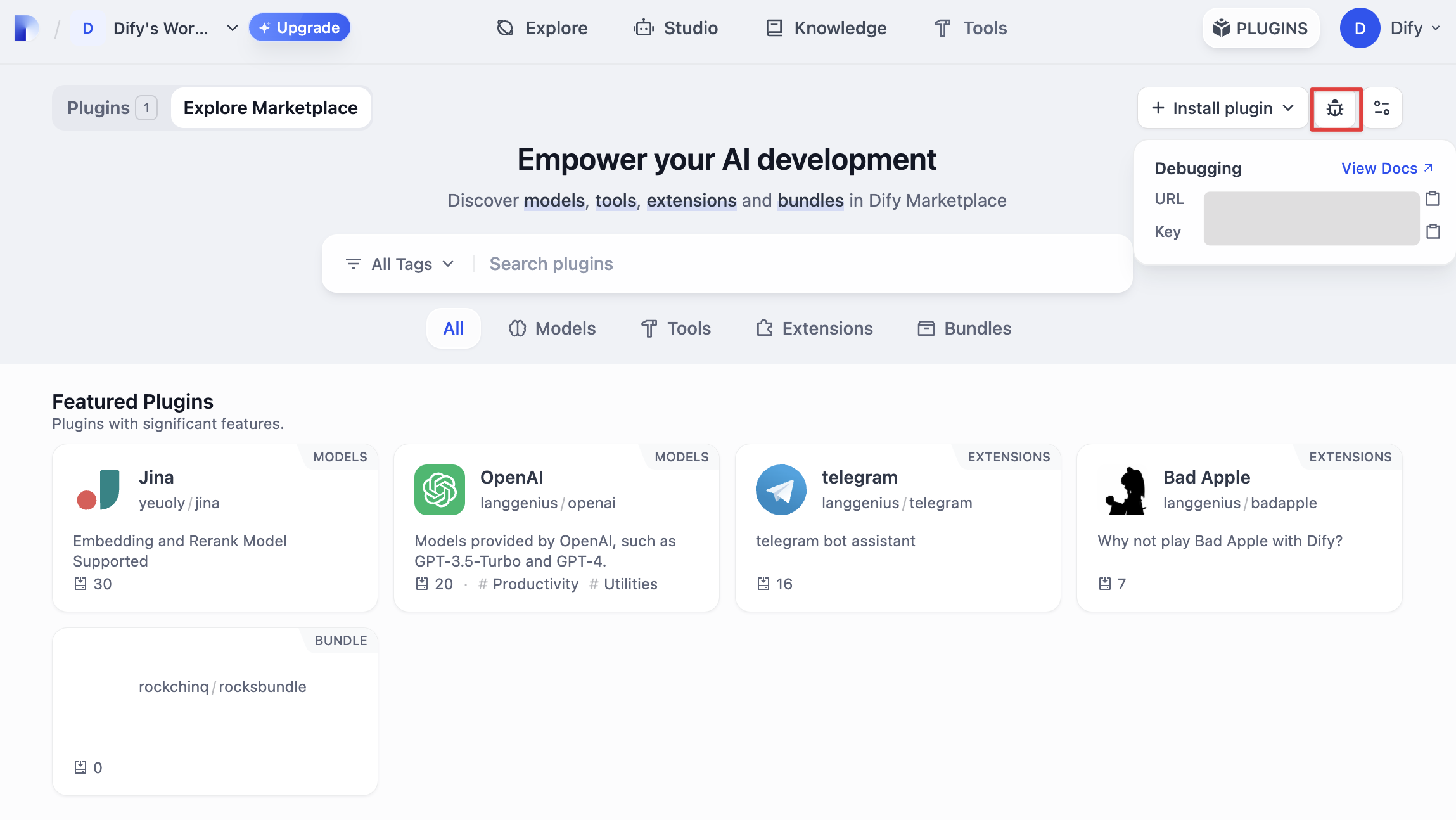
|
||
|
||
回到插件项目,拷贝 `.env.example` 文件并重命名为 `.env`,将获取的远程服务器地址和调试 Key 等信息填入其中。
|
||
|
||
`.env` 文件
|
||
|
||
```bash
|
||
INSTALL_METHOD=remote
|
||
REMOTE_INSTALL_HOST=remote-url
|
||
REMOTE_INSTALL_PORT=5003
|
||
REMOTE_INSTALL_KEY=****-****-****-****-****
|
||
```
|
||
|
||
运行 `python -m main` 命令启动插件。在插件页即可看到该插件已被安装至 Workspace 内。其他团队成员也可以访问该插件。
|
||
|
||
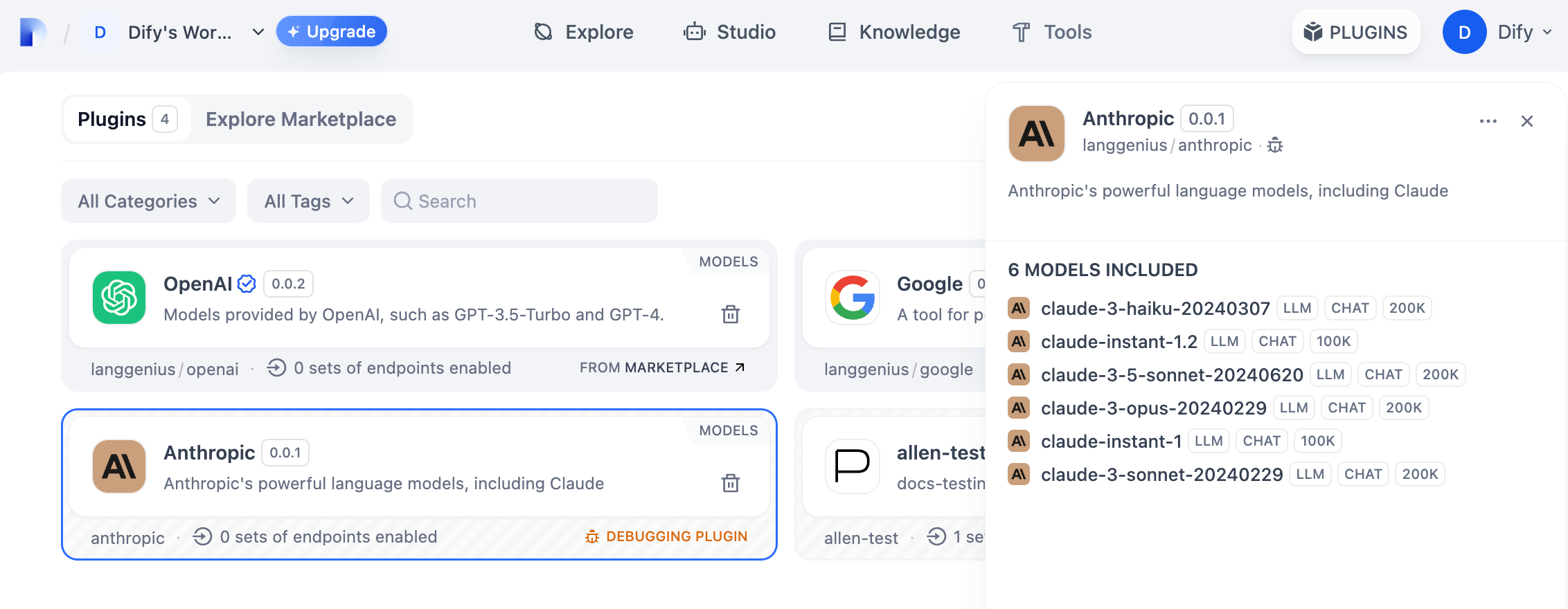
|
||
|
||
你可以在“设置” → “模型供应商”输入 API Key 以初始化该模型供应商。
|
||
|
||
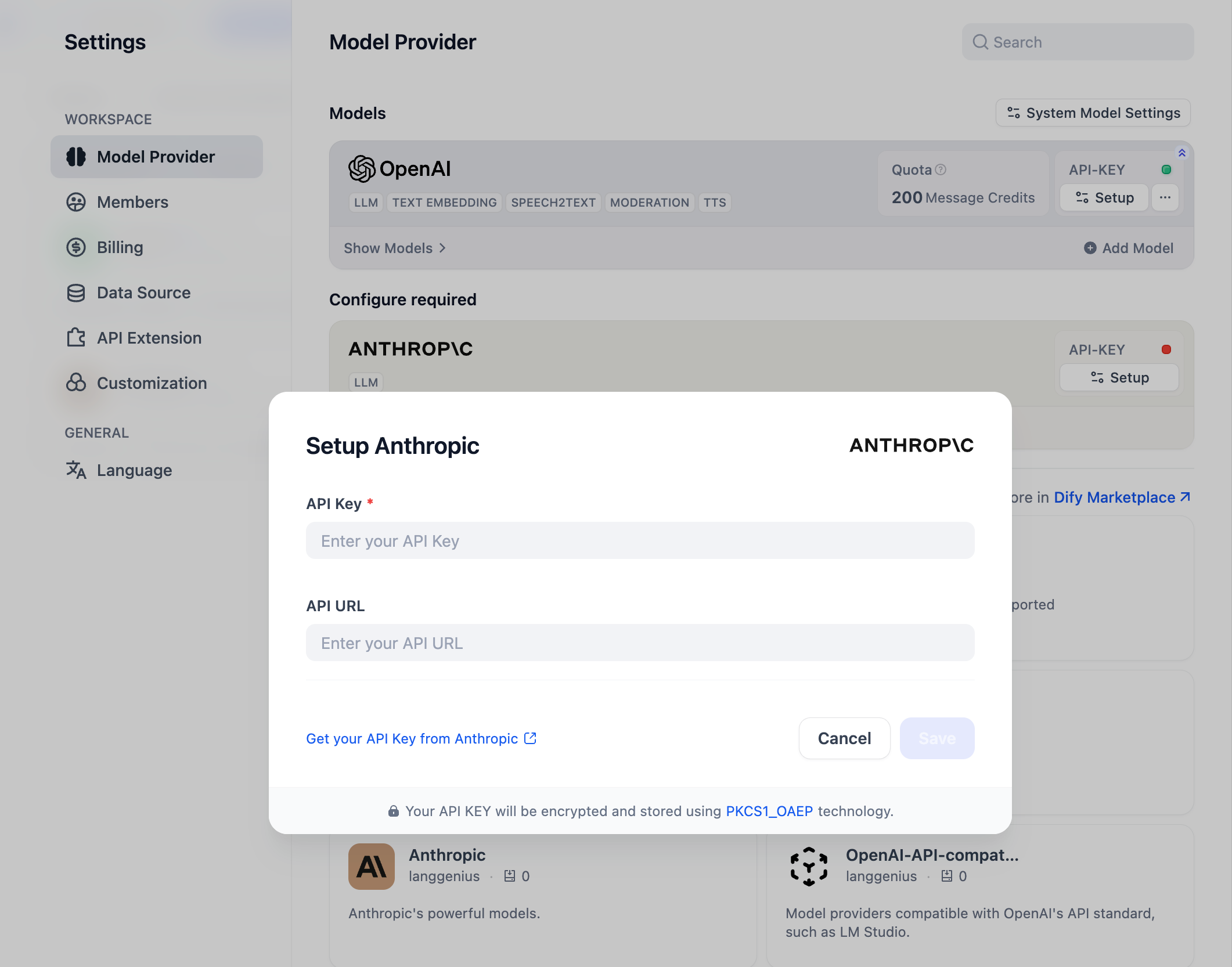
|
||
|
||
### 发布插件
|
||
|
||
现在可以将它上传至 [Dify Plugins 代码仓库](https://github.com/langgenius/dify-plugins) 来发布你的插件了!上传前,请确保你的插件遵循了[插件发布规范](https://docs.dify.ai/zh-hans/plugins/publish-plugins/publish-to-dify-marketplace)。审核通过后,代码将合并至主分支并自动上线至 [Dify Marketplace](https://marketplace.dify.ai/)。
|
||
|
||
### 探索更多
|
||
|
||
**快速开始:**
|
||
|
||
* [开发 Extension 类型插件](../extension-plugin)
|
||
* [开发 Model 类型插件](./)
|
||
* [Bundle 类型插件:将多个插件打包](../bundle)
|
||
|
||
**插件接口文档:**
|
||
|
||
* [Manifest](../../../schema-definition/manifest) 结构
|
||
* [Endpoint](../../../schema-definition/endpoint) 详细定义
|
||
* [反向调用 Dify 能力](../../../schema-definition/reverse-invocation-of-the-dify-service/)
|
||
* [工具](../../../schema-definition/tool)
|
||
* [模型](../../../schema-definition/model/)
|
||
|
||
{/*
|
||
Contributing Section
|
||
DO NOT edit this section!
|
||
It will be automatically generated by the script.
|
||
*/}
|
||
|
||
---
|
||
|
||
[编辑此页面](https://github.com/langgenius/dify-docs/edit/main/zh-hans/plugins/quick-start/develop-plugins/model-plugin/integrate-the-predefined-model.mdx) | [提交问题](https://github.com/langgenius/dify-docs/issues/new?template=docs.yml)
|
||
|