mirror of
https://github.com/langgenius/dify-docs.git
synced 2026-03-28 13:38:36 +07:00

71 lines
2.6 KiB
Plaintext
71 lines
2.6 KiB
Plaintext
---
|
|
title: Template
|
|
---
|
|
|
|
Template lets you dynamically format and combine variables from previous nodes into a single text-based output using Jinja2, a powerful templating syntax for Python. It's useful for combining data from multiple sources into a specific structure required by subsequent nodes. The simple example below shows how to assemble an article by piecing together various previous outputs:
|
|
|
|
<img src="https://assets-docs.dify.ai/2025/04/0838bb5c7e1d1a58ed30fcd9fc48920f.png" width="300" />
|
|
|
|
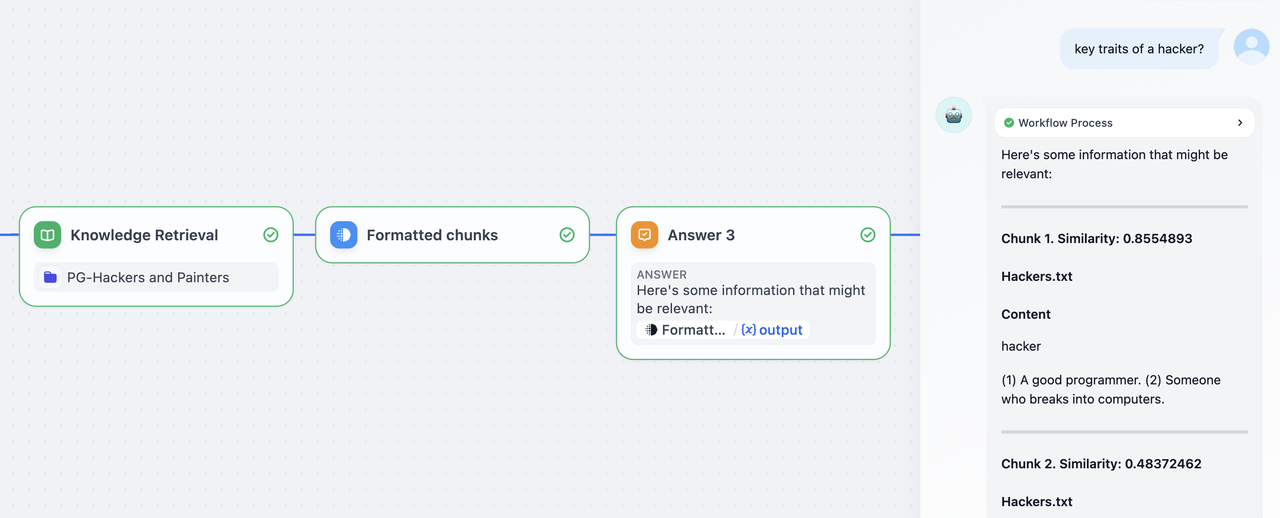
Beyond naive use cases, you can create more complex templates as per Jinja's [documentation](https://jinja.palletsprojects.com/en/3.1.x/templates/) for a variety of tasks. Here's one template that structures retrieved chunks and their relevant metadata from a knowledge retrieval node into a formatted markdown:
|
|
|
|
```Plain
|
|
{% for item in chunks %}
|
|
### Chunk {{ loop.index }}.
|
|
### Similarity: {{ item.metadata.score | default('N/A') }}
|
|
|
|
#### {{ item.title }}
|
|
|
|
##### Content
|
|
{{ item.content | replace('\n', '\n\n') }}
|
|
|
|
---
|
|
{% endfor %}
|
|
```
|
|
|
|
|
|
|
|
This template node can then be used within a Chatflow to return intermediate outputs to the end user, before a LLM response is initiated.
|
|
|
|
> The `Answer` node in a Chatflow is non-terminal. It can be inserted anywhere to output responses at multiple points within the flow.
|
|
|
|
Example: Support for rendering HTML forms:
|
|
|
|
```html
|
|
<form data-format="json"> // Default to text
|
|
<label for="username">Username:</label>
|
|
<input type="text" name="username" />
|
|
<label for="password">Password:</label>
|
|
<input type="password" name="password" />
|
|
<label for="content">Content:</label>
|
|
<textarea name="content"></textarea>
|
|
<label for="date">Date:</label>
|
|
<input type="date" name="date" />
|
|
<label for="time">Time:</label>
|
|
<input type="time" name="time" />
|
|
<label for="datetime">Datetime:</label>
|
|
<input type="datetime" name="datetime" />
|
|
<label for="select">Select:</label>
|
|
<input type="select" name="select" data-options='["hello","world"]'/>
|
|
<input type="checkbox" name="check" data-tip="By checking this means you agreed"/>
|
|
<button data-size="small" data-variant="primary">Login</button>
|
|
</form>
|
|
```
|
|
|
|
<img
|
|
src="https://assets-docs.dify.ai/2025/04/9d24e9cfa3cdde00e4eee15bd4bbea76.png"
|
|
width="300"
|
|
className="mx-auto"
|
|
alt="metadata_field"
|
|
/>
|
|
|
|
{/*
|
|
Contributing Section
|
|
DO NOT edit this section!
|
|
It will be automatically generated by the script.
|
|
*/}
|
|
|
|
---
|
|
|
|
[Edit this page](https://github.com/langgenius/dify-docs/edit/main/en/guides/workflow/node/template.mdx) | [Report an issue](https://github.com/langgenius/dify-docs/issues/new?template=docs.yml)
|
|
|