mirror of
https://github.com/langgenius/dify-docs.git
synced 2026-03-28 13:38:36 +07:00

69 lines
3.6 KiB
Plaintext
69 lines
3.6 KiB
Plaintext
---
|
|
title: Question Classifier
|
|
---
|
|
|
|
|
|
### 1. Definition
|
|
|
|
By defining classification descriptions, the issue classifier can infer and match user inputs to the corresponding categories and output the classification results.
|
|
|
|
***
|
|
|
|
### 2. Scenarios
|
|
|
|
Common use cases include **customer service conversation intent classification, product review classification, and bulk email classification**.
|
|
|
|
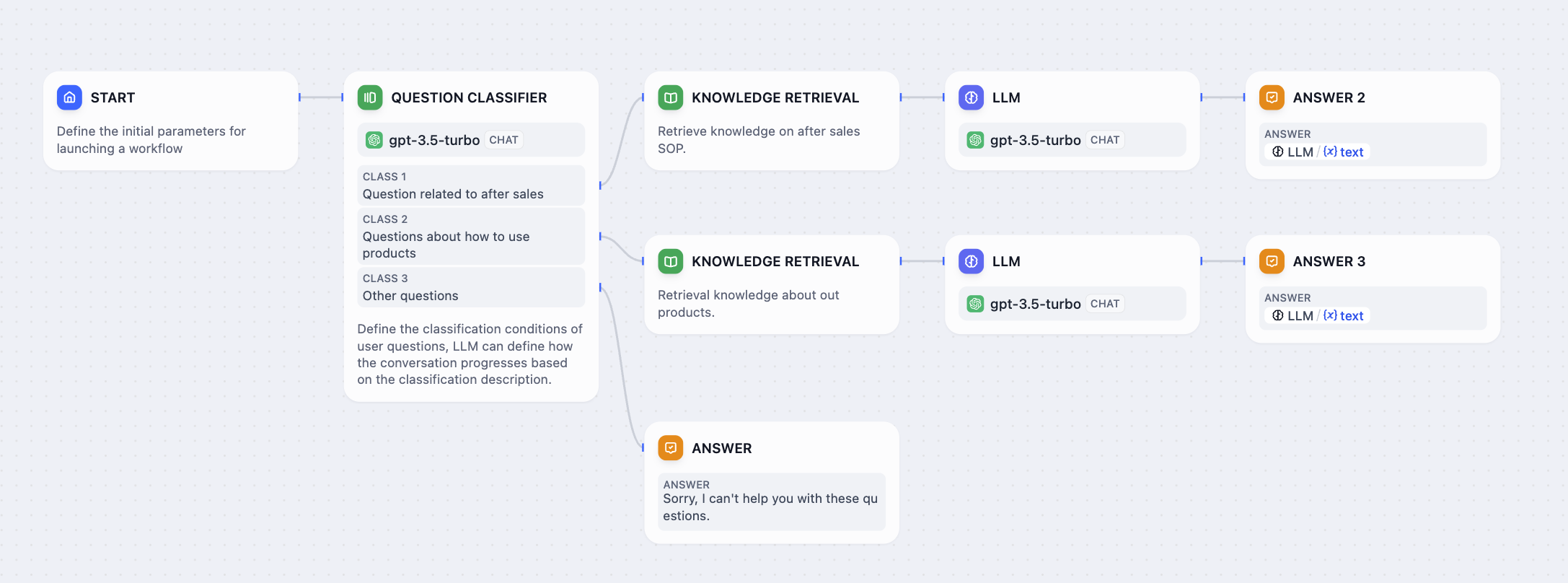
In a typical product customer service Q\&A scenario, the issue classifier can serve as a preliminary step before knowledge base retrieval. It classifies the user's input question, directing it to different downstream knowledge base queries to accurately respond to the user's question.
|
|
|
|
The following diagram is an example workflow template for a product customer service scenario:
|
|
|
|
|
|
|
|
In this scenario, we set up three classification labels/descriptions:
|
|
|
|
* Category 1: **Questions related to after-sales service**
|
|
* Category 2: **Questions related to product usage**
|
|
* Category 3: **Other questions**
|
|
|
|
When users input different questions, the issue classifier will automatically classify them based on the set classification labels/descriptions:
|
|
|
|
* "**How to set up contacts on iPhone 14?**" —> "**Questions related to product usage**"
|
|
* "**What is the warranty period?**" —> "**Questions related to after-sales service**"
|
|
* "**How's the weather today?**" —> "**Other questions**"
|
|
|
|
***
|
|
|
|
### 3. How to Configure
|
|
|
|
|
|
|
|
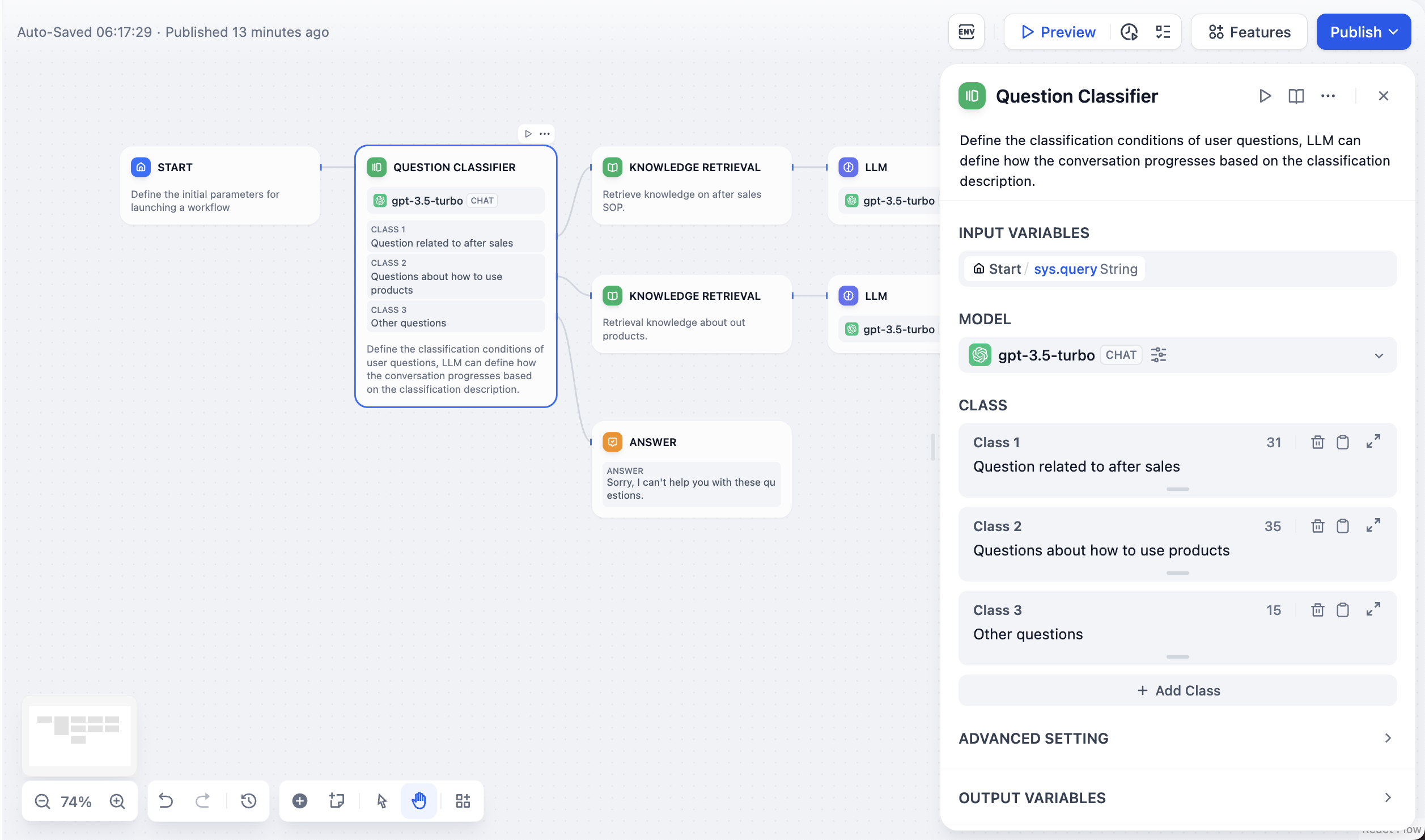
**Configuration Steps:**
|
|
|
|
1. **Select Input Variable**: This refers to the content to be classified, usually the user's question in a customer service Q\&A scenario, e.g., `sys.query`.
|
|
2. **Choose Inference Model**: The issue classifier leverages the natural language classification and inference capabilities of large language models. Selecting an appropriate model can enhance classification effectiveness.
|
|
3. **Write Classification Labels/Descriptions**: You can manually add multiple classifications by writing keywords or descriptive statements for each category, helping the large language model better understand the classification criteria.
|
|
4. **Choose Corresponding Downstream Nodes**: After classification, the issue classification node can direct the flow to different paths based on the relationship between the classification and downstream nodes.
|
|
|
|
#### Advanced Settings:
|
|
|
|
**Instructions**: In **Advanced Settings - Instructions**, you can add supplementary instructions, such as more detailed classification criteria, to enhance the classifier's capabilities.
|
|
|
|
**Memory**: When enabled, each input to the issue classifier will include chat history from the conversation to help the LLM understand the context and improve question comprehension in interactive dialogues.
|
|
|
|
**Memory Window**: When the memory window is closed, the system dynamically filters the amount of chat history passed based on the model's context window; when open, users can precisely control the amount of chat history passed (in terms of numbers).
|
|
|
|
**Output Variable**:
|
|
|
|
`class_name` stores the classification output label. You can reference this classification result in downstream nodes when needed.
|
|
|
|
{/*
|
|
Contributing Section
|
|
DO NOT edit this section!
|
|
It will be automatically generated by the script.
|
|
*/}
|
|
|
|
---
|
|
|
|
[Edit this page](https://github.com/langgenius/dify-docs/edit/main/en/guides/workflow/node/question-classifier.mdx) | [Report an issue](https://github.com/langgenius/dify-docs/issues/new?template=docs.yml)
|
|
|