mirror of
https://github.com/langgenius/dify-docs.git
synced 2026-03-28 13:38:36 +07:00
 5f57303221
- Add checkbox (boolean) and object input types to start node documentation
- Update conversation variables to support boolean and array[boolean] types
- Add boolean-specific operators (is/is not) to if/else node documentation
- Add array[boolean] operators (contains/not contains/empty checks) to if/else node
- Update all three languages: English, Chinese (zh-hans), and Japanese (ja-jp)

This change aligns with the core data type expansion PRD for Boolean & Object support.

🤖 Generated with [Claude Code](https://claude.ai/code)

Co-Authored-By: Claude <noreply@anthropic.com>
71 lines
2.9 KiB
Plaintext
71 lines
2.9 KiB
Plaintext
---
|
|
title: Conditional Branch IF/ELSE
|
|
---
|
|
|
|
### Definition
|
|
|
|
Allows you to split the workflow into two branches based on if/else conditions.
|
|
|
|
A conditional branching node has three parts:
|
|
|
|
* IF Condition: Select a variable, set the condition, and specify the value that satisfies the condition.
|
|
* IF condition evaluates to `True`, execute the IF path.
|
|
* IF condition evaluates to `False`, execute the ELSE path.
|
|
* If the ELIF condition evaluates to `True`, execute the ELIF path;
|
|
* If the ELIF condition evaluates to `False`, continue to evaluate the next ELIF path or execute the final ELSE path.
|
|
|
|
**Condition Types**
|
|
|
|
The available condition types depend on the variable's data type:
|
|
|
|
**For String/Number/Object variables:**
|
|
* Contains
|
|
* Not contains
|
|
* Starts with
|
|
* Ends with
|
|
* Is
|
|
* Is not
|
|
* Is empty
|
|
* Is not empty
|
|
|
|
**For Boolean variables:**
|
|
* Is (True/False)
|
|
* Is not (True/False)
|
|
|
|
**For Array[Boolean] variables:**
|
|
* Contains (True/False)
|
|
* Not contains (True/False)
|
|
* Is empty
|
|
* Is not empty
|
|
|
|
***
|
|
|
|
### Scenario
|
|
|
|
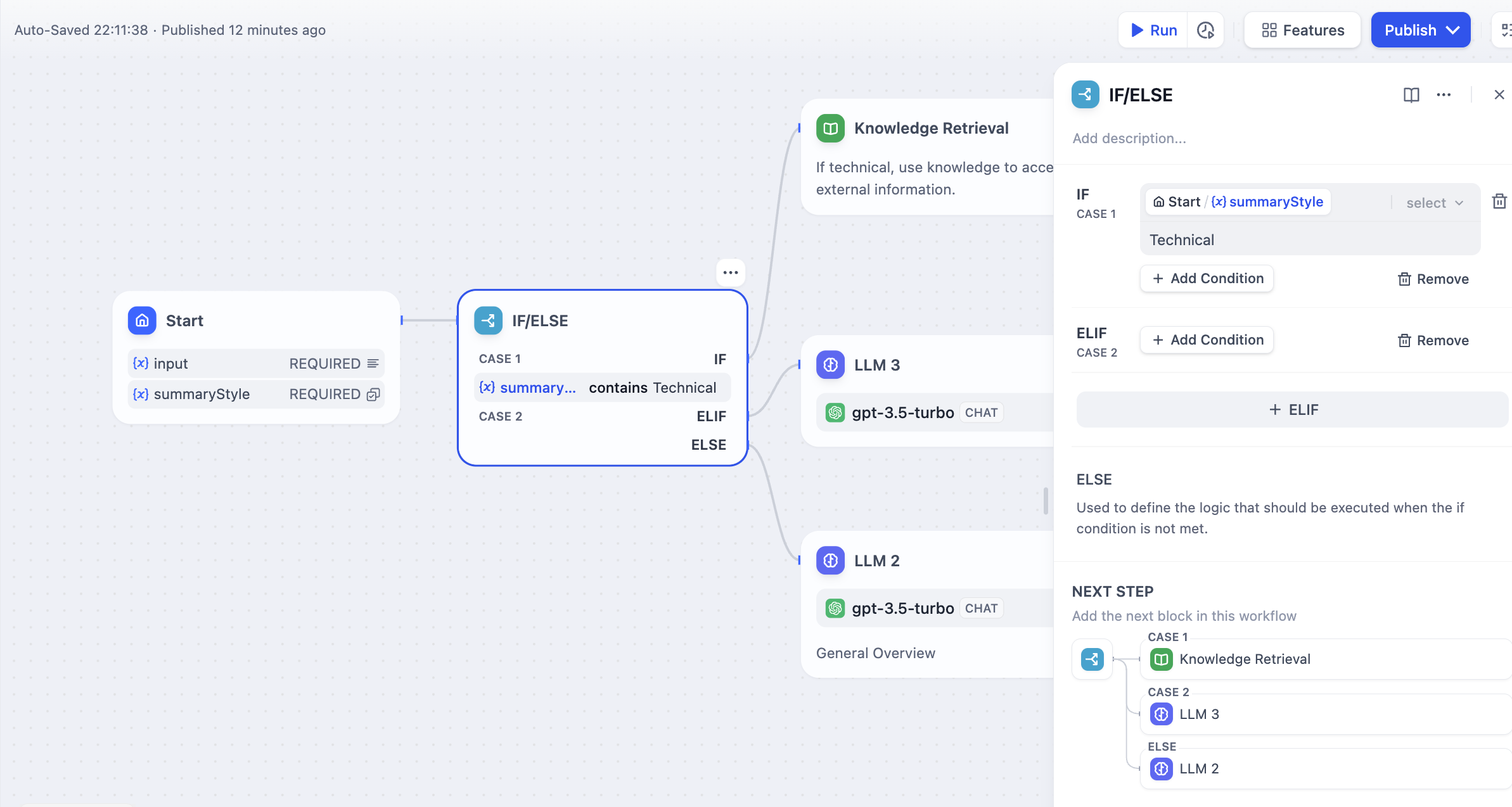
|
|
|
|
Taking the above **Text Summary Workflow** as an example:
|
|
|
|
* IF Condition: Select the `summarystyle` variable from the start node, with the condition **Contains** `technical`.
|
|
* IF condition evaluates to `True`, follow the IF path by querying technology-related knowledge through the knowledge retrieval node, then respond via the LLM node (as shown in the upper half of the diagram);
|
|
* IF condition evaluates to `False`, but an `ELIF` condition is added, where the input for the `summarystyle` variable **does not include** `technology`, yet the `ELIF` condition includes `science`, check if the condition in `ELIF` is `True`, then execute the steps defined within that path;
|
|
* If the condition within `ELIF` is `False`, meaning the input variable contains neither `technology` nor `science`, continue to evaluate the next `ELIF` condition or execute the final `ELSE` path;
|
|
* IF condition evaluates to `False`, i.e., the `summarystyle` variable input **does not contain** `technical`, execute the ELSE path, responding via the LLM2 node (lower part of the diagram).
|
|
|
|
**Multiple Condition Judgments**
|
|
|
|
For complex condition judgments, you can set multiple condition judgments and configure **AND** or **OR** between conditions to take the **intersection** or **union** of the conditions, respectively.
|
|
|
|
<img src="https://assets-docs.dify.ai/dify-enterprise-mintlify/en/guides/workflow/node/0b71ee7363e07298348e0c81e63481b0.png" alt="Multiple Condition Judgments" width="369" />
|
|
|
|
{/*
|
|
Contributing Section
|
|
DO NOT edit this section!
|
|
It will be automatically generated by the script.
|
|
*/}
|
|
|
|
---
|
|
|
|
[Edit this page](https://github.com/langgenius/dify-docs/edit/main/en/guides/workflow/node/ifelse.mdx) | [Report an issue](https://github.com/langgenius/dify-docs/issues/new?template=docs.yml)
|
|
|