mirror of
https://github.com/langgenius/dify-docs.git
synced 2026-03-28 13:38:36 +07:00

79 lines
2.4 KiB
Plaintext
79 lines
2.4 KiB
Plaintext
---
|
|
title: Integrate Local Models Deployed by GPUStack
|
|
---
|
|
|
|
[GPUStack](https://github.com/gpustack/gpustack) is an open-source GPU cluster manager for running AI models.
|
|
|
|
Dify allows integration with GPUStack for local deployment of large language model inference, embedding, reranking, speech to text and text to speech to capabilities.
|
|
|
|
## Deploying GPUStack
|
|
|
|
You can refer to the official [Documentation](https://docs.gpustack.ai) for deployment, or quickly integrate following the steps below:
|
|
|
|
### Linux or MacOS
|
|
|
|
GPUStack provides a script to install it as a service on systemd or launchd based systems. To install GPUStack using this method, just run:
|
|
|
|
```bash
|
|
curl -sfL https://get.gpustack.ai | sh -s -
|
|
```
|
|
|
|
### Windows
|
|
|
|
Run PowerShell as administrator (**avoid** using PowerShell ISE), then run the following command to install GPUStack:
|
|
|
|
```powershell
|
|
Invoke-Expression (Invoke-WebRequest -Uri "https://get.gpustack.ai" -UseBasicParsing).Content
|
|
```
|
|
|
|
Then you can follow the printed instructions to access the GPUStack UI.
|
|
|
|
## Deploying LLM
|
|
|
|
Using a LLM hosted on GPUStack as an example:
|
|
|
|
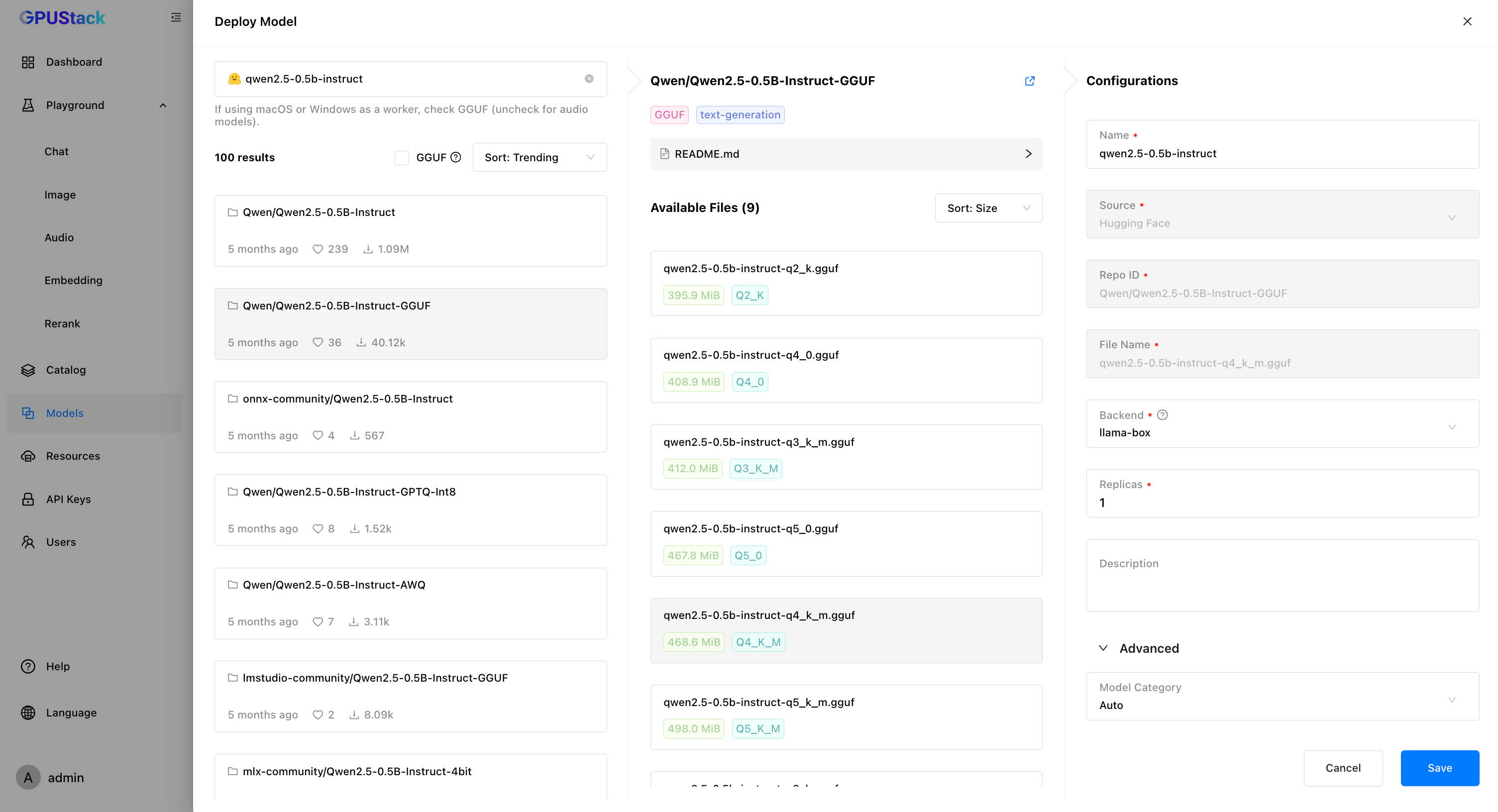
1. In GPUStack UI, navigate to the "Models" page and click on "Deploy Model", choose `Hugging Face` from the dropdown.
|
|
|
|
2. Use the search bar in the top left to search for the model name `Qwen/Qwen2.5-0.5B-Instruct-GGUF`.
|
|
|
|
3. Click `Save` to deploy the model.
|
|
|
|
|
|
|
|
## Create an API Key
|
|
|
|
1. Navigate to the "API Keys" page and click on "New API Key".
|
|
|
|
2. Fill in the name, then click `Save`.
|
|
|
|
3. Copy the API key and save it for later use.
|
|
|
|
## Integrating GPUStack into Dify
|
|
|
|
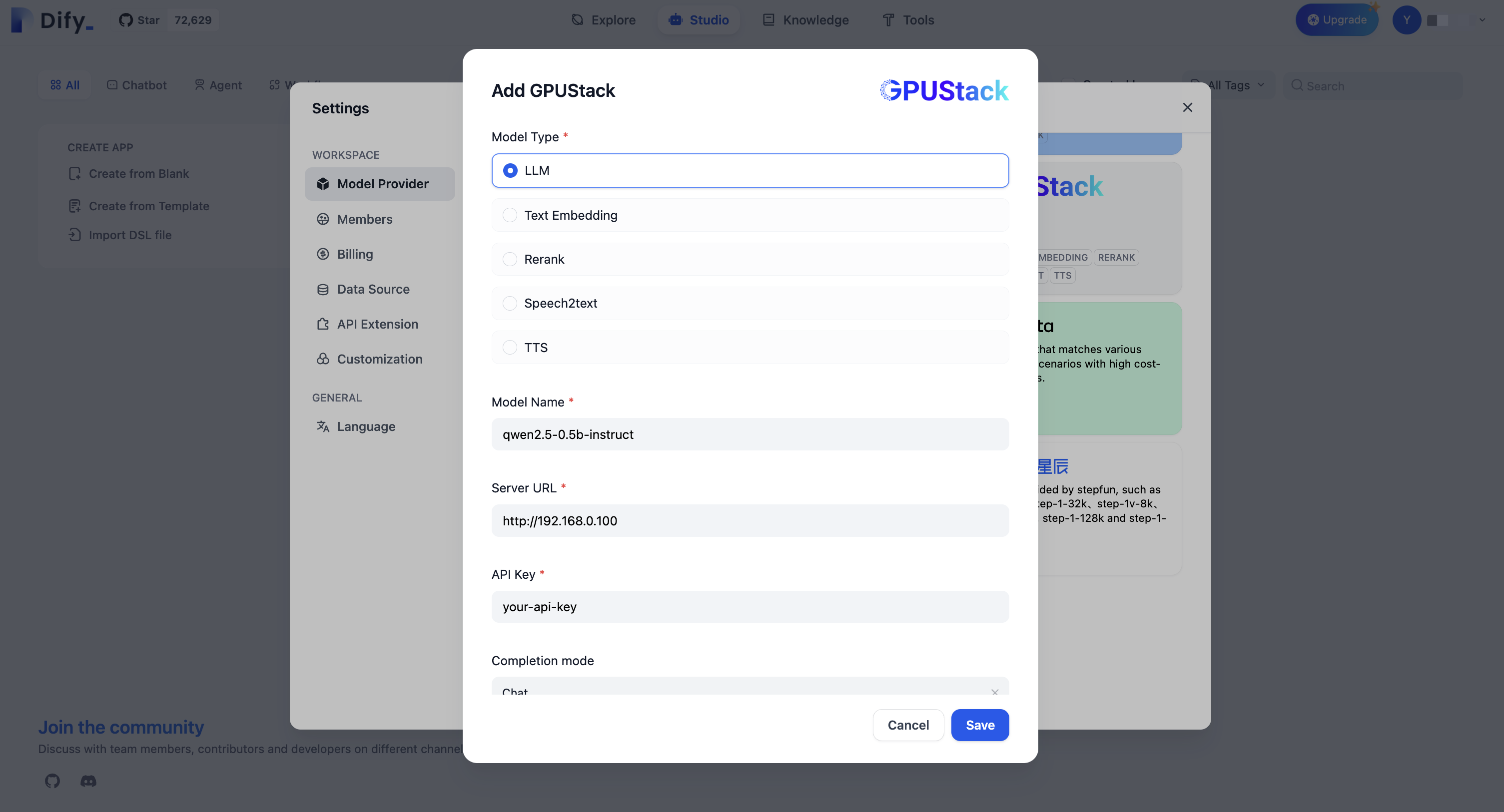
5. Go to `Settings > Model Providers > GPUStack` and fill in:
|
|
|
|
- Model Type: `LLM`
|
|
|
|
- Model Name: `qwen2.5-0.5b-instruct`
|
|
|
|
- Server URL: `http://your-gpustack-server-ip`
|
|
|
|
- API Key: `Input the API key you copied from previous steps`
|
|
|
|
Click "Save" to use the model in the application.
|
|
|
|
|
|
|
|
For more information about GPUStack, please refer to [GitHub Repo](https://github.com/gpustack/gpustack).
|
|
|
|
{/*
|
|
Contributing Section
|
|
DO NOT edit this section!
|
|
It will be automatically generated by the script.
|
|
*/}
|
|
|
|
---
|
|
|
|
[Edit this page](https://github.com/langgenius/dify-docs/edit/main/en/development/models-integration/gpustack.mdx) | [Report an issue](https://github.com/langgenius/dify-docs/issues/new?template=docs.yml)
|
|
|