mirror of
https://github.com/langgenius/dify-docs.git
synced 2026-03-27 13:28:32 +07:00

79 lines
4.1 KiB
Plaintext
79 lines
4.1 KiB
Plaintext
---
|
|
dimensions:
|
|
type:
|
|
primary: operational
|
|
detail: deployment
|
|
level: intermediate
|
|
standard_title: Release by File
|
|
language: en
|
|
title: Package as Local File and Share
|
|
description: This document provides detailed steps on how to package a Dify plugin
|
|
project as a local file and share it with others. It covers the preparation work
|
|
before packaging a plugin, using the Dify plugin development tool to execute packaging
|
|
commands, how to install the generated .difypkg file, and how to share plugin files
|
|
with other users.
|
|
---
|
|
|
|
After completing plugin development, you can package the plugin project as a local file and share it with others. After obtaining the plugin file, it can be installed into a Dify Workspace. If you haven't developed a plugin yet, you can refer to the [Plugin Development: Hello World Guide](/plugin-dev-en/0211-getting-started-dify-tool).
|
|
|
|
* **Features**:
|
|
* Not dependent on online platforms, **quick and flexible** way to share plugins.
|
|
* Suitable for **private plugins** or **internal testing**.
|
|
* **Publishing Process**:
|
|
* Package the plugin project as a local file.
|
|
* Upload the file on the Dify plugins page to install the plugin.
|
|
|
|
This article will introduce how to package a plugin project as a local file and how to install a plugin using a local file.
|
|
|
|
### Prerequisites
|
|
|
|
* **Dify Plugin Development Tool**, for detailed instructions, please refer to [Initializing Development Tools](/plugin-dev-en/0221-initialize-development-tools).
|
|
|
|
After configuration, enter the `dify version` command in the terminal to check if it outputs version information to confirm that the necessary development tools have been installed.
|
|
|
|
### Packaging the Plugin
|
|
|
|
> Before packaging the plugin, please ensure that the `author` field in the plugin's `manifest.yaml` file and the `.yaml` file under the `/provider` path is consistent with your GitHub ID. For detailed information about the manifest file, please refer to [General Specifications](/plugin-dev-en/0411-general-specifications).
|
|
|
|
After completing the plugin project development, make sure you have completed the [remote debugging test](/plugin-dev-en/0411-remote-debug-a-plugin). Navigate to the directory above your plugin project and run the following plugin packaging command:
|
|
|
|
```bash
|
|
dify plugin package ./your_plugin_project
|
|
```
|
|
|
|
After running the command, a file with the `.difypkg` extension will be generated in the current path.
|
|
|
|

|
|
|
|
### Installing the Plugin
|
|
|
|
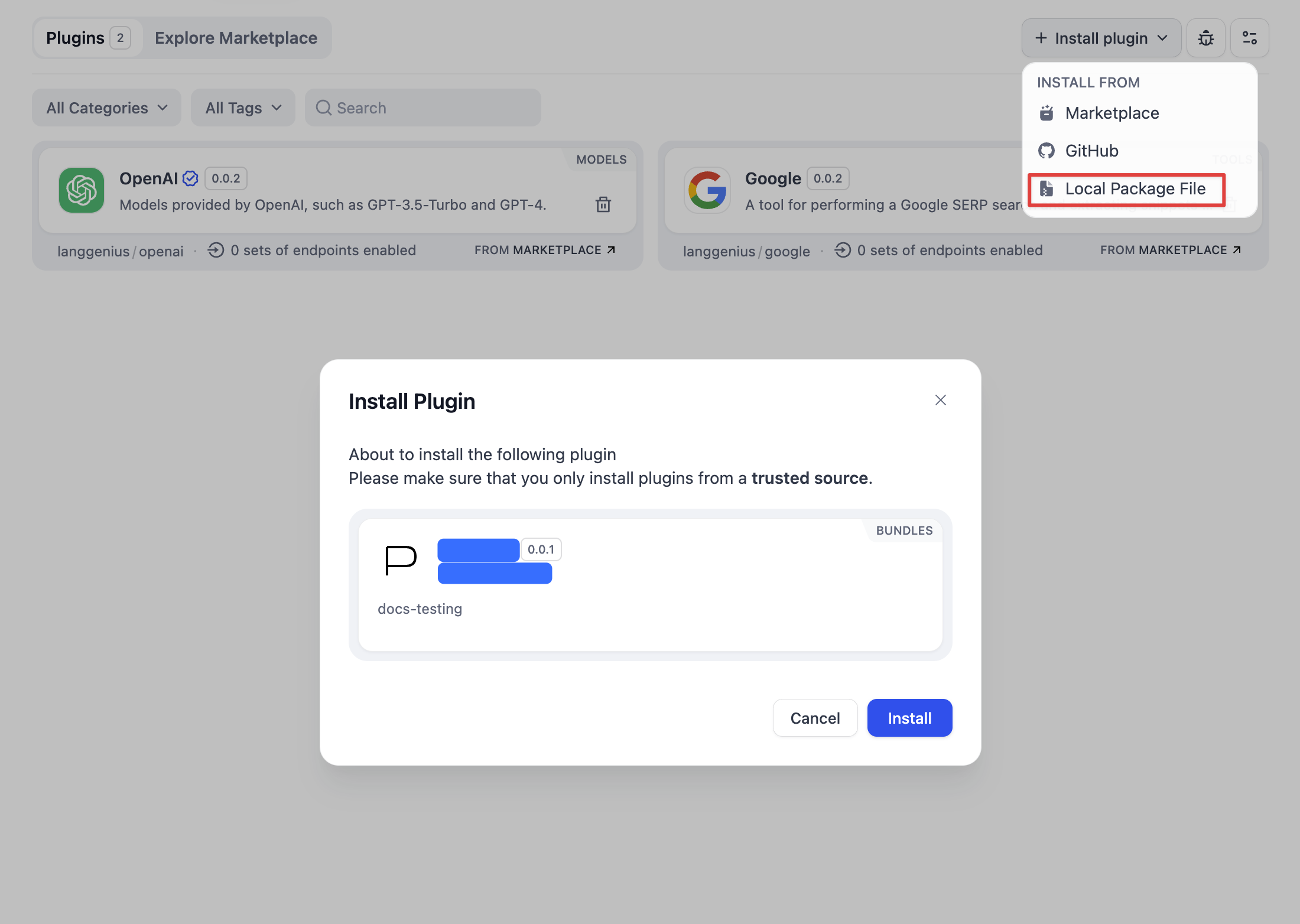
Visit the Dify plugin management page, click **Install Plugin** in the upper right corner → **Via Local File** to install, or drag and drop the plugin file to a blank area of the page to install the plugin.
|
|
|
|
|
|
|
|
### Publishing the Plugin
|
|
|
|
You can share the plugin file with others or upload it to the internet for others to download. If you want to share your plugin more widely, you can consider:
|
|
|
|
1. [Publish to Individual GitHub Repository](/plugin-dev-en/0322-release-to-individual-github-repo) - Share the plugin through GitHub
|
|
2. [Publish to Dify Marketplace](/plugin-dev-en/0322-release-to-dify-marketplace) - Publish the plugin on the official marketplace
|
|
|
|
## Related Resources
|
|
|
|
- [Publishing Plugins](/plugin-dev-en/0321-release-overview) - Learn about various publishing methods
|
|
- [Initializing Development Tools](/plugin-dev-en/0221-initialize-development-tools) - Configure plugin development environment
|
|
- [Remote Debugging Plugins](/plugin-dev-en/0411-remote-debug-a-plugin) - Learn plugin debugging methods
|
|
- [General Specifications](/plugin-dev-en/0411-general-specifications) - Define plugin metadata
|
|
- [Plugin Development: Hello World Guide](/plugin-dev-en/0211-getting-started-dify-tool) - Develop a plugin from scratch
|
|
|
|
{/*
|
|
Contributing Section
|
|
DO NOT edit this section!
|
|
It will be automatically generated by the script.
|
|
*/}
|
|
|
|
---
|
|
|
|
[Edit this page](https://github.com/langgenius/dify-docs/edit/main/plugin-dev-en/0322-release-by-file.mdx) | [Report an issue](https://github.com/langgenius/dify-docs/issues/new?template=docs.yml)
|
|
|