mirror of
https://github.com/langgenius/dify-docs.git
synced 2026-03-27 13:28:32 +07:00

126 lines
4.5 KiB
Plaintext
126 lines
4.5 KiB
Plaintext
---
|
||
dimensions:
|
||
type:
|
||
primary: reference
|
||
detail: examples
|
||
level: intermediate
|
||
standard_title: Endpoint
|
||
language: zh
|
||
title: 彩虹猫 Endpoint
|
||
description: Author Yeuoly,Allen 本文档详细介绍了Dify插件中Endpoint的结构和实现方式,以彩虹猫项目为例。内容包括如何定义Endpoint组、配置接口、实现_invoke方法以及处理请求和响应。文档详细解释了各种YAML配置字段的含义和使用方法。
|
||
---
|
||
|
||
本文将以[彩虹猫](/plugin-dev-zh/9231-extension-plugin)项目为例,说明插件内的 Endpoint 的结构。Endpoint是插件对外暴露的HTTP接口,可用于与外部系统集成。完整的插件代码请参考 [GitHub 仓库](https://github.com/langgenius/dify-plugin-sdks/tree/main/python/examples/neko)。
|
||
|
||
### 组定义
|
||
|
||
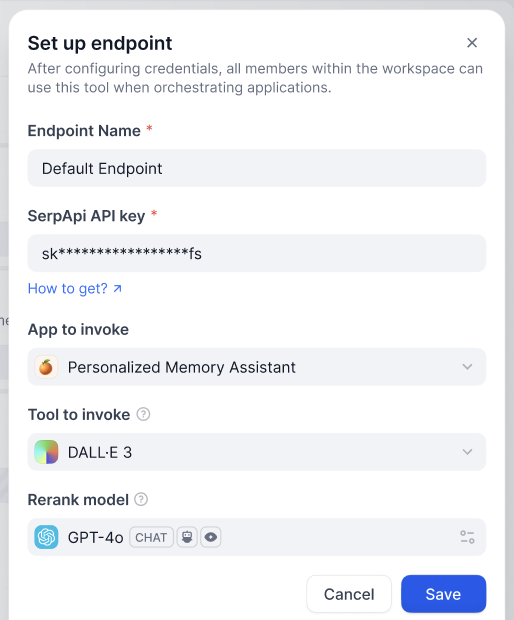
一个 `Endpoint` 组是多个 `Endpoint` 的集合,在 `Dify` 插件内新建 `Endpoint` 时可能需要填写如下配置。
|
||
|
||
|
||
|
||
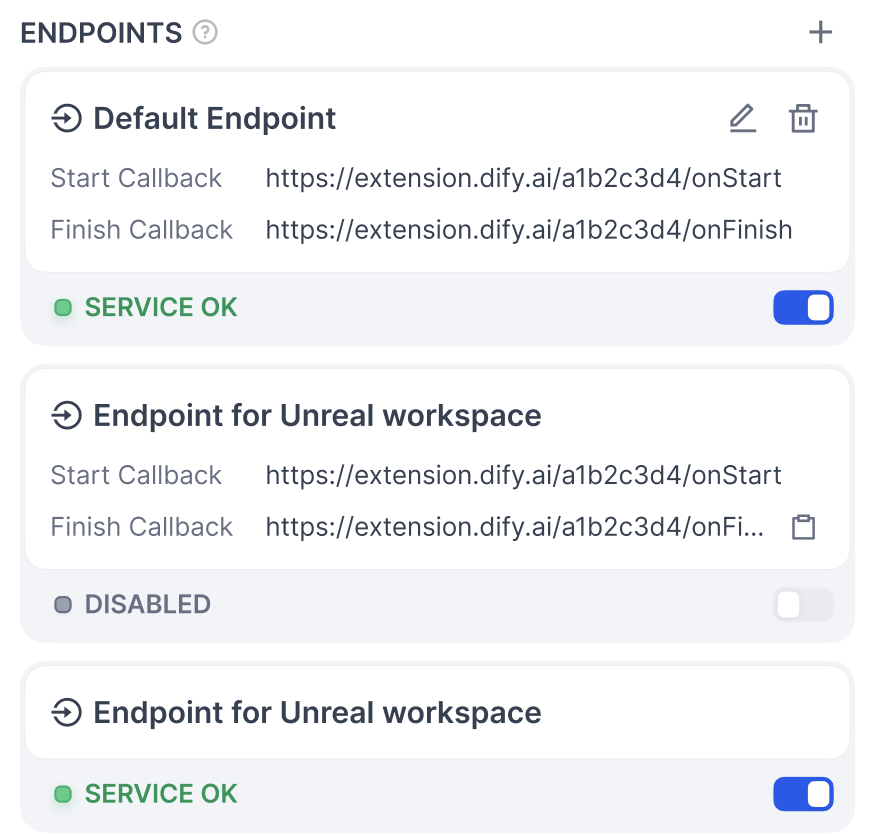
除了 `Endpoint Name` 外,你可以通过编写组的配置信息来添加新的表单项,点击保存后,你可以看到其中包含的多个接口,它们将使用相同的配置信息。
|
||
|
||
|
||
|
||
#### **结构**
|
||
|
||
* `settings`(map\[string] [ProviderConfig](/plugin-dev-zh/0411-general-specifications#providerconfig) ):Endpoint 配置定义
|
||
* `endpoints`(list\[string], required):指向具体的 `endpoint` 接口定义
|
||
|
||
```yaml
|
||
settings:
|
||
api_key:
|
||
type: secret-input
|
||
required: true
|
||
label:
|
||
en_US: API key
|
||
zh_Hans: API key
|
||
ja_Jp: API key
|
||
pt_BR: API key
|
||
placeholder:
|
||
en_US: Please input your API key
|
||
zh_Hans: 请输入你的 API key
|
||
ja_Jp: あなたの API key を入れてください
|
||
pt_BR: Por favor, insira sua chave API
|
||
endpoints:
|
||
- endpoints/duck.yaml
|
||
- endpoints/neko.yaml
|
||
```
|
||
|
||
### 接口定义
|
||
|
||
* `path`(string):遵循 werkzeug 接口标准
|
||
* `method`(string):接口方法,仅支持`HEAD` `GET` `POST` `PUT` `DELETE` `OPTIONS`
|
||
* `extra`(object):除基础信息外的配置信息
|
||
* `python`(object)
|
||
* `source`(string):实现该接口的源代码
|
||
|
||
```yaml
|
||
path: "/duck/<app_id>"
|
||
method: "GET"
|
||
extra:
|
||
python:
|
||
source: "endpoints/duck.py"
|
||
```
|
||
|
||
### 接口实现
|
||
|
||
需要实现一个继承自 `dify_plugin.Endpoint` 子类,并实现 `_invoke` 方法。
|
||
|
||
* **输入参数**
|
||
* `r`(Request):`werkzeug` 中的 `Request` 对象
|
||
* `values`(Mapping):从 path 中解析到的路径参数
|
||
* `settings`(Mapping):该 `Endpoint` 的配置信息
|
||
* **返回**
|
||
* `werkzeug` 中的 `Response` 对象,支持流式返回
|
||
* 不支持直接返回字符串
|
||
|
||
示例代码:
|
||
|
||
```python
|
||
import json
|
||
from typing import Mapping
|
||
from werkzeug import Request, Response
|
||
from dify_plugin import Endpoint
|
||
|
||
class Duck(Endpoint):
|
||
def _invoke(self, r: Request, values: Mapping, settings: Mapping) -> Response:
|
||
"""
|
||
Invokes the endpoint with the given request.
|
||
"""
|
||
app_id = values["app_id"]
|
||
|
||
def generator():
|
||
yield f"{app_id} <br>"
|
||
|
||
return Response(generator(), status=200, content_type="text/html")
|
||
```
|
||
|
||
## 注意事项
|
||
|
||
* Endpoint 只在插件被调用时才会实例化,并不是长期运行的服务
|
||
* 请在开发 Endpoint 时注意安全性,避免执行危险操作
|
||
* Endpoint 可以用于处理 Webhook 回调或提供接口给其他系统连接
|
||
|
||
如果您正在学习插件开发,建议先阅读[插件开发入门指南](/plugin-dev-zh/0211-getting-started-dify-tool)和[开发者速查表](/plugin-dev-zh/0131-cheatsheet)。
|
||
|
||
## 相关资源
|
||
|
||
- [插件开发基本概念](/plugin-dev-zh/0111-getting-started-dify-plugin) - 了解插件开发的整体架构
|
||
- [彩虹猫实例](/plugin-dev-zh/9231-extension-plugin) - 扩展插件开发示例
|
||
- [通用规范定义](/plugin-dev-zh/0411-general-specifications) - 了解 ProviderConfig 等通用结构
|
||
- [Slack 机器人插件开发示例](/plugin-dev-zh/0432-develop-a-slack-bot-plugin) - 另一个插件开发示例
|
||
- [插件开发入门指南](/plugin-dev-zh/0211-getting-started-dify-tool) - 从零开始开发插件
|
||
- [反向调用 Dify 服务](/plugin-dev-zh/9241-reverse-invocation) - 了解如何使用反向调用功能
|
||
|
||
{/*
|
||
Contributing Section
|
||
DO NOT edit this section!
|
||
It will be automatically generated by the script.
|
||
*/}
|
||
|
||
---
|
||
|
||
[编辑此页面](https://github.com/langgenius/dify-docs/edit/main/plugin-dev-zh/0432-endpoint.mdx) | [提交问题](https://github.com/langgenius/dify-docs/issues/new?template=docs.yml)
|
||
|