mirror of
https://github.com/langgenius/dify-docs.git
synced 2026-03-27 13:28:32 +07:00
 767397a9de
* fix redirect language code prefixes * rename: cn -> zh, jp -> ja * remove hardcoded ja / zh references * remove hardcoded 'english' references * renamed variable names and dict keys to language agnostic names * fix: add missing language helper methods to PRAnalyzer - Add get_language_directory() method - Initialize source_language and target_languages from config - Fixes AttributeError when generating mixed PR errors 🤖 Generated with [Claude Code](https://claude.com/claude-code) Co-Authored-By: Claude <noreply@anthropic.com> * test: kitchen sink workflow validation v2 This PR validates the translation workflow after config-driven refactoring: Changes: - Add new test file: test-workflow-validation.mdx - Modify existing file: introduction.mdx - Update docs.json navigation Tests: - New file translation (add workflow) - Existing file translation (update workflow) - Navigation sync across languages - Config-driven language codes (zh/ja instead of cn/jp) - Source language abstraction (no hardcoded "English") Expected workflow behavior: 1. Detect changes in en/ directory 2. Translate new file to zh and ja 3. Update modified file translations 4. Sync docs.json for all language sections 5. Commit translated files automatically 🤖 Generated with [Claude Code](https://claude.com/claude-code) Co-Authored-By: Claude <noreply@anthropic.com> * fix: update workflow paths to use zh/ja instead of cn/jp Aligns workflow trigger paths with the zh/ja language directory rename. 🤖 Generated with [Claude Code](https://claude.com/claude-code) Co-Authored-By: Claude <noreply@anthropic.com> * Revert "fix: update workflow paths to use zh/ja instead of cn/jp" This reverts commit9587b7cc5d. * Revert "test: kitchen sink workflow validation v2" This reverts commit4abdd69fd2. * fix: update workflow paths in doc analyze workflow to use zh/ja instead of cn/jp * Refactor/language codes (#240) * test: kitchen sink workflow validation v2 This PR validates the translation workflow after config-driven refactoring: Changes: - Add new test file: test-workflow-validation.mdx - Modify existing file: introduction.mdx - Update docs.json navigation Tests: - New file translation (add workflow) - Existing file translation (update workflow) - Navigation sync across languages - Config-driven language codes (zh/ja instead of cn/jp) - Source language abstraction (no hardcoded "English") Expected workflow behavior: 1. Detect changes in en/ directory 2. Translate new file to zh and ja 3. Update modified file translations 4. Sync docs.json for all language sections 5. Commit translated files automatically 🤖 Generated with [Claude Code](https://claude.com/claude-code) Co-Authored-By: Claude <noreply@anthropic.com> * fix: update workflow paths to use zh/ja instead of cn/jp Aligns workflow trigger paths with the zh/ja language directory rename. 🤖 Generated with [Claude Code](https://claude.com/claude-code) Co-Authored-By: Claude <noreply@anthropic.com> * Revert "fix: update workflow paths to use zh/ja instead of cn/jp" This reverts commit9587b7cc5d. * Revert "test: kitchen sink workflow validation v2" This reverts commit4abdd69fd2. * fix: update workflow paths in doc analyze workflow to use zh/ja instead of cn/jp --------- Co-authored-by: Claude <noreply@anthropic.com> * fix: update workflow files to use 'source' instead of 'english' After refactoring the PR analyzer to use 'source' for source language PRs (instead of hardcoded 'english'), the workflow files need to match. Changes: - sync_docs_analyze.yml: pr_type == 'source' (was 'english') - sync_docs_update.yml: PR_TYPE != 'source' check - Updated all comments from "English" to "source language" - Updated all pr_type values in JSON from "english" to "source" This ensures the workflows trigger correctly with the refactored config-driven language system. Related: language code refactoring (cn/jp → zh/ja) 🤖 Generated with [Claude Code](https://claude.com/claude-code) Co-Authored-By: Claude <noreply@anthropic.com> * Fix/workflow source language references (#245) * test: kitchen sink workflow validation v2 This PR validates the translation workflow after config-driven refactoring: Changes: - Add new test file: test-workflow-validation.mdx - Modify existing file: introduction.mdx - Update docs.json navigation Tests: - New file translation (add workflow) - Existing file translation (update workflow) - Navigation sync across languages - Config-driven language codes (zh/ja instead of cn/jp) - Source language abstraction (no hardcoded "English") Expected workflow behavior: 1. Detect changes in en/ directory 2. Translate new file to zh and ja 3. Update modified file translations 4. Sync docs.json for all language sections 5. Commit translated files automatically 🤖 Generated with [Claude Code](https://claude.com/claude-code) Co-Authored-By: Claude <noreply@anthropic.com> * fix: update workflow paths to use zh/ja instead of cn/jp Aligns workflow trigger paths with the zh/ja language directory rename. 🤖 Generated with [Claude Code](https://claude.com/claude-code) Co-Authored-By: Claude <noreply@anthropic.com> * Revert "fix: update workflow paths to use zh/ja instead of cn/jp" This reverts commit9587b7cc5d. * Revert "test: kitchen sink workflow validation v2" This reverts commit4abdd69fd2. * fix: update workflow paths in doc analyze workflow to use zh/ja instead of cn/jp * fix: update workflow files to use 'source' instead of 'english' After refactoring the PR analyzer to use 'source' for source language PRs (instead of hardcoded 'english'), the workflow files need to match. Changes: - sync_docs_analyze.yml: pr_type == 'source' (was 'english') - sync_docs_update.yml: PR_TYPE != 'source' check - Updated all comments from "English" to "source language" - Updated all pr_type values in JSON from "english" to "source" This ensures the workflows trigger correctly with the refactored config-driven language system. Related: language code refactoring (cn/jp → zh/ja) 🤖 Generated with [Claude Code](https://claude.com/claude-code) Co-Authored-By: Claude <noreply@anthropic.com> --------- Co-authored-by: Claude <noreply@anthropic.com> * fix * fix docs.json language codes * rename previous version docs: cn -> zh, jp -> ja * rm duplicate redirect entires --------- Co-authored-by: Claude <noreply@anthropic.com>
180 lines
11 KiB
Plaintext
180 lines
11 KiB
Plaintext
---
|
||
title: ゼロからAI画像生成アプリの構築方法
|
||
---
|
||
|
||
画像生成技術の発展に伴い、Dall-e、Flux、Stable Diffusionなどの優れた画像生成ツールが多数登場しています。
|
||
|
||
本記事では、Difyを使用してAI画像生成アプリを開発する方法について学びます。
|
||
|
||
<div class="image-side-by-side">
|
||
<img
|
||
src="https://assets-docs.dify.ai/dify-enterprise-mintlify/jp/workshop/basic/05ff829cf382e82c9ece2676032d2383.png)
|
||
|
||
## 今回の学ぶポイント
|
||
|
||
- Difyを使用してエイジェントの作り方
|
||
- エイジェントの基本的なコンセプト
|
||
- プロンプトエンジニアリングの基本
|
||
- ツールの使用方法
|
||
- 大規模モデルの幻覚の概念
|
||
|
||
## 1. Stablility API キーの設定
|
||
|
||
[こちら](https://platform.stability.ai/account/keys) をクリックして、ステイビリティAPIキー管理ページに移動します。
|
||
|
||
まだ登録していない場合は、API管理ページに入る前に登録を求められます。
|
||
|
||
管理ページに入ったら、キーをコピーするために`コピー`をクリックします。
|
||
|
||
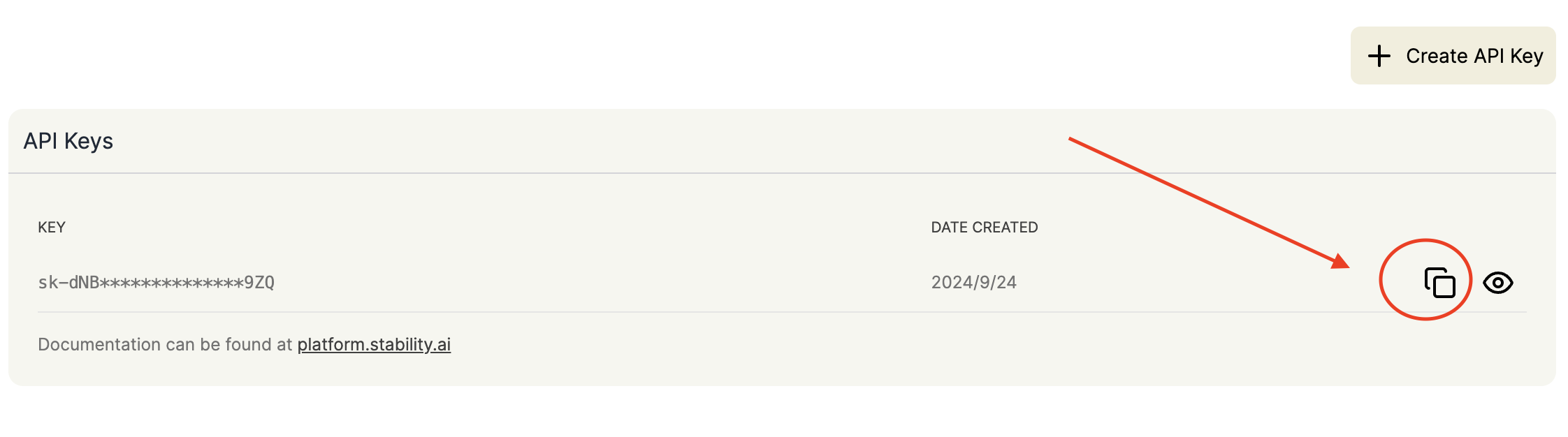
|
||
|
||
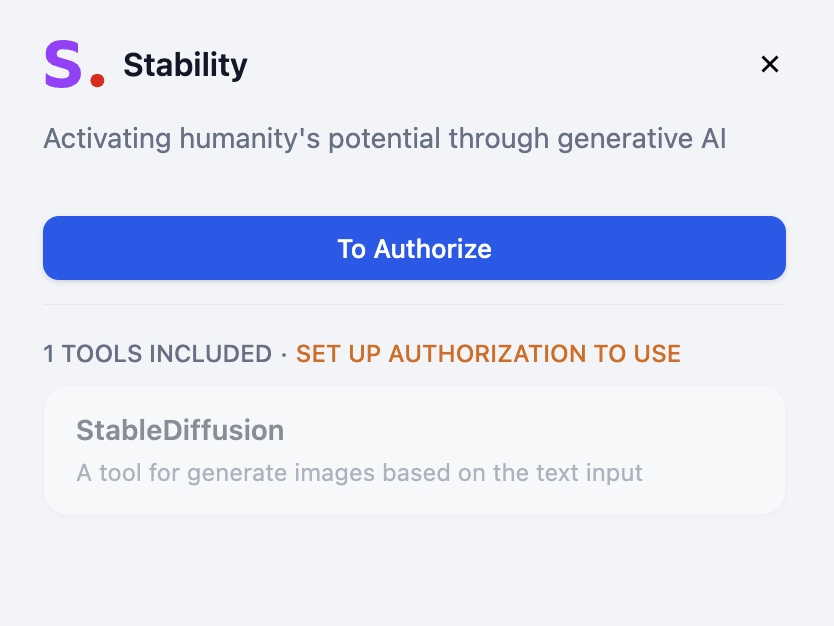
次に、[Dify - ツール - Stability](https://cloud.dify.ai/tools) にキーを入力する必要があります。以下の手順に従ってください:
|
||
|
||
- Difyにログインする
|
||
- ツールに入る
|
||
- ステイビリティを選択する
|
||
- 承認をクリック
|
||
|
||
- キーを入力して保存
|
||
|
||
## 2. モデルプロバイダの設定
|
||
|
||
インタラクションを最適化するために、ユーザーの指示を具体化するための大規模言語モデル(LLM)が必要です。つまり、画像生成のためのプロンプトを記述します。次に、Difyでモデルプロバイダを設定します。
|
||
|
||
Difyの無料版では、200回の無料のOpenAIメッセージクレジットが提供されます。
|
||
|
||
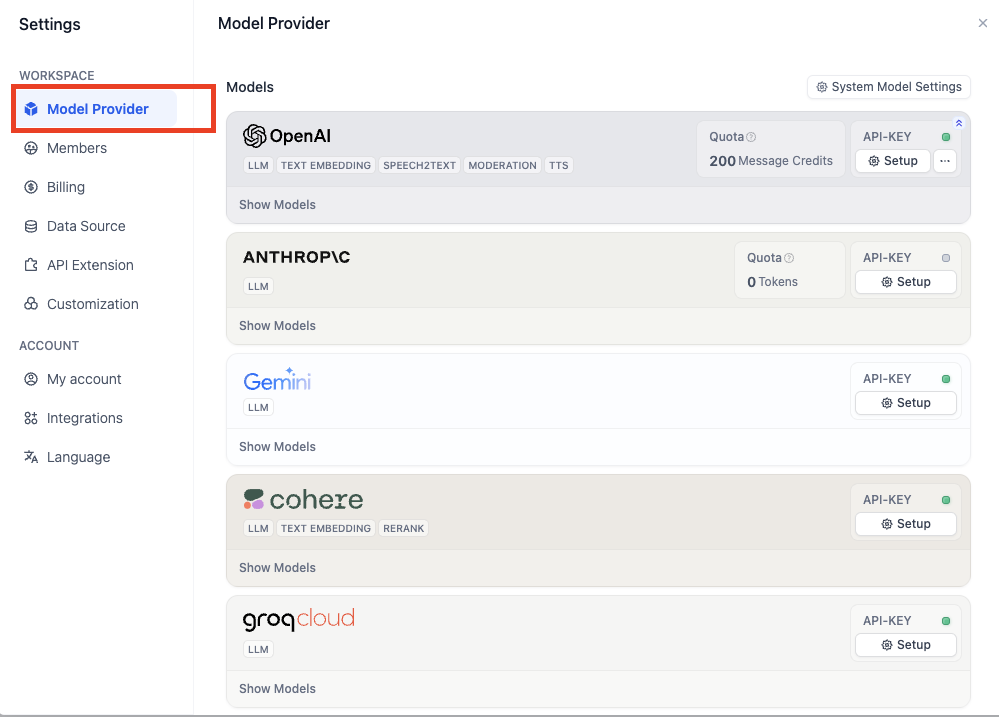
メッセージクレジットが不足している場合は、以下の手順に従って他のモデルプロバイダをカスタマイズできます:
|
||
|
||
**あなたのアバター - 設定 - モデルプロバイダ**の順にクリックします。
|
||
|
||
|
||
適切なモデルプロバイダが見つからない場合は、groqプラットフォームがLlamaなどのLLM用に無料のコールクレジットを提供しています。
|
||
|
||
[groq API管理ページ](https://console.groq.com/keys)にログインします。
|
||
|
||
**API Keyの作成**をクリックし、希望の名前を設定してAPIキーをコピーします。
|
||
|
||
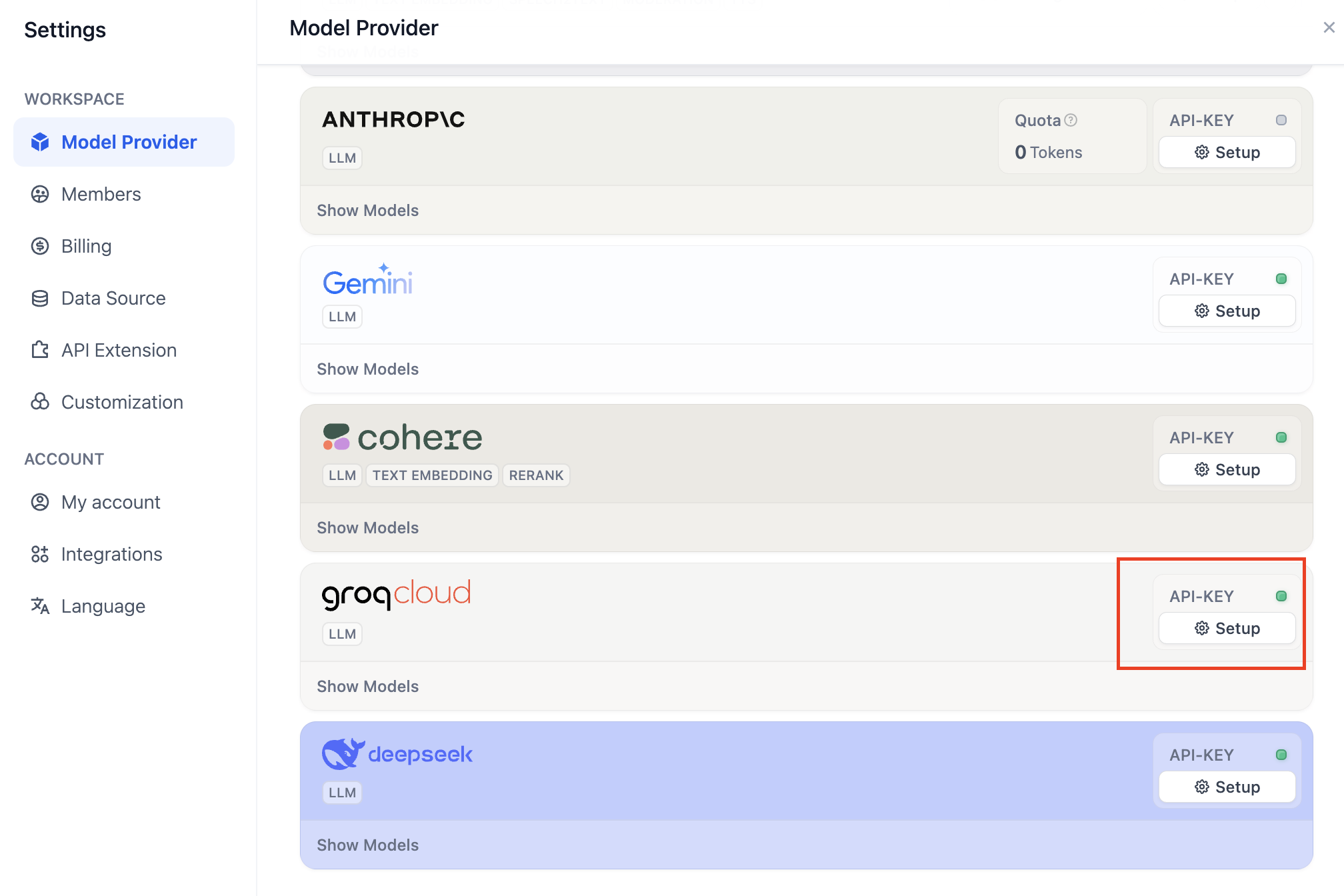
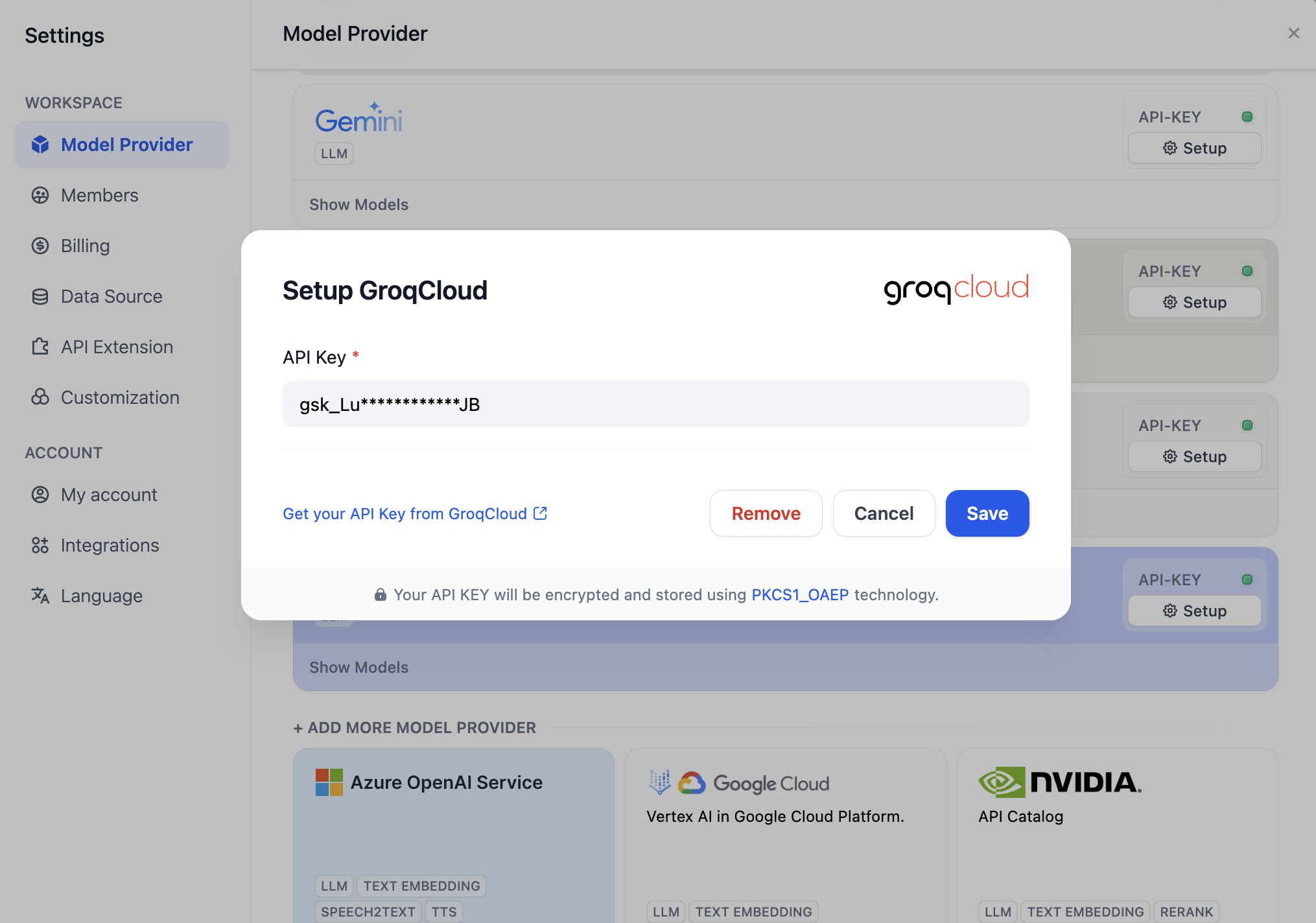
**Dify - モデルプロバイダ**に戻り、**groqcloud**を選択し、**設定**をクリックします。
|
||
|
||
|
||
|
||
API Keyを貼り付けて保存します。
|
||
|
||
|
||
|
||
## 3. エイジェントを作る
|
||
|
||
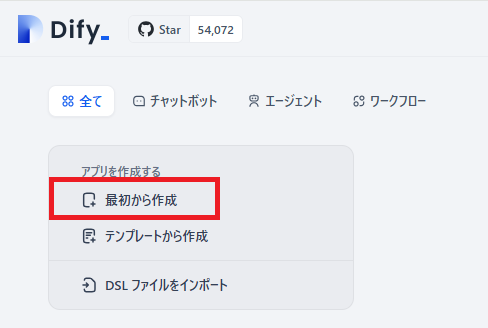
**Dify - スタジオ**に戻り、**最初から作成**を選択します。
|
||
|
||
|
||
|
||
この実験では、エージェントの基本的な使用方法を理解するだけで十分です。
|
||
|
||
<Info>
|
||
**エージェントとは?**
|
||
|
||
エージェントは、人間の行動と能力をシミュレートするAIシステムです。自然言語処理を通じて環境とやり取りし、入力情報を理解し、対応する出力を生成します。エージェントはまた「知覚」能力を持ち、さまざまな形式のデータを処理し・分析し、さまざまな外部ツールやAPIを呼び出して使用してタスクを完了することができます。この設計により、エージェントはより柔軟に複雑な状況を処理し、ある程度人間の思考や行動パターンをシミュレートできるようになります。
|
||
</Info>
|
||
|
||
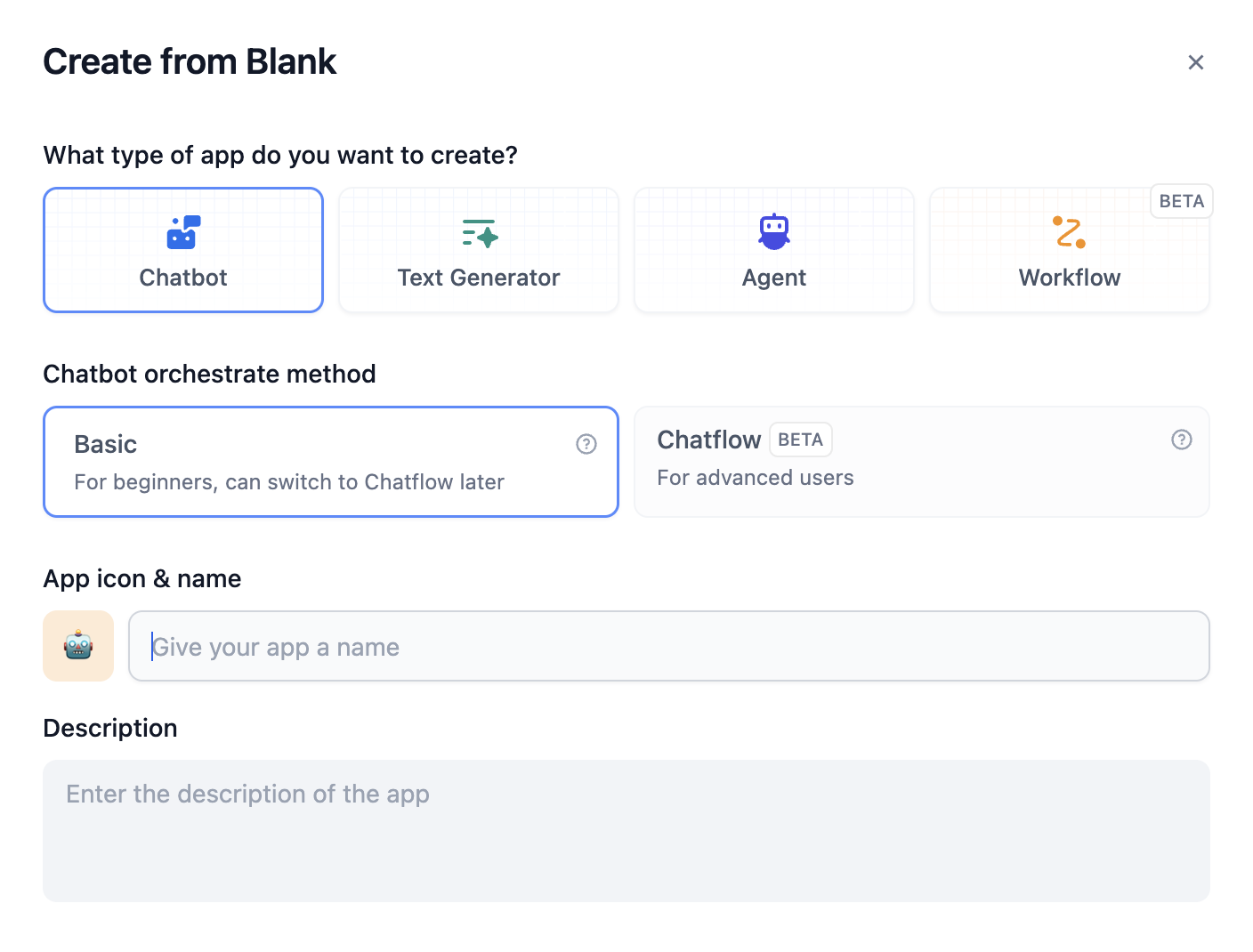
**エージェント**を選択し、名前を入力します。
|
||
|
||
|
||
|
||
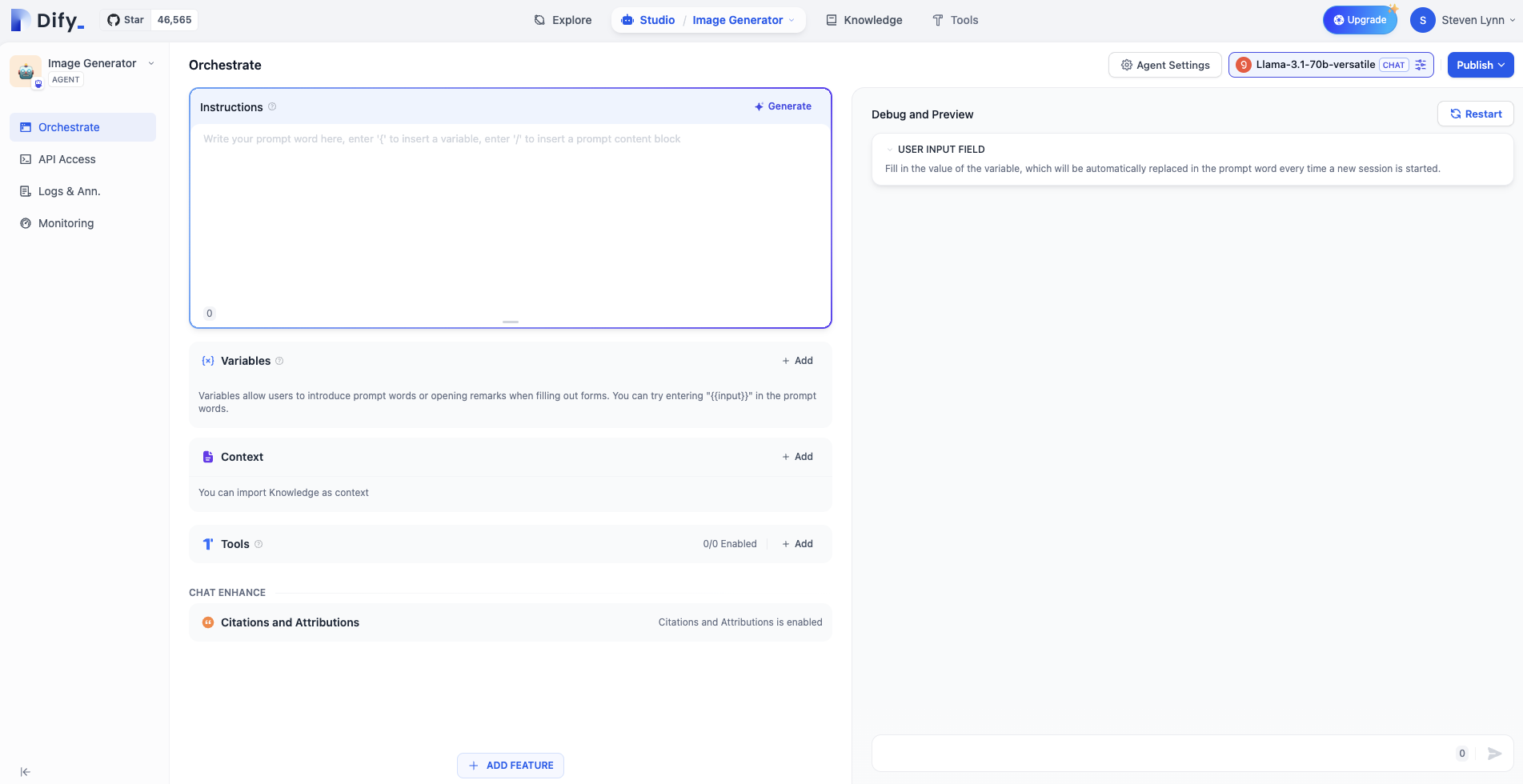
以下のようにエージェントのオーケストレーションインターフェースに入ります。
|
||
|
||
|
||
|
||
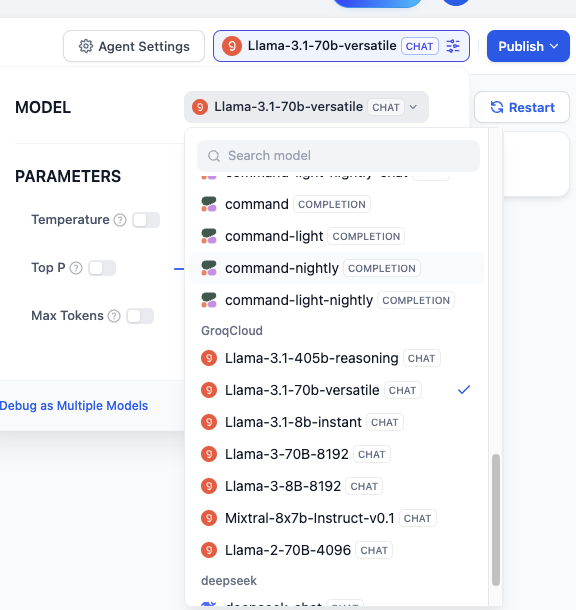
LLMを選択します。このチュートリアルでは、groqが提供するLlama-3.1-70Bを例にします:
|
||
|
||
|
||
|
||
**ツール**でステイビリティを選択します:
|
||
|
||

|
||
|
||
### プロンプトを書くのかしなくても可能ですか?もちろん可能です!
|
||
|
||
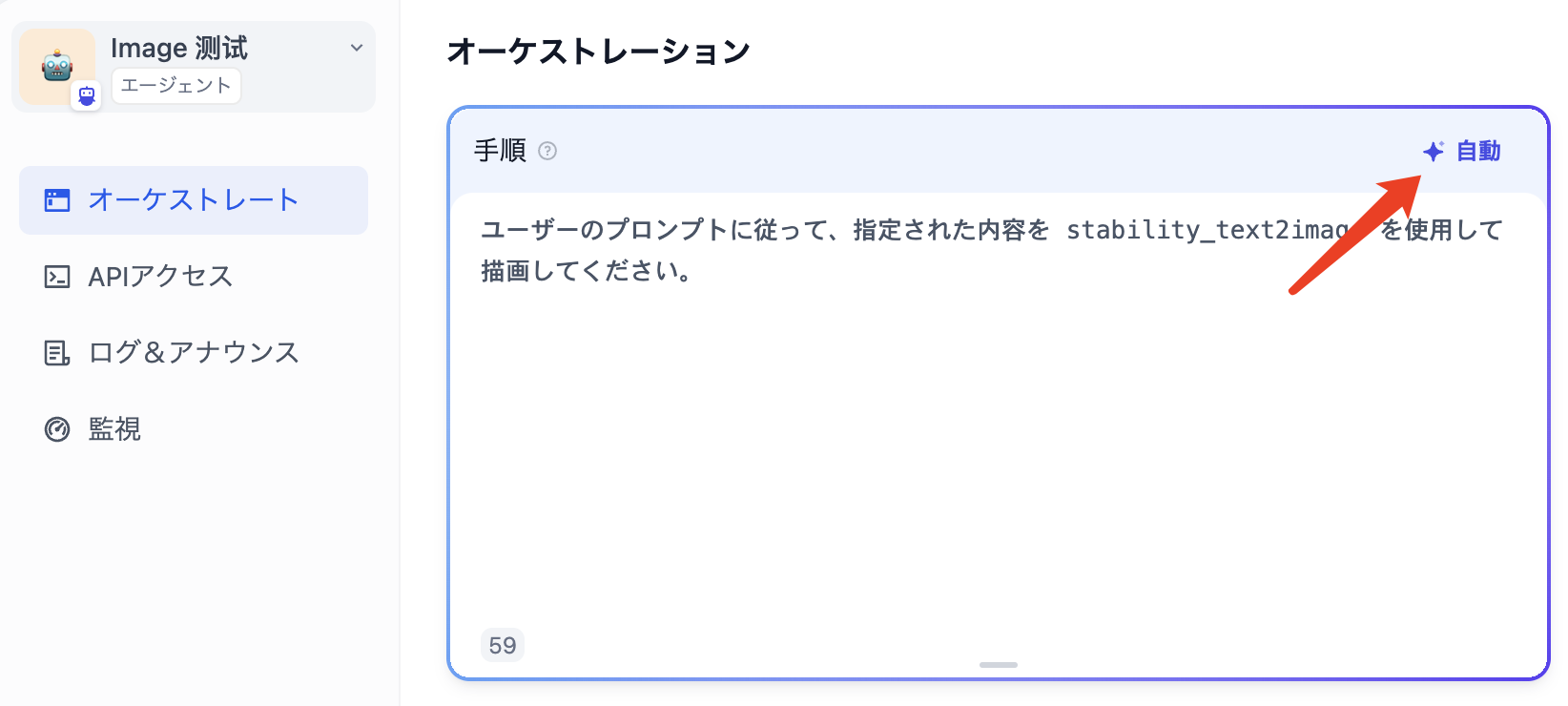
プロンプトの上部にある**自動**をクリックしてください。
|
||
|
||
|
||
|
||
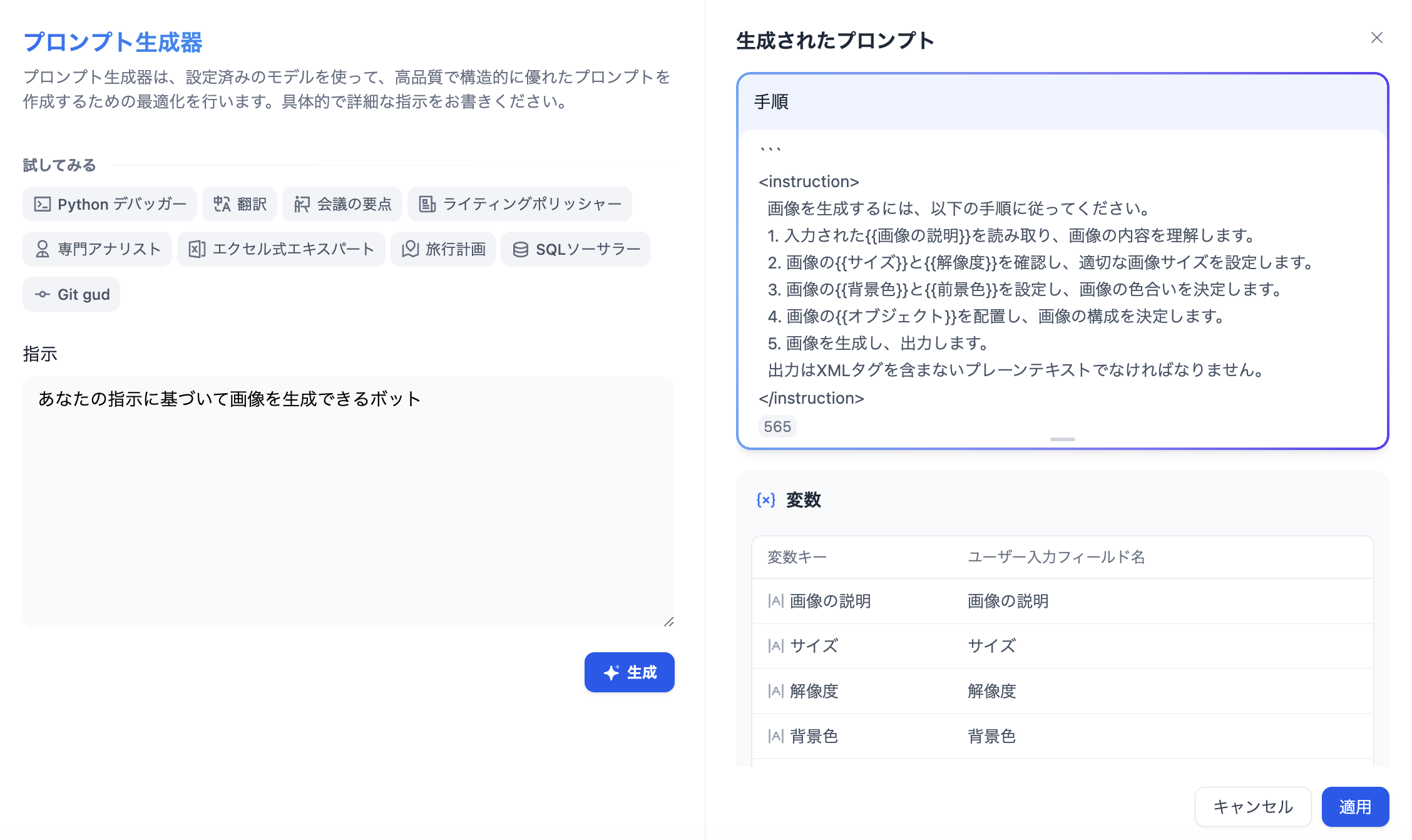
**指示**に要件を入力し、**自動**をクリックします。右側に生成されたプロンプトがAIによって作成されます。
|
||
|
||
|
||
|
||
ただし、プロンプトについての理解を深めるためには、初期段階ではこの機能に頼るべきではありません。
|
||
|
||
## 発表
|
||
|
||
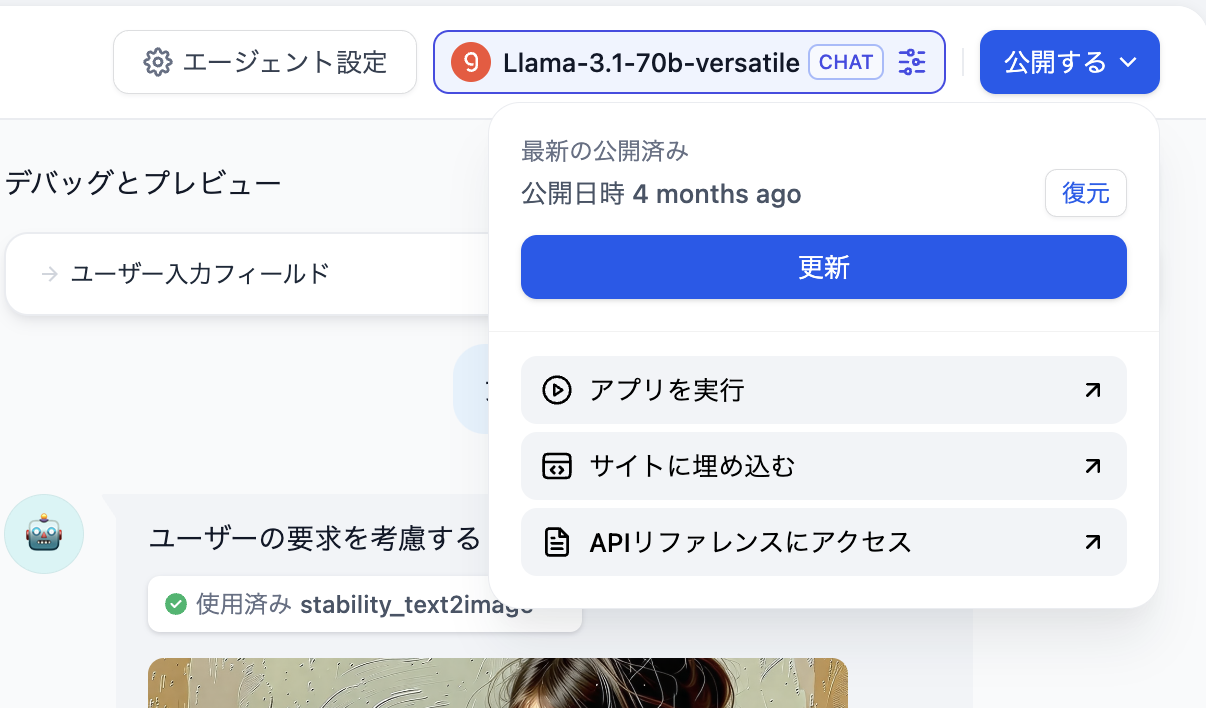
右上の公開ボタンをクリックし、公開後に**Run**を選択して、オンラインで実行されるエージェント用のWebページを取得します。
|
||
|
||
|
||
|
||
このWebページのURLをコピーして、友人と共有することができます。
|
||
|
||
## 質問1:生成された画像のスタイルを指定する方法は?
|
||
|
||
ユーザーの入力コマンドにスタイル指示を追加することができます。例えば:「アニメスタイルで、女の子が開いた本を描いてください。」
|
||
|
||
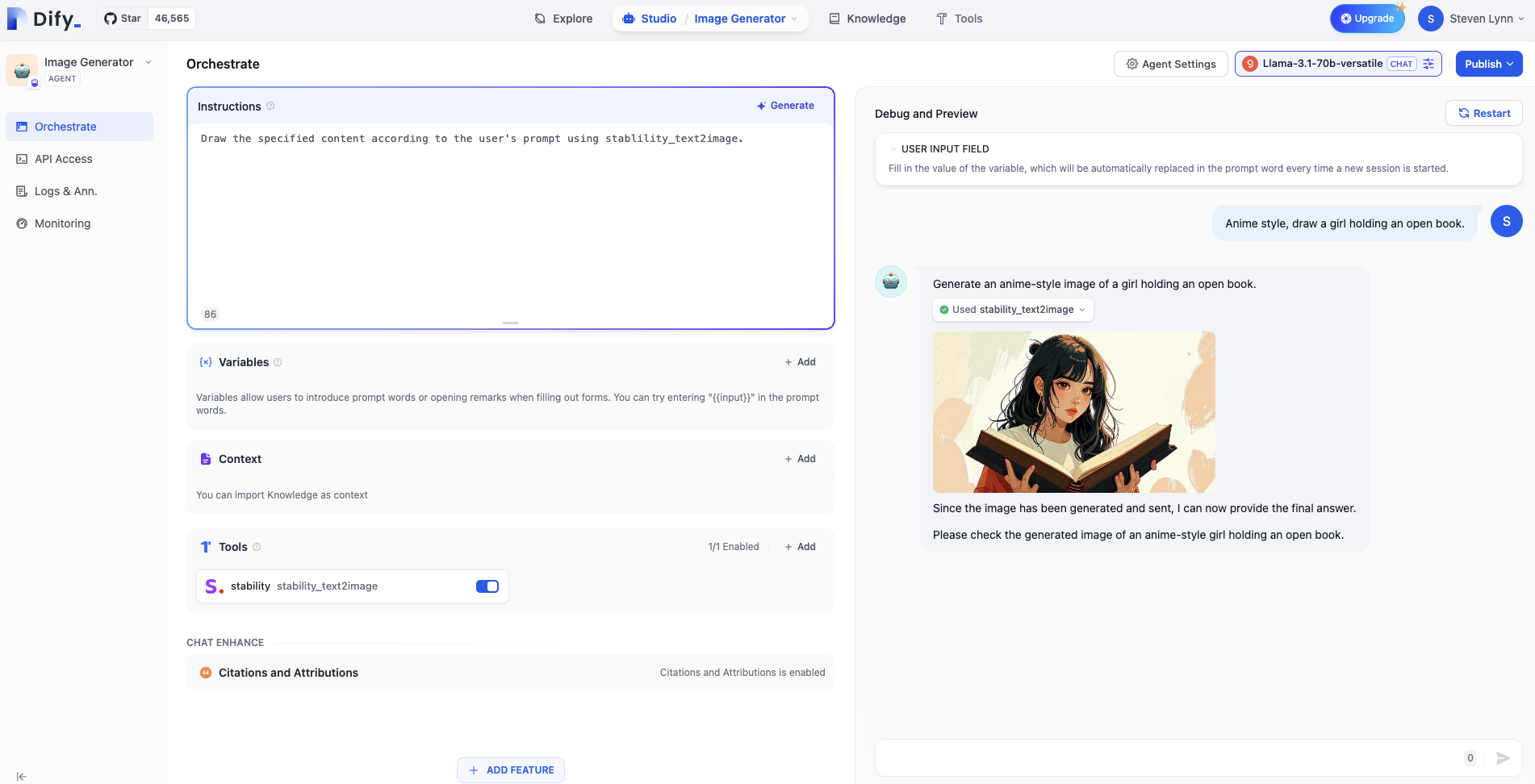
|
||
|
||
ただし、デフォルトのスタイルをアニメスタイルに設定したい場合は、システムプロンプトにその旨を追加することができます。なぜなら、システムプロンプトはユーザーコマンドが実行されるたびに認識され、優先されるからです。
|
||
|
||
```
|
||
ユーザーのプロンプトに従って、指定された内容をstability_text2imageを使用して描画してください。画像はアニメスタイルです。
|
||
```
|
||
|
||
## 質問2:特定のユーザーからのリクエストを拒否する方法は?
|
||
|
||
多くのビジネスシナリオでは、いくつかの不適切なコンテンツの出力を避ける必要がありますが、LLMはしばしば「無知」であり、出力コンテンツが間違っていてもユーザーの指示に従います。このように、モデルが間違ったコンテンツを作り出してユーザーに答えようとする現象を「モデルの幻覚」と呼びます。したがって、必要に応じてモデルがユーザーのリクエストを拒否できることが重要です。
|
||
|
||
さらに、ユーザーがビジネスに関係のないコンテンツを要求することもあり、エージェントがそのようなリクエストを拒否する必要があります。
|
||
|
||
異なるプロンプトをカテゴリ別に整理するために、マークダウン形式を使用して、エージェントに不適切なコンテンツを拒否する方法を教えるプロンプトを「制約」のセクションに記述します。もちろん、このフォーマットは標準化のためのものであり、独自のフォーマットを持つこともできます。
|
||
|
||
```
|
||
## タスク
|
||
ユーザーのプロンプトに従って、指定された内容をstability_text2imageを使用して描画してください。画像はアニメスタイルです。
|
||
|
||
## 制約
|
||
もしユーザーが描画に関係のないコンテンツを要求した場合、「申し訳ありませんが、その内容は理解できません。」と返答してください。
|
||
```
|
||
|
||
例えば、今夜の夕食は何ですか?と聞いてみましょう。
|
||
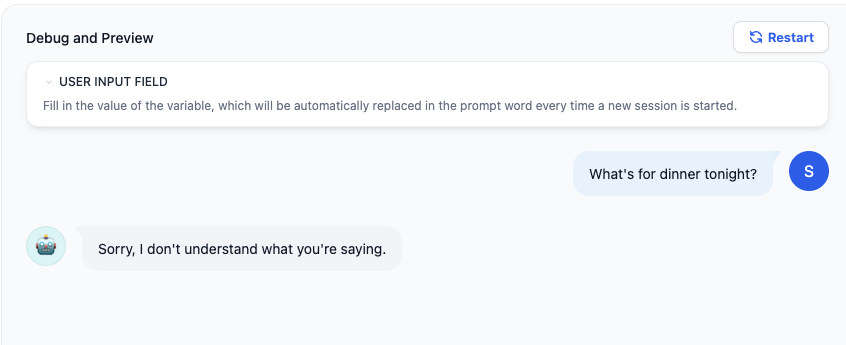
|
||
|
||
よりフォーマルなビジネスシナリオでは、感情的な単語ライブラリを使用してユーザーのリクエストを拒否することができます。
|
||
|
||
**Add Feature - Content Moderation**にキーワード「dinner」を追加します。ユーザーがそのキーワードを入力すると、エージェントアプリは「申し訳ありませんが、その内容は理解できません。」と出力します。
|
||
|
||
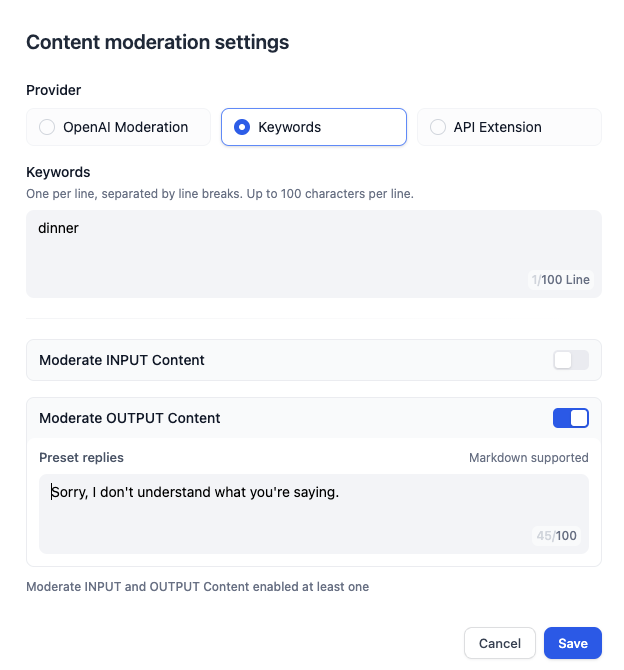
|