---
dimensions:
type:
primary: implementation
detail: standard
level: beginner
standard_title: Initialize Development Tools
language: en
title: Initializing Development Tools
description: This document details the necessary preparations before developing Dify
plugins, including complete steps for installing the Dify plugin scaffold tool (dify-plugin-daemon)
and configuring a Python environment (version requirement ≥3.12). The document also
provides reference links for developing various types of plugins.
---
Before start to develop Dify plugins please prepare the following prerequisites:
* Dify plugin scaffolding tool
* Python environment, version ≥ 3.12
> The Dify plugin development scaffolding tool, also known as `dify-plugin-daemon`, can be regarded as a plugin development SDK.
### **1. Installing the Dify Plugin Development Scaffolding Tool**
Visit the [Dify plugin GitHub page](https://github.com/langgenius/dify-plugin-daemon/releases) and select and download the version suitable for your operating system.
Using **macOS with M-series chips** as an example: Download the `dify-plugin-darwin-arm64` file from the project address mentioned above. Then, in the terminal, navigate to the file's location and grant it execution permissions:
```
chmod +x dify-plugin-darwin-arm64
```
Run the following command to verify successful installation.
```
./dify-plugin-darwin-arm64 version
```
> If the system shows an "Apple cannot verify" error, go to **Settings → Privacy & Security → Security**, and click the "Open Anyway" button.
After running the command, the installation is successful, if the terminal returns version information like `v0.0.1-beta.15`.
**Tips:**
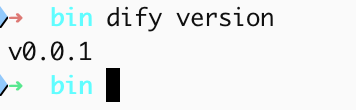
If you want to use the `dify` command globally in your system to run the scaffolding tool, it's recommended to rename the binary file to `dify` and copy it to the `/usr/local/bin` system path.
After configuration, entering the `dify version` command in the terminal will output the version number.
 ### **2. Initialize Python Environment**
For detailed instructions, please refer to the [Python installation](https://pythontest.com/python/installing-python-3-11/) tutorial. Python version 3.12 or higher is required.
### 3. **Develop plugins**
Please refer to the following content for examples of different types of plugin development:
- [Tool Plugin Development Guide](/plugin_dev_en/0211-getting-started-dify-tool.en) - Hello World introductory tutorial
- [Model Plugin Development Guide](/plugin_dev_en/0211-getting-started-new-model.en) - Quickly integrate a new model
- [Agent Strategy Plugin Development Guide](/plugin_dev_en/9433-agent-strategy-plugin.en) - Create custom reasoning strategies
- [Extension Plugin Development Guide](/plugin_dev_en/9231-extension-plugin.en) - Implement external service integration via Webhook
- [Plugin Packaging and Publishing](/plugin_dev_en/0321-release-overview.en) - Publish your plugin
## Next Learning Steps
- [Dify Plugin Development: Hello World Guide](/plugin_dev_en/0211-getting-started-dify-tool.en) - Start your first plugin development
- [Developer Cheatsheet](/plugin_dev_en/0131-cheatsheet.en) - Learn common commands and concepts
- [General Specification Definitions](/plugin_dev_en/0411-general-specifications.en) - Learn about plugin metadata configuration
{/*
Contributing Section
DO NOT edit this section!
It will be automatically generated by the script.
*/}
Help improve our documentation by contributing directly
Found an error or have suggestions? Let us know
### **2. Initialize Python Environment**
For detailed instructions, please refer to the [Python installation](https://pythontest.com/python/installing-python-3-11/) tutorial. Python version 3.12 or higher is required.
### 3. **Develop plugins**
Please refer to the following content for examples of different types of plugin development:
- [Tool Plugin Development Guide](/plugin_dev_en/0211-getting-started-dify-tool.en) - Hello World introductory tutorial
- [Model Plugin Development Guide](/plugin_dev_en/0211-getting-started-new-model.en) - Quickly integrate a new model
- [Agent Strategy Plugin Development Guide](/plugin_dev_en/9433-agent-strategy-plugin.en) - Create custom reasoning strategies
- [Extension Plugin Development Guide](/plugin_dev_en/9231-extension-plugin.en) - Implement external service integration via Webhook
- [Plugin Packaging and Publishing](/plugin_dev_en/0321-release-overview.en) - Publish your plugin
## Next Learning Steps
- [Dify Plugin Development: Hello World Guide](/plugin_dev_en/0211-getting-started-dify-tool.en) - Start your first plugin development
- [Developer Cheatsheet](/plugin_dev_en/0131-cheatsheet.en) - Learn common commands and concepts
- [General Specification Definitions](/plugin_dev_en/0411-general-specifications.en) - Learn about plugin metadata configuration
{/*
Contributing Section
DO NOT edit this section!
It will be automatically generated by the script.
*/}
Help improve our documentation by contributing directly
Found an error or have suggestions? Let us know