---
title: Extension 插件
---
{/*
贡献者注意:
----------------
本文档为旧版文档,即将弃用。
请勿对此版本进行更改。
所有更新应指向新版本:
/plugin-dev-zh/9231-extension-plugin
*/}
作为我们文档重组的一部分,此页面正在逐步淘汰。
点击此卡片跳转到包含最新信息的更新版本。
如果您在新的文档中发现任何差异或需要改进的地方,请使用页面底部的“报告问题”按钮。
本文将引导你快速开发一个 Extension 类型的插件,以帮助你了解插件开发的基础流程。
### 前置准备
* Dify 插件脚手架工具
* Python 环境,版本号 ≥ 3.12
关于如何准备插件开发的脚手架工具,详细说明请参考[安装插件开发工具](initialize-development-tools)。
### 创建新项目
在当前路径下,运行脚手架命令行工具,创建一个新的 dify 插件项目。
```
./dify-plugin-darwin-arm64 plugin init
```
如果你已将该二进制文件重命名为了 `dify` 并拷贝到了 `/usr/local/bin` 路径下,可以运行以下命令创建新的插件项目:
```bash
dify plugin init
```
### **填写插件信息**
按照提示配置插件名称、作者信息与插件描述。如果你是团队协作,也可以将作者填写为组织名。
> 插件名称长度必须为 1-128 个字符,并且只能包含字母、数字、破折号和下划线。

填写完成后,在插件开发语言环节中选择 Python。

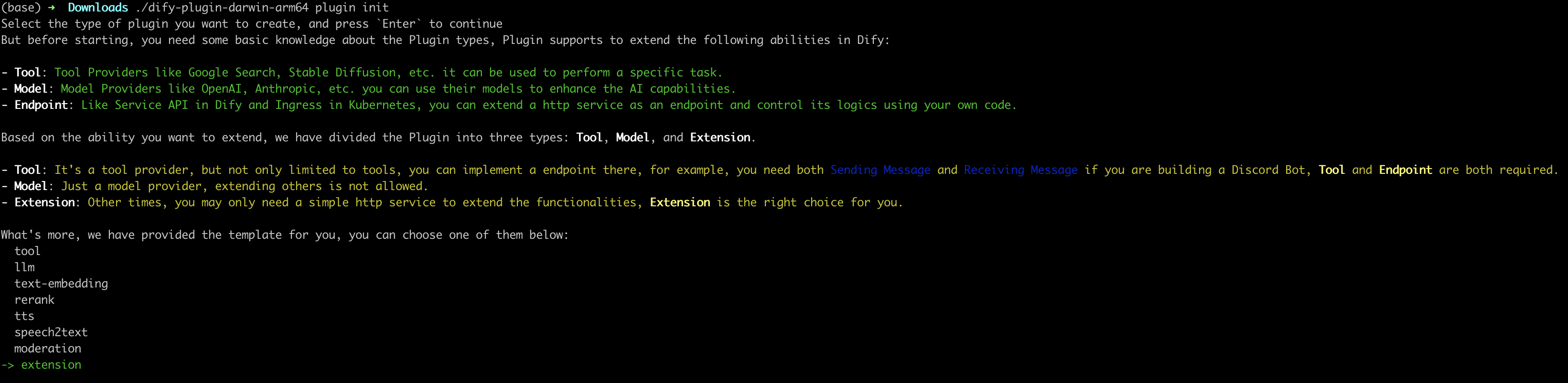
### 3. 选择插件类型并初始化项目模板
脚手架工具内的所有模板均已提供完整的代码项目。出于演示说明,本文将以 `Extension` 类型插件模板作为示例。对于已熟悉插件的开发者而言,无需借助模板,可参考[接口文档](../../schema-definition/)指引完成不同类型的插件开发。
#### 配置插件权限
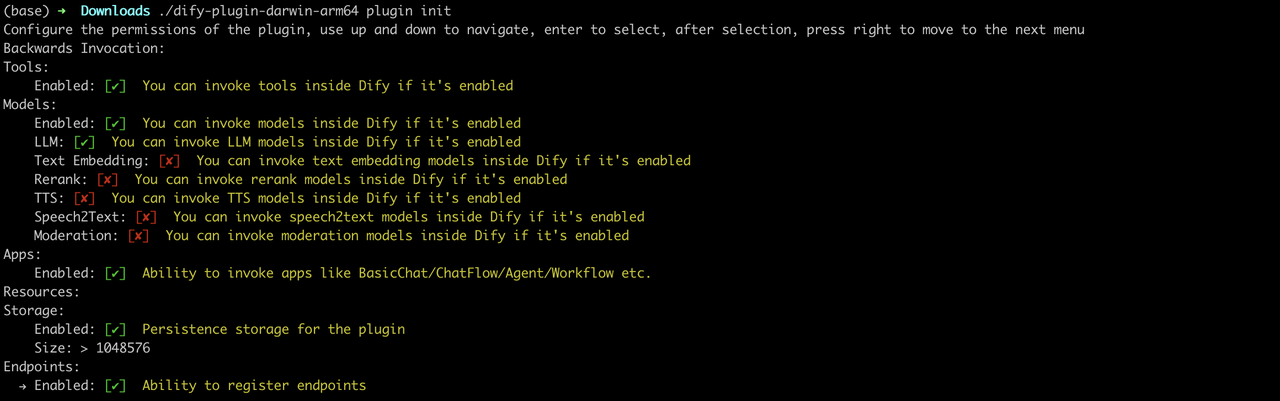
插件还需要读取 Dify 主平台的权限才能正常连接。需要为该示例插件授予以下权限:
* Tools
* LLMs
* Apps
* 启用持久化存储 Storage,分配默认大小存储
* 允许注册 Endpoint
> 在终端内使用方向键选择权限,使用 “Tab” 按钮授予权限。
勾选所有权限项后,轻点回车完成插件的创建。系统将自动生成插件项目代码。
插件的基础文件结构包含以下内容:
```
.
├── GUIDE.md
├── README.md
├── _assets
│ └── icon.svg
├── endpoints
│ ├── your-project.py
│ └── your-project.yaml
├── group
│ └── your-project.yaml
├── main.py
├── manifest.yaml
└── requirements.txt
```
* `GUIDE.md` 一个简短的引导教程,带领你完成插件的编写流程。
* `README.md` 关于当前插件的简介信息,你需要把有关该插件的介绍和使用方法填写至该文件内。
* `_assets` 存储所有与当前插件相关的多媒体文件。
* `endpoints` 按照 cli 中的引导创建的一个 `Extension` 类型插件模板,该目录存放所有 Endpoint 的功能实现代码。
* `group` 指定密钥类型、多语言设置以及 API 定义的文件路径。
* `main.py` 整个项目的入口文件。
* `manifest.yaml` 整个插件的基础配置文件,包含该插件需要什么权限、是什么类型的扩展等配置信息。
* `requirements.txt` 存放 Python 环境的依赖项。
### 开发插件
#### 1. 定义插件的请求入口 Endpoint
编辑 `endpoints/test_plugin.yaml` ,参考以下代码进行修改:
```yaml
path: "/neko"
method: "GET"
extra:
python:
source: "endpoints/test_plugin.py"
```
该代码的意图是定义该插件的入口路径为 `/neko`,请求方法为 GET 类型。插件的功能实现代码为 `endpoints/test_plugin.py` 文件。
#### 2. 编写插件功能
插件功能:请求服务,输出一只彩虹猫。
编写插件的功能实现代码 `endpoints/test_plugin.py` 文件,参考以下示例代码:
```python [expandable]
from typing import Mapping
from werkzeug import Request, Response
from flask import Flask, render_template_string
from dify_plugin import Endpoint
app = Flask(__name__)
class NekoEndpoint(Endpoint):
def _invoke(self, r: Request, values: Mapping, settings: Mapping) -> Response:
ascii_art = '''
⬜️⬜️⬜️⬜️⬜️⬜️⬜️⬜️⬜️⬜️⬜️⬜️⬜️⬜️⬜️⬜️⬜️⬜️⬜️⬜️⬜️⬜️⬜️⬜️⬜️⬜️⬜️⬛️⬛️⬛️⬛️⬛️⬛️⬛️⬛️⬛️⬛️⬛️⬛️⬛️⬛️⬛️⬛⬛️⬜️⬜️⬜️⬜️⬜⬜️⬜️️
🟥🟥⬜️⬜️⬜️⬜️⬜️⬜️⬜️⬜️🟥🟥🟥🟥🟥🟥🟥🟥⬜️⬜️⬜️⬜️⬜️⬜️⬜️⬜️⬛🥧🥧🥧🥧🥧🥧🥧🥧🥧🥧🥧🥧🥧🥧🥧🥧🥧⬛️⬜️⬜️⬜️⬜️⬜⬜️️
🟥🟥🟥🟥🟥🟥🟥🟥🟥🟥🟥🟥🟥🟥🟥🟥🟥🟥🟥🟥🟥🟥🟥🟥🟥⬛️🥧🥧🥧💟💟💟💟💟💟💟💟💟💟💟💟💟🥧🥧🥧⬛️⬜️⬜️⬜️⬜⬜️️
🟥🟥🟥🟥🟥🟥🟥🟥🟥🟥🟥🟥🟥🟥🟥🟥🟥🟥🟥🟥🟥🟥🟥🟥🟥⬛️🥧🥧💟💟💟💟💟💟🍓💟💟🍓💟💟💟💟💟🥧🥧⬛️⬜️⬜️⬜️⬜️⬜️️
🟧🟧🟥🟥🟥🟥🟥🟥🟥🟥🟧🟧🟧🟧🟧🟧🟧🟧🟥🟥🟥🟥🟥🟥🟥⬛🥧💟💟🍓💟💟💟💟💟💟💟💟💟💟💟💟💟💟🥧⬛️⬜️⬜️⬜️⬜⬜️️
🟧🟧🟧🟧🟧🟧🟧🟧🟧🟧🟧🟧🟧🟧🟧🟧🟧🟧🟧🟧🟧🟧🟧🟧🟧⬛️🥧💟💟💟💟💟💟💟💟💟💟⬛️⬛️💟💟🍓💟💟🥧⬛️⬜️⬛️️⬛️️⬜⬜️️
🟧🟧🟧🟧🟧🟧🟧🟧🟧🟧🟧🟧🟧🟧🟧🟧🟧🟧🟧🟧🟧🟧🟧🟧🟧⬛️🥧💟💟💟💟💟💟💟💟💟⬛️🌫🌫⬛💟💟💟💟🥧⬛️⬛️🌫🌫⬛⬜️️
🟨🟨🟧🟧🟧🟧🟧🟧🟧🟧🟨🟨🟨🟨🟨🟨🟨🟨🟧⬛️⬛️⬛️⬛️🟧🟧⬛️🥧💟💟💟💟💟💟🍓💟💟⬛️🌫🌫🌫⬛💟💟💟🥧⬛️🌫🌫🌫⬛⬜️️
🟨🟨🟨🟨🟨🟨🟨🟨🟨🟨🟨🟨🟨🟨🟨🟨🟨🟨🟨⬛️🌫🌫⬛️⬛️🟧⬛️🥧💟💟💟💟💟💟💟💟💟⬛️🌫🌫🌫🌫⬛️⬛️⬛️⬛️🌫🌫🌫🌫⬛⬜️️
🟨🟨🟨🟨🟨🟨🟨🟨🟨🟨🟨🟨🟨🟨🟨🟨🟨🟨🟨⬛️⬛️🌫🌫⬛️⬛️⬛️🥧💟💟💟🍓💟💟💟💟💟⬛️🌫🌫🌫🌫🌫🌫🌫🌫🌫🌫🌫🌫⬛⬜️️
🟩🟩🟨🟨🟨🟨🟨🟨🟨🟨🟩🟩🟩🟩🟩🟩🟩🟩🟨🟨⬛⬛️🌫🌫⬛️⬛️🥧💟💟💟💟💟💟💟🍓⬛️🌫🌫🌫🌫🌫🌫🌫🌫🌫🌫🌫🌫🌫🌫⬛️
🟩🟩🟩🟩🟩🟩🟩🟩🟩🟩🟩🟩🟩🟩🟩🟩🟩🟩🟩🟩🟩⬛️⬛️🌫🌫⬛️🥧💟🍓💟💟💟💟💟💟⬛️🌫🌫🌫⬜️⬛️🌫🌫🌫🌫🌫⬜️⬛️🌫🌫⬛️
️🟩🟩🟩🟩🟩🟩🟩🟩🟩🟩🟩🟩🟩🟩🟩🟩🟩🟩🟩🟩🟩🟩⬛️⬛️⬛️⬛️🥧💟💟💟💟💟💟💟💟⬛️🌫🌫🌫⬛️⬛️🌫🌫🌫⬛️🌫⬛️⬛️🌫🌫⬛️
🟦🟦🟩🟩🟩🟩🟩🟩🟩🟩🟦🟦🟦🟦🟦🟦🟦🟦🟩🟩🟩🟩🟩🟩⬛️⬛️🥧💟💟💟💟💟🍓💟💟⬛🌫🟥🟥🌫🌫🌫🌫🌫🌫🌫🌫🌫🟥🟥⬛️
🟦🟦🟦🟦🟦🟦🟦🟦🟦🟦🟦🟦🟦🟦🟦🟦🟦🟦🟦🟦🟦🟦🟦🟦🟦⬛️🥧🥧💟🍓💟💟💟💟💟⬛️🌫🟥🟥🌫⬛️🌫🌫⬛️🌫🌫⬛️🌫🟥🟥⬛️
🟦🟦🟦🟦🟦🟦🟦🟦🟦🟦🟦🟦🟦🟦🟦🟦🟦🟦🟦🟦🟦🟦🟦🟦🟦⬛️🥧🥧🥧💟💟💟💟💟💟💟⬛️🌫🌫🌫⬛️⬛️⬛️⬛️⬛️⬛️⬛️🌫🌫⬛️⬜️
🟪🟪🟦🟦🟦🟦🟦🟦🟦🟦🟪🟪🟪🟪🟪🟪🟪🟪🟦🟦🟦🟦🟦🟦⬛️⬛️⬛️🥧🥧🥧🥧🥧🥧🥧🥧🥧🥧⬛️🌫🌫🌫🌫🌫🌫🌫🌫🌫🌫⬛️⬜️⬜️
🟪🟪🟪🟪🟪🟪🟪🟪🟪🟪🟪🟪🟪🟪🟪🟪🟪🟪🟪🟪🟪🟪🟪⬛️🌫🌫🌫⬛️⬛️⬛️⬛️⬛️⬛️⬛️⬛️⬛️⬛️⬛️⬛️⬛️⬛️⬛️⬛️⬛️⬛️⬛️⬛️⬛️⬜️⬜️⬜️
🟪🟪🟪🟪🟪🟪🟪🟪🟪🟪🟪🟪🟪🟪🟪🟪🟪🟪🟪🟪🟪🟪🟪⬛️🌫🌫⬛️⬛️⬜️⬛️🌫🌫⬛️⬜️⬜️⬜️⬜️⬜️⬛️🌫🌫⬛️⬜️⬛️🌫🌫⬛️⬜️⬜️⬜️⬜️
⬜️⬜️🟪🟪🟪🟪🟪🟪🟪🟪⬜️⬜️⬜️⬜️⬜️⬜️⬜️⬜️🟪🟪🟪🟪🟪⬛️⬛️⬛️⬛⬜️⬜️⬛️⬛️⬛️⬜️⬜️⬜️⬜️⬜️⬜️⬜️⬛️⬛️⬛️⬜️⬜️⬛️⬛️⬜️⬜️⬜️⬜️⬜️️
'''
ascii_art_lines = ascii_art.strip().split('\n')
with app.app_context():
return Response(render_template_string('''
''', ascii_art_lines=ascii_art_lines), status=200, content_type="text/html")
```
运行此代码需要先安装以下 Python 依赖包:
```python
pip install werkzeug
pip install flask
pip install dify-plugin
```
### 调试插件
接下来需测试插件是否可以正常运行。Dify 提供远程调试方式,前往“插件管理”页获取调试 Key 和远程服务器地址。
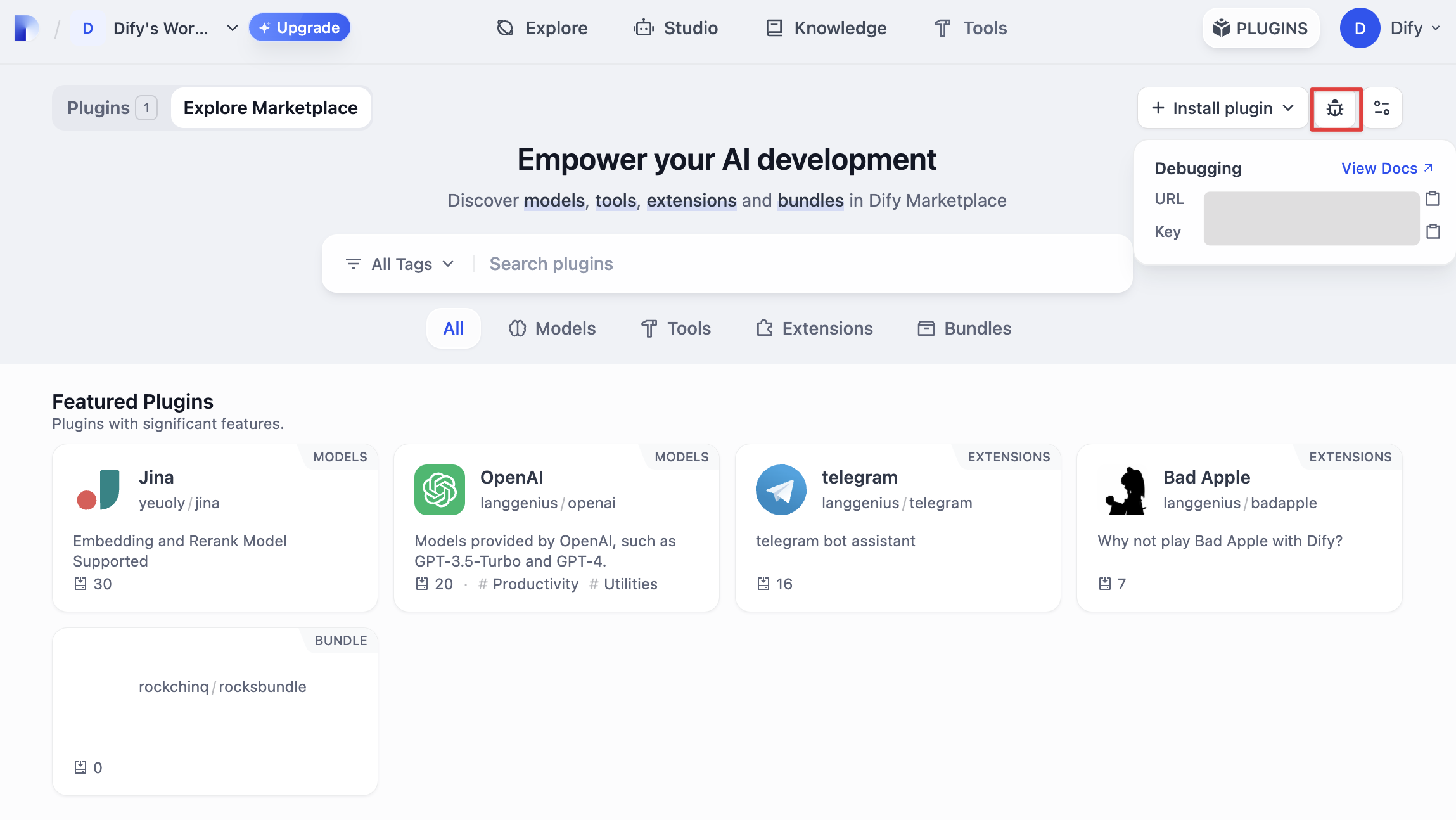
回到插件项目,拷贝 `.env.example` 文件并重命名为 `.env`,将获取的远程服务器地址和调试 Key 等信息填入其中。
`.env` 文件
```bash
INSTALL_METHOD=remote
REMOTE_INSTALL_HOST=remote-url
REMOTE_INSTALL_PORT=5003
REMOTE_INSTALL_KEY=****-****-****-****-****
```
运行 `python -m main` 命令启动插件。在插件页即可看到该插件已被安装至 Workspace 内。其他团队成员也可以访问该插件。
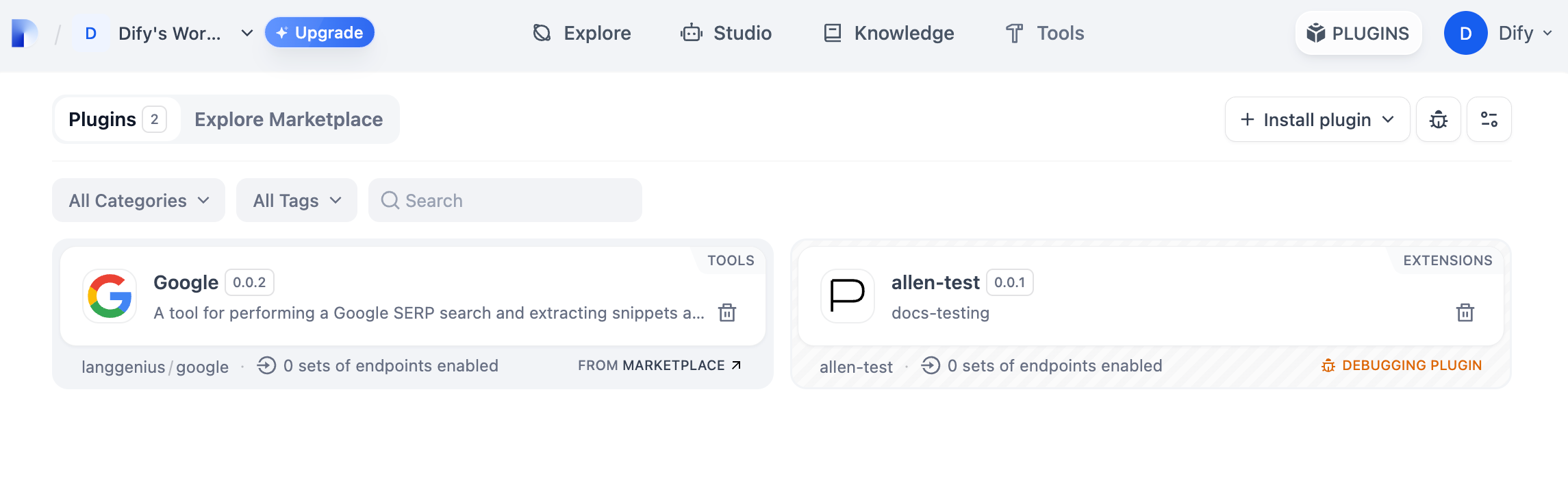
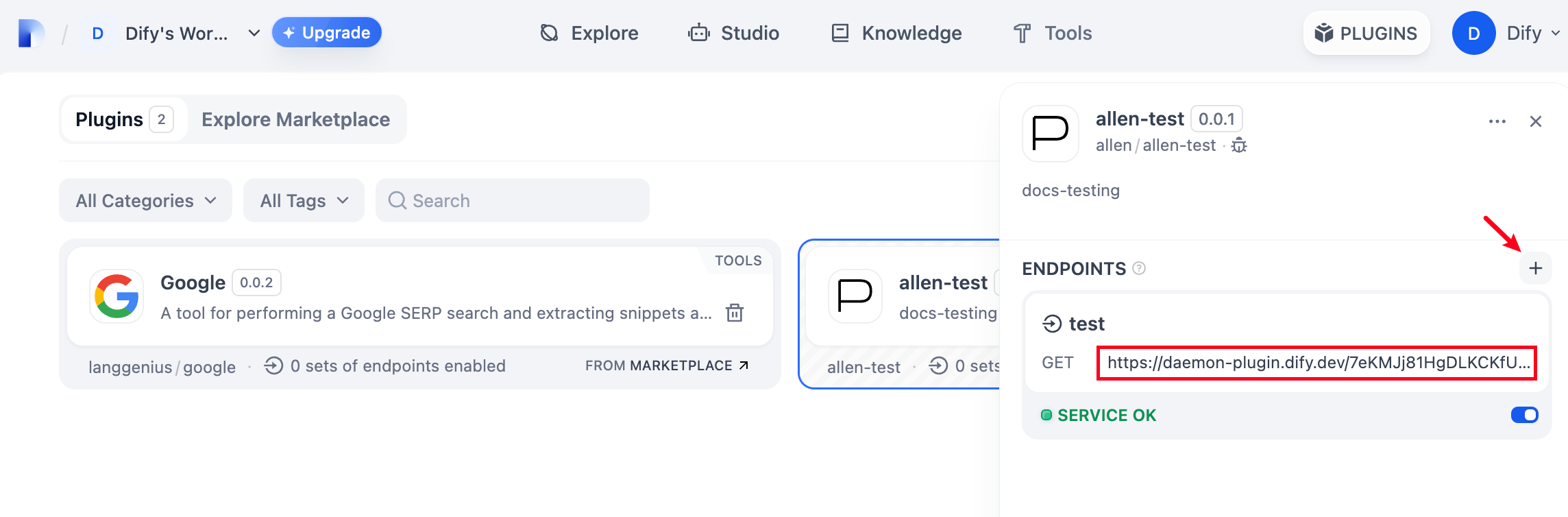
在插件内新增 Endpoint,随意填写名称和 `api_key` 等信息。访问自动生成的 URL,即可看到由插件提供的网页服务。
### 打包插件
确认插件能够正常运行后,可以通过以下命令行工具打包并命名插件。运行以后你可以在当前文件夹发现 `neko.difypkg` 文件,该文件为最终的插件包。
```bash
dify-plugin package ./neko
```
恭喜,你已完成一个插件的完整开发、测试打包过程!
### 发布插件
现在可以将它上传至 [Dify Plugins 代码仓库](https://github.com/langgenius/dify-plugins) 来发布你的插件了!上传前,请确保你的插件遵循了[插件发布规范](https://docs.dify.ai/zh-hans/plugins/publish-plugins/publish-to-dify-marketplace)。审核通过后,代码将合并至主分支并自动上线至 [Dify Marketplace](https://marketplace.dify.ai/)。
### 探索更多
**快速开始:**
* [Tool 插件:Google Search](tool-plugin)
* [Model 插件](model-plugin/)
* [Bundle 插件:将多个插件打包](bundle)
**插件接口文档:**
* [Manifest](../../schema-definition/manifest) 结构
* [Endpoint](../../schema-definition/endpoint) 详细定义
* [反向调用 Dify 能力](../../schema-definition/reverse-invocation-of-the-dify-service/)
* [工具](../../schema-definition/tool)
* [模型](../../schema-definition/model/)
* [扩展 Agent 策略](../../schema-definition/agent)
**最佳实践:**
[开发 Slack Bot 插件](../../best-practice/develop-a-slack-bot-plugin)
{/*
Contributing Section
DO NOT edit this section!
It will be automatically generated by the script.
*/}
---
[编辑此页面](https://github.com/langgenius/dify-docs/edit/main/zh-hans/plugins/quick-start/develop-plugins/extension-plugin.mdx) | [提交问题](https://github.com/langgenius/dify-docs/issues/new?template=docs.yml)