---
dimensions:
type:
primary: reference
detail: examples
level: advanced
standard_title: Agent Strategy Plugin
language: en
title: Agent Strategy Plugin
description: This document details how to develop an Agent strategy plugin, covering
the entire process from initializing the plugin template to invoking models, invoking
tools, outputting logs, and packaging for release. It provides detailed code examples,
including how to implement automated tool invocation features that help LLMs perform
reasoning or decision-making logic.
---
An **Agent Strategy Plugin** helps an LLM carry out tasks like reasoning or decision-making, including choosing and calling tools, as well as handling results. This allows the system to address problems more autonomously.
Below, you’ll see how to develop a plugin that supports **Function Calling** to automatically fetch the current time.
### Prerequisites
- Dify plugin scaffolding tool
- Python environment (version ≥ 3.12)
For details on preparing the plugin development tool, see [Initializing the Development Tool](/plugin-dev-en/0221-initialize-development-tools).
**Tip**: Run `dify version` in your terminal to confirm that the scaffolding tool is installed.
---
### 1. Initializing the Plugin Template
Run the following command to create a development template for your Agent plugin:
```
dify plugin init
```
Follow the on-screen prompts and refer to the sample comments for guidance.
```bash
➜ Dify Plugins Developing dify plugin init
Edit profile of the plugin
Plugin name (press Enter to next step): # Enter the plugin name
Author (press Enter to next step): Author name # Enter the plugin author
Description (press Enter to next step): Description # Enter the plugin description
---
Select the language you want to use for plugin development, and press Enter to con
BTW, you need Python 3.12+ to develop the Plugin if you choose Python.
-> python # Select Python environment
go (not supported yet)
---
Based on the ability you want to extend, we have divided the Plugin into four type
- Tool: It's a tool provider, but not only limited to tools, you can implement an
- Model: Just a model provider, extending others is not allowed.
- Extension: Other times, you may only need a simple http service to extend the fu
- Agent Strategy: Implement your own logics here, just by focusing on Agent itself
What's more, we have provided the template for you, you can choose one of them b
tool
-> agent-strategy # Select Agent strategy template
llm
text-embedding
---
Configure the permissions of the plugin, use up and down to navigate, tab to sel
Backwards Invocation:
Tools:
Enabled: [✔] You can invoke tools inside Dify if it's enabled # Enabled by default
Models:
Enabled: [✔] You can invoke models inside Dify if it's enabled # Enabled by default
LLM: [✔] You can invoke LLM models inside Dify if it's enabled # Enabled by default
Text Embedding: [✘] You can invoke text embedding models inside Dify if it'
Rerank: [✘] You can invoke rerank models inside Dify if it's enabled
...
```
After initialization, you’ll get a folder containing all the resources needed for plugin development. Familiarizing yourself with the overall structure of an Agent Strategy Plugin will streamline the development process:
```text
├── GUIDE.md # User guide and documentation
├── PRIVACY.md # Privacy policy and data handling guidelines
├── README.md # Project overview and setup instructions
├── _assets/ # Static assets directory
│ └── icon.svg # Agent strategy provider icon/logo
├── main.py # Main application entry point
├── manifest.yaml # Basic plugin configuration
├── provider/ # Provider configurations directory
│ └── basic_agent.yaml # Your agent provider settings
├── requirements.txt # Python dependencies list
└── strategies/ # Strategy implementation directory
├── basic_agent.py # Basic agent strategy implementation
└── basic_agent.yaml # Basic agent strategy configuration
```
All key functionality for this plugin is in the `strategies/` directory.
---
### 2. Developing the Plugin
Agent Strategy Plugin development revolves around two files:
- **Plugin Declaration**: `strategies/basic_agent.yaml`
- **Plugin Implementation**: `strategies/basic_agent.py`
#### 2.1 Defining Parameters
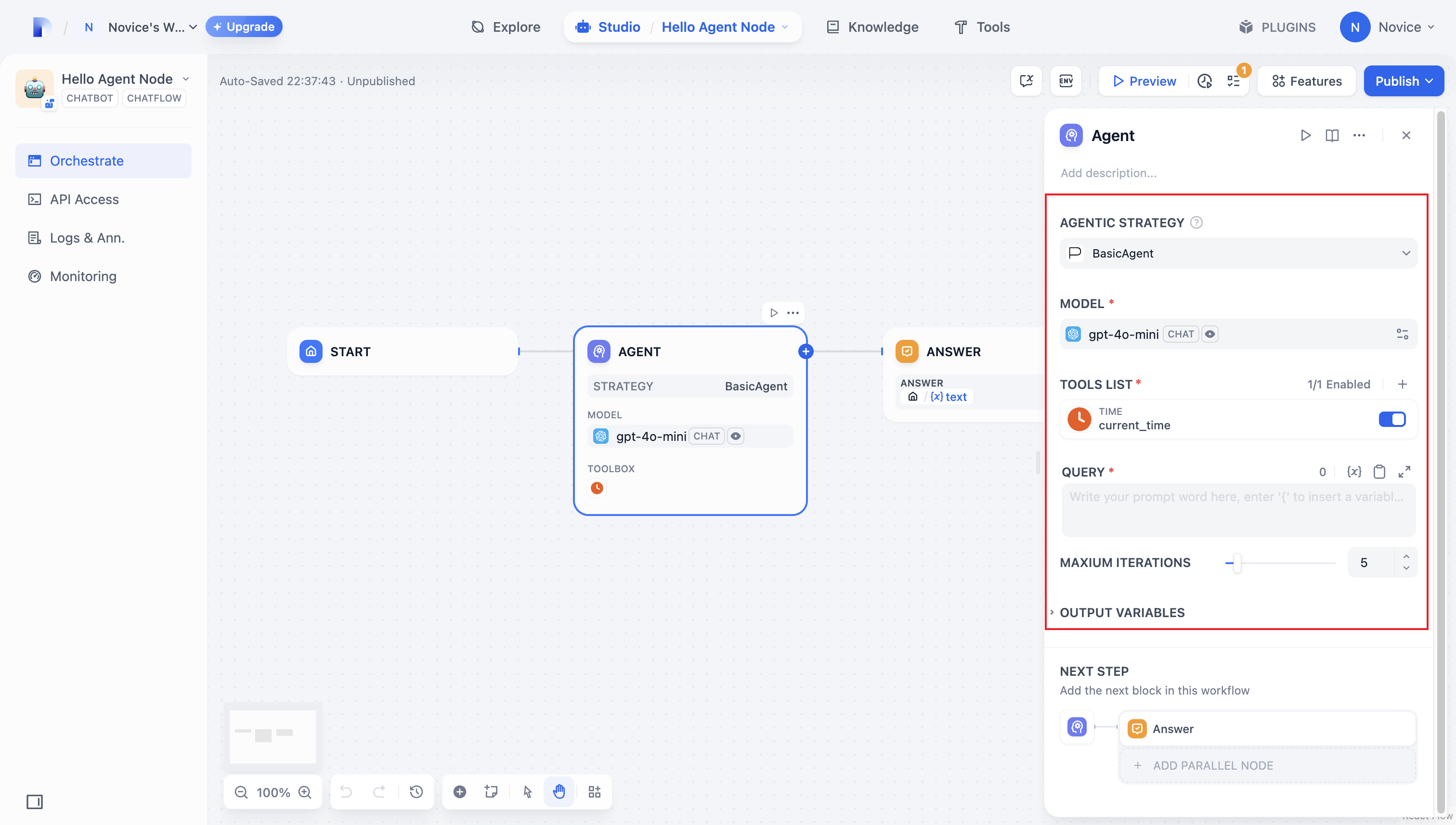
To build an Agent plugin, start by specifying the necessary parameters in `strategies/basic_agent.yaml`. These parameters define the plugin’s core features, such as calling an LLM or using tools.
We recommend including the following four parameters first:
1. **model**: The large language model to call (e.g., GPT-4, GPT-4o-mini).
2. **tools**: A list of tools that enhance your plugin’s functionality.
3. **query**: The user input or prompt content sent to the model.
4. **maximum_iterations**: The maximum iteration count to prevent excessive computation.
Example Code:
```yaml
identity:
name: basic_agent # the name of the agent_strategy
author: novice # the author of the agent_strategy
label:
en_US: BasicAgent # the engilish label of the agent_strategy
description:
en_US: BasicAgent # the english description of the agent_strategy
parameters:
- name: model # the name of the model parameter
type: model-selector # model-type
scope: tool-call&llm # the scope of the parameter
required: true
label:
en_US: Model
zh_Hans: 模型
pt_BR: Model
- name: tools # the name of the tools parameter
type: array[tools] # the type of tool parameter
required: true
label:
en_US: Tools list
zh_Hans: 工具列表
pt_BR: Tools list
- name: query # the name of the query parameter
type: string # the type of query parameter
required: true
label:
en_US: Query
zh_Hans: 查询
pt_BR: Query
- name: maximum_iterations
type: number
required: false
default: 5
label:
en_US: Maxium Iterations
zh_Hans: 最大迭代次数
pt_BR: Maxium Iterations
max: 50 # if you set the max and min value, the display of the parameter will be a slider
min: 1
extra:
python:
source: strategies/basic_agent.py
```
Once you’ve configured these parameters, the plugin will automatically generate a user-friendly interface so you can easily manage them:
#### 2.2 Retrieving Parameters and Execution
After users fill out these basic fields, your plugin needs to process the submitted parameters. In `strategies/basic_agent.py`, define a parameter class for the Agent, then retrieve and apply these parameters in your logic.
Verify incoming parameters:
```python
from dify_plugin.entities.agent import AgentInvokeMessage
from dify_plugin.interfaces.agent import AgentModelConfig, AgentStrategy, ToolEntity
from pydantic import BaseModel
class BasicParams(BaseModel):
maximum_iterations: int
model: AgentModelConfig
tools: list[ToolEntity]
query: str
```
After getting the parameters, the specific business logic is executed:
```python
class BasicAgentAgentStrategy(AgentStrategy):
def _invoke(self, parameters: dict[str, Any]) -> Generator[AgentInvokeMessage]:
params = BasicParams(**parameters)
```
### 3. Invoking the Model
In an Agent Strategy Plugin, **invoking the model** is central to the workflow. You can invoke an LLM efficiently using `session.model.llm.invoke()` from the SDK, handling text generation, dialogue, and so forth.
If you want the LLM **handle tools**, ensure it outputs structured parameters to match a tool’s interface. In other words, the LLM must produce input arguments that the tool can accept based on the user’s instructions.
Construct the following parameters:
* model
* prompt\_messages
* tools
* stop
* stream
Example code for method definition:
```python
def invoke(
self,
model_config: LLMModelConfig,
prompt_messages: list[PromptMessage],
tools: list[PromptMessageTool] | None = None,
stop: list[str] | None = None,
stream: bool = True,
) -> Generator[LLMResultChunk, None, None] | LLMResult:...
```
To view the complete functionality implementation, please refer to the Example Code for model invocation.
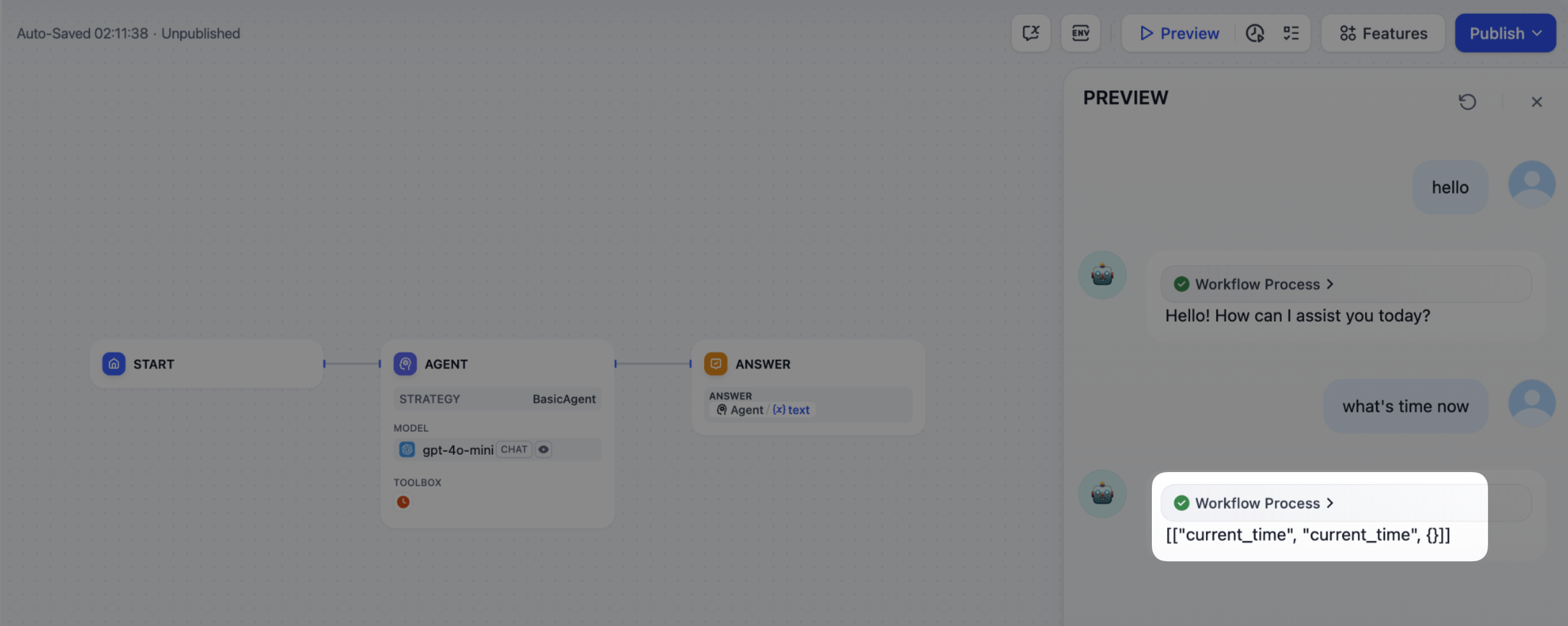
This code achieves the following functionality: after a user inputs a command, the Agent strategy plugin automatically calls the LLM, constructs the necessary parameters for tool invocation based on the generated results, and enables the model to flexibly dispatch integrated tools to efficiently complete complex tasks.
### 4. Handle a Tool
After specifying the tool parameters, the Agent Strategy Plugin must actually call these tools. Use `session.tool.invoke()` to make those requests.
Construct the following parameters:
- provider
- tool\_name
- parameters
Example code for method definition:
```python
def invoke(
self,
provider_type: ToolProviderType,
provider: str,
tool_name: str,
parameters: dict[str, Any],
) -> Generator[ToolInvokeMessage, None, None]:...
```
If you’d like the LLM itself to generate the parameters needed for tool calls, you can do so by combining the model’s output with your tool-calling code.
```python
tool_instances = (
{tool.identity.name: tool for tool in params.tools} if params.tools else {}
)
for tool_call_id, tool_call_name, tool_call_args in tool_calls:
tool_instance = tool_instances[tool_call_name]
self.session.tool.invoke(
provider_type=ToolProviderType.BUILT_IN,
provider=tool_instance.identity.provider,
tool_name=tool_instance.identity.name,
parameters={**tool_instance.runtime_parameters, **tool_call_args},
)
```
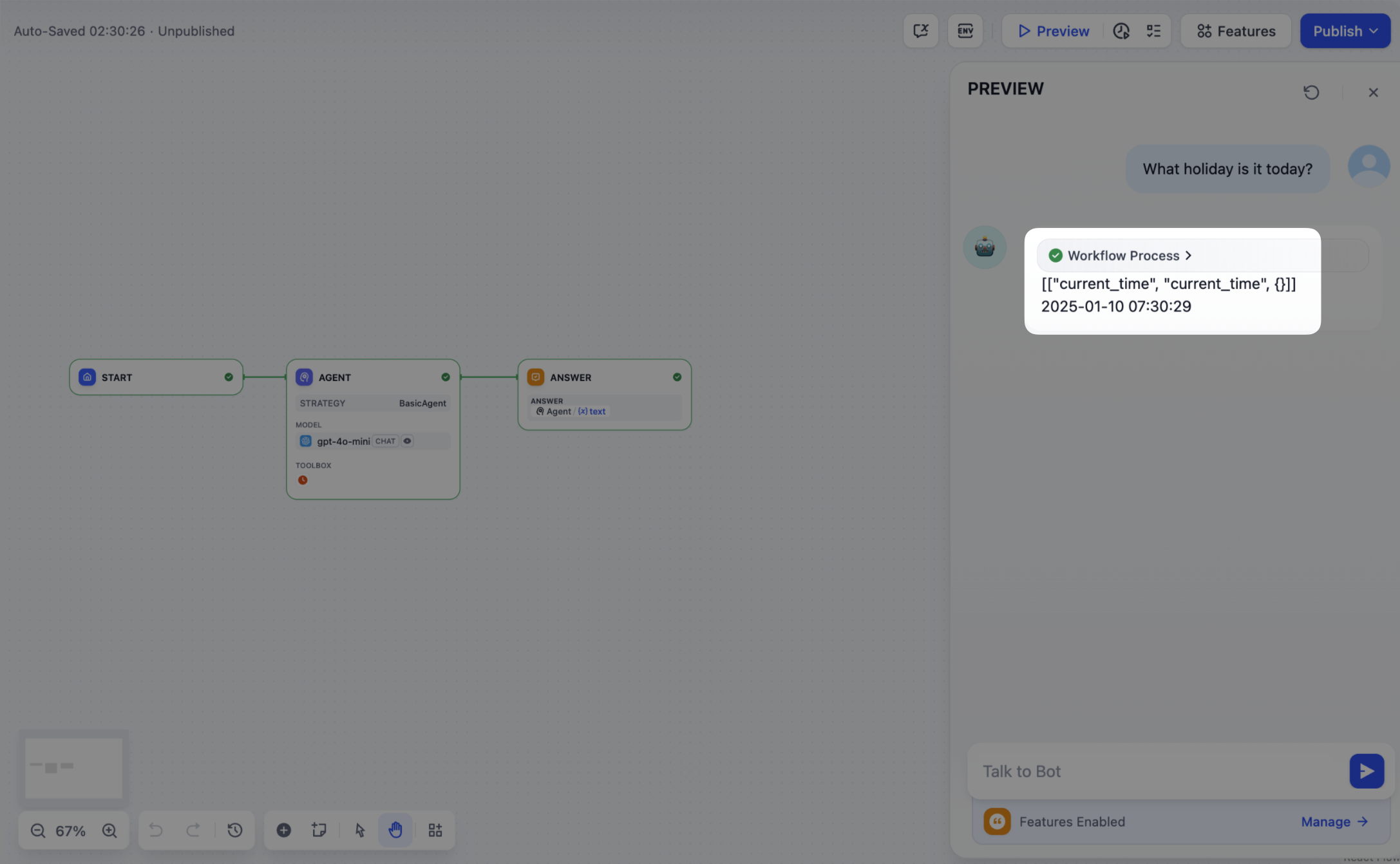
With this in place, your Agent Strategy Plugin can automatically perform **Function Calling**—for instance, retrieving the current time.
### 5. Creating Logs
Often, multiple steps are necessary to complete a complex task in an **Agent Strategy Plugin**. It’s crucial for developers to track each step’s results, analyze the decision process, and optimize strategy. Using `create_log_message` and `finish_log_message` from the SDK, you can log real-time states before and after calls, aiding in quick problem diagnosis.
For example:
- Log a “starting model call” message before calling the model, clarifying the task’s execution progress.
- Log a “call succeeded” message once the model responds, ensuring the model’s output can be traced end to end.
```python
model_log = self.create_log_message(
label=f"{params.model.model} Thought",
data={},
metadata={"start_at": model_started_at, "provider": params.model.provider},
status=ToolInvokeMessage.LogMessage.LogStatus.START,
)
yield model_log
self.session.model.llm.invoke(...)
yield self.finish_log_message(
log=model_log,
data={
"output": response,
"tool_name": tool_call_names,
"tool_input": tool_call_inputs,
},
metadata={
"started_at": model_started_at,
"finished_at": time.perf_counter(),
"elapsed_time": time.perf_counter() - model_started_at,
"provider": params.model.provider,
},
)
```
When the setup is complete, the workflow log will output the execution results:
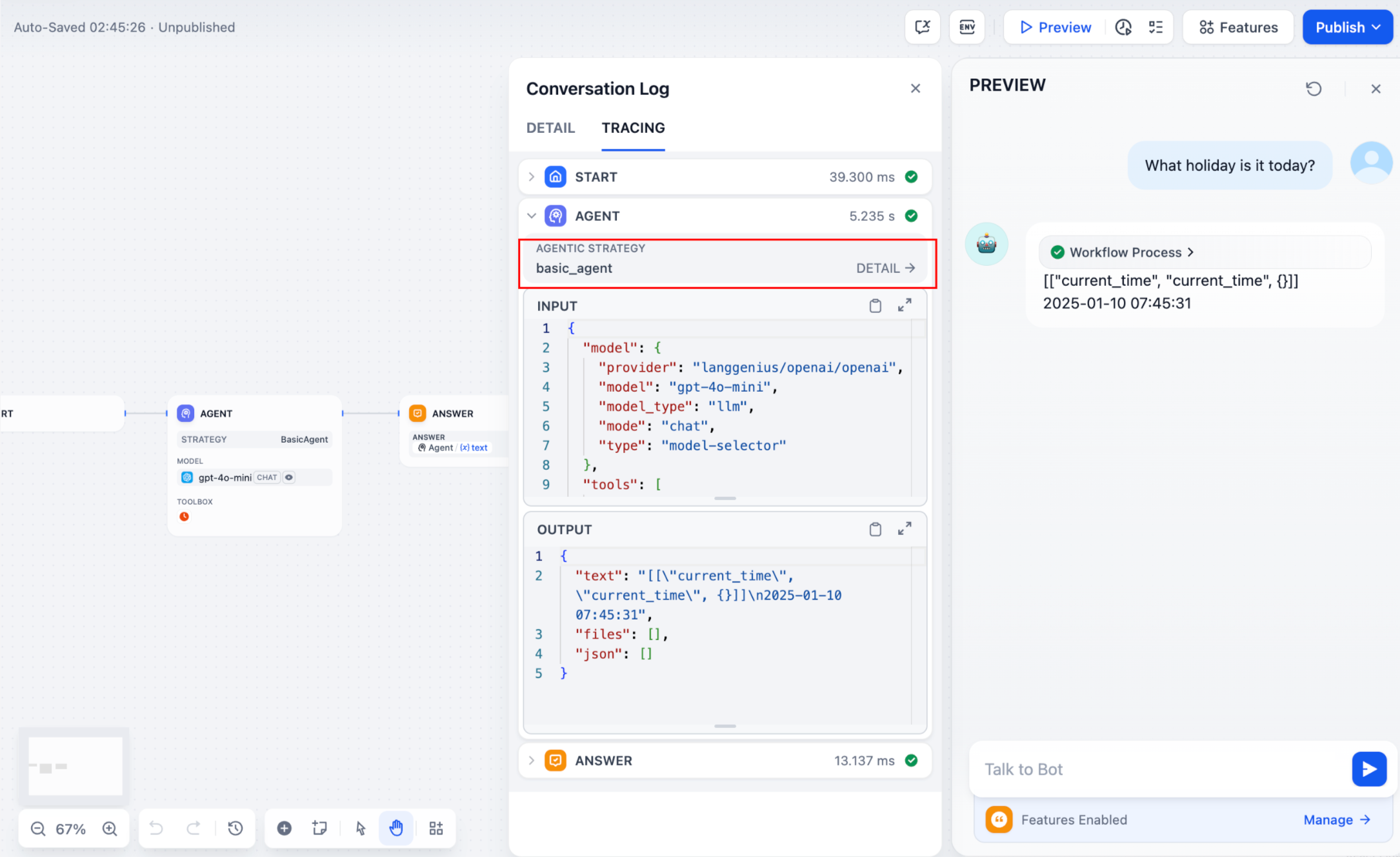
If multiple rounds of logs occur, you can structure them hierarchically by setting a `parent` parameter in your log calls, making them easier to follow.
Reference method:
```python
function_call_round_log = self.create_log_message(
label="Function Call Round1 ",
data={},
metadata={},
)
yield function_call_round_log
model_log = self.create_log_message(
label=f"{params.model.model} Thought",
data={},
metadata={"start_at": model_started_at, "provider": params.model.provider},
status=ToolInvokeMessage.LogMessage.LogStatus.START,
# add parent log
parent=function_call_round_log,
)
yield model_log
```
#### Sample code for agent-plugin functions
#### Invoke Model
The following code demonstrates how to give the Agent strategy plugin the ability to invoke the model:
```python
import json
from collections.abc import Generator
from typing import Any, cast
from dify_plugin.entities.agent import AgentInvokeMessage
from dify_plugin.entities.model.llm import LLMModelConfig, LLMResult, LLMResultChunk
from dify_plugin.entities.model.message import (
PromptMessageTool,
UserPromptMessage,
)
from dify_plugin.entities.tool import ToolInvokeMessage, ToolParameter, ToolProviderType
from dify_plugin.interfaces.agent import AgentModelConfig, AgentStrategy, ToolEntity
from pydantic import BaseModel
class BasicParams(BaseModel):
maximum_iterations: int
model: AgentModelConfig
tools: list[ToolEntity]
query: str
class BasicAgentAgentStrategy(AgentStrategy):
def _invoke(self, parameters: dict[str, Any]) -> Generator[AgentInvokeMessage]:
params = BasicParams(**parameters)
chunks: Generator[LLMResultChunk, None, None] | LLMResult = (
self.session.model.llm.invoke(
model_config=LLMModelConfig(**params.model.model_dump(mode="json")),
prompt_messages=[UserPromptMessage(content=params.query)],
tools=[
self._convert_tool_to_prompt_message_tool(tool)
for tool in params.tools
],
stop=params.model.completion_params.get("stop", [])
if params.model.completion_params
else [],
stream=True,
)
)
response = ""
tool_calls = []
tool_instances = (
{tool.identity.name: tool for tool in params.tools} if params.tools else {}
)
for chunk in chunks:
# check if there is any tool call
if self.check_tool_calls(chunk):
tool_calls = self.extract_tool_calls(chunk)
tool_call_names = ";".join([tool_call[1] for tool_call in tool_calls])
try:
tool_call_inputs = json.dumps(
{tool_call[1]: tool_call[2] for tool_call in tool_calls},
ensure_ascii=False,
)
except json.JSONDecodeError:
# ensure ascii to avoid encoding error
tool_call_inputs = json.dumps(
{tool_call[1]: tool_call[2] for tool_call in tool_calls}
)
print(tool_call_names, tool_call_inputs)
if chunk.delta.message and chunk.delta.message.content:
if isinstance(chunk.delta.message.content, list):
for content in chunk.delta.message.content:
response += content.data
print(content.data, end="", flush=True)
else:
response += str(chunk.delta.message.content)
print(str(chunk.delta.message.content), end="", flush=True)
if chunk.delta.usage:
# usage of the model
usage = chunk.delta.usage
yield self.create_text_message(
text=f"{response or json.dumps(tool_calls, ensure_ascii=False)}\n"
)
result = ""
for tool_call_id, tool_call_name, tool_call_args in tool_calls:
tool_instance = tool_instances[tool_call_name]
tool_invoke_responses = self.session.tool.invoke(
provider_type=ToolProviderType.BUILT_IN,
provider=tool_instance.identity.provider,
tool_name=tool_instance.identity.name,
parameters={**tool_instance.runtime_parameters, **tool_call_args},
)
if not tool_instance:
tool_invoke_responses = {
"tool_call_id": tool_call_id,
"tool_call_name": tool_call_name,
"tool_response": f"there is not a tool named {tool_call_name}",
}
else:
# invoke tool
tool_invoke_responses = self.session.tool.invoke(
provider_type=ToolProviderType.BUILT_IN,
provider=tool_instance.identity.provider,
tool_name=tool_instance.identity.name,
parameters={**tool_instance.runtime_parameters, **tool_call_args},
)
result = ""
for tool_invoke_response in tool_invoke_responses:
if tool_invoke_response.type == ToolInvokeMessage.MessageType.TEXT:
result += cast(
ToolInvokeMessage.TextMessage, tool_invoke_response.message
).text
elif (
tool_invoke_response.type == ToolInvokeMessage.MessageType.LINK
):
result += (
f"result link: {cast(ToolInvokeMessage.TextMessage, tool_invoke_response.message).text}."
+ " please tell user to check it."
)
elif tool_invoke_response.type in {
ToolInvokeMessage.MessageType.IMAGE_LINK,
ToolInvokeMessage.MessageType.IMAGE,
}:
result += (
"image has been created and sent to user already, "
+ "you do not need to create it, just tell the user to check it now."
)
elif (
tool_invoke_response.type == ToolInvokeMessage.MessageType.JSON
):
text = json.dumps(
cast(
ToolInvokeMessage.JsonMessage,
tool_invoke_response.message,
).json_object,
ensure_ascii=False,
)
result += f"tool response: {text}."
else:
result += f"tool response: {tool_invoke_response.message!r}."
tool_response = {
"tool_call_id": tool_call_id,
"tool_call_name": tool_call_name,
"tool_response": result,
}
yield self.create_text_message(result)
def _convert_tool_to_prompt_message_tool(
self, tool: ToolEntity
) -> PromptMessageTool:
"""
convert tool to prompt message tool
"""
message_tool = PromptMessageTool(
name=tool.identity.name,
description=tool.description.llm if tool.description else "",
parameters={
"type": "object",
"properties": {},
"required": [],
},
)
parameters = tool.parameters
for parameter in parameters:
if parameter.form != ToolParameter.ToolParameterForm.LLM:
continue
parameter_type = parameter.type
if parameter.type in {
ToolParameter.ToolParameterType.FILE,
ToolParameter.ToolParameterType.FILES,
}:
continue
enum = []
if parameter.type == ToolParameter.ToolParameterType.SELECT:
enum = (
[option.value for option in parameter.options]
if parameter.options
else []
)
message_tool.parameters["properties"][parameter.name] = {
"type": parameter_type,
"description": parameter.llm_description or "",
}
if len(enum) > 0:
message_tool.parameters["properties"][parameter.name]["enum"] = enum
if parameter.required:
message_tool.parameters["required"].append(parameter.name)
return message_tool
def check_tool_calls(self, llm_result_chunk: LLMResultChunk) -> bool:
"""
Check if there is any tool call in llm result chunk
"""
return bool(llm_result_chunk.delta.message.tool_calls)
def extract_tool_calls(
self, llm_result_chunk: LLMResultChunk
) -> list[tuple[str, str, dict[str, Any]]]:
"""
Extract tool calls from llm result chunk
Returns:
List[Tuple[str, str, Dict[str, Any]]]: [(tool_call_id, tool_call_name, tool_call_args)]
"""
tool_calls = []
for prompt_message in llm_result_chunk.delta.message.tool_calls:
args = {}
if prompt_message.function.arguments != "":
args = json.loads(prompt_message.function.arguments)
tool_calls.append(
(
prompt_message.id,
prompt_message.function.name,
args,
)
)
return tool_calls
```
#### Handle Tools
The following code shows how to implement model calls for the Agent strategy plugin and send canonicalized requests to the tool.
```python
import json
from collections.abc import Generator
from typing import Any, cast
from dify_plugin.entities.agent import AgentInvokeMessage
from dify_plugin.entities.model.llm import LLMModelConfig, LLMResult, LLMResultChunk
from dify_plugin.entities.model.message import (
PromptMessageTool,
UserPromptMessage,
)
from dify_plugin.entities.tool import ToolInvokeMessage, ToolParameter, ToolProviderType
from dify_plugin.interfaces.agent import AgentModelConfig, AgentStrategy, ToolEntity
from pydantic import BaseModel
class BasicParams(BaseModel):
maximum_iterations: int
model: AgentModelConfig
tools: list[ToolEntity]
query: str
class BasicAgentAgentStrategy(AgentStrategy):
def _invoke(self, parameters: dict[str, Any]) -> Generator[AgentInvokeMessage]:
params = BasicParams(**parameters)
chunks: Generator[LLMResultChunk, None, None] | LLMResult = (
self.session.model.llm.invoke(
model_config=LLMModelConfig(**params.model.model_dump(mode="json")),
prompt_messages=[UserPromptMessage(content=params.query)],
tools=[
self._convert_tool_to_prompt_message_tool(tool)
for tool in params.tools
],
stop=params.model.completion_params.get("stop", [])
if params.model.completion_params
else [],
stream=True,
)
)
response = ""
tool_calls = []
tool_instances = (
{tool.identity.name: tool for tool in params.tools} if params.tools else {}
)
for chunk in chunks:
# check if there is any tool call
if self.check_tool_calls(chunk):
tool_calls = self.extract_tool_calls(chunk)
tool_call_names = ";".join([tool_call[1] for tool_call in tool_calls])
try:
tool_call_inputs = json.dumps(
{tool_call[1]: tool_call[2] for tool_call in tool_calls},
ensure_ascii=False,
)
except json.JSONDecodeError:
# ensure ascii to avoid encoding error
tool_call_inputs = json.dumps(
{tool_call[1]: tool_call[2] for tool_call in tool_calls}
)
print(tool_call_names, tool_call_inputs)
if chunk.delta.message and chunk.delta.message.content:
if isinstance(chunk.delta.message.content, list):
for content in chunk.delta.message.content:
response += content.data
print(content.data, end="", flush=True)
else:
response += str(chunk.delta.message.content)
print(str(chunk.delta.message.content), end="", flush=True)
if chunk.delta.usage:
# usage of the model
usage = chunk.delta.usage
yield self.create_text_message(
text=f"{response or json.dumps(tool_calls, ensure_ascii=False)}\n"
)
result = ""
for tool_call_id, tool_call_name, tool_call_args in tool_calls:
tool_instance = tool_instances[tool_call_name]
tool_invoke_responses = self.session.tool.invoke(
provider_type=ToolProviderType.BUILT_IN,
provider=tool_instance.identity.provider,
tool_name=tool_instance.identity.name,
parameters={**tool_instance.runtime_parameters, **tool_call_args},
)
if not tool_instance:
tool_invoke_responses = {
"tool_call_id": tool_call_id,
"tool_call_name": tool_call_name,
"tool_response": f"there is not a tool named {tool_call_name}",
}
else:
# invoke tool
tool_invoke_responses = self.session.tool.invoke(
provider_type=ToolProviderType.BUILT_IN,
provider=tool_instance.identity.provider,
tool_name=tool_instance.identity.name,
parameters={**tool_instance.runtime_parameters, **tool_call_args},
)
result = ""
for tool_invoke_response in tool_invoke_responses:
if tool_invoke_response.type == ToolInvokeMessage.MessageType.TEXT:
result += cast(
ToolInvokeMessage.TextMessage, tool_invoke_response.message
).text
elif (
tool_invoke_response.type == ToolInvokeMessage.MessageType.LINK
):
result += (
f"result link: {cast(ToolInvokeMessage.TextMessage, tool_invoke_response.message).text}."
+ " please tell user to check it."
)
elif tool_invoke_response.type in {
ToolInvokeMessage.MessageType.IMAGE_LINK,
ToolInvokeMessage.MessageType.IMAGE,
}:
result += (
"image has been created and sent to user already, "
+ "you do not need to create it, just tell the user to check it now."
)
elif (
tool_invoke_response.type == ToolInvokeMessage.MessageType.JSON
):
text = json.dumps(
cast(
ToolInvokeMessage.JsonMessage,
tool_invoke_response.message,
).json_object,
ensure_ascii=False,
)
result += f"tool response: {text}."
else:
result += f"tool response: {tool_invoke_response.message!r}."
tool_response = {
"tool_call_id": tool_call_id,
"tool_call_name": tool_call_name,
"tool_response": result,
}
yield self.create_text_message(result)
def _convert_tool_to_prompt_message_tool(
self, tool: ToolEntity
) -> PromptMessageTool:
"""
convert tool to prompt message tool
"""
message_tool = PromptMessageTool(
name=tool.identity.name,
description=tool.description.llm if tool.description else "",
parameters={
"type": "object",
"properties": {},
"required": [],
},
)
parameters = tool.parameters
for parameter in parameters:
if parameter.form != ToolParameter.ToolParameterForm.LLM:
continue
parameter_type = parameter.type
if parameter.type in {
ToolParameter.ToolParameterType.FILE,
ToolParameter.ToolParameterType.FILES,
}:
continue
enum = []
if parameter.type == ToolParameter.ToolParameterType.SELECT:
enum = (
[option.value for option in parameter.options]
if parameter.options
else []
)
message_tool.parameters["properties"][parameter.name] = {
"type": parameter_type,
"description": parameter.llm_description or "",
}
if len(enum) > 0:
message_tool.parameters["properties"][parameter.name]["enum"] = enum
if parameter.required:
message_tool.parameters["required"].append(parameter.name)
return message_tool
def check_tool_calls(self, llm_result_chunk: LLMResultChunk) -> bool:
"""
Check if there is any tool call in llm result chunk
"""
return bool(llm_result_chunk.delta.message.tool_calls)
def extract_tool_calls(
self, llm_result_chunk: LLMResultChunk
) -> list[tuple[str, str, dict[str, Any]]]:
"""
Extract tool calls from llm result chunk
Returns:
List[Tuple[str, str, Dict[str, Any]]]: [(tool_call_id, tool_call_name, tool_call_args)]
"""
tool_calls = []
for prompt_message in llm_result_chunk.delta.message.tool_calls:
args = {}
if prompt_message.function.arguments != "":
args = json.loads(prompt_message.function.arguments)
tool_calls.append(
(
prompt_message.id,
prompt_message.function.name,
args,
)
)
return tool_calls
```
#### Example of a complete function code
A complete sample plugin code that includes a **invoking model, handling tool** and a **function to output multiple rounds of logs**:
```python
import json
import time
from collections.abc import Generator
from typing import Any, cast
from dify_plugin.entities.agent import AgentInvokeMessage
from dify_plugin.entities.model.llm import LLMModelConfig, LLMResult, LLMResultChunk
from dify_plugin.entities.model.message import (
PromptMessageTool,
UserPromptMessage,
)
from dify_plugin.entities.tool import ToolInvokeMessage, ToolParameter, ToolProviderType
from dify_plugin.interfaces.agent import AgentModelConfig, AgentStrategy, ToolEntity
from pydantic import BaseModel
class BasicParams(BaseModel):
maximum_iterations: int
model: AgentModelConfig
tools: list[ToolEntity]
query: str
class BasicAgentAgentStrategy(AgentStrategy):
def _invoke(self, parameters: dict[str, Any]) -> Generator[AgentInvokeMessage]:
params = BasicParams(**parameters)
function_call_round_log = self.create_log_message(
label="Function Call Round1 ",
data={},
metadata={},
)
yield function_call_round_log
model_started_at = time.perf_counter()
model_log = self.create_log_message(
label=f"{params.model.model} Thought",
data={},
metadata={"start_at": model_started_at, "provider": params.model.provider},
status=ToolInvokeMessage.LogMessage.LogStatus.START,
parent=function_call_round_log,
)
yield model_log
chunks: Generator[LLMResultChunk, None, None] | LLMResult = (
self.session.model.llm.invoke(
model_config=LLMModelConfig(**params.model.model_dump(mode="json")),
prompt_messages=[UserPromptMessage(content=params.query)],
tools=[
self._convert_tool_to_prompt_message_tool(tool)
for tool in params.tools
],
stop=params.model.completion_params.get("stop", [])
if params.model.completion_params
else [],
stream=True,
)
)
response = ""
tool_calls = []
tool_instances = (
{tool.identity.name: tool for tool in params.tools} if params.tools else {}
)
tool_call_names = ""
tool_call_inputs = ""
for chunk in chunks:
# check if there is any tool call
if self.check_tool_calls(chunk):
tool_calls = self.extract_tool_calls(chunk)
tool_call_names = ";".join([tool_call[1] for tool_call in tool_calls])
try:
tool_call_inputs = json.dumps(
{tool_call[1]: tool_call[2] for tool_call in tool_calls},
ensure_ascii=False,
)
except json.JSONDecodeError:
# ensure ascii to avoid encoding error
tool_call_inputs = json.dumps(
{tool_call[1]: tool_call[2] for tool_call in tool_calls}
)
print(tool_call_names, tool_call_inputs)
if chunk.delta.message and chunk.delta.message.content:
if isinstance(chunk.delta.message.content, list):
for content in chunk.delta.message.content:
response += content.data
print(content.data, end="", flush=True)
else:
response += str(chunk.delta.message.content)
print(str(chunk.delta.message.content), end="", flush=True)
if chunk.delta.usage:
# usage of the model
usage = chunk.delta.usage
yield self.finish_log_message(
log=model_log,
data={
"output": response,
"tool_name": tool_call_names,
"tool_input": tool_call_inputs,
},
metadata={
"started_at": model_started_at,
"finished_at": time.perf_counter(),
"elapsed_time": time.perf_counter() - model_started_at,
"provider": params.model.provider,
},
)
yield self.create_text_message(
text=f"{response or json.dumps(tool_calls, ensure_ascii=False)}\n"
)
result = ""
for tool_call_id, tool_call_name, tool_call_args in tool_calls:
tool_instance = tool_instances[tool_call_name]
tool_invoke_responses = self.session.tool.invoke(
provider_type=ToolProviderType.BUILT_IN,
provider=tool_instance.identity.provider,
tool_name=tool_instance.identity.name,
parameters={**tool_instance.runtime_parameters, **tool_call_args},
)
if not tool_instance:
tool_invoke_responses = {
"tool_call_id": tool_call_id,
"tool_call_name": tool_call_name,
"tool_response": f"there is not a tool named {tool_call_name}",
}
else:
# invoke tool
tool_invoke_responses = self.session.tool.invoke(
provider_type=ToolProviderType.BUILT_IN,
provider=tool_instance.identity.provider,
tool_name=tool_instance.identity.name,
parameters={**tool_instance.runtime_parameters, **tool_call_args},
)
result = ""
for tool_invoke_response in tool_invoke_responses:
if tool_invoke_response.type == ToolInvokeMessage.MessageType.TEXT:
result += cast(
ToolInvokeMessage.TextMessage, tool_invoke_response.message
).text
elif (
tool_invoke_response.type == ToolInvokeMessage.MessageType.LINK
):
result += (
f"result link: {cast(ToolInvokeMessage.TextMessage, tool_invoke_response.message).text}."
+ " please tell user to check it."
)
elif tool_invoke_response.type in {
ToolInvokeMessage.MessageType.IMAGE_LINK,
ToolInvokeMessage.MessageType.IMAGE,
}:
result += (
"image has been created and sent to user already, "
+ "you do not need to create it, just tell the user to check it now."
)
elif (
tool_invoke_response.type == ToolInvokeMessage.MessageType.JSON
):
text = json.dumps(
cast(
ToolInvokeMessage.JsonMessage,
tool_invoke_response.message,
).json_object,
ensure_ascii=False,
)
result += f"tool response: {text}."
else:
result += f"tool response: {tool_invoke_response.message!r}."
tool_response = {
"tool_call_id": tool_call_id,
"tool_call_name": tool_call_name,
"tool_response": result,
}
yield self.create_text_message(result)
def _convert_tool_to_prompt_message_tool(
self, tool: ToolEntity
) -> PromptMessageTool:
"""
convert tool to prompt message tool
"""
message_tool = PromptMessageTool(
name=tool.identity.name,
description=tool.description.llm if tool.description else "",
parameters={
"type": "object",
"properties": {},
"required": [],
},
)
parameters = tool.parameters
for parameter in parameters:
if parameter.form != ToolParameter.ToolParameterForm.LLM:
continue
parameter_type = parameter.type
if parameter.type in {
ToolParameter.ToolParameterType.FILE,
ToolParameter.ToolParameterType.FILES,
}:
continue
enum = []
if parameter.type == ToolParameter.ToolParameterType.SELECT:
enum = (
[option.value for option in parameter.options]
if parameter.options
else []
)
message_tool.parameters["properties"][parameter.name] = {
"type": parameter_type,
"description": parameter.llm_description or "",
}
if len(enum) > 0:
message_tool.parameters["properties"][parameter.name]["enum"] = enum
if parameter.required:
message_tool.parameters["required"].append(parameter.name)
return message_tool
def check_tool_calls(self, llm_result_chunk: LLMResultChunk) -> bool:
"""
Check if there is any tool call in llm result chunk
"""
return bool(llm_result_chunk.delta.message.tool_calls)
def extract_tool_calls(
self, llm_result_chunk: LLMResultChunk
) -> list[tuple[str, str, dict[str, Any]]]:
"""
Extract tool calls from llm result chunk
Returns:
List[Tuple[str, str, Dict[str, Any]]]: [(tool_call_id, tool_call_name, tool_call_args)]
"""
tool_calls = []
for prompt_message in llm_result_chunk.delta.message.tool_calls:
args = {}
if prompt_message.function.arguments != "":
args = json.loads(prompt_message.function.arguments)
tool_calls.append(
(
prompt_message.id,
prompt_message.function.name,
args,
)
)
return tool_calls
```
### 3. Debugging the Plugin
After finalizing the plugin’s declaration file and implementation code, run `python -m main` in the plugin directory to restart it. Next, confirm the plugin runs correctly. Dify offers remote debugging—go to [“Plugin Management”](https://console-plugin.dify.dev/plugins) to obtain your debug key and remote server address.

Back in your plugin project, copy `.env.example` to `.env` and insert the relevant remote server and debug key info.
```bash
INSTALL_METHOD=remote
REMOTE_INSTALL_URL=debug.dify.ai:5003
REMOTE_INSTALL_KEY=********-****-****-****-************
```
Then run:
```bash
python -m main
```
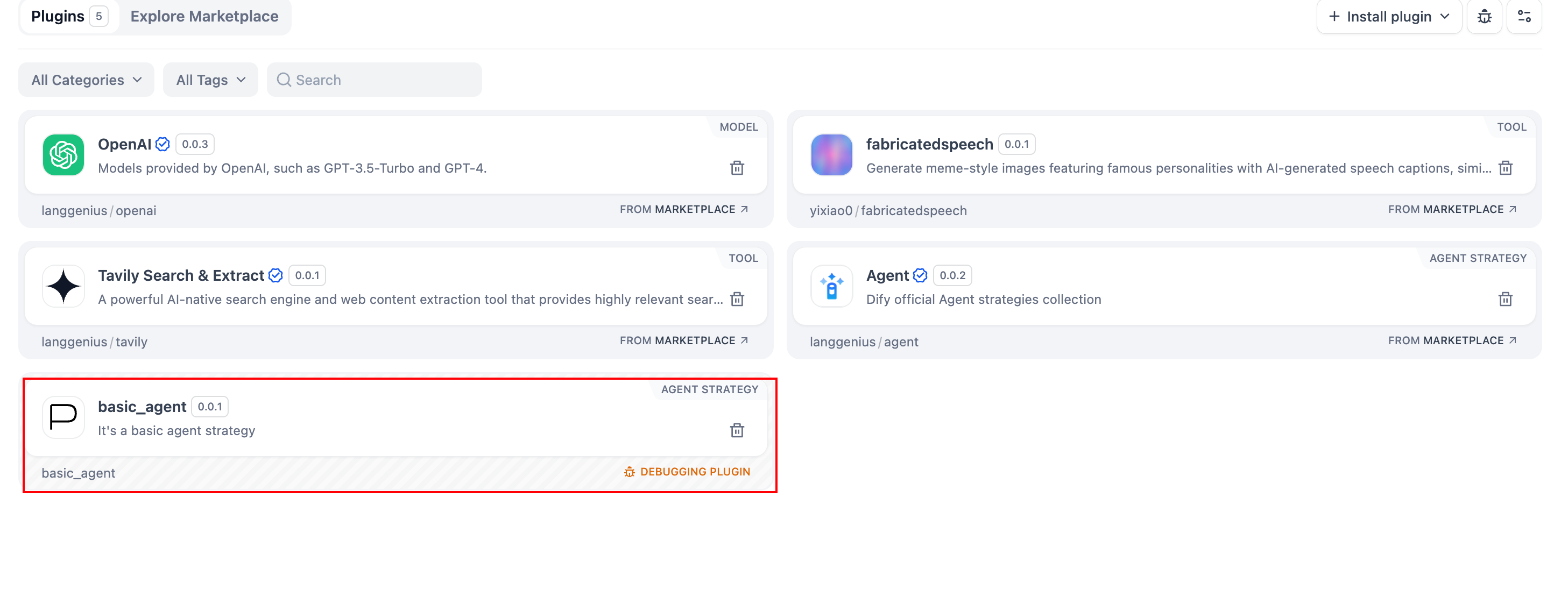
You’ll see the plugin installed in your Workspace, and team members can also access it.
### Packaging the Plugin (Optional)
Once everything works, you can package your plugin by running:
```bash
# Replace ./basic_agent/ with your actual plugin project path.
dify plugin package ./basic_agent/
```
A file named `google.difypkg` (for example) appears in your current folder—this is your final plugin package.
**Congratulations!** You’ve fully developed, tested, and packaged your Agent Strategy Plugin.
### Publishing the Plugin (Optional)
You can now upload it to the [Dify Plugins repository](https://github.com/langgenius/dify-plugins). Before doing so, ensure it meets the [Plugin Publishing Guidelines](https://docs.dify.ai/plugins/publish-plugins/publish-to-dify-marketplace). Once approved, your code merges into the main branch, and the plugin automatically goes live on the [Dify Marketplace](https://marketplace.dify.ai/).
---
### Further Exploration
Complex tasks often need multiple rounds of thinking and tool calls, typically repeating **model invoke → tool use** until the task ends or a maximum iteration limit is reached. Managing prompts effectively is crucial in this process. Check out the [complete Function Calling implementation](https://github.com/langgenius/dify-official-plugins/blob/main/agent-strategies/cot_agent/strategies/function_calling.py) for a standardized approach to letting models call external tools and handle their outputs.
{/*
Contributing Section
DO NOT edit this section!
It will be automatically generated by the script.
*/}
---
[Edit this page](https://github.com/langgenius/dify-docs/edit/main/plugin-dev-en/9433-agent-strategy-plugin.mdx) | [Report an issue](https://github.com/langgenius/dify-docs/issues/new?template=docs.yml)