---
dimensions:
type:
primary: implementation
detail: high
level: beginner
standard_title: Extension Plugin
language: en
title: Extension Plugin
description: This document provides a complete tutorial for developing Extension type
plugins, detailing the entire process including environment preparation, project
creation, defining plugin request entry points, writing functional code, debugging,
packaging, and publishing. The example project is a Nyan Cat plugin that demonstrates
how to handle HTTP requests and provide web services through an Extension plugin.
---
This article will guide you through quickly developing an Extension type plugin to help you understand the basic plugin development process.
### Prerequisites
* Dify plugin scaffolding tool
* Python environment, version ≥ 3.12
For detailed instructions on preparing the plugin development scaffolding tool, please refer to [Initializing Development Tools](/plugin-dev-en/0221-initialize-development-tools).
### Creating a New Project
In the current path, run the scaffolding command line tool to create a new Dify plugin project.
```
./dify-plugin-darwin-arm64 plugin init
```
If you have renamed the binary file to `dify` and copied it to the `/usr/local/bin` path, you can run the following command to create a new plugin project:
```bash
dify plugin init
```
#### 1. Filling in Plugin Information
Follow the prompts to configure the plugin name, author information, and plugin description. If you are working collaboratively as a team, you can also enter an organization name as the author.
> The plugin name must be 1-128 characters long and can only contain letters, numbers, hyphens, and underscores.

Once completed, select Python as the plugin development language.

#### 2. Select Plugin Type and Initialize Project Template
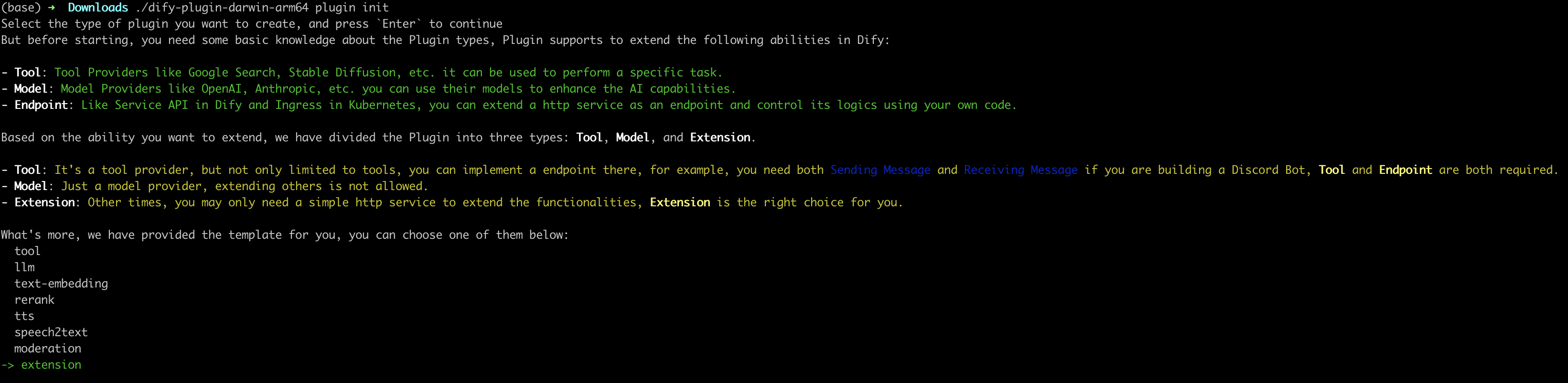
All templates in the scaffolding tool provide complete code projects. For demonstration purposes, this article will use the `Extension` type plugin template as an example. For developers already familiar with plugin development, templates are not necessary, and you can refer to the [interface documentation](/plugin-dev-en/0411-general-specifications) to guide the development of different types of plugins.
#### 3. Configure Plugin Permissions
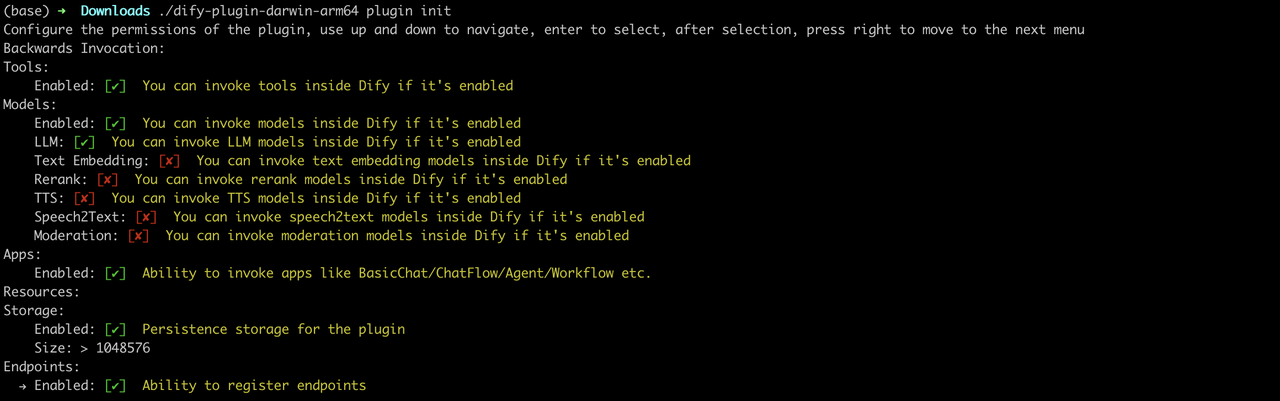
The plugin also needs permissions to read from the Dify main platform to connect properly. Grant the following permissions to this example plugin:
* Tools
* LLMs
* Apps
* Enable persistent storage Storage, allocate default size storage
* Allow registering Endpoints
> Use the arrow keys in the terminal to select permissions, and use the "Tab" button to grant permissions.
After checking all permission items, press Enter to complete the plugin creation. The system will automatically generate the plugin project code.
The basic file structure of the plugin includes the following:
```
.
├── GUIDE.md
├── README.md
├── _assets
│ └── icon.svg
├── endpoints
│ ├── your-project.py
│ └── your-project.yaml
├── group
│ └── your-project.yaml
├── main.py
├── manifest.yaml
└── requirements.txt
```
* `GUIDE.md` A short tutorial guiding you through the plugin writing process.
* `README.md` Brief introduction about the current plugin, where you need to fill in the introduction and usage instructions for the plugin.
* `_assets` Stores all multimedia files related to the current plugin.
* `endpoints` An `Extension` type plugin template created according to the CLI guidance, this directory stores all Endpoint implementation code.
* `group` Specifies the key type, multilingual settings, and the file path of the API definition.
* `main.py` The entry file for the entire project.
* `manifest.yaml` The basic configuration file for the entire plugin, containing configuration information such as what permissions the plugin needs and what type of extension it is.
* `requirements.txt` Stores Python environment dependencies.
### Developing the Plugin
#### 1. Define the Plugin's Request Entry Point (Endpoint)
Edit `endpoints/test_plugin.yaml`, referring to the following code for modification:
```yaml
path: "/neko"
method: "GET"
extra:
python:
source: "endpoints/test_plugin.py"
```
The intent of this code is to define the entry path for the plugin as `/neko`, with the request method as GET type. The plugin's functional implementation code is in the `endpoints/test_plugin.py` file.
#### 2. Write Plugin Functionality
Plugin functionality: Request service, output a Nyan Cat.
Write the plugin's functional implementation code in the `endpoints/test_plugin.py` file, referring to the following example code:
```python
from typing import Mapping
from werkzeug import Request, Response
from flask import Flask, render_template_string
from dify_plugin import Endpoint
app = Flask(__name__)
class NekoEndpoint(Endpoint):
def _invoke(self, r: Request, values: Mapping, settings: Mapping) -> Response:
ascii_art = '''
⬜️⬜️⬜️⬜️⬜️⬜️⬜️⬜️⬜️⬜️⬜️⬜️⬜️⬜️⬜️⬜️⬜️⬜️⬜️⬜️⬜️⬜️⬜️⬜️⬜️⬜️⬜️⬛️⬛️⬛️⬛️⬛️⬛️⬛️⬛️⬛️⬛️⬛️⬛️⬛️⬛️⬛️⬛⬛️⬜️⬜️⬜️⬜️⬜⬜️⬜️️
🟥🟥⬜️⬜️⬜️⬜️⬜️⬜️⬜️⬜️🟥🟥🟥🟥🟥🟥🟥🟥⬜️⬜️⬜️⬜️⬜️⬜️⬜️⬜️⬛🥧🥧🥧🥧🥧🥧🥧🥧🥧🥧🥧🥧🥧🥧🥧🥧🥧⬛️⬜️⬜️⬜️⬜️⬜⬜️️
🟥🟥🟥🟥🟥🟥🟥🟥🟥🟥🟥🟥🟥🟥🟥🟥🟥🟥🟥🟥🟥🟥🟥🟥🟥⬛️🥧🥧🥧💟💟💟💟💟💟💟💟💟💟💟💟💟🥧🥧🥧⬛️⬜️⬜️⬜️⬜⬜️️
🟥🟥🟥🟥🟥🟥🟥🟥🟥🟥🟥🟥🟥🟥🟥🟥🟥🟥🟥🟥🟥🟥🟥🟥🟥⬛️🥧🥧💟💟💟💟💟💟🍓💟💟🍓💟💟💟💟💟🥧🥧⬛️⬜️⬜️⬜️⬜️⬜️️
🟧🟧🟥🟥🟥🟥🟥🟥🟥🟥🟧🟧🟧🟧🟧🟧🟧🟧🟥🟥🟥🟥🟥🟥🟥⬛🥧💟💟🍓💟💟💟💟💟💟💟💟💟💟💟💟💟💟🥧⬛️⬜️⬜️⬜️⬜⬜️️
🟧🟧🟧🟧🟧🟧🟧🟧🟧🟧🟧🟧🟧🟧🟧🟧🟧🟧🟧🟧🟧🟧🟧🟧🟧⬛️🥧💟💟💟💟💟💟💟💟💟💟⬛️⬛️💟💟🍓💟💟🥧⬛️⬜️⬛️️⬛️️⬜⬜️️
🟧🟧🟧🟧🟧🟧🟧🟧🟧🟧🟧🟧🟧🟧🟧🟧🟧🟧🟧🟧🟧🟧🟧🟧🟧⬛️🥧💟💟💟💟💟💟💟💟💟⬛️🌫🌫⬛💟💟💟💟🥧⬛️⬛️🌫🌫⬛⬜️️
🟨🟨🟧🟧🟧🟧🟧🟧🟧🟧🟨🟨🟨🟨🟨🟨🟨🟨🟧⬛️⬛️⬛️⬛️🟧🟧⬛️🥧💟💟💟💟💟💟🍓💟💟⬛️🌫🌫🌫⬛💟💟💟🥧⬛️🌫🌫🌫⬛⬜️️
🟨🟨🟨🟨🟨🟨🟨🟨🟨🟨🟨🟨🟨🟨🟨🟨🟨🟨🟨⬛️🌫🌫⬛️⬛️🟧⬛️🥧💟💟💟💟💟💟💟💟💟⬛️🌫🌫🌫🌫⬛️⬛️⬛️⬛️🌫🌫🌫🌫⬛⬜️️
🟨🟨🟨🟨🟨🟨🟨🟨🟨🟨🟨🟨🟨🟨🟨🟨🟨🟨🟨⬛️⬛️🌫🌫⬛️⬛️⬛️🥧💟💟💟🍓💟💟💟💟💟⬛️🌫🌫🌫🌫🌫🌫🌫🌫🌫🌫🌫🌫⬛⬜️️
🟩🟩🟨🟨🟨🟨🟨🟨🟨🟨🟩🟩🟩🟩🟩🟩🟩🟩🟨🟨⬛⬛️🌫🌫⬛️⬛️🥧💟💟💟💟💟💟💟🍓⬛️🌫🌫🌫🌫🌫🌫🌫🌫🌫🌫🌫🌫🌫🌫⬛️
🟩🟩🟩🟩🟩🟩🟩🟩🟩🟩🟩🟩🟩🟩🟩🟩🟩🟩🟩🟩🟩⬛️⬛️🌫🌫⬛️🥧💟🍓💟💟💟💟💟💟⬛️🌫🌫🌫⬜️⬛️🌫🌫🌫🌫🌫⬜️⬛️🌫🌫⬛️
️🟩🟩🟩🟩🟩🟩🟩🟩🟩🟩🟩🟩🟩🟩🟩🟩🟩🟩🟩🟩🟩🟩⬛️⬛️⬛️⬛️🥧💟💟💟💟💟💟💟💟⬛️🌫🌫🌫⬛️⬛️🌫🌫🌫⬛️🌫⬛️⬛️🌫🌫⬛️
🟦🟦🟩🟩🟩🟩🟩🟩🟩🟩🟦🟦🟦🟦🟦🟦🟦🟦🟩🟩🟩🟩🟩🟩⬛️⬛️🥧💟💟💟💟💟🍓💟💟⬛🌫🟥🟥🌫🌫🌫🌫🌫🌫🌫🌫🌫🟥🟥⬛️
🟦🟦🟦🟦🟦🟦🟦🟦🟦🟦🟦🟦🟦🟦🟦🟦🟦🟦🟦🟦🟦🟦🟦🟦🟦⬛️🥧🥧💟🍓💟💟💟💟💟⬛️🌫🟥🟥🌫⬛️🌫🌫⬛️🌫🌫⬛️🌫🟥🟥⬛️
🟦🟦🟦🟦🟦🟦🟦🟦🟦🟦🟦🟦🟦🟦🟦🟦🟦🟦🟦🟦🟦🟦🟦🟦🟦⬛️🥧🥧🥧💟💟💟💟💟💟💟⬛️🌫🌫🌫⬛️⬛️⬛️⬛️⬛️⬛️⬛️🌫🌫⬛️⬜️
🟪🟪🟦🟦🟦🟦🟦🟦🟦🟦🟪🟪🟪🟪🟪🟪🟪🟪🟦🟦🟦🟦🟦🟦⬛️⬛️⬛️🥧🥧🥧🥧🥧🥧🥧🥧🥧🥧⬛️🌫🌫🌫🌫🌫🌫🌫🌫🌫🌫⬛️⬜️⬜️
🟪🟪🟪🟪🟪🟪🟪🟪🟪🟪🟪🟪🟪🟪🟪🟪🟪🟪🟪🟪🟪🟪🟪⬛️🌫🌫🌫⬛️⬛️⬛️⬛️⬛️⬛️⬛️⬛️⬛️⬛️⬛️⬛️⬛️⬛️⬛️⬛️⬛️⬛️⬛️⬛️⬛️⬜️⬜️⬜️
🟪🟪🟪🟪🟪🟪🟪🟪🟪🟪🟪🟪🟪🟪🟪🟪🟪🟪🟪🟪🟪🟪🟪⬛️🌫🌫⬛️⬛️⬜️⬛️🌫🌫⬛️⬜️⬜️⬜️⬜️⬜️⬛️🌫🌫⬛️⬜️⬛️🌫🌫⬛️⬜️⬜️⬜️⬜️
⬜️⬜️🟪🟪🟪🟪🟪🟪🟪🟪⬜️⬜️⬜️⬜️⬜️⬜️⬜️⬜️🟪🟪🟪🟪🟪⬛️⬛️⬛️⬛⬜️⬜️⬛️⬛️⬛️⬜️⬜️⬜️⬜️⬜️⬜️⬜️⬛️⬛️⬛️⬜️⬜️⬛️⬛️⬜️⬜️⬜️⬜️⬜️️
'''
ascii_art_lines = ascii_art.strip().split('\n')
with app.app_context():
return Response(render_template_string('''
''', ascii_art_lines=ascii_art_lines), status=200, content_type="text/html")
```
To run this code, you need to first install the following Python dependency packages:
```python
pip install werkzeug
pip install flask
pip install dify-plugin
```
### Debugging the Plugin
Next, you need to test whether the plugin can function properly. Dify provides a remote debugging method. Go to the "Plugin Management" page to obtain the debugging Key and remote server address.
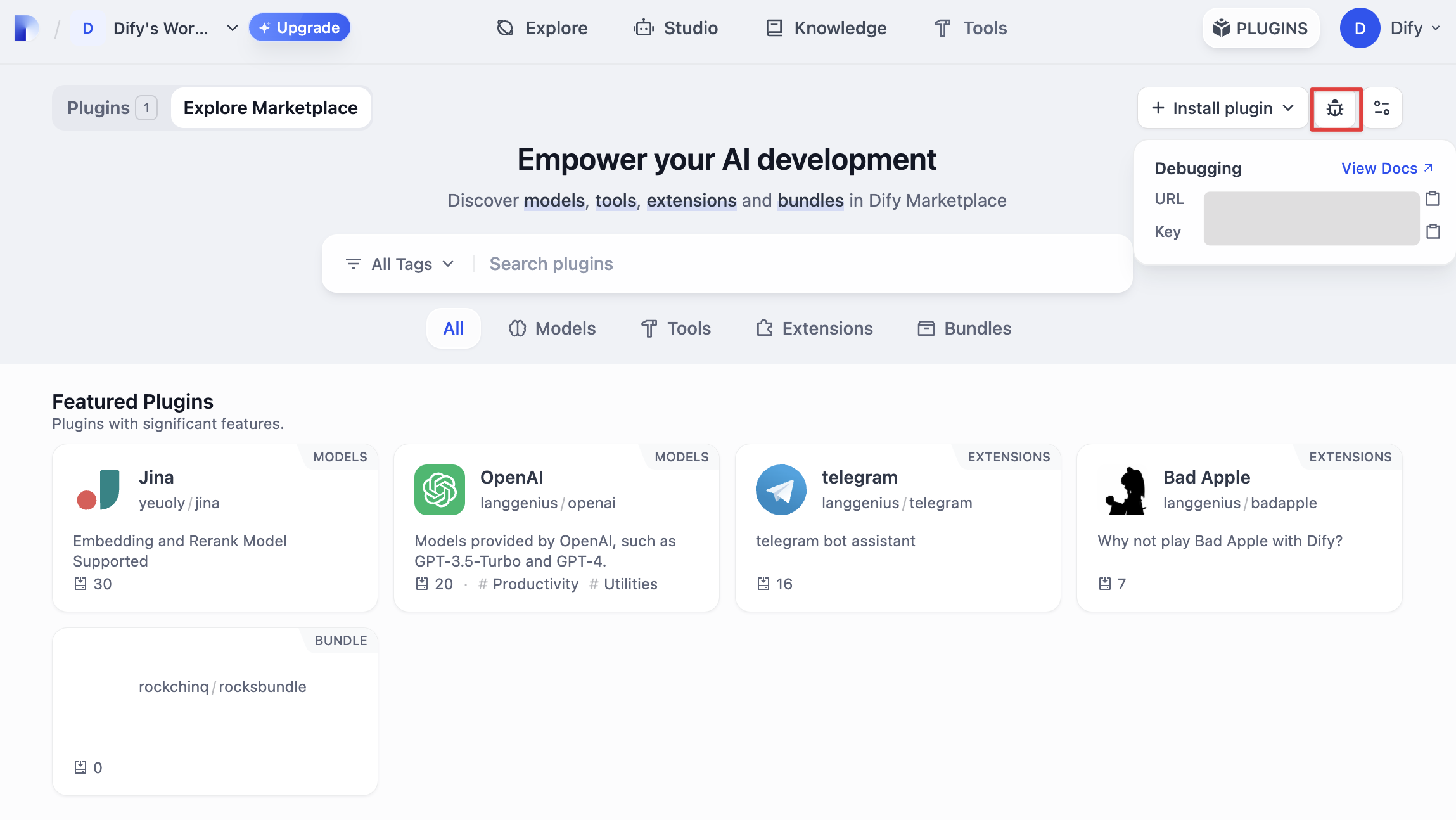
Return to the plugin project, copy the `.env.example` file and rename it to `.env`, then fill in the remote server address and debugging Key information you obtained.
`.env` file
```bash
INSTALL_METHOD=remote
REMOTE_INSTALL_URL=debug.dify.ai:5003
REMOTE_INSTALL_KEY=********-****-****-****-************
```
Run the `python -m main` command to start the plugin. On the plugins page, you can see that the plugin has been installed in the Workspace. Other team members can also access the plugin.
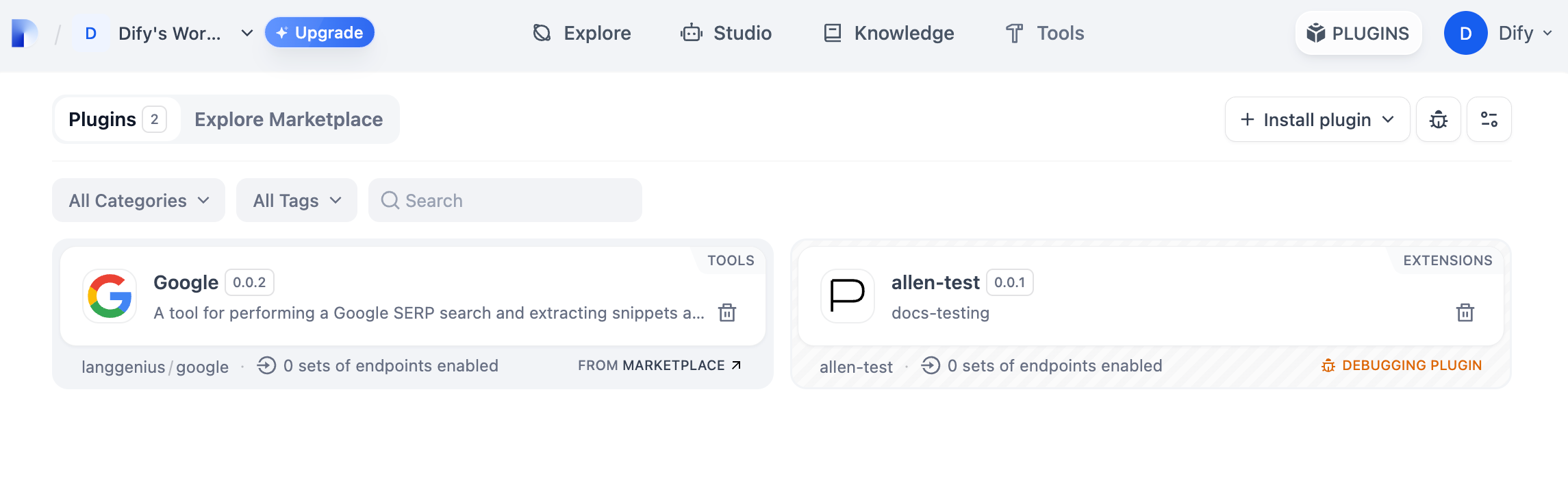
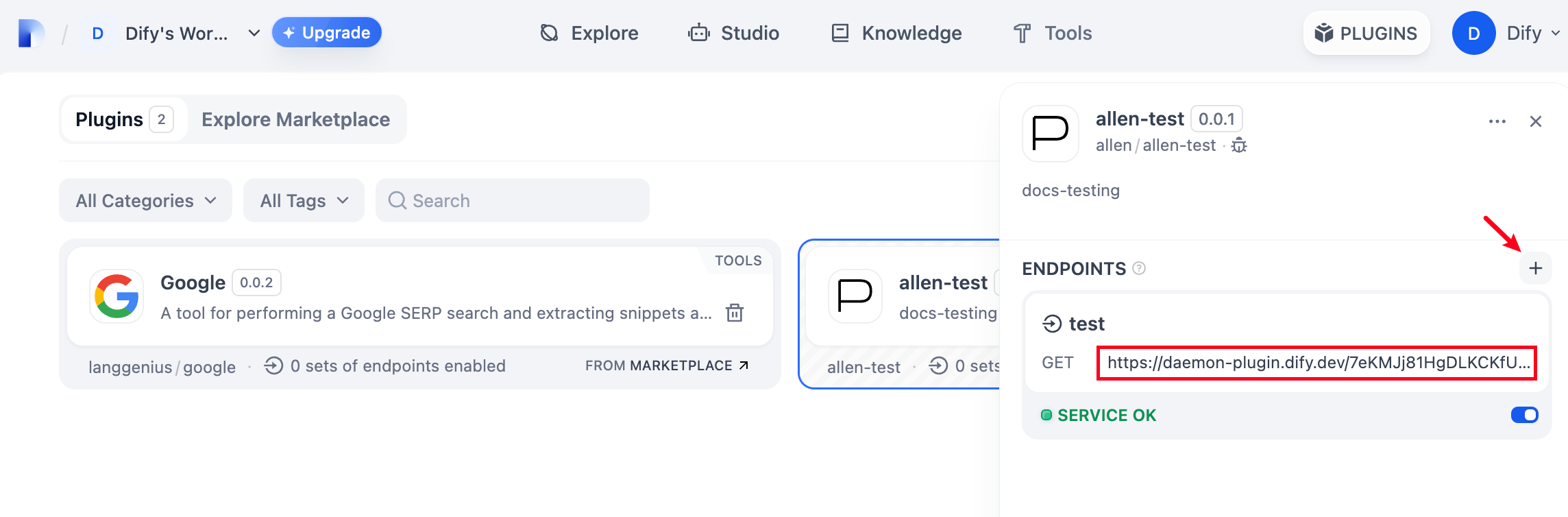
Add a new Endpoint in the plugin, fill in the name and `api_key` information as desired. Visit the automatically generated URL to see the web service provided by the plugin.
### Packaging the Plugin
After confirming that the plugin can run normally, you can package and name the plugin using the following command line tool. After running, you will discover a `neko.difypkg` file in the current folder, which is the final plugin package.
```bash
# Replace ./neko with the actual path of the plugin project
dify plugin package ./neko
```
Congratulations, you have completed the entire process of developing, testing, and packaging a plugin!
### Publishing the Plugin
Now you can upload it to the [Dify Plugins code repository](https://github.com/langgenius/dify-plugins) to publish your plugin! Before uploading, please ensure that your plugin follows the [plugin publishing specifications](/plugin-dev-en/0322-release-to-dify-marketplace). After the review is approved, the code will be merged into the main branch and automatically launched to the [Dify Marketplace](https://marketplace.dify.ai/).
### Explore More
**Quick Start:**
* [Tool Plugin: Google Search](/plugin-dev-en/0222-tool-plugin)
* [Model Plugin](/plugin-dev-en/0211-getting-started-new-model)
* [Bundle Plugin: Packaging Multiple Plugins](/plugin-dev-en/9241-bundle)
**Plugin Interface Documentation:**
* [Manifest](/plugin-dev-en/0411-general-specifications) Structure
* [Endpoint](/plugin-dev-en/0411-general-specifications) Detailed Definition
* [Reverse Invocation of Dify Capabilities](/plugin-dev-en/9241-reverse-invocation)
* [Tools](/plugin-dev-en/0411-tool)
* [Models](/plugin-dev-en/0412-model-schema)
* [Extending Agent Strategies](/plugin-dev-en/9232-agent)
**Best Practices:**
[Developing a Slack Bot Plugin](/plugin-dev-en/0432-develop-a-slack-bot-plugin)
{/*
Contributing Section
DO NOT edit this section!
It will be automatically generated by the script.
*/}
---
[Edit this page](https://github.com/langgenius/dify-docs/edit/main/plugin-dev-en/9231-extension-plugin.mdx) | [Report an issue](https://github.com/langgenius/dify-docs/issues/new?template=docs.yml)